
Travel connectivity guide
Puerto Rico eSIM for mobile internet
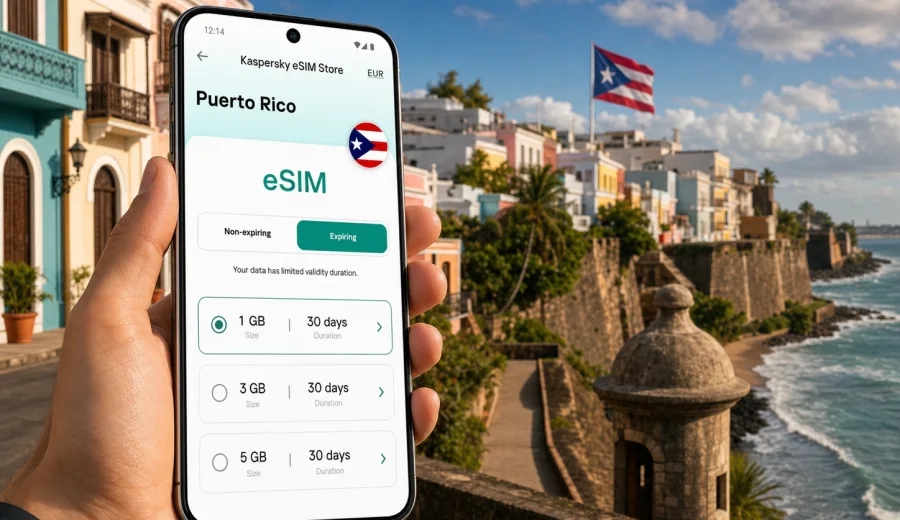
eSIM in Puerto Rico: mobile connection and internet for your trip
Puerto Rico is an easy destination to underestimate from a connectivity point of view. It feels familiar to many travelers, especially if they arrive from the United States, yet the trip still depends on practical mobile internet: maps for Old San Juan, ride-hailing after landing, hotel check-in messages, restaurant bookings, beach weather updates, ferries, banking confirmations, and group chats that keep the whole itinerary moving.
An eSIM can make that part of the trip simpler. Instead of looking for a physical SIM card after arrival or relying only on hotel Wi-Fi, you can prepare a digital SIM profile on a compatible phone and use a data plan for your stay. Kaspersky eSIM Store is an app and website where you can quickly choose, arrange, and activate an eSIM with a suitable mobile data plan for travel abroad. It is designed for travelers who want to see the destination, data allowance, validity period, and basic conditions before they start using mobile internet.
This guide explains how to think about eSIM use across Puerto Rico, what to check before buying a plan, how much data different travel styles may need, and how to avoid common mistakes with activation, roaming settings, and device compatibility.
Why mobile internet matters in Puerto Rico
Puerto Rico rewards flexible planning. A morning in San Juan can turn into an afternoon on the coast, a road trip to the mountains, or an evening in a neighborhood where the best place to eat is not the one you bookmarked before the trip. Mobile internet helps you adjust without turning every decision into a Wi-Fi hunt.
Common situations where a working data connection is useful include:
- navigating from Luis Munoz Marin International Airport to San Juan, Condado, Isla Verde, or another base;
- checking ride-hailing, taxi, shuttle, or rental car details;
- using maps in Old San Juan, where streets are compact and parking can be confusing;
- confirming hotel or apartment access codes;
- translating menus, opening booking confirmations, and checking opening hours;
- coordinating beach days, tours, ferries, and meeting points;
- using messenger calls when your travel SIM does not include a standard phone number;
- receiving banking, airline, and account notifications that require internet access.
Public Wi-Fi can help in hotels, cafes, malls, and airports, but it is not a travel plan by itself. It may require registration, slow down during busy hours, or disappear exactly when you are between places. A prepared eSIM gives you a clearer fallback for the moments when you need mobile internet away from a fixed location.
What an eSIM does for a Puerto Rico trip
An eSIM is a digital SIM profile installed on a compatible device. For travel, it usually gives you mobile data for a selected country, region, or route. It does not usually replace every function of your home mobile plan. In many travel eSIM plans, standard voice calls and SMS are not included unless the conditions of the specific plan say otherwise.
For most travelers, that is enough. Messaging apps, internet calls, maps, email, banking apps, boarding passes, and travel services all depend mainly on data. If you need to receive traditional SMS to your regular number, you may still keep your primary SIM active and use the eSIM for mobile data, depending on your phone and carrier settings.
The practical value is control. Before you travel, you can look at the data size, validity period, destination, and price, then install the eSIM on the phone you plan to use. When you arrive, you have fewer steps to complete while standing in a queue, collecting luggage, or trying to reach accommodation.
Puerto Rico travel scenarios and data needs
Your ideal data allowance depends less on the country itself and more on how you use the phone. A traveler who mainly checks maps and messages may use far less data than someone uploading video, navigating by car every day, and working remotely from a hotspot.
| Trip style | Typical mobile internet use | Practical data approach |
|---|---|---|
| Weekend in San Juan | Maps, ride-hailing, restaurants, messaging, boarding passes | A smaller data plan can be enough if hotel Wi-Fi covers heavy use |
| Beach and city break | Navigation, photo sharing, weather, local searches, messenger calls | Choose a plan with room for daily movement outside Wi-Fi |
| Road trip around the island | Maps, route changes, parking searches, music, travel apps | Prioritize a larger allowance and download offline maps too |
| Remote work add-on | Email, documents, video calls, tethering, cloud tools | Pick more data and avoid relying on mobile data for all video calls |
| Family or group trip | Shared planning, uploads, ride coordination, hotspot in short bursts | Estimate per person rather than treating one phone as the only connection |
As a rule of thumb, maps and messaging are modest, short videos and cloud backups are heavy, and hotspot use can consume data quickly. If your phone automatically uploads photos and videos, turn that off on mobile data or restrict it to Wi-Fi. A few background settings can make a small plan last much longer.
Where eSIM is useful across the island
Puerto Rico is not just one city break. Many visitors move between different travel environments, and each one creates a different connectivity need.
In San Juan, mobile internet helps with dense urban movement: rides, restaurant searches, museum hours, walking routes, and last-minute changes. In coastal areas such as Rincon, Cabo Rojo, Luquillo, Fajardo, and Isla Verde, it helps with beach conditions, weather, parking, and tour communication. In the interior, including mountain routes and coffee country, it is useful to have maps and key details prepared before leaving strong Wi-Fi.
For water-based plans, check details before you leave your hotel. Ferries, boat tours, and remote beaches are exactly the kind of travel moments where you should not assume that every app will load instantly. Download confirmations, meeting points, and offline map areas in advance.
Check device compatibility before you buy
The first technical question is simple: does your phone or tablet support eSIM, and is it not locked in a way that prevents using another mobile profile? Many recent iPhone, Google Pixel, Samsung Galaxy, and some other flagship or upper-mid-range devices support eSIM, but support varies by exact model, country of purchase, and carrier lock status.
Before choosing a plan, check your device. This is especially important if you bought your phone through a carrier, use an older device, or travel with a second phone that has not used eSIM before.
Also check these points:
- your device software is up to date enough to add an eSIM profile;
- you have a stable internet connection for installation;
- you can access the email, app, or account where installation details will be available;
- your phone has space for another eSIM profile if you already use several;
- you understand which SIM will be used for mobile data after arrival;
- data roaming may need to be enabled for the travel eSIM, depending on the plan instructions.
Do this before departure when possible. Troubleshooting is easier on your home Wi-Fi than at an airport exit with bags in hand.
When to install and when to activate
Travelers often mix up installation and activation. Installation means adding the eSIM profile to your device. Activation means the plan starts working under the conditions of the selected eSIM plan. The exact start moment can depend on plan rules, so read the instructions shown during setup.
A practical approach is:
1. Choose your destination and plan before departure.
2. Install the eSIM while you have reliable Wi-Fi.
3. Keep your primary SIM active if you need calls or SMS on your regular number.
4. On arrival, set the travel eSIM as the line for mobile data.
5. Enable data roaming for the eSIM if the instructions say it is required.
6. Test maps, messaging, and a browser page before leaving the airport or hotel.
If you are installing manually, follow the correct guide for your device: Android installation instructions or iOS installation instructions. Do not delete an eSIM profile after installation unless you are sure you no longer need it; in many cases, an activated eSIM cannot simply be moved to another phone.
How to choose a data plan for Puerto Rico
Start with your itinerary, not with a random number of gigabytes. A short city trip with hotel Wi-Fi is different from a week of driving, beaches, video sharing, and hotspot use.
Use this checklist:
- Trip length: count full travel days, including arrival and departure.
- Navigation: driving and walking maps increase daily use.
- Media habits: video, reels, cloud backups, and large photo uploads are data-heavy.
- Work needs: email is light, video meetings are not.
- Group setup: decide whether each traveler needs their own data plan.
- Wi-Fi availability: hotels can reduce mobile data use, but do not plan around cafe Wi-Fi for essential tasks.
- Validity period: make sure the plan covers the whole stay, including delays.
Once you know the trip pattern, you can choose an eSIM data plan for Puerto Rico in Kaspersky eSIM Store and compare the available data allowance and validity options for your route. The best choice is usually the plan that fits your actual daily use with a margin, not the largest package by default.
Practical setup before departure
Set aside ten quiet minutes before you leave. You do not need to turn connectivity prep into a technical project, but you should avoid doing every step under time pressure.
Before your flight, prepare this:
- install the eSIM on the device you will carry in Puerto Rico;
- save the setup instructions somewhere you can open offline;
- update your phone operating system if an update is pending;
- download offline maps for San Juan and any road trip areas;
- sign in to ride-hailing, airline, hotel, banking, and messaging apps;
- disable mobile data backups for photos and videos;
- decide whether your primary SIM stays active for calls or SMS;
- pack a power bank if you expect long navigation days.
If you travel with family, do not make one phone responsible for everything. Make sure another person has offline copies of bookings and meeting points.
Arrival checklist for Puerto Rico
After landing, take a minute to confirm that the correct line is handling mobile data. This small check prevents many avoidable problems.
| Setting | What to verify | Why it matters |
|---|---|---|
| Mobile data line | Travel eSIM selected for data | Prevents accidental use of your home plan for internet |
| Data roaming | Enabled if required by the eSIM instructions | Some travel eSIM plans need roaming enabled to connect |
| Primary SIM | Kept on or off intentionally | Useful if you need SMS, but may create roaming charges if unmanaged |
| Low data mode | Enabled if you want to conserve traffic | Reduces background app use |
| Hotspot | Off unless needed | Tethering can use data quickly |
| App updates | Wi-Fi only | Prevents large background downloads |
If the connection does not appear immediately, wait a few minutes, toggle airplane mode, and recheck the selected data line. Also confirm that the eSIM is installed, turned on, and not blocked by a missing roaming setting. If you still need help, use the support options available through the app or website.
How much data common apps can use
Exact data use varies by app settings, device, media quality, and background behavior, but the pattern is predictable. Messaging and maps are usually light. Video, cloud storage, and hotspots are usually heavy.
| Activity | Data impact | Travel tip |
|---|---|---|
| Text messaging | Low | Keep media auto-downloads off in group chats |
| Map navigation | Low to moderate | Download offline maps before long drives |
| Social media browsing | Moderate | Video-heavy feeds can grow quickly |
| Photo uploads | Moderate to high | Save cloud backup for Wi-Fi |
| Video streaming | High | Download entertainment on Wi-Fi before travel |
| Video calls | High | Use hotel Wi-Fi for long calls when possible |
| Hotspot for laptop | High | Use only when needed and monitor balance |
The simplest way to control usage is to treat mobile data as your travel connection, not your unlimited home broadband replacement. Use it for movement, communication, bookings, maps, and essential tasks. Push large uploads, system updates, and streaming to Wi-Fi.
eSIM versus roaming and physical SIM cards
There is no single option that is best for every traveler. The right choice depends on your phone, itinerary, budget, and comfort with setup.
| Option | Strengths | Trade-offs |
|---|---|---|
| Travel eSIM | Can be prepared before the trip, no physical card, clear data package | Requires compatible unlocked device and careful setup |
| Home roaming | Keeps your existing number and familiar carrier settings | Costs and data limits vary widely by home plan |
| Physical local SIM | Familiar concept, may include local options | Requires finding a seller, handling a SIM card, and possibly language or ID steps |
| Public Wi-Fi | Useful for heavy downloads at hotels or cafes | Not dependable for movement, maps, or urgent messages |
An eSIM is often the most convenient choice when your main need is mobile internet and your device supports it. It is especially practical for short stays, late arrivals, business add-ons, and travelers who prefer to prepare before departure.
Mistakes to avoid
The most common eSIM problems are not dramatic. They are usually small setup choices made at the wrong time.
Avoid these:
- buying a plan before checking whether your exact device supports eSIM;
- installing the profile on the wrong phone;
- deleting the eSIM profile after activation;
- assuming a data-only eSIM includes a regular phone number;
- leaving cloud photo backup or app updates active on mobile data;
- forgetting to switch the mobile data line after arrival;
- waiting until you are outside Wi-Fi to read the installation instructions;
- choosing a validity period that ends before your return day.
Also avoid relying on a single connection method for essential travel documents. Save hotel addresses, booking references, passport copies where appropriate, and emergency contacts offline. Mobile internet makes travel smoother, but important information should not exist only inside one live app session.
Puerto Rico-specific planning tips
Puerto Rico is compact enough for spontaneous day trips, but that flexibility can increase data use. If you rent a car, maps may stay active for hours. If you move between beaches, restaurants, and scenic stops, you may repeatedly search for parking, opening hours, route changes, and weather updates.
For San Juan, save your accommodation area, airport route, and a few backup restaurants. For beach days, check the route and parking before departure. For El Yunque, coastal drives, or mountain areas, download maps and tour details in advance. For ferries or boat tours, keep screenshots of booking confirmations and meeting points.
If you plan to share photos often, set an upload routine: select favorites on mobile data if needed, then save full-resolution uploads for Wi-Fi. This keeps your plan available for the tasks that matter most while you are moving.
Quick answers
Can I use eSIM in Puerto Rico for normal phone calls?
Many travel eSIM plans are focused on mobile data. Standard voice calls and SMS are not usually included unless the selected plan conditions say so. You can often use messaging and internet calling apps over data.
Should I install the eSIM before I travel?
In most cases, yes. Install it while you have stable Wi-Fi, then activate or start using it according to the plan instructions. This reduces stress after arrival.
Do I need to turn on data roaming?
Some travel eSIM plans require data roaming to be enabled on the eSIM line. Follow the setup instructions for the selected plan and make sure your home SIM is not accidentally used for mobile data.
Can I keep my regular SIM active?
Usually yes, if your device supports dual SIM or dual eSIM behavior. Many travelers keep the regular SIM for calls or SMS and use the travel eSIM for mobile data. Check your device settings and carrier conditions.
What if my phone is locked?
A locked phone may not allow another eSIM profile to work. Check with your carrier before buying a travel eSIM if you are unsure.
Is eSIM enough for remote work in Puerto Rico?
It can support email, messaging, and backup connectivity, but long video calls and laptop hotspot use can consume data quickly. If work is critical, combine mobile data with reliable accommodation Wi-Fi and choose a plan with a larger allowance.
Final preparation before you go
For a smooth trip, treat mobile internet as part of your packing list. Check device compatibility, choose a data allowance that matches your itinerary, install the eSIM while you have good Wi-Fi, and keep offline copies of essential details. Once you arrive, confirm that the travel eSIM is selected for mobile data and that the required settings are enabled.
Kaspersky eSIM Store helps you prepare an eSIM for travel by letting you choose, arrange, and activate a suitable mobile data plan through the app or website. If Puerto Rico is your next destination, you can prepare your eSIM data plan for Puerto Rico before the trip and arrive with one less practical detail to solve at the airport.