Travel connectivity guide
Puerto Vallarta eSIM: Mobile Internet for Your Trip
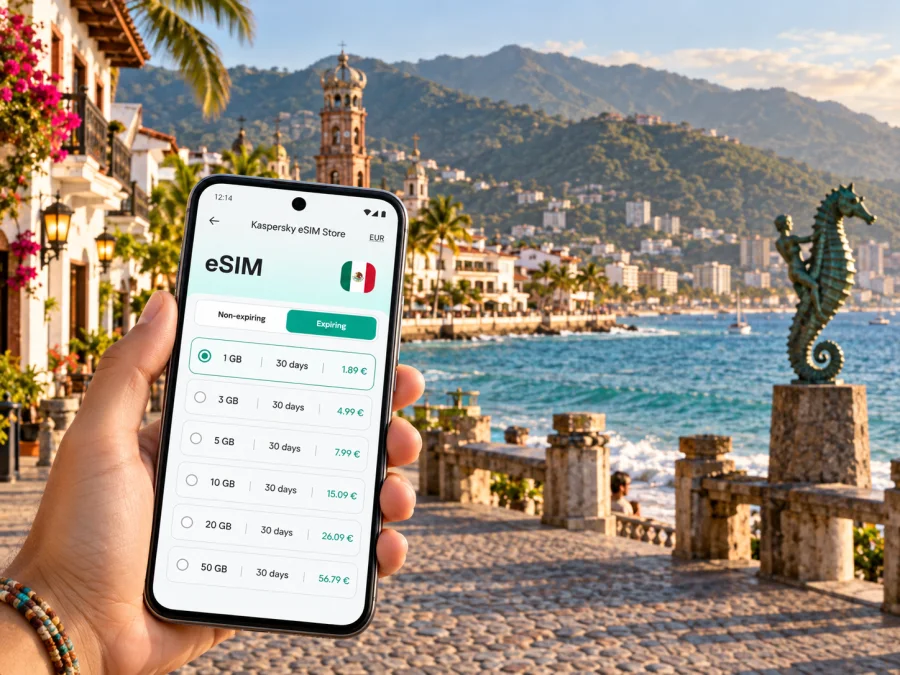
Puerto Vallarta eSIM for mobile connection and internet
Puerto Vallarta is a coastal city where a day can move between the airport, a hotel zone, the historic center, the Malecón and a beach farther south. If you are arriving from abroad, mobile internet can make those transitions easier: check your transfer details, open a map, message your host and keep booking information close at hand. An eSIM lets you prepare a mobile data option without looking for a physical SIM card after landing.
Plan around when you will need data, how often you will move between districts and whether your itinerary continues beyond Puerto Vallarta. A waterfront stay, a multi-district work visit and a coastal excursion have different needs.
When an eSIM can help in Puerto Vallarta
Puerto Vallarta International Airport (PVR) is north of the central waterfront districts. After arrival, you may need to coordinate a pickup, confirm the address of a hotel or rental, or find the next step in your journey. Having a data connection available can help you retrieve a reservation, contact a driver or share your location without relying on airport Wi-Fi.
Once in town, the city’s districts are spread along the coast and into the hills. A map is useful when you are comparing a route on foot with a taxi or rideshare, checking where a restaurant is in relation to your hotel, or finding the right entrance to a property on a sloping street. Street names and accommodation pins are especially useful when a place has more than one access point or the final approach is not obvious.
A phone connection can support everyday tasks: opening maps between the Malecón and nearby streets, checking a restaurant location, retrieving transfer details, clarifying check-in instructions or messaging family. Use travel apps where available.
Plan how an eSIM fits with your existing phone service. If your home SIM remains active for calls or messages, check which line handles data and review roaming settings. The eSIM option described in Kaspersky eSIM Store is intended for mobile data; calls, SMS and a separate number are not included unless the specific tariff states otherwise. Internet messaging apps can be used when data and app features allow.
Plan around the district where you will stay
Puerto Vallarta is not one compact resort strip. Your hotel location changes the kind of navigation you will do, how often you will arrange transport and how much of the day you spend walking. A few familiar names help organize a map search:
| Area | What it can mean for your day | When mobile data is handy |
|---|---|---|
| Marina Vallarta | A marina-side base and hotel area north of the center, closer to the airport than the southern waterfront | Confirm a pickup point, find a restaurant or coordinate airport arrival |
| Hotel Zone | A stretch of coastal hotels between the airport side and central districts | Check the route between accommodation, shops and meeting points |
| Centro and the Malecón | Central streets, waterfront landmarks, shops and restaurants | Navigate on foot and locate a specific address among busy streets |
| Zona Romántica | A southern central district with restaurants, lodging and the Los Muertos beach area | Find an evening reservation, return route or meeting spot |
| Amapas and Conchas Chinas | Hillside and southern coastal areas where routes can include steep streets | Follow a precise map pin and arrange transport for the final stretch |
Use the table as a map-planning aid, not a ranking: hotels sharing a district label can have very different surroundings. Save the full address and property pin, note the nearest recognizable street or entrance, and ask where a driver should drop you off. A short map distance uphill may still be a steep walk, particularly with luggage. A screenshot of the address is a useful backup.
Arrival at PVR: make the first hour simpler
The first leg from the airport is easier when the essential details are ready before you land. Save the name and address of your hotel, the contact details for your host or transfer provider, and any pickup instructions. If someone is meeting you, agree on a clear meeting point and a fallback way to contact each other.
After collecting your bags, follow the instructions from your accommodation or transfer provider. A map pin may not identify the exact pickup area, so confirm where to meet and check that the destination in a ride app matches your booking. Keep the address and reservation in a screenshot or note as a backup, charge your phone, and confirm which line handles data. For a late arrival, arrange the transfer details in advance and keep the provider’s instructions accessible offline.
Moving between the waterfront and the hills
Walking works well around the Malecón and central streets. Use a map when turning inland or returning to your hotel, and consider the slope before walking with luggage to Amapas or Conchas Chinas.
For longer trips, compare local buses, taxis and app-based rides according to your destination and timing. Routes, fares and service availability can change, so check current information locally. If you use a ride app, verify the pickup point, vehicle details and destination in the app. A phone connection helps coordinate a trip, but pause somewhere safe before checking directions and agree on a recognizable meeting point with your group.
- Short central stroll: follow a walking map and keep your phone away while crossing streets.
- Trip to another district: check the route and pickup location before leaving the hotel.
- Hillside stay: consider the slope and luggage before deciding to walk.
- Evening return: confirm your pickup point in a well-lit, easy-to-identify place.
Offline maps are useful backups but may not show live traffic or updated details.
Day trips from Puerto Vallarta
Puerto Vallarta can be a base for outings along the coast and into the surrounding region. Depending on your plans, a day may involve a boat departure, a road transfer or a meeting at a marina or tour office. The key mobile-data question is whether your chosen tariff covers the complete route, not only the city where you start. Coverage and terms depend on the specific tariff and network arrangements; read the destination details before purchase and do not infer regional access from a city name.
Before a day trip, save the operator’s meeting point and check-in time, take a screenshot of the booking, and share the plan with someone in your group. If the itinerary includes a remote beach, a boat or a mountain road, expect that connectivity can vary. Keep the return instructions and accommodation address available offline. Mobile internet can help with coordination where service is available; it cannot guarantee a connection in every location.
For an excursion that crosses state lines or includes another destination, check whether the eSIM tariff covers every place on the itinerary. A regional or multi-country option may be relevant for some routes, but its scope and data conditions must be confirmed in the product details. If the trip stays within the country, you can review eSIM options for Mexico and compare the listed coverage, data allowance and duration with your dates and route.
Choosing an eSIM option for this trip
Start with your itinerary, then compare the tariff details shown in the app or website. The best fit depends on the length of your stay, expected data use, destination coverage and whether you need one option for Puerto Vallarta or several stops. Avoid choosing only by the headline data amount: the validity period and supported destinations matter just as much.
| Question | What to consider |
|---|---|
| How long will you be away? | Match the validity period to arrival and departure dates, including any travel days. |
| Where will you go? | Confirm Mexico is covered and check any additional destinations on your route. |
| How will you use data? | Maps and messages differ from frequent video, uploads or remote work. |
| What happens to your regular number? | Decide whether your home SIM should remain enabled for calls or SMS. |
| Is your phone ready? | Confirm eSIM support and that the device is not carrier-locked. |
Kaspersky eSIM Store is an app and website where you can choose, arrange and activate an eSIM with a suitable tariff for mobile internet while traveling abroad. Review the tariff conditions before purchase, including supported destination, data amount, validity and any usage limits. The product helps you prepare an eSIM for the trip; it is not a mobile network operator and does not provide coverage itself.
Install and activate before leaving or after arrival
If convenient, complete the setup before your flight while you have a stable internet connection. Read the instructions for your device and the activation details supplied with the eSIM. Follow the steps carefully and leave the eSIM profile installed as directed. When you reach Puerto Vallarta, select the travel eSIM for mobile data and enable data roaming for that eSIM if the instructions or tariff require it. Settings vary by device, so use the instructions that match your phone.
- Check that your device supports eSIM and is not locked to a carrier. Check your device.
- Open the relevant setup guide: instructions for Android or instructions for iOS.
- Install the eSIM using the method provided with your order. Keep the QR code or activation information accessible if you need it during setup.
- In your phone’s mobile settings, choose which line will handle mobile data. Keep your usual line selected for calls or messages if you need those services.
- At the destination, follow the tariff instructions for activation and data roaming. Allow the phone time to connect, then check that the selected data line is the eSIM.
Do not delete an eSIM profile just because the connection does not appear immediately. First check the setup steps, selected data line, roaming setting and tariff validity. If the problem continues, use the support route provided with your purchase. Avoid repeatedly changing settings without knowing what each control does, especially if you rely on your home SIM for authentication or calls.
If you install after landing, setup requires internet access. Having instructions and activation details ready reduces steps after a long flight. Confirm device requirements and when validity begins before starting.
What to check before you travel
Before departure, check the following:
- Device compatibility: Verify that your exact phone model supports eSIM. Availability may vary by model, region or carrier version; check your device.
- Carrier lock: Confirm that your phone can use an eSIM from another provider if it was purchased through a carrier.
- Tariff conditions: Check the destination, data allowance, validity period and any activation or fair-use terms shown for the tariff.
- Route: If you leave Puerto Vallarta for another part of Mexico or a nearby destination, confirm that the tariff applies there too.
- Data settings: Know how to select the travel eSIM for mobile data and whether data roaming must be enabled for that line.
- Home number: Decide whether you need your usual line for calls, SMS or account verification, and understand any roaming costs from your home provider.
- Power and access: Carry your device charged, keep setup details available and make sure you can access the email or account used for the purchase.
An eSIM for mobile data does not necessarily include a local phone number. If you need to call a hotel or business using a conventional telephone number, check whether your usual line supports the call or use an internet calling app where appropriate. Do not assume that every app or service will behave the same way abroad.
Frequently asked questions
Do I need an eSIM as soon as I arrive?
It depends on your roaming arrangement and plans. If you want data for the airport transfer, check-in or maps, preparing an option in advance can be convenient.
Can I keep my regular number?
Your home SIM may remain active if your phone supports dual SIM use, but settings vary by device. A travel data eSIM does not replace your usual calls or SMS unless its tariff says so. Check roaming costs with your home provider.
Will an eSIM work everywhere in Puerto Vallarta?
No connection can be guaranteed in every place. Availability depends on the tariff, network arrangements, device and local conditions, and may vary outside built-up areas.
Can I use it beyond the city?
Check the listed destinations before purchase and confirm every stop on your route is covered. Review regional terms if your itinerary includes another destination.
Can I use it for calls and messages?
The travel eSIM described here is intended for mobile data and does not include an ordinary phone number, calls or SMS unless its specific tariff says otherwise. Internet messaging apps can work over data.
Prepare for your Puerto Vallarta stay
Before you go, save your accommodation address, pickup details and key reservations; decide which phone line will handle data; and check that the device and tariff fit your itinerary. That preparation is useful whether you are staying near Marina Vallarta, exploring Centro and the Malecón, or using Zona Romántica as a base for a longer coastal visit.
Choose an eSIM option that matches your dates, data needs and destinations, then follow the device-specific setup steps. You can choose an eSIM tariff for your trip to Mexico through Kaspersky eSIM Store and prepare your mobile data before arriving in Puerto Vallarta.


