
Travel connectivity guide
Puerto Varas eSIM for Mobile Internet
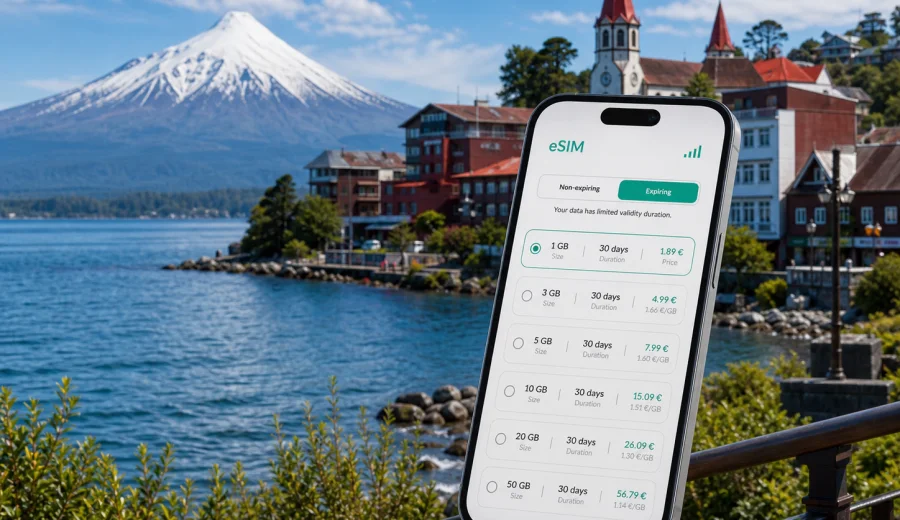
Puerto Varas eSIM: mobile connection and internet for a trip to Chile's lake city
Puerto Varas is a small city with a travel rhythm that quickly spreads beyond the center. You may arrive through El Tepual Airport near Puerto Montt, check in near Lake Llanquihue, walk the waterfront, book a trip to Petrohue, message a driver, and change plans when clouds cover Osorno Volcano. A stable mobile connection makes those everyday decisions easier, especially when you are outside hotel Wi-Fi.
For many visitors, an eSIM is a practical way to prepare mobile internet before arriving in Puerto Varas. You can keep your physical SIM in the phone, avoid searching for a SIM shop after a long flight or bus ride, and choose a data plan that matches your stay in Chile. Kaspersky eSIM Store is an app and website where travelers can choose, arrange, and activate an eSIM with a suitable data plan for mobile internet during an international trip.
This guide is about Puerto Varas, not a general Chile itinerary. Chile matters because the city is in Chile and the country determines the correct data destination, but the real use cases are local: airport transfers, hotel check-in, lakefront walks, restaurants, transport, business messages, weather checks, and trips from Puerto Varas to nearby towns and natural sights.
Why mobile internet matters in Puerto Varas
Puerto Varas is easy to enjoy on foot, but the useful places are not all in one compact grid. The lakefront, Plaza de Armas, hotels above the center, viewpoints, bus stops, tour offices, restaurants, pharmacies, and rental-car locations can sit on different streets and elevations. Mobile maps help you avoid long detours, especially in rain or when you are carrying bags.
Mobile internet is useful in Puerto Varas for:
- navigating between the waterfront, city center, hotels, and bus stops;
- messaging a transfer driver from El Tepual Airport or Puerto Montt;
- checking weather before Osorno Volcano, Petrohue, or lake trips;
- translating menus, hotel messages, and transport details;
- confirming tour pickup points and schedule changes;
- using banking, airline, booking, and map apps without public Wi-Fi;
- sharing your live location with friends or colleagues;
- keeping work chats available during a business stay.
The city also rewards quick decisions. A clear view of Osorno Volcano can appear for an hour and disappear again. A dry morning can become a wet afternoon. A restaurant that looked close on a map may be uphill from your hotel. With mobile data ready, you can adjust without returning to accommodation just to reconnect.
Arrival and first connection
Most international travelers reach Puerto Varas after flying through Santiago and then continuing to Puerto Montt. From El Tepual Airport, the usual next step is a transfer, taxi, rental car, or bus connection. That first hour is when prepared mobile internet is most valuable: you need the hotel address, the route, the driver's message, and sometimes a late check-in code.
If your eSIM is already installed on a compatible device, you can switch to the travel data line when the selected plan conditions allow activation. Read the plan validity rules before departure, because some travelers prefer to install the eSIM at home and activate data only when they reach Chile.
Before the trip, prepare these items:
| Task | Why it helps in Puerto Varas |
|---|---|
| Save hotel and apartment addresses offline | Some stays are outside the busiest lakefront blocks. |
| Install the eSIM on stable Wi-Fi | Setup is easier before the airport or bus terminal. |
| Keep transfer details in one note | Pickup points and delays are simpler to manage. |
| Download an offline map backup | Useful if you need to adjust settings after arrival. |
| Check plan duration | A weekend in Puerto Varas and a longer Chile route need different validity periods. |
An eSIM is not a reason to skip offline backups. Keep essential addresses, booking numbers, and passport copies available without internet. The point is to avoid depending on airport Wi-Fi, hotel Wi-Fi, or a physical SIM purchase for your first practical decisions.
Choosing data for Puerto Varas
The right data amount depends on how you travel. Puerto Varas can be a quiet weekend base, a lake district sightseeing hub, a remote-work stop, or the first night before Patagonia. Each pattern uses mobile data differently.
| Travel style | Likely data use | What to consider |
|---|---|---|
| Short city stay | Low to moderate | Maps, messages, restaurants, tickets, light photo sharing. |
| Lake district sightseeing | Moderate | Weather, navigation, guides, transport, route changes. |
| Rental car trips | Moderate to high | Live maps, fuel stops, parking, group coordination. |
| Remote work | High | Calls, files, authentication, possible hotspot use. |
| Family or group trip | Variable | One phone often handles planning for everyone. |
If you mostly use maps and messaging, a smaller package may be enough. If you upload videos, tether a laptop, or spend several days moving between Puerto Varas, Frutillar, Puerto Montt, Chiloe, and Patagonia routes, choose more data and check the hotspot and validity conditions of the selected plan.
Moving around the city
Inside Puerto Varas, mobile data helps with small but frequent decisions. You may walk along Costanera Vicente Perez Rosales, find a cafe near the lake, check opening hours before going uphill, or compare transport options when rain starts. The center is friendly, but the weather and slopes make good navigation useful.
Practical city uses include:
- saving your hotel as a favorite location before you go out;
- marking Plaza de Armas, the lakefront, bus stops, and tour pickup points;
- checking walking time before choosing a restaurant outside the central area;
- sending your location after sunset or during group travel;
- finding pharmacies, ATMs, supermarkets, laundry, and parking;
- using translation when a menu or message is only in Spanish.
Hotel Wi-Fi can be helpful, but it is not the same as travel connectivity. Accommodation in Puerto Varas ranges from lakefront hotels to cabins, apartments, and guesthouses. Wi-Fi quality can vary by room, occupancy, building layout, and weather. Mobile data gives you a fallback when you are waiting for check-in, leaving luggage, moving between towns, or handling an important message outside the property.
Trips from Puerto Varas where data helps
Puerto Varas is often a base rather than the whole trip. This is where an eSIM becomes more useful than it may seem during planning.
Petrohue Waterfalls and Todos los Santos Lake. Travelers use mobile data for pickup messages, route timing, weather checks, and last-minute changes. If you drive, download offline maps too, because lake and rural routes should not rely only on live navigation.
Osorno Volcano. Visibility and weather can change quickly. A data connection helps you confirm tour status, check conditions, and adjust the day if the volcano is covered.
Frutillar. This lakeside town is an easy day trip for cafes, views, museums, and music-related stops. Data helps with bus timing, restaurant searches, walking routes, and return planning.
Puerto Montt. Many travelers use Puerto Montt for airport access, onward buses, shopping, or the Angelmo area. It is busier and less compact than Puerto Varas, so mobile maps and messaging are especially useful.
Chiloe and longer Chile routes. If Puerto Varas is only the start of a larger route, choose a data plan for the whole Chile segment, not just the first two nights.
After you know your route, you can choose a data plan for travel in Chile through Kaspersky eSIM Store and prepare the eSIM before moving between Puerto Varas, Puerto Montt, the lake district, and onward destinations.
Setup checklist before departure
Use this checklist before you leave for Chile:
1. Check that your phone supports eSIM and is not locked to one carrier.
2. Choose a Chile data plan with a duration that fits your route.
3. Install the eSIM profile while you have stable internet.
4. Keep your primary SIM available if you need banking or verification messages.
5. Save hotel, transfer, and tour confirmations offline.
6. Download offline maps for Puerto Varas, Puerto Montt, Frutillar, Petrohue, and any driving route.
7. Turn off automatic cloud backups on mobile data if your package is limited.
8. Review whether data roaming should be enabled for the eSIM line under the plan instructions.
Before buying, check your device to confirm eSIM support. Compatibility depends on the phone model, region, and carrier lock status. A compatible device and a clear setup process matter more than rushing into a plan you cannot use.
Installing and activating the eSIM
The general process is simple: choose a plan, arrange it through the app or website, install the eSIM profile, and activate the data line according to the selected plan conditions. Use stable Wi-Fi during installation because the eSIM profile must be downloaded to the phone.
For detailed setup, use the official guides for your device: Android installation instructions and iOS installation instructions. Read the steps before travel if you are not used to managing multiple SIM lines.
After installation, review these settings:
| Setting | What to check |
|---|---|
| Mobile data line | Select the eSIM when you want to use the travel data plan. |
| Default voice line | Keep your regular SIM for calls if you still need it. |
| Data roaming | Some eSIM plans require roaming on the eSIM line. |
| Low Data Mode | Useful for controlling background usage. |
| Hotspot | Check plan conditions before tethering a laptop or another phone. |
Most travel eSIM data plans focus on mobile internet. They may not include a local phone number, standard voice calls, or SMS unless those features are clearly stated in the selected plan conditions. For calls and messages in Puerto Varas, many travelers use internet-based apps over mobile data.
Common Puerto Varas scenarios
Weekend by the lake. You arrive from Santiago or Puerto Montt, stay near the center, walk the waterfront, and take one day trip. Your data use will likely be maps, messages, restaurants, weather, and light uploads. Hotel Wi-Fi can handle heavier photo backups.
Outdoor-focused itinerary. You visit Petrohue, Osorno Volcano, Todos los Santos Lake, Frutillar, or Puerto Octay. Navigation, tour coordination, and weather checks become more frequent. Choose enough data for live route checks and keep offline maps as backup.
Business trip or workation. Use accommodation Wi-Fi for long calls when it is stable, and keep mobile data for email, calendar changes, authentication prompts, maps, and backup connectivity outside the room. If you plan to tether a laptop, check whether the selected plan allows it.
Family or group travel. One phone often becomes the planning center. It handles maps, restaurant searches, translation, tickets, weather, and messages. Disable automatic media downloads and choose a data package with some margin.
Stopover before Patagonia. Even one night in Puerto Varas can include important logistics: bus tickets, car pickup, ferry timing, accommodation messages, and route planning. Choose a plan that fits the whole Chile route if you continue south.
Roaming, physical SIM, or eSIM?
| Option | Best for | Puerto Varas trade-off |
|---|---|---|
| Standard roaming | Minimal setup with your home operator | Costs and data limits depend on your home plan. |
| Physical local SIM | Longer stays with time to visit a shop | Requires a SIM slot and setup after arrival. |
| eSIM data plan | Preparing mobile internet before or soon after arrival | Requires a compatible phone and careful plan review. |
For Puerto Varas, the main advantage of an eSIM is preparation. You can install the profile before the trip, keep your main SIM in place, and arrive with a clearer plan for maps, messages, and transport.
FAQ: eSIM and internet in Puerto Varas
Is an eSIM useful for Puerto Varas?
Yes. Travelers often move between the airport, hotels, the lakefront, nearby towns, and outdoor routes. An eSIM data plan helps with maps, messages, weather, transport, bookings, and work access without needing a physical SIM card.
Should I choose a city plan or a Chile plan?
Choose a plan for Chile because Puerto Varas is in Chile. The city is the travel focus, but the data destination should match the country where you will use the eSIM.
Can I install the eSIM before I travel?
In many cases, you can install the eSIM profile before departure while you have stable internet. Activation timing and validity depend on the selected plan, so read the plan details before switching on the eSIM data line.
Will I get a Chilean phone number?
Most travel eSIM data plans are for mobile internet. They may not include a local phone number, standard voice calls, or SMS unless the selected plan conditions state it.
How much data do I need?
For a short stay with hotel Wi-Fi, maps and messaging may be enough. For rental cars, day trips, photo uploads, remote work, or tethering, choose a larger package.
What if signal varies outside town?
Download offline maps, save booking details, and keep key addresses in notes before heading toward rural, lake, or volcano routes. Mobile internet is useful, but outdoor travel still benefits from offline backups.
Prepare mobile internet for Puerto Varas
Puerto Varas is easiest when you can adapt: a clearer volcano view, a changed pickup point, a rainy afternoon, a dinner plan across town, or a quick trip to Frutillar can all reshape the day. Prepared mobile internet gives you more control over those moments.
Before departure, check eSIM compatibility, choose a data amount that fits your route, install the eSIM on a stable connection, and keep offline copies of essential documents. When you are ready to prepare mobile internet for the trip, you can select an eSIM data plan for Chile through Kaspersky eSIM Store and arrive in Puerto Varas with your phone ready for maps, messages, transport, and local plans.