
Travel connectivity guide
Punakha eSIM: mobile internet travel guide
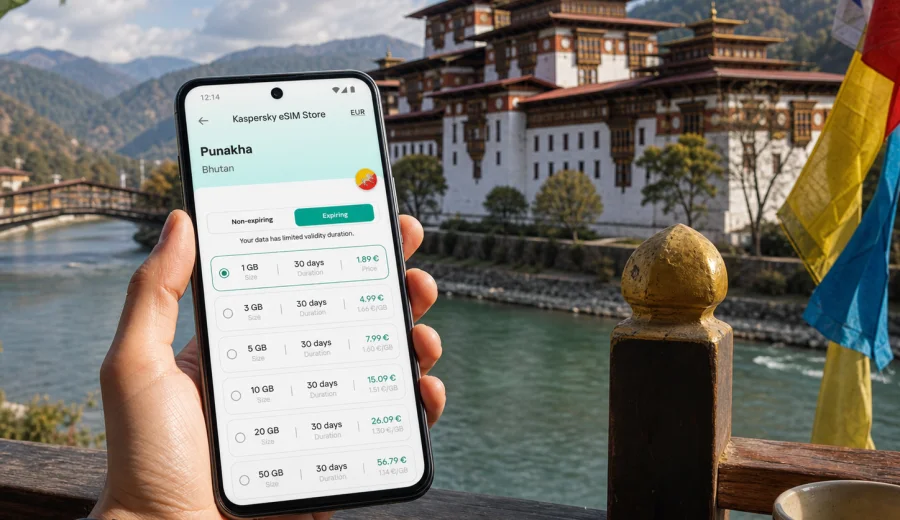
Punakha eSIM guide: mobile connection and internet for your Bhutan trip
Punakha is one of Bhutan's most memorable travel bases: quiet rivers, the whitewashed walls of Punakha Dzong, terraced fields, suspension bridges, hillside temples, and road trips that often begin in Paro or Thimphu. It is not a city where most visitors rush from one metro stop to another. You move by car, on foot, between valleys, hotels, viewpoints, monasteries, and village roads. That makes mobile internet especially useful: you use it to coordinate drivers, check maps before signal gets weaker in the hills, message your hotel, translate practical details, and share arrival updates with people waiting for you.
An eSIM can make that routine simpler. Instead of looking for a physical SIM card after a long flight or depending only on hotel Wi-Fi, you can prepare a digital SIM profile before the trip and activate mobile data when it is time to use it. The key is to treat eSIM as part of your travel planning, not as a last-minute accessory.
Why mobile internet matters in Punakha
Punakha is scenic and relaxed, but it is also spread across a valley rather than concentrated in one dense urban grid. A typical visitor may stay near Khuruthang, visit Punakha Dzong, walk to the suspension bridge, continue toward Chimi Lhakhang near Lobesa, and return to a riverside lodge or hillside hotel. Even a simple day can include several short drives and walking segments.
Mobile data helps with practical tasks that become awkward when you rely only on Wi-Fi:
- confirming pickup times with a guide or driver;
- checking the route between Paro, Thimphu, Dochula Pass, and Punakha;
- sending your hotel a message if mountain roads slow the journey;
- using maps around Khuruthang, Lobesa, and the dzong area;
- keeping travel documents, bookings, and payment confirmations accessible;
- using messaging apps for calls when ordinary voice service is not part of the data plan;
- checking weather before a hike, bridge walk, or temple visit.
Punakha is not the place to assume that every stop will have public Wi-Fi. Many hotels and cafes do offer internet, but quality and availability can vary by location, building, and time of day. A prepared eSIM gives you a separate mobile data option for the moments between those fixed Wi-Fi points.
Arrival: getting online before the road to Punakha
Most international visitors reach Bhutan through Paro International Airport, then continue by road through Thimphu or over Dochula Pass toward Punakha. The road journey is part of the trip: mountain views, bends, checkpoints, weather changes, and planned stops. It is also the stage where mobile data quickly becomes useful.
If your first night is in Paro or Thimphu, you may not need to rush. You can connect to hotel Wi-Fi, review your eSIM instructions, and activate data before the drive. If you are continuing to Punakha soon after arrival, it is better to prepare the eSIM before departure, while you still have predictable Wi-Fi and enough time to check settings.
Use this checklist before the road journey:
- Install the eSIM profile before leaving home or while connected to reliable Wi-Fi.
- Keep your primary SIM active if you need banking SMS or calls.
- Label the eSIM clearly, for example "Bhutan data" or "Travel data".
- Turn on data roaming for the eSIM only if the selected plan instructions require it.
- Set the eSIM as the mobile data line when you want to start using the package.
- Save hotel, driver, guide, and agency contacts in your messaging app.
Preparing before the drive gives you more control than trying to solve connection problems on the road.
Punakha travel scenarios where eSIM helps
| Scenario in Punakha | Why data is useful | Practical tip |
|---|---|---|
| Arrival by road from Paro or Thimphu | You may need to update your hotel or driver during a long transfer | Activate data before leaving a strong Wi-Fi connection |
| Punakha Dzong visit | You may want maps, timing messages, and photo backup | Download key information first, then use mobile data for updates |
| Khuruthang and central errands | Restaurants, shops, ATMs, and pickups are easier to coordinate online | Keep your hotel address saved offline as well |
| Lobesa and Chimi Lhakhang | The area is outside the main dzong stop and often part of a guided route | Share your expected return time with your driver |
| Riverside lodges and hillside hotels | Wi-Fi may be strongest in common areas, not every room | Use eSIM data for essential messages when hotel Wi-Fi is weak |
| Business or official visits | Schedule changes and document access matter | Keep cloud files synced before leaving your hotel |
| Day trips beyond Punakha | Roads and valleys can reduce connection consistency | Download maps and keep data for communication, not heavy streaming |
The point is not to be online every minute. In Punakha, the best travel rhythm is still slow: temples, river views, courtyards, and mountain air. Mobile internet simply keeps the practical layer of the trip under control.
Choosing a data amount for Punakha
The right eSIM plan depends on how you use your phone. Punakha trips are often part of a wider Bhutan itinerary, so think about the full route, not only the days spent in the valley.
For light use, a small package can be enough if you mainly need messaging, maps, booking confirmations, and occasional web searches. For moderate use, choose more data if you plan to upload photos, use cloud documents, join video calls, or rely on online maps throughout the day. For heavier use, consider a larger package if Punakha is part of a longer route and you expect to use mobile data away from hotel Wi-Fi.
Here is a practical way to estimate:
- Messaging and map checks: low data use.
- Photo uploads and social posts: moderate data use.
- Video calls, large cloud files, and streaming: high data use.
- Shared hotspot use: can consume data quickly.
If you are visiting Punakha for two or three days within a Bhutan itinerary, choose a plan that covers arrival, road transfers, Thimphu, Paro, and side trips too.
When to prepare your eSIM for Punakha
The best moment is before you need it. Install the eSIM profile while you have stable Wi-Fi, then activate mobile data according to the plan instructions when the trip begins or when you arrive in Bhutan. This avoids rushed setup at the airport, at the hotel desk, or in a moving car.
Before buying a plan, check that your phone supports eSIM and is not locked to one operator. You can use the internal compatibility checker here: check your device. If the device is not compatible, an eSIM profile will not solve the problem, no matter how good the selected data package looks.
If you are planning Punakha as part of a Bhutan journey, Kaspersky eSIM Store can help you review destination options and choose a mobile internet plan for your trip to Punakha and Bhutan before you leave. Use the plan details to compare data volume, validity period, destination coverage, and whether the package fits the length of your route.
How to install and activate an eSIM before a Punakha trip
The setup is usually easiest when you are still on reliable Wi-Fi. Keep your phone charged and avoid starting the installation while you are about to board, drive, or lose signal.
1. Choose Bhutan as the destination and review the available eSIM plan conditions.
2. Confirm your device supports eSIM and is not locked.
3. Complete the order and open the installation details.
4. Install the eSIM profile using the QR code or manual method shown in the instructions.
5. Name the line clearly so you do not confuse it with your home SIM.
6. Keep your primary line for calls or SMS if needed.
7. Select the eSIM as your mobile data line when you want to use the package.
8. Check whether data roaming must be enabled for the eSIM.
For step-by-step setup, use the Android installation instructions or the iOS installation instructions. The exact phone menu can vary by model and system version, so follow the instructions for your device type rather than guessing from memory.
Remember that an eSIM travel plan normally focuses on mobile data. It may not include a local phone number, ordinary voice calls, or SMS unless the selected plan says otherwise. For calls, many travelers use messaging apps over data.
Local movement: what to expect around Punakha
Punakha is compact in feeling but not always compact in movement. The dzong, suspension bridge, Khuruthang, Lobesa, riverside hotels, and nearby temples can sit far enough apart that you need a car for comfort and timing. Walking is pleasant in specific areas, but most visitors still rely on a guide, driver, taxi arrangement, or hotel transfer.
Mobile data supports that movement in several ways:
- You can send a precise meeting point near the dzong or bridge.
- You can check whether your driver is waiting at the same gate or parking area.
- You can message your hotel if you decide to stop for lunch before returning.
- You can look up walking time before starting a riverside route.
- You can keep maps available even when signs are limited.
Do not rely only on live navigation. Download or save key places before heading out: your hotel, Punakha Dzong, the suspension bridge, Chimi Lhakhang, the main town area, and any meeting points set by your guide. Mobile data is excellent for updates, but offline preparation is still smart in mountain valleys.
Hotels, lodges, and riverside stays
Punakha has a different hotel pattern from large business capitals. Many stays are chosen for views, quiet, proximity to nature, or a retreat atmosphere. That can mean beautiful locations slightly away from the busiest roads.
When you arrive at a hotel, ask where Wi-Fi is strongest. Some properties have better connection in the lobby or restaurant than in rooms set across a larger site. If you need to work, send documents, or join a call, test the connection before the scheduled time rather than five minutes before.
An eSIM is useful as a backup, especially for:
- confirming next-day pickup times;
- receiving schedule changes from a tour operator;
- checking flight or road updates for the next leg;
- messaging family when hotel Wi-Fi is slow;
- using translation or map apps in the evening.
If your accommodation is a quiet riverside lodge, do not plan heavy mobile-data tasks such as long video calls unless you have checked the connection. Use hotel Wi-Fi for large uploads when it is reliable, and keep eSIM data for travel-critical communication.
Business trips, official travel, and short working stays
Punakha is not a classic business hub, but it can appear in official itineraries, development projects, cultural programs, education travel, and meetings connected with regional visits. In these cases, mobile internet is less about sightseeing and more about reliability.
Before you travel, prepare a small connectivity kit:
- offline copies of the meeting agenda and hotel confirmation;
- cloud files synced to the phone before leaving Wi-Fi;
- contact numbers saved in both phone contacts and a messaging app;
- a charger or power bank for long road days;
- an eSIM plan with enough data for urgent documents and messaging;
- screenshots of installation details and plan information.
If you need video calls, schedule them from a hotel or office-style location after testing the connection. If you only need email, messaging, maps, and document review, a moderate data package is usually more practical than chasing Wi-Fi between appointments.
Stopovers and short visits: one day in Punakha
Some travelers visit Punakha as a day trip or overnight stop between Thimphu and central Bhutan routes. In that case, the value of eSIM is timing. You may have only a few hours for Punakha Dzong, the suspension bridge, lunch, and a temple visit. Losing time because you cannot message the driver or find the next stop is frustrating.
For a short visit, keep the setup simple:
- activate data before the drive begins;
- save the hotel or vehicle pickup point;
- keep the driver's number pinned in your messaging app;
- avoid large photo uploads until you return to Wi-Fi;
- use mobile data for maps, messages, weather, and schedule changes.
Short visits also make validity period important. A plan with a long validity window may be useful if Punakha is only one stop in a route across Bhutan. A tiny package may be enough for a single day if you use it carefully.
Day trips from Punakha and data planning
Punakha can be a base for valley drives, village visits, temple stops, viewpoints, and onward routes. The further you move from the main town area, the more you should treat mobile data as helpful but not the only layer of preparation.
Before leaving for a day trip:
- download or save the route;
- confirm the return time with your driver;
- tell your hotel if you expect to be late;
- keep important contacts available offline;
- check whether your data plan has enough remaining balance;
- avoid using mobile data for background app updates.
Turn off automatic cloud backup on mobile data if you are carrying many photos and videos. Punakha is photogenic, but a phone can burn through a small package quickly if every image uploads in the background.
Data-saving settings for Punakha
These settings are useful before any Bhutan road trip, but they are especially relevant in Punakha because you may move between hotels, valleys, and sightseeing points:
- Set app updates to Wi-Fi only.
- Disable automatic video playback in social apps.
- Download offline maps for the main route.
- Save PDF tickets, hotel confirmations, and contact details.
- Use low-data mode if your phone supports it.
- Pause cloud photo backup until you are on Wi-Fi.
- Check which line is set for mobile data before leaving the hotel.
Small settings make a visible difference. A plan that is enough for messaging, maps, and searches can feel too small if background apps are allowed to sync freely.
Common mistakes to avoid
The first mistake is waiting until the road transfer begins to think about connectivity. If you are in a car between Paro, Thimphu, Dochula Pass, and Punakha, you may not have the best conditions for installing a new mobile profile. Prepare while you are on stable Wi-Fi.
The second mistake is assuming that eSIM replaces every part of a local phone service. Many travel eSIM plans are for mobile data. Ordinary calls and SMS may not be included. Keep your primary SIM available if you depend on bank codes or phone calls.
The third mistake is choosing a plan only for Punakha without considering the full Bhutan route. If your trip includes Paro, Thimphu, Punakha, and onward valleys, your data package should match the whole itinerary.
The fourth mistake is ignoring device compatibility. Always check before buying. A locked or incompatible phone cannot use eSIM just because the destination plan is available.
Quick answers about eSIM in Punakha
Can I install an eSIM after I arrive in Punakha?
You can install it when you have reliable Wi-Fi and your device supports eSIM, but it is usually better to install the profile before you need mobile data. Do not leave setup until you are already in a car or away from stable internet.
Does an eSIM give me a Bhutanese phone number?
Not necessarily. Travel eSIM plans commonly focus on mobile data. Voice calls and SMS are included only if the specific plan conditions say so.
Is eSIM useful if my hotel has Wi-Fi?
Yes, because Punakha travel involves movement between hotels, riverside areas, temples, viewpoints, and road transfers. Hotel Wi-Fi helps at the property; mobile data helps between fixed Wi-Fi points.
Should I activate the plan before leaving home?
Follow the plan instructions. In many cases, you can install the eSIM profile before departure and activate mobile data when you are ready to use the package. Check validity rules before activating too early.
What should I do before a day trip from Punakha?
Download your route, save contacts offline, charge your phone, check remaining data, and use mobile internet mainly for messages, maps, and important updates.
Final checklist before you go to Punakha
Use this checklist the day before your Punakha journey or road transfer:
- Device checked for eSIM support and operator lock status.
- eSIM profile installed while on stable Wi-Fi.
- Bhutan data line labeled clearly.
- Mobile data line selected correctly.
- Data roaming setting checked for the selected eSIM.
- Hotel, guide, driver, and agency contacts saved.
- Main Punakha locations saved in maps.
- App updates and cloud backups limited to Wi-Fi.
- Plan validity and data volume reviewed.
Punakha rewards unhurried travel, but the practical details still matter. A prepared eSIM helps you keep navigation, messaging, hotel coordination, and route updates available without turning the trip into a search for Wi-Fi.
Before you leave, use Kaspersky eSIM Store to prepare an eSIM plan for your trip to Punakha and Bhutan. Choose the data volume and validity period that match your route, install the eSIM on a compatible device, and keep mobile internet ready for the moments when the valley, the road, and your schedule do not wait for the next Wi-Fi connection.