
Travel connectivity guide
Punta Arenas eSIM for Mobile Internet
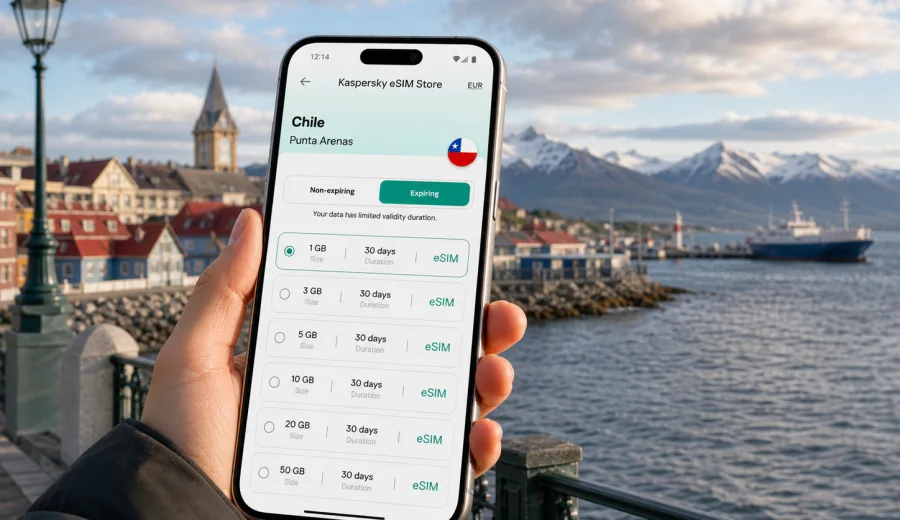
Punta Arenas eSIM: mobile connection and internet for your trip
Punta Arenas is often the city where a Patagonia trip becomes practical. You may arrive here before a cruise, a drive toward Puerto Natales, a business visit in southern Chile, or a stopover on the way to remote landscapes. In all of these situations, mobile internet is not just a convenience. It helps you find your hotel, confirm transfers, check weather changes, message drivers, open boarding passes, and keep maps available when the wind and distance make every errand take longer than expected.
An eSIM can make that first day easier because you do not need to search for a physical SIM card after landing. With a compatible phone, you can prepare a digital SIM profile before the trip, keep your main SIM for calls or messages if needed, and use a travel data plan for online tasks in Chile. For Punta Arenas, that matters most in the moments between the airport, the waterfront, the city center, bus terminals, hotels, and onward routes through Magallanes.
This guide focuses on how to plan mobile connection and internet for Punta Arenas specifically: arrival at the airport, movement around the city, short stays, business trips, local navigation, and regional travel from the city.
Why mobile internet matters in Punta Arenas
Punta Arenas is compact enough to explore on foot in the central area, but the practical parts of a trip often depend on live information. The airport is outside the city center, distances can feel longer in poor weather, and many travelers use Punta Arenas as a base for plans that continue beyond the city.
Mobile internet is useful for:
- checking pickup details after landing at Presidente Carlos Ibanez del Campo International Airport;
- opening maps for the route into the center, the Costanera, Plaza Munoz Gamero, or Cerro de la Cruz;
- messaging a hotel, driver, tour operator, colleague, or ferry contact;
- confirming bus information before travel toward Puerto Natales or other regional stops;
- translating short messages when arranging transport or reception details;
- checking weather before walking along the waterfront or planning a day trip;
- using banking, booking, airline, and ride-hailing apps when public Wi-Fi is not convenient.
The city is also a place where travelers often handle logistics: buying supplies, repacking for colder conditions, checking documents, arranging a vehicle, or waiting for a connection. A prepared eSIM helps you keep those tasks moving instead of depending on the next cafe, hotel lobby, or airport Wi-Fi signal.
Arrival: what to do before leaving the airport
The first mobile-internet need usually appears before you reach the city. After your flight lands, you may need to message your accommodation, check whether a transfer is still waiting, look up the address in Spanish, or confirm where to meet a driver. If your eSIM is already installed on a compatible phone, you can switch mobile data to the eSIM profile when the conditions of your selected plan allow activation.
A simple arrival checklist:
1. Before departure, install the eSIM while you still have a stable connection.
2. Keep the QR code or installation details accessible in your email or account.
3. On arrival, select the eSIM profile for mobile data.
4. Enable data roaming for the eSIM if the plan instructions require it.
5. Open a lightweight map first, then load hotel and transfer details.
6. Save your hotel address offline in case the signal is weaker indoors.
This sequence avoids one of the most common travel problems: arriving tired, carrying luggage, and trying to solve internet access at the same time as transport. In Punta Arenas, where many visitors continue toward another destination, the first hour can decide whether the rest of the day stays organized.
Local movement: airport, center, waterfront, and hotels
Most short visits involve a few predictable zones. The airport is north of the city, the central grid is where many hotels, restaurants, offices, and agencies are located, and the waterfront gives access to the Costanera and views across the Strait of Magellan. Depending on your itinerary, you may also visit Zona Franca for supplies, a ferry point, or a car-rental location.
| Situation in Punta Arenas | Why internet helps | Practical tip |
|---|---|---|
| Airport transfer | Confirm meeting points and addresses | Load your hotel pin before leaving the terminal |
| Central hotel check-in | Share arrival time or documents | Keep reservation details available offline too |
| Walking near Plaza Munoz Gamero | Navigate short routes and restaurant options | Save the hotel location as a favorite |
| Costanera and waterfront | Check weather, wind, and walking distance | Carry a charged power bank on longer walks |
| Zona Franca errands | Compare routes and opening times in apps | Avoid depending only on public Wi-Fi |
| Regional departure | Confirm bus, cruise, or car pickup details | Recheck documents before leaving the city |
An eSIM does not replace good trip planning, but it reduces friction. You can handle small decisions from the sidewalk, the hotel lobby, or the back seat of a transfer without stopping to find a local SIM shop.
How much data to plan for Punta Arenas
Data use depends on your habits, not only on the city. A traveler who checks maps and messages will use far less than someone uploading videos, joining work calls, or using cloud backup. Punta Arenas also attracts visitors who take many photos and videos on the waterfront or before continuing into Patagonia, so it is worth separating essential data from optional data.
Typical data needs:
- light use: messaging, maps, email, boarding passes, hotel apps;
- medium use: frequent navigation, social media, photo uploads, restaurant searches, translation;
- heavy use: video calls, large uploads, laptop tethering, cloud sync, streaming.
For a short stopover, a small data package may be enough if you use hotel Wi-Fi for heavy uploads. For a longer stay or a route that continues to Puerto Natales, Torres del Paine, or other parts of Chile, consider the full trip duration rather than the night count in Punta Arenas only. The most useful plan is the one that matches your actual route, the number of days, and the amount of data you expect to use.
Choosing an eSIM plan for Punta Arenas
For a city trip, choose the plan by country coverage first. Punta Arenas is in Chile, so the relevant travel eSIM should be suitable for Chile or for a broader region that includes Chile, depending on your itinerary. Then compare the data allowance, validity period, activation rules, and whether top-ups are available under the selected plan conditions.
Before you decide, check four details:
- destination: Chile should match your Punta Arenas trip;
- duration: the validity period should cover the day you arrive and the day you leave;
- data volume: allow extra data for maps, weather, bookings, and messaging;
- device: your phone must support eSIM and must not be locked in a way that prevents eSIM use.
If Punta Arenas is the first stop in a longer Chile route, it is usually easier to plan the eSIM around the whole Chile stay. You can choose a suitable eSIM plan for your trip to Chile in Kaspersky eSIM Store and review the available data volume, duration, destination, and price before you arrange the eSIM.
Practical scenarios for different travelers
Short stopover
If you are in Punta Arenas for one night before a cruise, flight, or bus connection, mobile internet mainly helps with timing. You need maps, boarding or booking details, weather, messaging, and perhaps a restaurant search near your hotel. Install the eSIM before departure, keep the plan ready, and avoid heavy uploads until you reach reliable Wi-Fi.
Patagonia gateway trip
If Punta Arenas is the starting point for Puerto Natales, Torres del Paine, or a road trip, think beyond the city. You may use data for navigation, route checks, weather, accommodation messages, and ticket confirmations. Coverage and speed can vary outside urban areas, so download offline maps for remote sections and use mobile data for updates when available.
Best fit: a plan sized for the full Chile itinerary, not only for the city stay.
Business visit
Business travelers often need reliable access to email, calendars, messaging, documents, and calls through internet-based apps. Punta Arenas can involve meetings around the city center, hotel work sessions, airport transfers, and field visits. An eSIM helps keep work communication separate from hotel Wi-Fi availability, but large files and long video calls can use data quickly.
Best fit: a larger data allowance, with laptop tethering used carefully if the selected plan and device settings allow it.
Installation and activation
Kaspersky eSIM Store is an app and website where you can choose, arrange, install, and activate an eSIM with a suitable data plan for mobile internet during an international trip. The exact activation behavior depends on the selected plan, your device, and local mobile conditions, so it is better to install the eSIM before travel while you have stable Wi-Fi.
General steps:
1. Check that your phone supports eSIM.
2. Choose Chile as the destination, or a broader option if it fits your route.
3. Review data volume, validity period, price, and plan conditions.
4. Arrange the selected eSIM plan.
5. Install the eSIM using the on-screen instructions or QR code.
6. When ready to use it, set the eSIM as the mobile data line.
7. Enable data roaming for the eSIM if the instructions for your plan require it.
For device-specific setup, use the Android installation guide or the iOS installation guide. It is also sensible to check your device before buying a plan, especially if your phone was purchased through a carrier or in a market where eSIM availability can vary by model.
What to check before buying
The most important check is device compatibility. Not every phone supports eSIM, and some devices may be locked by a carrier. Also remember that an eSIM data plan for travel usually focuses on mobile internet. It may not include a regular phone number, voice calls, or SMS unless the selected plan conditions state otherwise. You can still use internet-based calling and messaging apps when data is available.
Pre-trip checklist:
- Your device supports eSIM.
- The device is not carrier-locked in a way that prevents adding another mobile profile.
- You understand when the plan validity period starts.
- You know whether data roaming must be enabled for the eSIM profile.
- You have saved the QR code or installation details.
- Your phone is charged before arrival and a power bank is available for long transfer days.
- Offline maps and essential documents are downloaded before leaving the city.
This checklist is especially useful for Punta Arenas because many itineraries continue into areas where solving phone setup problems is less convenient than in a major capital city.
City-specific tips for lower data use
Punta Arenas travel days can involve long walks, wind, cold, and frequent route checks. Small habits help preserve both data and battery.
- Download the city map before arrival.
- Save your hotel, airport, bus terminal, ferry point, and meeting locations.
- Turn off automatic cloud photo backup while using mobile data.
- Download translation packs before the trip.
- Use hotel Wi-Fi for app updates and large file transfers.
FAQ
Can I use an eSIM as soon as I land in Punta Arenas?
You can use it when it has been installed correctly, the selected plan is active according to its conditions, and local mobile service is available. Install the eSIM before the trip if possible, then switch mobile data to the eSIM profile when you are ready to use it.
Does an eSIM include a Chilean phone number?
Travel eSIM plans usually focus on mobile data. A regular phone number, voice calls, and SMS are not included unless the selected plan conditions say otherwise. For calls and messages, you can use internet-based apps when mobile data is available.
Should I buy a plan only for Punta Arenas or for all of Chile?
For most city articles, the country is the correct planning unit. If you will continue beyond Punta Arenas, choose a plan that fits the full Chile itinerary, including your arrival and departure days.
Is public Wi-Fi enough for a Punta Arenas trip?
It may be enough for some hotel tasks, but it is less convenient for airport transfers, walking navigation, ride coordination, and last-minute booking changes. A travel eSIM can reduce dependence on public Wi-Fi during movement around the city.
What if I continue to Puerto Natales or Torres del Paine?
Plan data for the full route and download offline maps before leaving Punta Arenas. Mobile service can vary outside urban areas, so do not rely on live data for every remote section.
Prepare mobile internet before you go
Punta Arenas rewards travelers who arrive organized. The city is a logistics hub as much as a destination: you may land, check in, buy supplies, confirm a transfer, meet a group, or continue toward another part of southern Chile. A prepared eSIM helps keep those steps manageable because your maps, messages, bookings, and weather checks are available when you need them.
Before your trip, confirm that your device supports eSIM, choose a data allowance that fits your route, install the eSIM while you have stable internet, and keep important details offline. When you are ready to arrange mobile internet for the trip, you can review eSIM options for Chile in Kaspersky eSIM Store and choose a plan that matches your travel dates and expected data use.