
Travel connectivity guide
Punta Cana eSIM for Mobile Internet
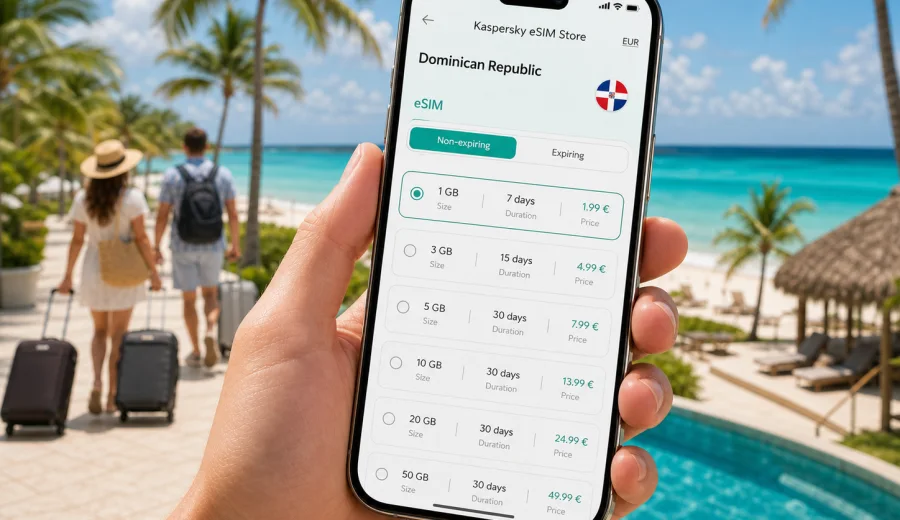
Punta Cana eSIM: mobile connection and internet for your trip
Punta Cana is one of the easiest places in the Caribbean to enjoy once your phone is ready. The airport is close to the resort corridors, transfers are frequent, beaches are spread across different areas, and many trips start early in the morning. Mobile internet is useful from the first minutes after landing: you may need to message a driver, find a hotel shuttle, check a booking, open a map, translate a restaurant menu, or confirm a tour pickup time.
An eSIM can make that first hour smoother because you do not need to look for a physical SIM card counter before you leave the terminal. You choose a data plan before the trip or after arrival, install the digital SIM profile on a compatible device, and use mobile data for the everyday tasks that keep a vacation or business trip organized. It is especially practical in Punta Cana, where many visitors move between the airport, Bavaro, Cap Cana, Uvero Alto, Macao, Cabeza de Toro, and day-trip routes rather than staying in one compact downtown area.
This guide focuses on mobile connection and internet in Punta Cana: airport arrival, hotel transfers, resort areas, beach days, excursions, remote work, short stopovers, and trips from the city to other parts of the Dominican Republic.
Why mobile internet matters in Punta Cana
Punta Cana looks simple on a map, but a trip can involve many small decisions. Hotels may be 20 to 45 minutes from the airport depending on the area and traffic. Some resorts have several entrances. Tour operators often confirm exact pickup windows by message. Restaurant reservations, golf tee times, diving centers, marina departures, and spa appointments may all sit in different apps or inboxes.
With mobile data ready, you can handle these moments without waiting for hotel Wi-Fi:
- message your transfer driver after landing at Punta Cana International Airport;
- open the hotel address and check which lobby or gate to use;
- share your live location with a travel companion;
- confirm a catamaran, Saona Island, buggy, or fishing pickup time;
- use maps between Bavaro Beach, Downtown Punta Cana, BlueMall, Cap Cana, and Macao Beach;
- check restaurant menus, resort apps, and digital room keys;
- use messenger calls when voice calls are not included in your travel data plan;
- keep work chats and email reachable during a business or conference stay.
Many Punta Cana travelers rely on resort Wi-Fi once they check in. That can be enough inside a room or lobby, but it does not solve the whole route. The most useful internet moments often happen between Wi-Fi zones: at arrivals, in a taxi, at a marina, on the way to a beach club, or during a day trip when you need a map, a voucher, or a quick message.
Where an eSIM helps most around the city
Punta Cana is not a classic walking city with one dense center. It is a coastal travel zone with separate resort areas, beaches, shopping points, golf communities, marinas, and excursion routes. That makes a reliable data setup more useful than it might seem for a beach destination.
| Punta Cana scenario | Why mobile data helps |
|---|---|
| Airport arrival | Find pickup instructions, contact a driver, check hotel transfer details, and load maps before leaving the terminal. |
| All-inclusive resort stay | Use resort apps, restaurant bookings, chat with family, and stay reachable outside the room. |
| Bavaro and El Cortecito | Compare dining options, navigate short taxi rides, and coordinate beach or nightlife plans. |
| Cap Cana and marina trips | Confirm meeting points, boat departure times, and resort gate details. |
| Macao Beach or buggy tours | Keep route details and messages available where Wi-Fi is less predictable. |
| Business travel | Join calls, receive files, and keep messaging available between hotel, venue, and airport. |
| Stopovers | Use maps, transport apps, and booking confirmations without searching for a local SIM. |
The value is not only speed. It is control. You know the data allowance, validity period, destination, and activation details before you depend on the connection. That helps you decide whether you need a light plan for messaging and maps, a larger plan for a long stay, or a regional option if Punta Cana is part of a Caribbean route.
Before you travel: check your phone and plan the data you need
Before choosing an eSIM, confirm that your phone or tablet supports eSIM and is not locked to a single carrier. This is worth checking before payment because eSIM support depends on the exact device model and market version. If you are unsure, use the compatibility check before you travel: check your device.
Then estimate your data use by trip style:
- Weekend or stopover: maps, messaging, flight updates, hotel details, and a few ride or restaurant searches usually need a modest allowance.
- One-week resort stay: messaging, photos, browsing, restaurant bookings, short videos, and occasional work tasks may require a medium allowance.
- Family trip: each traveler may need a separate data setup unless one phone will share a hotspot and the selected plan allows tethering.
- Remote work or business trip: video calls, file transfers, and cloud tools can use data quickly, so choose a plan with more headroom.
- Excursion-heavy vacation: day trips often mean less Wi-Fi and more maps, messaging, and mobile vouchers.
eSIM travel plans usually focus on mobile data. They may not include a regular phone number, voice calls, or SMS unless those features are stated in the plan conditions. For most Punta Cana trips, that is workable because many calls and messages can go through internet-based apps, but it is still important to check the details before you rely on a plan for business or urgent communication.
Arrival at Punta Cana International Airport
Punta Cana International Airport is designed around tourism, with many visitors moving directly from arrivals to resort transfers. The practical challenge is not usually distance; it is coordination. Drivers may wait in different zones, tour desks may have similar names, and hotel shuttle instructions can vary by booking channel.
If your eSIM is installed before departure, you can turn on the travel line when allowed by the plan conditions and use mobile data as soon as your device connects to a local network. If you prefer to install after landing, use airport Wi-Fi only long enough to complete the setup, then keep mobile data available for the transfer.
Useful arrival checklist:
1. Save your hotel name, address, and booking reference offline.
2. Keep the transfer company name and emergency contact visible in your messages.
3. Install the eSIM profile while you still have stable Wi-Fi.
4. After landing, select the eSIM line for mobile data in your phone settings.
5. Confirm whether data roaming should be enabled for the eSIM line according to the plan instructions.
6. Send a short message to your driver or hotel once mobile data is active.
Do not wait until you are outside with bags, heat, noise, and limited patience to start reading setup instructions. A few minutes of preparation before departure can save time at the airport.
Punta Cana areas and how connectivity needs change
Different parts of Punta Cana create different phone habits. In Bavaro and Arena Gorda, mobile data helps with beach clubs, restaurants, resort apps, and short rides. In El Cortecito and Los Corales, it is useful for walking between cafes, small hotels, and beach access points. In Cap Cana, keep data ready for marina departures, golf, gated entrances, and restaurant reservations. In Uvero Alto, longer transfers make messages and route checks more important. For Macao Beach and buggy tours, save route details offline but keep mobile data available for pickup changes and return transport.
How much data is enough for Punta Cana?
There is no single correct allowance because Punta Cana trips vary from quiet resort stays to full schedules of excursions. The simplest method is to match the plan to your daily phone habits.
| Trip type | Typical phone use | Practical data approach |
|---|---|---|
| Resort-first vacation | Messaging, weather, restaurant bookings, light browsing | Choose a smaller or medium plan if hotel Wi-Fi will handle streaming. |
| Active beach and excursion trip | Maps, pickups, vouchers, photo sharing, messaging | Add extra data because you will spend more time away from Wi-Fi. |
| Business or conference stay | Email, calls, documents, hotspot, ride coordination | Choose more data and check whether hotspot use is allowed. |
| Family vacation | Several devices, photos, kids' entertainment, group chats | Consider separate eSIM setups or a larger allowance if tethering is allowed. |
| Caribbean route | Punta Cana plus another island or country | Compare a Dominican Republic plan with a regional plan that matches the route. |
Streaming video, cloud photo backup, large app updates, and long video calls use data much faster than maps or messaging. If you want to keep the plan for practical travel tasks, download entertainment, playlists, offline maps, airline apps, and hotel documents before you leave home.
Around the middle of your trip planning, it is worth choosing the actual travel data option rather than leaving it for the airport. You can prepare an eSIM plan for Punta Cana through the Dominican Republic page and compare available allowances and validity periods before you need the connection.
Installing an eSIM for a Punta Cana trip
The installation process depends on your device, but the travel routine is usually straightforward: choose the destination and plan, install the eSIM profile, then activate it according to the plan instructions. For device-specific steps, use the official setup guides: Android installation guide and iOS installation guide.
For a smoother trip, separate installation from activation in your mind:
- Installation adds the eSIM profile to your phone. It is best done on stable Wi-Fi before travel.
- Activation starts the plan according to its conditions. Some plans activate when installed, while others activate when the eSIM connects to a supported network at the destination.
- Mobile data selection tells your phone which line should be used for internet access.
- Data roaming for the eSIM line may need to be enabled depending on the plan instructions.
Before departure, label the line clearly, for example "Travel eSIM" or "Dominican Republic data". Keep your home SIM available if you need banking messages or your regular number, but set mobile data to the eSIM once you are ready to use the travel plan.
Mobile internet for hotel life
Punta Cana hotels often have Wi-Fi, but quality can vary between the room, beach, pool, lobby, restaurant, and conference areas. Use hotel Wi-Fi for streaming, large backups, and software updates when it is stable. Keep mobile data for practical tasks that cannot wait: transfer messages, mobile boarding passes, restaurant bookings, excursion pickup changes, and work chats between hotel zones.
Getting around Punta Cana with mobile data
Transport in Punta Cana is often arranged through hotels, transfer companies, taxis, private drivers, tours, and car rentals. Clear pickup points matter because resorts can have several gates, lobbies, or tour desks. Mobile data helps you send your location, confirm a driver, compare travel time between Bavaro and Cap Cana, translate short messages, and keep a group aligned. If you rent a car, download offline maps as a backup and use mobile data for live updates.
Day trips from Punta Cana
Many visitors use Punta Cana as a base for island trips, beach visits, cultural stops, adventure parks, golf, diving, snorkeling, fishing, or drives toward other parts of the Dominican Republic. Before a day trip, save the operator name, pickup time, booking voucher, return meeting point, and emergency contact. Use mobile data for live updates and messages, but keep essential information offline as well.
Short stopovers and business trips
Some travelers pass through Punta Cana for a wedding weekend, a cruise add-on, a conference, or a short resort break. On a short trip, time spent solving connectivity problems feels especially expensive. Choose a validity period that covers arrival and departure days, install the eSIM before the flight, and keep hotel and transfer documents offline.
For business travel, mobile data is a backup for email, chat, calendar changes, urgent files, and venue navigation. If you need laptop access, check whether hotspot use is allowed by the selected plan. For video calls, use stable hotel Wi-Fi when possible and keep the eSIM allowance for movement between the hotel, venue, and airport.
Practical settings to check on your phone
A few settings can decide whether your eSIM feels effortless or frustrating. Label the travel line clearly, set it as the default line for mobile data, follow the plan instructions for data roaming, pause automatic app updates over mobile data, and check hotspot rules before relying on tethering. If mobile data does not start immediately, do not delete the eSIM profile in a hurry. First check the selected data line, roaming setting, setup instructions, and activation conditions.
Common mistakes to avoid
The most common Punta Cana connectivity problems are avoidable:
- waiting until airport arrival to read installation steps;
- choosing too little data for an excursion-heavy trip;
- assuming that a data eSIM includes a phone number, voice calls, or SMS;
- forgetting to check device compatibility before selecting a plan;
- leaving automatic app updates and cloud backup enabled on mobile data;
- relying only on resort Wi-Fi for transfers and day trips;
- deleting an eSIM profile before checking support instructions;
- confusing the home SIM line with the travel eSIM line in phone settings.
The goal is not to be online every second. The goal is to make the important moments easier: arrival, transfers, navigation, booking confirmations, group coordination, and urgent messages.
FAQ: eSIM and internet in Punta Cana
Is an eSIM useful if my Punta Cana hotel has Wi-Fi?
Yes, because hotel Wi-Fi usually helps only when you are on property and logged in. An eSIM is useful during arrival, transfers, beach visits, excursions, restaurant trips, and airport departure.
Should I install the eSIM before flying to the Dominican Republic?
In most cases, yes. Install the profile on stable Wi-Fi before departure and read the activation rules for the selected plan. This reduces setup pressure when you arrive in Punta Cana.
Can I keep my regular SIM active?
Usually you can keep your regular SIM for your home number and use the eSIM for mobile data, if your device supports that setup. Check your phone settings carefully so mobile data uses the travel eSIM and not expensive roaming on your home line.
Does a travel eSIM include calls and SMS?
Many travel eSIM plans focus on mobile data and do not include a regular phone number, voice calls, or SMS unless the plan conditions say otherwise. You can often use internet-based messaging and calling apps over mobile data.
What if I visit Santo Domingo or another Dominican destination after Punta Cana?
For a city-to-city route inside the Dominican Republic, choose a plan that covers the Dominican Republic and has enough validity for the whole itinerary. If your trip includes other countries, compare country and regional options before selecting.
Choose mobile internet for Punta Cana before you go
Punta Cana is easier when your phone is ready before the first transfer. Install your eSIM on a compatible device, check the activation rules, save key documents offline, and decide how much data you need for hotels, beaches, excursions, transport, and work.
Kaspersky eSIM Store is an app and website where you can quickly choose, set up, and activate an eSIM with a suitable data plan for mobile internet during an international trip. Before departure, choose an eSIM plan for your Dominican Republic trip so your Punta Cana arrival, local movement, and return journey are easier to manage.