
Travel connectivity guide
Qatar eSIM: mobile connection and internet
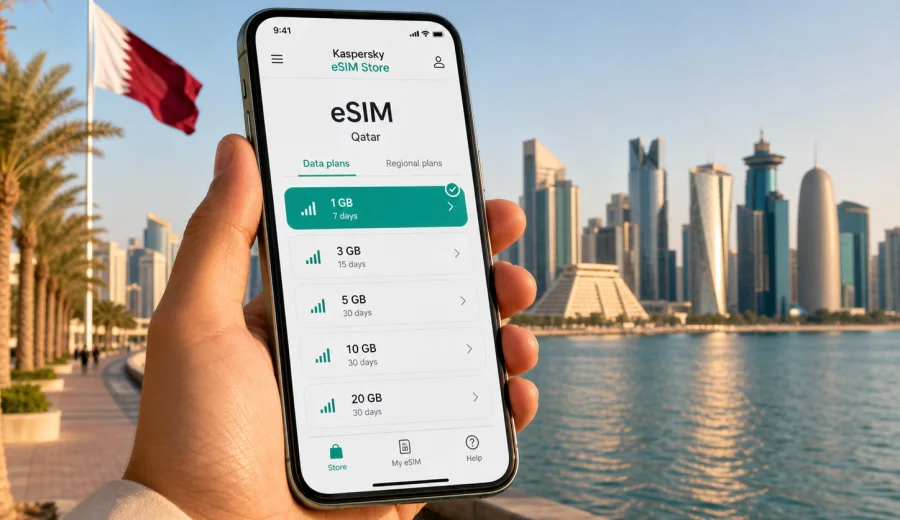
eSIM for Qatar: mobile connection and internet for your trip
Qatar is a compact country, but a trip there can still be very connected: airport transfers, hotel check-in, bookings, maps around Doha, business calls, and day trips all depend on mobile internet. An eSIM can make that first online step easier because you do not need to look for a physical SIM card after arrival.
This guide explains how to prepare an eSIM for Qatar, how to think about data volume and validity, what to check on your phone before buying a plan, and how to use mobile data calmly during the trip. The focus is practical: internet access for travel, not a replacement for a local mobile contract.
Why eSIM is useful for mobile internet in Qatar
For many visitors, Qatar starts at Hamad International Airport. The first hour can include passport control, baggage tracking, a hotel transfer, payment confirmations, maps, and messages to family or colleagues. If mobile data is already prepared, you can avoid spending that time comparing unfamiliar SIM options or relying only on public Wi-Fi.
An eSIM is a digital SIM profile installed on a compatible smartphone or tablet. For a trip, it is usually used for mobile data while your regular SIM remains available for your usual number, banking messages, or calls through your home operator. You choose a data plan for the destination, install the eSIM, and select it for mobile data when you need it.
In Qatar, that can be helpful in several common situations:
- navigating from Hamad International Airport to Doha, Lusail, West Bay, or The Pearl;
- checking hotel, restaurant, event, and museum bookings;
- using maps and ride-hailing apps between districts;
- keeping work chats and email available during a business visit;
- staying reachable through internet-based messengers.
Qatar’s distances are often shorter than in larger countries, but online tasks can be dense. A conference day, shopping trip, or desert excursion may create more data use than expected because you switch between maps, messaging, cloud documents, and media.
eSIM, roaming, local SIM: what changes for travelers
There are several ways to get online in Qatar. None is universally best for every traveler, so it helps to compare them by how you travel.
| Option | What it is good for | What to check before relying on it |
|---|---|---|
| Standard roaming | Keeping your home SIM active with minimal setup | Price per GB, daily fees, fair-use limits, and whether data roaming is enabled |
| Physical local SIM | Longer stays where you specifically want a local SIM arrangement | Shop location, opening hours, registration process, package details, and device SIM slot availability |
| Public Wi-Fi | Light use at hotels, airports, malls, and offices | Login requirements, reliability, security practices, and availability outside buildings |
| Travel eSIM | Preparing mobile data before or during the trip without a physical SIM | Device compatibility, plan validity, data volume, activation timing, and whether calls or SMS are included |
An eSIM is especially convenient when your trip is short, your schedule is busy, or you want to make decisions before you arrive. The important point is to read the conditions of the selected plan: data amount, validity period, destination, and any activation notes.
How much data you may need in Qatar
Data use depends more on behavior than geography. A traveler who mainly uses maps and messaging can use far less data than someone who watches video, uploads files, or joins video meetings. Before choosing a plan, look at the apps you expect to use.
| Trip style | Typical online activity | Planning logic |
|---|---|---|
| Stopover or 1-2 days | Messaging, maps, hotel transfer, boarding passes | A smaller package may be enough if you avoid streaming |
| City break in Doha | Maps, restaurants, museums, short video sharing, payments | Choose enough data for daily navigation and media uploads |
| Business trip | Email, work chats, cloud files, calls through meeting apps | Allow extra data for attachments and video meetings |
| Family trip | Several devices, maps, entertainment, photo backups | Consider whether one phone will use hotspot and monitor usage often |
| Regional itinerary | Qatar plus another country in the same journey | Check whether a country plan or regional option better matches the route |
For light use, messaging and maps are usually the core. For heavier use, video is the main driver: streaming, calls, uploads, and backups can consume data quickly. If you use your phone as a hotspot, treat the plan as shared travel data.
Short practical rule: estimate your normal daily data use, add a margin for navigation and uploads, then choose a plan with a validity period that covers the whole stay. Avoid buying purely by the largest number of gigabytes if you will not use them before the plan expires.
What to check before buying an eSIM plan
The most important eSIM check happens before payment. A few minutes of preparation can prevent problems later, especially if you are already at the airport or about to leave.
Use this checklist before purchase:
- Check that your device supports eSIM and is not locked to a single operator.
- Make sure you have a stable internet connection for installation, such as home Wi-Fi or trusted hotel Wi-Fi.
- Read when the plan validity starts: after purchase, after installation, or after connection to a supported network, depending on the plan conditions.
- Check whether the eSIM is data-only or includes any voice/SMS features. Many travel eSIM plans are intended for mobile data.
- Decide which SIM will handle mobile data and which SIM will handle calls or messages.
If your device is not compatible with eSIM, a digital plan will not install correctly. If the device is locked by a carrier, an eSIM profile from another arrangement may not work as expected. These are device conditions, not travel conditions, so check them before you depend on the plan.
How Kaspersky eSIM Store fits into trip preparation
Kaspersky eSIM Store is an app and website where you can quickly choose, arrange, and activate an eSIM with a suitable data plan for mobile internet in an international trip. It helps make preparation clearer: choose the destination, compare plan conditions, install the eSIM on a compatible device, and manage the plan through the site or app.
For Qatar, this is useful because travel schedules are often concentrated. A visitor may arrive late, move directly to a hotel or meeting, and need navigation, messages, and booking details immediately. Preparing mobile data in advance reduces the number of tasks you need to solve on arrival.
When you are ready to compare options, you can choose an eSIM plan for your trip to Qatar and review the data volume, validity period, and plan conditions before purchase. Choose the option that matches your route and expected usage.
Choosing a Qatar eSIM plan: practical scenarios
The right plan depends on length of stay, work needs, media habits, and whether you will share data with another device. Use scenarios instead of guessing.
A short stopover
For a stopover, you may need mobile internet for boarding information, maps, a ride into Doha, and messaging. A smaller plan can be enough if you avoid video streaming and cloud backups. Install the eSIM before departure if the plan conditions allow it, but check when validity begins.
A weekend in Doha
A weekend can include Souq Waqif, Msheireb, the Corniche, museums, restaurants, and transport between districts. Choose a plan that covers the full weekend and gives enough data for navigation, social apps, and occasional media uploads.
A business trip
Business travelers often need predictable access for email, calendar changes, chat apps, file previews, and video calls. If you will join meetings from the phone or use a laptop through hotspot, choose more data and monitor usage.
A family or group trip
One phone can become the practical center of the trip: maps, taxi apps, bookings, tickets, and restaurant searches. If that phone shares hotspot with other devices, data can disappear quickly.
Trips beyond Doha
Qatar is compact, but travel can still include Lusail, Al Wakrah, Education City, the desert, beaches, or Khor Al Adaid with a tour. For trips outside central Doha, download key documents and map areas in advance.
Installation and activation basics
Install the eSIM while you still have a reliable internet connection. After purchase, the eSIM profile is usually added through on-screen steps or a QR code. The exact process differs by operating system and device model.
For setup details, use the official guides: Android eSIM installation instructions and iOS eSIM installation instructions. Keep them open until you confirm that the eSIM profile has been added.
A simple setup flow looks like this:
1. Check that the device supports eSIM and is not carrier-locked.
2. Choose Qatar as the destination and select a plan by data amount and validity.
3. Complete the purchase and open the installation instructions.
4. Add the eSIM profile to the device using the provided steps.
5. Label the eSIM clearly, for example “Qatar data”, so you can identify it later.
6. When ready to use it, select the eSIM for mobile data.
7. If the plan instructions require it, enable data roaming for the eSIM profile.
8. Check the remaining data and validity during the trip.
Do not delete the eSIM profile unless you are sure you no longer need it. In many cases, an activated eSIM profile cannot simply be moved to another device.
Settings that help control data use
Mobile data feels more predictable when you control background activity. Not every upload needs to happen immediately over mobile data.
Before departure:
- download offline map areas for Doha and your hotel district;
- save hotel address, booking confirmations, and tickets;
- turn off automatic app updates on mobile data;
- pause automatic photo and video backup over mobile data;
- set a data warning on your phone if the operating system supports it.
During the trip:
- use mobile data for maps, messages, payments, and urgent work;
- save large uploads for trusted Wi-Fi when possible;
- avoid long video streaming sessions if your data package is small;
- turn hotspot off when you are not using it.
This approach does not make the trip less connected. It simply keeps the data plan focused on the moments when mobile internet matters most.
Common mistakes to avoid
The same eSIM mistakes appear in many trips. Most are easy to avoid:
- buying a plan before checking eSIM compatibility;
- installing the eSIM on the wrong device;
- deleting the eSIM profile after installation;
- assuming that a data-only plan includes a local phone number;
- leaving the home SIM selected for mobile data and creating roaming charges;
- using hotspot for laptops without monitoring data;
- relying on mobile data for documents that should also be saved offline.
If something does not work immediately, check the basics first: the eSIM is installed, the correct profile is selected for mobile data, data roaming is enabled if required by the plan instructions, airplane mode is off, and the device has had a few minutes to register on the network. If the issue continues, contact support through the available channel and include device model, operating system, plan, and the step where the problem appears.
FAQ about eSIM and internet in Qatar
Does a Qatar eSIM include a local phone number?
Many travel eSIM plans are designed for mobile internet and may not include a traditional phone number, voice calls, or SMS. Use internet-based messengers for calls and messages unless the specific plan says otherwise.
Do I need to enable data roaming?
Some eSIM plans require data roaming to be enabled on the eSIM profile. Follow the installation and activation instructions for the selected plan. Keep roaming data disabled on your home SIM if you do not want it to use mobile data abroad.
Can I use hotspot with an eSIM?
Hotspot availability can depend on the device, operating system, and plan conditions. If hotspot is allowed and you use it with a laptop or another phone, monitor data closely because background updates and cloud sync can use a lot of traffic.
What if my eSIM does not connect right away?
Check that the eSIM profile is installed, selected for mobile data, and configured according to the instructions. Restarting the device or toggling airplane mode may help. If the issue remains, contact support and provide the plan details and device model.
Final checklist before you travel
Before leaving for Qatar, make sure you can answer these points:
- Your phone supports eSIM and is not carrier-locked.
- You know whether the selected plan is data-only.
- The validity period covers your full stay.
- You understand when the plan starts counting validity.
- The eSIM is installed or the installation steps are saved.
- Your home SIM will not accidentally use roaming data.
- Important documents are saved offline.
- You know where to check remaining data during the trip.
This preparation turns mobile internet into a planned travel tool rather than a task you must solve after landing.
Choose an eSIM plan for Qatar
If Qatar is your next destination, prepare mobile internet before the busy part of the trip begins. In Kaspersky eSIM Store, you can review available data plans, choose the validity and data volume that fit your route, and install the eSIM on a compatible device.
Prepare an eSIM plan for your trip to Qatar so maps, messages, bookings, and travel apps are ready when you need them.