Travel connectivity guide
Queensway eSIM for Mobile Internet in Gibraltar
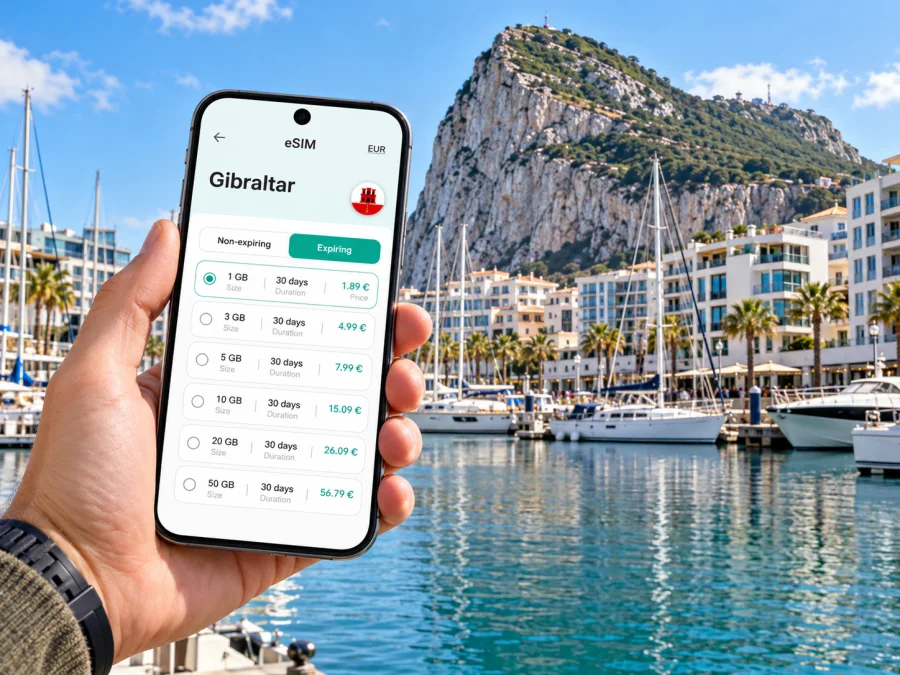
Queensway eSIM: mobile connection and internet for a Gibraltar visit
Queensway is a useful name to know when you are staying by Gibraltar’s western waterfront. The destination most visitors mean is Queensway Quay Marina: a residential and leisure area on Queensway, close to the town centre and the harbour. It is not a separate city. The wider destination is Gibraltar, a British Overseas Territory with city status, on the Iberian Peninsula beside Spain. That distinction matters for both travel planning and mobile data: choose a plan whose stated destination includes Gibraltar, rather than assuming that a Spain or United Kingdom plan applies.
A working mobile connection helps with the practical details of a short stay: locating your accommodation, checking a route from the airport, messaging your host, finding a restaurant around the marina, and keeping maps available while you walk into town. An eSIM can prepare mobile internet without replacing the physical SIM already in your phone. The right setup depends on your route, device, plan terms and where you will travel beyond Queensway.
What “Queensway” means for a visitor
Queensway runs along Gibraltar’s west side. Queensway Quay is a marina development beside the water, with apartments, restaurants and bars. The official tourism listing describes the marina as a short walk from the busy town centre. In practice, this makes the area convenient for a waterfront stay while keeping central streets, shops and historic sights within reach on foot or by local transport.
Keep three place names clear when planning:
| Name | How it fits your trip |
|---|---|
| Queensway | The road and address area named in the input for this guide. |
| Queensway Quay Marina | A marina and nearby residential and dining area on Queensway. |
| Gibraltar | The territory and city whose entry arrangements and mobile-market destination are relevant to your visit. |
The marina’s location is more useful for navigation than treating “Queensway” as a standalone municipality. Search for the exact property, restaurant or marina entrance in your map app, then check the walking route from your arrival point. Nearby waterfront areas such as Ocean Village and the town centre are useful orientation points, but they are distinct places. A pin can look close on a map while a vehicle route follows one-way streets or the harbour road network, so confirm the mode of travel before setting off.
Arriving and getting oriented
Gibraltar International Airport is close to the town, but the first part of the journey can still involve waiting, border formalities or traffic. If you arrive by air, check your accommodation address before leaving the terminal and keep its contact details available offline as well as online. A map pin and written address are useful if a driver asks where you are going.
The runway is part of the local street geography. Pedestrians may cross it at the designated crossing when it is open; vehicles use the airport tunnel route. Conditions and crossing arrangements can change, so follow airport and local instructions rather than treating the runway crossing as an ordinary road crossing. If you are walking from the airport or frontier, check the current route and any temporary closures before you start. A mobile map is useful, but follow signs and staff directions first.
From the airport, a taxi or pre-arranged transfer is the simplest option if you have luggage, arrive late, or do not know the area. A bus may suit a lighter arrival, but check the current timetable and stop locations on the day. Routes and operating arrangements can change; do not rely on an old screenshot or a route number remembered from a previous visit. Gibraltar’s Ministry of Transport publishes route information online, and the government has announced that visitors can plan journeys using current bus route and timing information in Google Maps.
For a walk to Queensway Quay, assess your bags, the weather and the exact access point first. A wheeled suitcase is less comfortable on uneven paving or slopes than a small backpack. If your accommodation is within a private marina complex, ask the host for its best entrance and any access instructions; a general map pin may place you at a perimeter road rather than the door.
Why mobile data helps around the marina
Queensway is compact, but a visitor can still need data for several separate tasks. Use it to:
- navigate from the airport, frontier or bus stop to the correct Queensway address;
- message accommodation staff about check-in, a delayed arrival or a gate code;
- compare walking and bus routes into the town centre or toward the south of Gibraltar;
- book or coordinate a taxi, tour or onward transfer;
- check weather, opening times and route changes before setting out;
- translate a message or read travel documents saved in a cloud account.
Download a map of Gibraltar and save important information before departure. Data coverage, congestion and indoor reception can vary by location and provider, so offline maps are a useful backup.
Messaging and internet calls can work through data-based apps when both parties have access to them. A travel eSIM for mobile data generally does not provide a conventional local phone number, voice minutes or SMS unless its specific terms say otherwise. Keep your existing number available for calls or one-time verification messages if you need it, and confirm how your home SIM handles roaming before travel.
Choosing a plan for Queensway and Gibraltar
Choose based on the territory, not just the nearest large country on a map. Gibraltar has its own destination listing and mobile market. A tariff described for Spain, the United Kingdom, Europe or a wider region should be treated as applicable only if its terms explicitly include Gibraltar. Regional labels can be broad; check the country list or coverage details for the selected plan before checkout.
You can review eSIM options for a trip to Gibraltar and compare the displayed data allowance, validity period and price. Those conditions belong to the selected tariff and can change, so use the details shown when you make your choice. Kaspersky eSIM Store is an app and website where you can select, arrange and activate an eSIM with a suitable plan for mobile internet while travelling abroad.
Estimate data by what you will do, not by the number of days alone. A visitor who mostly checks maps and messages may use less than someone who uploads photos, joins video meetings or streams media over mobile data. If you expect to spend time on video calls for work, connect to reliable Wi-Fi when appropriate and reserve cellular data for travel, navigation and messages. You can also reduce background data use and turn off automatic media downloads.
| Your visit | What to consider when selecting data |
|---|---|
| One-night stop near the marina | Maps, check-in messages, transport updates and basic browsing. |
| Several days exploring Gibraltar | Repeated navigation, photos, attraction details and transport checks. |
| Work trip from a Queensway apartment | Email, document access, messaging and occasional calls; estimate video use separately. |
| Gibraltar plus an onward Spain itinerary | Verify both destinations are included. Do not infer cross-border coverage from proximity. |
| Cruise or boat day | Check where the tariff applies at sea and at the next port; land coverage does not imply maritime service. |
Before paying, check the plan’s destination list, data allowance, validity, activation rules and any speed or usage conditions. If you are staying only in Gibraltar, there is no need to select a wider regional tariff unless your itinerary or plan comparison makes that useful. If you will cross into Spain, confirm whether a separate destination or a regional plan is appropriate. A change of territory can mean a different network selection and plan scope, even if the border is only a short drive away.
Prepare your phone before departure
First, confirm that your phone supports eSIM and is not locked to a carrier that prevents adding another profile. Device names can conceal regional variants: two phones with the same retail family name may have different eSIM support depending on the exact model number or market of sale. Check your settings and manufacturer information for the device you own; do not rely on a general list alone. Check whether your device is compatible before choosing a plan.
Keep access to the internet during setup. You may need Wi-Fi to download or install an eSIM profile, so install it before leaving home or while connected to trusted Wi-Fi. Read the tariff instructions before scanning a QR code. Some profiles can be installed ahead of a trip, while the point at which validity begins depends on the specific plan. Do not assume that installation and first use are the same event.
A practical preparation checklist:
- update the phone’s operating system while you have a stable connection;
- check that the device is unlocked and the exact variant supports eSIM;
- save your booking address, arrival instructions and emergency contacts offline;
- choose Gibraltar explicitly in the tariff destination details;
- keep the QR code or installation details accessible on another screen or device;
- decide which SIM should handle mobile data and which should remain available for your home number;
- review data roaming settings for the travel eSIM and your home SIM separately.
Installing and activating an eSIM
The exact labels in phone settings differ by operating system and device. Follow the supplied plan instructions and check each confirmation screen before proceeding.
- Connect to stable Wi-Fi and open your eSIM installation details.
- In the phone’s mobile or cellular settings, choose the option to add an eSIM.
- Scan the provided QR code or follow the available manual installation method.
- Label the new line clearly, such as “Gibraltar travel data”, so it is easy to recognize.
- Set the travel eSIM as the mobile-data line when you are ready to use it.
- Enable data roaming for that eSIM only if the tariff instructions require it.
- Keep your home line’s roaming settings under review to avoid unintended charges.
- After arrival, allow the phone time to register and check the selected data line before using maps or downloads.
For step-by-step help, use the Android eSIM installation instructions or the iOS eSIM installation instructions. Menu names can vary between software versions. Do not delete an eSIM profile to troubleshoot unless the plan instructions or support team tells you to; some profiles cannot be reinstalled after removal.
If the phone shows no data after installation, check the basics in order: confirm the eSIM line is enabled, verify it is selected for mobile data, review the plan’s activation instructions, and check whether roaming must be enabled for that line. Restarting the phone may help it refresh its network registration. If the issue continues, contact the service support channel associated with your plan and share the device model, location and troubleshooting steps. Avoid resetting network settings without understanding which saved Wi-Fi and network details will be removed.
Moving between Queensway, town and the rest of Gibraltar
Queensway Quay is a waterfront base rather than a transport hub. Plan short journeys around the actual destination. The central town is within walking reach for many visitors, while a bus or taxi may be preferable when you have luggage, mobility needs, heat exposure or a tight schedule. The marina, Ocean Village, the old town streets and the southern attractions should not be treated as one single point on a map.
Gibraltar’s bus network is useful for reaching different districts, but use a current map and timetable because route arrangements can change. The government publishes route information online and has enabled visitors to plan journeys using current route and timing information in Google Maps. Mobile internet helps you compare available stops and departures on the day.
Save your accommodation, intended stop and return point as separate map pins. If you are meeting someone, share the exact venue or entrance rather than only “Queensway”; the name covers a road and a wider area.
Itinerary examples
A short overnight stop
Before landing, save the accommodation address and check-in details. Once connected, confirm the route from the airport and send your arrival time to the host. After dropping your bag, use a walking route for the marina and town rather than repeatedly requesting new directions. Keep mobile data available for a return taxi or a change to the check-in plan.
A business visit
Download meeting documents before leaving the hotel or apartment. Use mobile data for address updates, email and messaging, and connect to Wi-Fi for large downloads or long video calls when suitable. If the meeting location is in another district, confirm its exact entrance and allow for the time needed to walk to a stop or arrange a vehicle. Do not assume that your eSIM includes voice calls or SMS; arrange a data-based calling option or keep your usual number available.
A Gibraltar and Spain itinerary
Treat the border as a change of destination for plan selection. Check the Gibraltar tariff scope for the days spent in Gibraltar and confirm Spain separately for the onward part of the trip. If a regional tariff lists both, review its validity and conditions rather than relying on its label. Save your accommodation and transport details for each side of the trip before crossing.
Common planning mistakes
Choosing a Spain plan because Gibraltar is next to Spain. Proximity does not establish plan coverage. Read the destination list and confirm Gibraltar is included.
Assuming the UK plan includes Gibraltar. Gibraltar is a separate territory with its own destination listing in the country links. Treat inclusion as a tariff-specific fact and verify it before checkout.
Checking only the phone’s marketing name. A regional device variant may differ. Verify support using the exact model and the device’s own settings.
Installing an eSIM at the airport without keeping the QR code accessible. If the QR code is displayed on the same phone, you may need an alternate way to show or scan it. Follow the available manual installation steps if offered.
Expecting a data plan to replace a normal phone service. A mobile-data eSIM generally does not add a local phone number or standard SMS. Keep another way to receive essential messages.
Assuming a map pin is the building entrance. Marina complexes can have access points facing different roads. Ask your host or venue for the correct entrance and any gate instructions.
Frequently asked questions
Is Queensway a city?
No. Queensway is the supplied destination name for this guide and refers to an area and road in Gibraltar; Queensway Quay Marina is a notable waterfront location there. The broader destination is Gibraltar, which has official city status.
Which destination should I select for an eSIM plan?
Select Gibraltar when the plan is for a stay in Queensway. Choose Spain or another destination only when your itinerary includes it and the tariff explicitly covers that place. A regional plan should list Gibraltar in its terms if you expect to use it there.
Will a travel eSIM give me a Gibraltar phone number?
Usually a travel data plan is for mobile internet and does not include conventional calls, SMS or a local number unless that is expressly stated in its conditions. You can use internet-based messaging and calling apps with data access.
Can I install the eSIM before arriving?
Often an eSIM profile can be installed in advance, but the activation and validity rules depend on the selected plan. Read those instructions before installation and check when the validity period starts.
Does a Spain or UK tariff automatically work in Gibraltar?
No. Do not infer coverage from geography or political association. Check the selected tariff’s destination list for Gibraltar and verify its conditions before purchase.
Before you set out
For a Queensway visit, the essential preparation is straightforward: save the precise marina or accommodation address, choose a plan that names Gibraltar, verify your phone’s exact eSIM-compatible model, and install the profile using a stable connection. Keep the airport route, local transport information and check-in details accessible if data is delayed or unavailable. Check the current bus service before travelling, and treat any border crossing as a separate destination check.
When your trip dates and expected data use are clear, use the Gibraltar destination page to choose an eSIM plan for your visit. Kaspersky eSIM Store is available through its app and website to help you select, arrange and activate an eSIM with a suitable plan for mobile internet abroad. Review the plan’s destination, allowance, validity and activation terms, then prepare your phone before departure.


