
Travel connectivity guide
Quepos eSIM: Mobile Internet for Your Trip
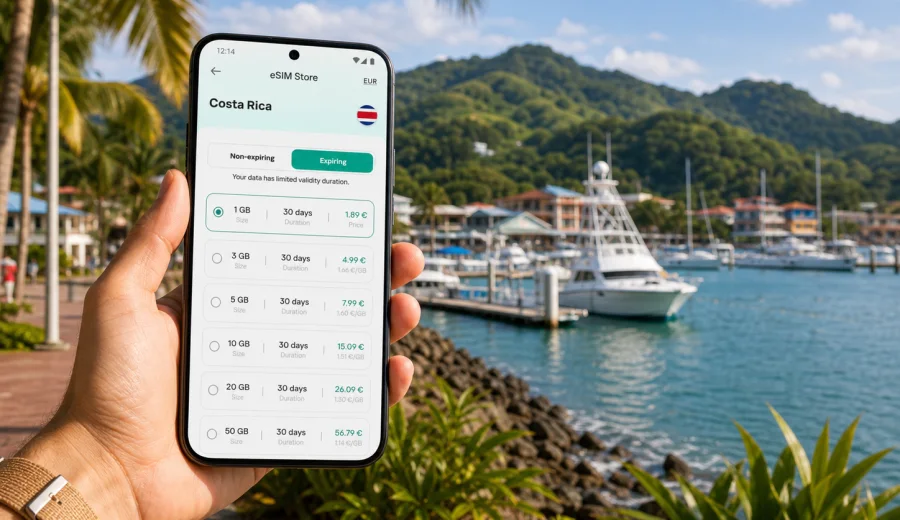
Quepos eSIM: mobile connection and internet for your Costa Rica trip
Quepos is a practical base for Costa Rica’s central Pacific coast: a working town with a marina, bus connections, tour offices, restaurants, hotels and quick access to Manuel Antonio National Park. For many travelers, it is not just a beach stop. It is where you arrange a boat trip, check in with a guide, confirm a shuttle, join a fishing charter, find your hotel after a late arrival, or continue by road toward Uvita, Dominical, or San Jose.
That makes mobile internet more than a convenience. In Quepos, you may need data before you reach the hotel desk, while walking between the waterfront and the bus station, when a rain shower changes your plans, or when a driver needs a precise pickup point near the marina. An eSIM helps you prepare that connection before you travel, without looking for a physical SIM card after arrival.
This guide focuses on using eSIM for Quepos itself: arrival routes, local movement, navigation, hotels, day trips, business travel, short stopovers, and the small decisions that make a Costa Rica itinerary easier to manage.
Why mobile internet matters in Quepos
Quepos is compact, but your trip can still depend on several moving parts. The town connects travelers to beaches, rainforest trails, marina activities, intercity buses, domestic transfers, and private shuttles. Some places are easy to reach on foot, while others require a taxi, bus, rented car, or organized tour. Mobile data keeps those choices visible.
Typical Quepos situations where a stable data plan helps:
- checking the route from your accommodation to Marina Pez Vela;
- confirming a Manuel Antonio pickup time with a guide;
- using maps when roads, hills, and one-way streets make walking less obvious;
- comparing taxi, bus, shuttle, and rental car options;
- messaging a hotel if you arrive after reception hours;
- sharing your location with other travelers in your group;
- checking weather before a boat trip or rainforest walk;
- using translation, banking, airline, and booking apps;
- working from a hotel, apartment, cafe, or marina lounge.
You can often find Wi-Fi in hotels, restaurants, and tour offices, but public or shared Wi-Fi is not a full travel connection. It may not help while you are waiting on the street, sitting in a shuttle, or trying to message a driver from an unfamiliar corner of town.
Arrival: getting online before you reach Quepos
Many visitors reach Quepos by road from San Jose, by private transfer, by rental car, or through regional travel connections. The journey can involve airport pickup points, highway stops, coastal roads, and hotel directions that are easier to manage with mobile data. If you are arriving from Juan Santamaria International Airport near San Jose, you may want internet long before Quepos appears on your map.
For travelers landing in Costa Rica and going directly to Quepos, the first online tasks are usually practical:
1. Tell your driver or hotel that you have landed.
2. Open the saved route to Quepos or Manuel Antonio.
3. Check whether the transfer includes stops.
4. Confirm the exact address of your accommodation.
5. Download or refresh maps before mountain and coastal road sections.
6. Keep airline, banking, and booking apps available during the transfer.
If you are renting a car, data is especially useful. Roads around the central Pacific coast can be straightforward on a map but slower in real life because of weather, traffic, bridges, parking, and narrow streets near popular beaches. An eSIM does not replace offline preparation, but it gives you a working layer for route updates, hotel messages, and last-minute changes.
Local movement inside Quepos
Quepos has several travel zones that matter for connectivity: the town center, the waterfront, the marina, the road toward Manuel Antonio, nearby hotels, bus stops, tour meeting points, and beach access areas. You might walk in the center, take a taxi to a hillside hotel, use a bus toward Manuel Antonio, or meet a tour vehicle at a landmark instead of a formal address.
Mobile internet helps because many directions in a travel town are situational. A pickup may say “near the marina entrance,” a restaurant may be easier to find by map pin than by street name, and your accommodation may sit on a road where walking with luggage is possible but not pleasant. With data, you can adjust in real time instead of relying only on printed notes.
| Quepos situation | Why data helps | Preparation tip |
|---|---|---|
| Walking from the bus stop | Streets can be busy and unfamiliar | Save the hotel location before arrival |
| Taxi to a hillside property | The driver may need a map pin | Keep the booking address and map link ready |
| Marina activity | Meeting points can change by operator | Confirm the pier or office before leaving |
| Manuel Antonio day trip | Buses, taxis, and walking routes differ | Check the route and expected travel time |
| Rainy-season changes | Plans can move indoors quickly | Keep messaging apps and weather open |
The practical rule is simple: Quepos is manageable, but it is easier when your phone is not limited to hotel Wi-Fi.
Choosing an eSIM data amount for Quepos
Your ideal data allowance depends on how you travel. A short Quepos stopover with light map use needs much less than a week of video calls, cloud backups, and remote work. Before choosing a plan, think about the whole Costa Rica route, not only the town center.
For a Quepos-focused trip, estimate data by activity:
- light use: maps, messages, email, bookings, ride coordination;
- moderate use: maps plus social posts, photo uploads, restaurant searches, banking apps;
- heavy use: video calls, remote work, hotspot use, streaming, large file uploads.
If you are staying in a hotel with reliable Wi-Fi and using mobile data mainly outdoors, a smaller package may be enough. If you will move between San Jose, Quepos, Manuel Antonio, Uvita, Dominical, and other towns, a larger package or longer validity period can reduce the need to watch every megabyte.
Avoid choosing only by price. Look at the data volume, validity period, destination coverage, activation rules, and whether your phone supports eSIM. A plan that is too small can become inconvenient during a transfer day, while a plan that is too large may be unnecessary for a short visit.
If your Quepos itinerary includes several Costa Rica stops, you can choose an eSIM plan for Costa Rica before the transfer and use it as the data layer for the city, the coast, and onward travel. This is especially useful when your trip includes both urban logistics and outdoor activities.
Before you buy: compatibility and timing
An eSIM works only on devices that support eSIM and are not restricted in a way that prevents adding a mobile plan. Before you pay for a plan, check your device, confirm that it supports eSIM, and make sure you understand how your phone handles cellular data lines.
Timing also matters. Many travelers prefer to install the eSIM before departure and activate it when needed according to the plan’s instructions. This can be convenient if you land in Costa Rica tired, with limited airport time, or with a transfer already waiting. Keep your primary SIM active if you need SMS from your bank or airline, and set the eSIM as the data line when you are ready to use mobile internet abroad.
eSIM plans for travel usually focus on mobile data. They may not include a local phone number, standard voice calls, or SMS unless those features are clearly stated in the plan conditions. For calls and messages in Quepos, many travelers use internet-based apps over mobile data.
When to prepare your Quepos eSIM
The best moment is before the trip reaches a point where you are already under time pressure. If you are flying into Costa Rica and going to Quepos the same day, prepare the eSIM at home over a stable Wi-Fi connection. If you are already in Costa Rica and adding Quepos to your route, prepare it from your hotel before you start the transfer.
This sequence keeps the process controlled:
1. Check that your phone supports eSIM and is ready for another mobile plan.
2. Choose Costa Rica as the destination for your trip.
3. Compare data volume and validity period.
4. Read the plan conditions before payment.
5. Install the eSIM while you have reliable Wi-Fi.
6. Activate or switch mobile data according to the instructions when you are ready to use it.
7. Keep the QR code or setup details accessible until installation is complete.
How to install and activate eSIM for the trip
Installation is easier when you do it calmly, not while standing at an airport exit or trying to find a shuttle. Use Wi-Fi, keep your phone charged, and follow the steps for your device. If you need device-specific guidance, use the Android installation instructions or the iOS installation instructions.
A practical setup checklist:
- install the eSIM while connected to stable Wi-Fi;
- label the eSIM clearly, for example “Costa Rica data”;
- keep your home SIM available if you need banking or airline SMS;
- set the travel eSIM as the mobile data line when appropriate;
- check whether data roaming must be enabled for the eSIM;
- turn off heavy background updates before travel days;
- save the plan details and support information.
Quepos travel scenarios and data use
Different travelers use mobile internet in different ways. Use the trip type to choose a realistic allowance, not just the smallest package.
| Trip type | Main data needs in Quepos |
|---|---|
| Weekend or short stopover | Maps, hotel messages, dinner plans, bus or shuttle checks |
| Manuel Antonio-focused stay | Park logistics, taxi coordination, weather, group messages |
| Marina and activity travel | Operator updates, meeting points, documents, timing changes |
| Remote work or business trip | Email, authentication apps, video calls, backup hotspot use |
For work trips, be conservative. Video calls, file transfers, and hotspot use can consume data quickly. Hotel or apartment Wi-Fi may handle most tasks, but an eSIM is valuable as a backup for email, messaging, authentication apps, and urgent calls over internet services.
Hotels, apartments, and hillside stays
Accommodation around Quepos varies from town-center hotels to hillside properties, vacation rentals, and places closer to the Manuel Antonio road. The difference matters. In the center, you may be able to walk to restaurants and services. On a hillside or along a road with limited sidewalks, you may depend more on taxis, buses, or arranged pickup.
Before arrival, save:
- the exact property name and address;
- a map pin, not only written directions;
- reception hours and check-in instructions;
- a messaging contact from the booking confirmation;
- a screenshot of the route from the bus stop, marina, or shuttle drop-off point.
Mobile data helps you use those details when the plan changes. If a driver stops at the wrong entrance or a rental host asks for your arrival time, a working data connection prevents small problems from becoming long delays.
Transport from Quepos to nearby destinations
Quepos is often one stop in a longer Costa Rica route. Travelers continue toward Manuel Antonio, Jaco, Uvita, Dominical, San Jose, Sierpe, or other Pacific coast destinations. The town is useful because it has transport connections, but departure details can still require checking.
For onward travel, use mobile data to:
- confirm shuttle pickup windows;
- compare public bus and private transfer timing;
- check driving time before leaving the coast;
- message the next hotel if you are delayed;
- review fuel, food, and cash-stop options for a road trip;
- keep maps available when the route moves away from busy areas.
If your route includes remote beaches, national parks, or rural roads, download offline maps and important documents as a backup. eSIM is part of a good travel setup, not a reason to skip basic preparation.
FAQ: eSIM for Quepos
Is Quepos a city where eSIM is useful?
Yes. Quepos is small enough to explore but active enough that mobile data is useful every day. You may need maps, weather, bookings, transport messages, and tour updates while moving between the town, marina, hotels, and Manuel Antonio.
Should I activate eSIM before arriving in Costa Rica?
You can usually install it before travel and activate or start using it according to the plan instructions. Read the conditions carefully, because validity timing can depend on the selected plan. Many travelers prefer to complete installation at home over stable Wi-Fi.
Will eSIM give me a Costa Rican phone number?
Travel eSIM plans are often data-focused and may not include a standard phone number, voice calls, or SMS unless stated in the plan details. For calls and messages, you can use internet-based apps over mobile data.
Can I use eSIM for hotspot in Quepos?
Hotspot availability depends on the plan and device settings. If you plan to connect a laptop or another traveler’s phone, check the plan conditions and choose enough data for that use.
Final preparation before you travel to Quepos
Before you leave for Costa Rica, make a simple connectivity plan. Check your phone compatibility, estimate your data needs, save offline maps, install the eSIM over Wi-Fi, and keep your travel documents accessible.
If you want to prepare mobile internet before the trip, you can select an eSIM plan for Costa Rica through Kaspersky eSIM Store, then install and activate it according to your device and plan instructions. It gives you a practical way to handle data for Quepos without turning your first travel day into a search for connectivity.