Travel connectivity guide
Rabat eSIM: Mobile Internet in Malta
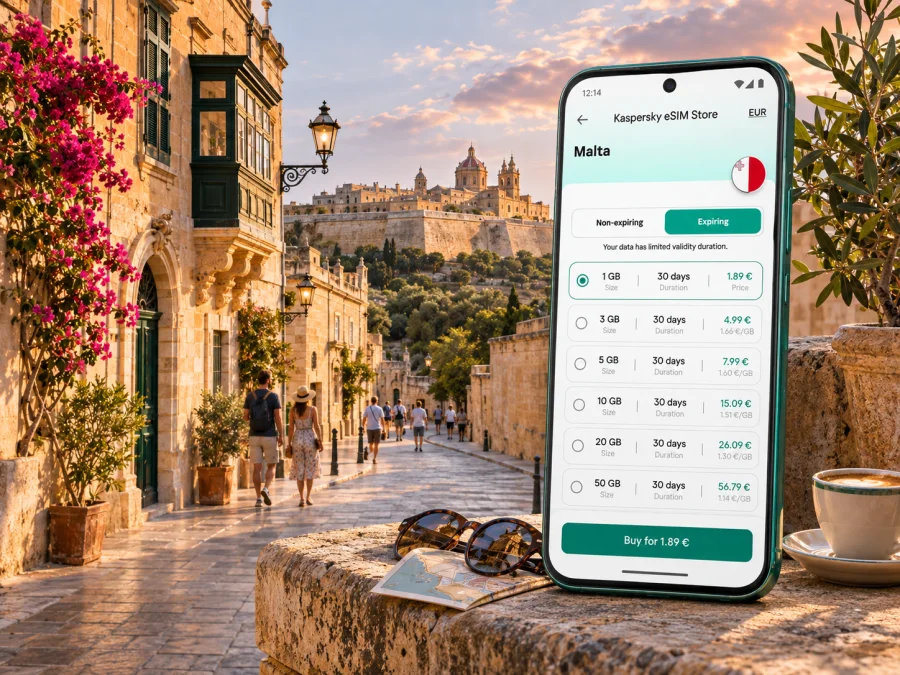
Rabat eSIM for mobile connection and internet in Malta
Rabat in Malta is a compact inland town beside the walled city of Mdina. It is not the Moroccan capital with the same name, and it is not Malta’s capital: that is Valletta. For a visitor, Rabat is a useful base for exploring the island’s historic centre, walking between the town and Mdina, and taking buses toward Valletta, the airport, or the northern coast. A mobile connection helps with each small transition: finding the right stop, checking a museum’s current opening details, coordinating a pickup, or rerouting when plans change.
An eSIM can give a compatible, unlocked device mobile data without replacing its physical SIM. Before choosing one for a trip to Rabat, check that the plan covers Malta, read the data allowance and validity carefully, and confirm when the plan starts counting time or data. Coverage and service depend on the local network and the conditions of the selected plan; no digital SIM can guarantee a signal in every indoor or underground space.
What to expect from a visit to Rabat
Rabat is a living town of lanes, churches, cafés, shops, heritage sites and a bus terminus. It sits beside Mdina, but the places are distinct: Rabat is outside Mdina’s historic walls, while Mdina is the fortified old city on the rise.
You may look up directions on a narrow street, switch to a walking route near Mdina, then check a bus departure. A saved map is a fallback if reception is weak or your plan is not active.
If Rabat is a day trip, keep your next route, accommodation address and tickets available offline as well as online.
Arrival: getting from Malta International Airport to Rabat
Malta International Airport is in Luqa, south of Rabat. Public transport connects the airport with localities across Malta, and Malta Public Transport currently lists direct Airport Direct services serving Rabat as well as other airport bus routes. The route network and operating details can change, so check the operator’s live timetable on the day you travel rather than relying on an old screenshot or a timetable copied into a travel blog.
A simple arrival sequence is:
- Before landing, save your accommodation’s full address and the nearest bus stop or landmark.
- At the airport, connect to Wi-Fi or mobile data and check the current bus options to Rabat.
- Compare the destination shown on the bus with your route plan; services may continue beyond Rabat.
- Keep the route map or stop name visible, and follow the signs to the airport bus terminal.
- When you reach Rabat, use the live map for the final walk instead of assuming the bus stops directly at your door.
Direct buses can reduce transfers, but an individual service may not match your arrival time. A taxi or pre-arranged transfer can be more practical with bulky luggage, late arrival, limited mobility, or a tight onward schedule. Check fare and pickup details with the relevant provider before travelling. Mobile data is useful for locating the pickup point and sharing your estimated arrival, but have the address written down in case the phone battery runs low.
Check the service again after landing, especially if your flight is delayed. Pin the airport, Rabat terminus and accommodation so you can compare a bus with a direct transfer.
First-hour checklist
- [ ] Save your accommodation address and check a current journey option.
- [ ] Review the plan’s activation and data roaming instructions.
- [ ] Keep a charger and a payment method available for a backup ride.
Getting around on foot and by bus
Rabat rewards walking, especially when your plans centre on Mdina and the nearby historic sites. The older streets are not laid out like a modern grid. Use a map to find an entrance, then follow local signs for the final approach. Expect uneven stone, slopes and steps.
For island-wide travel, the bus is a useful connection between Rabat and other localities. Malta Public Transport lists routes from Valletta to Rabat, including routes 50, 51, 52, 53 and 56, and airport connections including route 201. Published services and stop patterns can change. Use the current journey planner or timetable shortly before departure, and check the destination display on the bus. If a route requires a transfer, note the interchange and allow time to find the correct platform or stop.
The operator has announced a free shuttle within Rabat during road works. As this is a temporary service, check whether it runs on your date and confirm its stops before relying on it.
| Travel need | Useful preparation | Why a mobile connection helps |
|---|---|---|
| Airport to Rabat | Check the latest Airport Direct and other airport-route options | Recheck after a delayed flight and locate the correct stop |
| Valletta to Rabat | Compare the current route and departure time | Follow a transfer or find the terminus on arrival |
| Rabat to Mdina | Save a walking map and meeting point | Navigate the short but winding approach and share your location |
| Catacombs or museums | Confirm the site address and current visitor information | Check the entrance, directions and any last-minute updates |
| Continuing to another locality | Save the destination and a backup route | Replan if a connection is missed |
Choosing mobile internet for your Rabat trip
Estimate use from your itinerary. Occasional maps and messaging require less data than streaming, video calls or large uploads. Compare the allowance and validity with your stay, and use Wi-Fi for large downloads when practical.
To compare plans, check these points before paying:
- Destination: Malta must be included in the coverage terms. A regional plan may list several countries; read the included destinations rather than inferring them from its name.
- Data amount: Estimate how often you will use maps, browsing, email, photo uploads and calls over the internet. Video and cloud backups can use data quickly.
- Validity: Check the number of days and exactly when the validity period begins. Installation and activation may be separate events, depending on the plan.
- Network conditions: Service depends on the partner network, location, device settings and local conditions. Historic buildings, thick walls and underground sites can reduce reception.
- Tethering: If you plan to share data with a laptop or another phone, confirm that hotspot use is allowed by the specific plan.
- Voice and SMS: A travel data eSIM generally should not be treated as a replacement phone number. Check the plan terms; use your usual SIM for calls and texts if its roaming conditions suit you, or use internet messaging apps.
- Device: Confirm eSIM support for your exact device and regional model, and make sure it is not carrier-locked.
Kaspersky eSIM Store is an app and website where you can choose, arrange and activate an eSIM with a suitable plan for mobile internet while travelling abroad. It is a preparation step, not a promise of local coverage. To compare the current destination options for Malta, review the eSIM plans for a Malta trip and read the plan terms before selecting one.
How mobile data fits into a Rabat visit
- Bus stops and transfers: Use a live map to distinguish nearby stops and confirm the direction of travel. Save the return stop before leaving the terminus.
- Museums and heritage sites: St Paul’s Catacombs and Domvs Romana are in Rabat; the National Museum of Natural History is in nearby Mdina. Check current hours and entrances before leaving, and save tickets or confirmations offline.
- Walking between town and Mdina: A map helps with orientation, but steps, slopes and heat affect the pace. Agree on a meeting point if your group separates, and download a route in case reception drops.
- A short stop or work trip: Save the next address and check your return connection before starting a visit. For a video call, test accommodation Wi-Fi first and keep mobile data as a fallback if your plan allows it.
Underground spaces and thick-walled buildings can weaken reception. Save directions and agree how to meet outside rather than relying on a message or map to load inside a site.
A practical setup plan for your eSIM
Complete the setup while you have a stable internet connection and enough time to read the installation instructions. Most importantly, follow the specific steps shown for the eSIM you select: the exact activation conditions may differ between plans.
Before you travel
- Check the device. Confirm that the exact phone model and regional variant support eSIM and are not locked to a mobile operator. Check whether your device is compatible.
- Choose the destination and plan. Make sure Malta is covered, and compare the data allowance, validity, activation trigger and any hotspot restrictions.
- Read the activation terms. Find out whether the validity starts at installation, activation or first network use. Do not assume that every plan starts its clock in the same way.
- Install with internet access. Use the plan’s QR code or in-app flow as instructed. Keep the usual SIM profile available if you still need its number for calls or verification messages.
- Label the lines. Give the travel eSIM a clear name, such as “Malta data,” so you can tell it apart from your everyday SIM in settings.
- Save the instructions. Keep the installation details, accommodation address and support information somewhere accessible offline.
Step-by-step setup guides are available for Android and iPhone and iOS. Menu labels vary by phone and operating-system version, so use the guide for your device and the activation directions included with your chosen plan.
On arrival in Malta
- Open your phone’s SIM or mobile-data settings.
- Select the travel eSIM for mobile data if its terms say it is ready to be used.
- Keep your primary line enabled only if you need calls or messages on that number, and check its roaming charges first.
- Turn on data roaming for the travel eSIM only if the plan’s instructions require it.
- Allow the phone a few minutes to register, then open a simple webpage or map to check that data works.
- If there is no connection, confirm the selected data line, restart the phone if the instructions recommend it, and review the plan’s troubleshooting steps before changing settings at random.
If you prefer to wait before using the plan, leave the travel line switched off until the plan’s activation conditions and your arrival timing are clear. Be careful with deleting an eSIM profile: installation profiles are not always reusable, and a deleted profile may require support to restore. Keep the confirmation and installation details until the trip is over.
Keep your phone useful throughout the day
Download an offline map and pin your accommodation, the Rabat terminus and planned sites. Pause photo backups and large downloads if your data allowance is limited; use a trusted Wi-Fi connection for updates when practical. Save transport directions and tickets offline, carry a charger, and label your everyday SIM and travel eSIM clearly. If reception drops indoors, step outside before troubleshooting.
Common planning mistakes to avoid
Do not confuse Rabat, Malta with Rabat, Morocco, or treat Mdina and Rabat as the same place. Search for the exact locality, site or stop. Recheck transport timetables and temporary services on the day, since routes can change. Before buying an eSIM, confirm support for your exact regional device variant, carrier-unlocked status, Malta coverage and the activation terms. A data plan may not include an ordinary phone number, voice calls or SMS, so review its terms and your usual SIM’s roaming costs.
Frequently asked questions
Is Rabat in Malta the capital of Malta?
No. Rabat is a town near Mdina; Valletta is Malta’s capital. Add “Malta” to searches because Rabat is also the name of Morocco’s capital.
Can I get from Malta International Airport to Rabat by bus?
Yes. Public transport lists airport services serving Rabat. Check the live timetable on your travel date, since stops and departures can change; another route may require a transfer.
Can I use an eSIM in Rabat?
If your exact device supports eSIM, is carrier-unlocked, and the selected plan covers Malta, you may use it for data. Check the device variant, activation conditions and plan terms. Reception depends on local network and building conditions.
Will a travel eSIM include a Maltese phone number?
Not necessarily. Many travel plans are data-only and do not include ordinary calls or SMS. Check the terms and your everyday SIM’s roaming charges if you need to stay reachable on that number.
Should I install the eSIM before leaving home?
Installing where you have reliable internet is practical, but follow the plan’s activation instructions: validity may begin at different stages. Save the setup details and QR code somewhere you can access later.
What should I check before taking a bus from Rabat?
Confirm the route, destination, stop and current departure time. If you need to transfer, identify the second stop in advance and leave time to find it.
Prepare for Rabat with a clear plan
Keep an offline copy of key addresses, a current bus option for your next stop, and a mobile-data plan whose destination and activation conditions you understand. Kaspersky eSIM Store is an app and website that helps you choose and activate an eSIM for mobile internet while travelling. Explore current eSIM options for Malta, check device compatibility, and follow your plan’s instructions before setting off for Rabat.


