
Travel connectivity guide
Rabat eSIM: mobile internet for Morocco travel
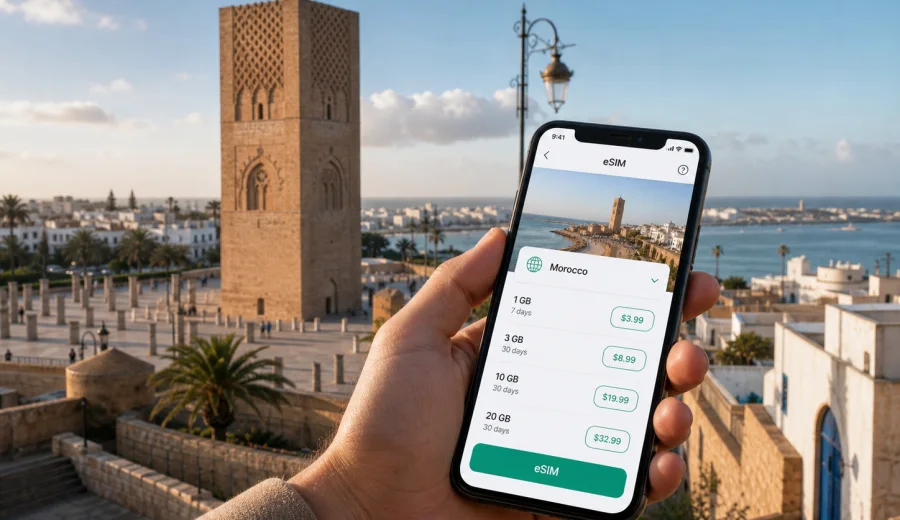
Rabat eSIM: mobile connection and internet for a trip to Morocco
Rabat is a calm capital by Moroccan standards, but a trip still asks a lot from your phone. You may land at Rabat-Sale Airport, cross the Bouregreg toward the city center, check into a riad in the Medina, attend meetings in Hay Riad or Agdal, and then use maps to reach the Kasbah of the Udayas, Hassan Tower, Chellah, or the Atlantic waterfront. In each of these moments, mobile internet is less about browsing for fun and more about keeping the trip organized.
An eSIM can be a practical way to prepare mobile connection for Rabat without looking for a physical SIM card after arrival. You choose a suitable data plan for Morocco, install the eSIM on a compatible device, and use mobile data for maps, messaging, ride-hailing, hotel details, restaurant reservations, work tools, and onward travel plans. It is especially useful if your trip is short, if you arrive outside regular shop hours, or if you prefer to set up internet access before the plane lands.
This guide focuses on Rabat itself: airport arrival, city transport, districts, hotels, business travel, stopovers, and day trips from the capital. Morocco is the country context because the data plan must match the destination, but the practical question is local: how do you stay online while moving through Rabat?
Why mobile internet matters in Rabat
Rabat is easier to navigate than many larger capitals, yet the city is spread across several practical zones. The Medina, Hassan, Agdal, Hay Riad, Souissi, and the river connection with Sale can each create a different travel pattern. A hotel may be close to a tram stop but far from your meeting. A restaurant may be in a small street where the final walk matters more than the taxi ride. A business appointment may be in a modern office district where you need a building pin, not just a street name.
Reliable mobile data helps with everyday travel tasks:
- opening your hotel booking and address at the airport;
- checking the route from Rabat-Sale Airport to the city;
- sharing your live location with family or colleagues;
- translating short phrases when asking for directions;
- comparing tram, taxi, and walking routes;
- confirming meeting locations in Agdal, Hay Riad, or Souissi;
- using maps around the Medina and the Kasbah of the Udayas;
- checking train times for Casablanca, Kenitra, Tangier, or Marrakesh;
- keeping messenger calls available when the eSIM tariff includes data only.
The value is not only speed. It is continuity. You can move from airport to hotel, from hotel to meeting, and from meeting to dinner without waiting for public Wi-Fi or taking time to solve mobile internet setup in the middle of the day.
Arrival in Rabat: the first hour
The first hour in Rabat is when a prepared eSIM can be most useful. If you arrive at Rabat-Sale Airport, you may need to contact your accommodation, check a transfer, order a taxi, or decide whether to go directly into Rabat or first cross toward Sale. If you arrive by train, Rabat Ville and Rabat Agdal stations are different starting points, and your best route depends on the district where you are staying.
A simple arrival checklist:
- before departure, save your hotel name, address, and booking reference offline;
- install the eSIM while you still have stable Wi-Fi;
- check that your phone supports eSIM and is not locked to one carrier;
- after landing, turn on the eSIM line for mobile data if the plan is ready to use;
- keep your primary SIM available for calls or SMS if you still need it;
- open your map app and confirm the route before leaving the terminal or station.
This approach avoids a common travel problem: arriving with enough information to know where you are going, but no connection to update the route if something changes.
Rabat travel scenarios where eSIM is useful
Different travelers use mobile data in different ways. Rabat is compact enough for short visits, but each travel style has its own connection needs.
| Scenario in Rabat | Typical mobile internet use | What to consider when choosing a data plan |
|---|---|---|
| Weekend city break | Maps, messaging, restaurant search, photo backup on Wi-Fi later | A smaller data package may be enough if you avoid heavy video |
| Business trip | Email, calendar, taxi apps, cloud documents, messenger calls | Choose enough data for work tools and allow a buffer |
| Family trip | Navigation, translations, hotel coordination, activity planning | Plan for more frequent map and messaging use |
| Stopover or short stay | Airport transfer, hotel check-in, city route, onward ticket | A short-validity plan can be practical if available |
| Morocco itinerary starting in Rabat | Rabat plus Casablanca, Tangier, Fes, Marrakesh, or coastal towns | Make sure the plan covers Morocco for the full route duration |
The best eSIM choice is not always the largest package. It should match your trip length, the number of days you need mobile data, and your habits. If you stream video on mobile data, upload large files, or use video calls often, you need more traffic than a traveler who mainly uses maps and messages.
City movement: tram, taxis, walking, and navigation
Rabat has useful public transport, but visitors often combine several modes in one day. You may take a tram between central areas, use a taxi for a cross-city ride, and walk through older streets where the final few hundred meters are easiest on foot. Mobile internet makes this mixed movement smoother because you can adjust without returning to the hotel lobby or relying on a cafe connection.
For tram and walking routes, mobile data is mainly about orientation. You can check the nearest stop, estimate walking time, and decide whether a route is still reasonable in hot weather or after dark. Around the Medina, Oudayas, and riverfront, maps help you keep the general direction even when narrow streets make the route feel less direct.
For taxis and transfers, mobile connection helps you:
- send a precise hotel pin instead of explaining the address from memory;
- compare travel time before agreeing on a route;
- message a driver, host, or colleague if you are delayed;
- keep the destination available if pronunciation or spelling causes confusion;
- check the return route before leaving a restaurant, museum, or meeting.
Rabat is not a city where you need to be online every second, but the moments when you do need data are often the moments when you are already moving.
District guide: how connection needs change by area
Rabat's districts shape how you use your phone. The same eSIM data plan can support all of them, but your habits may change through the day.
Medina and Kasbah of the Udayas. Use maps lightly but often. Streets can be narrow, and the most useful navigation is sometimes a quick direction check rather than a full route. Keep your hotel pin saved before you start exploring.
Hassan and the area around Hassan Tower. This area is common for sightseeing, government buildings, and city walks. You may use mobile data for route planning, opening ticket or booking details, and coordinating a meeting point.
Agdal. Agdal is practical for hotels, restaurants, shops, train access, and business stays. Mobile data is useful for finding exact entrances, checking train connections, and moving between meetings.
Hay Riad and Souissi. These districts are often relevant for business, embassies, conferences, and longer stays. If your trip includes work calls, cloud documents, or shared calendars, choose a data allowance with a margin.
Sale and the Bouregreg river area. Crossing between Rabat and Sale may involve tram, taxi, or walking depending on the plan. Mobile internet helps confirm timing and avoid confusion about which side of the river your destination is on.
How to choose an eSIM data plan for Rabat
Start with the country: Rabat is in Morocco, so the plan should be suitable for Morocco unless your trip is part of a broader regional route. Then match the plan to duration and data use. A traveler in Rabat for two meeting days has a different need from a traveler using Rabat as the first stop on a ten-day Morocco itinerary.
Use this practical decision sequence:
1. Define the route. Is the trip only Rabat, or will you continue to Casablanca, Fes, Tangier, Marrakesh, or another destination?
2. Count the days when you need mobile data. Include arrival and departure days, not only full sightseeing days.
3. Estimate your data habits. Maps and messaging use less traffic than video, large uploads, or hotspot sharing.
4. Check validity. The plan duration should cover the real travel window.
5. Review the plan conditions before checkout. Availability, price, data amount, and duration depend on the selected tariff.
6. Install before you travel if possible, then activate according to the instructions and tariff conditions.
For a city trip, it is also worth keeping a small buffer. A delayed train, a changed hotel, or an extra work call can turn a minimal plan into a stressful one. Choosing a little more data than your strict estimate can be more comfortable than trying to conserve every megabyte.
A simple data estimate for Rabat
These ranges are only planning guidance, not a guarantee. Actual data use depends on your apps, settings, signal conditions, and background sync.
| Use pattern | What it usually includes | Planning note |
|---|---|---|
| Light | Maps, messages, email headers, occasional web search | Suitable for travelers who use hotel Wi-Fi for media and backups |
| Moderate | Frequent navigation, messenger calls, restaurant search, tickets, work chat | A common pattern for active city travel |
| Heavy | Video calls, hotspot use, cloud files, social media uploads, streaming | Choose a larger allowance and monitor usage |
To save data in Rabat, download offline map areas before departure, disable automatic video playback, pause cloud photo backup on mobile data, and update apps over Wi-Fi. These small settings matter more than most travelers expect.
Preparing eSIM before the trip
Preparation is the most comfortable option because you can use stable home Wi-Fi and avoid solving setup during arrival. In Kaspersky eSIM Store, you can choose the destination, review tariff details, and prepare an eSIM for mobile internet in Morocco. If you want to compare available options before your Rabat trip, you can choose a data plan for Morocco and then install the eSIM on a compatible device.
Before you rely on eSIM for Rabat, check three things:
- your phone or tablet supports eSIM;
- the device is not locked in a way that prevents using another mobile data profile;
- you understand when the selected plan starts counting validity and data use.
If you are unsure about compatibility, use the device check before checkout: check your device. This is especially important if you bought your phone through a carrier, use an older model, or travel with a tablet instead of a phone.
Installing and activating eSIM
The exact steps depend on your device, but the logic is simple: choose a plan, install the eSIM profile, set it for mobile data, and follow the activation conditions of the selected tariff. You can install before departure if the plan instructions allow it, or after arrival when you still have Wi-Fi.
For device-specific setup, use the relevant guide:
After installation, keep these settings in mind:
- set the eSIM as the mobile data line when you want to use it in Rabat;
- keep your primary SIM active only if you need regular calls or SMS;
- enable data roaming for the eSIM if the instructions for the selected plan require it;
- avoid deleting the eSIM profile unless you are sure you no longer need it;
- monitor data use in your phone settings and in the account area if available.
An eSIM for travel usually focuses on mobile data. It may not include a local phone number, voice calls, or SMS unless this is stated in the plan conditions. For most city travel tasks in Rabat, messenger calls and chat apps over mobile data are enough, but banks, airlines, and work systems may still send SMS to your primary number.
Rabat for business travelers
Rabat is an administrative and diplomatic capital, so many visits are work-led rather than purely touristic. Business travelers often move between hotels, offices, ministries, embassies, coworking spaces, and restaurants for meetings. In that pattern, mobile internet supports punctuality and continuity.
Useful work settings before arrival:
- download meeting addresses and calendar invites for offline access;
- keep identity, booking, and travel documents available in secure offline storage;
- set messaging apps to download large files only on Wi-Fi;
- test whether your work apps need two-factor authentication by SMS;
- carry a power bank if you expect a full day of navigation and calls.
Rabat for short stays and stopovers
A short Rabat stay can be surprisingly dense. You might arrive in the afternoon, check into a hotel in Agdal, visit the Kasbah of the Udayas near sunset, have dinner, and leave by train the next morning. In that schedule, there is little time to solve connectivity after arrival.
For stopovers and one-night stays, focus on:
- having mobile data ready before you leave the airport or station;
- keeping the hotel address and next departure details easy to open;
- choosing a plan with validity that fits arrival and departure days;
- avoiding heavy uploads until you are on hotel Wi-Fi;
- using mobile data for navigation, messages, and transport decisions.
Day trips and onward travel from Rabat
Many visitors use Rabat as part of a wider Morocco route. Casablanca is a common next stop for flights, business, or a quick visit. Tangier, Fes, Meknes, Kenitra, and Marrakesh can also be part of a longer itinerary. If your trip extends beyond Rabat, choose your eSIM plan for the whole Morocco route, not only the capital.
Mobile data is useful between cities for:
- checking train platforms, timing, and station names;
- sharing arrival updates with hosts or colleagues;
- opening hotel addresses in the next city;
- adjusting plans if a train, meeting, or transfer changes;
- using maps after arrival without waiting for Wi-Fi.
Practical checklist before you fly to Rabat
Use this checklist a day or two before departure:
- Confirm that Rabat, Morocco is covered by the destination you select.
- Check eSIM compatibility and carrier lock status on your device.
- Choose a data allowance based on maps, messaging, work, and media habits.
- Read the plan validity rules before checkout.
- Install the eSIM while connected to stable Wi-Fi.
- Save the QR code or setup details where you can access them if needed.
- Download offline maps for Rabat and any onward cities.
- Save your hotel, meeting, and station addresses.
- Decide which SIM line will handle mobile data and which will handle calls or SMS.
- Pack a charger or power bank for long arrival days.
This is also a good moment to reduce background data use: turn off automatic app updates, limit cloud backup on mobile data, and check whether your map app has offline areas downloaded.
Quick answers about eSIM in Rabat
Do I need an eSIM only for Rabat or for all of Morocco?
For a city article, the practical focus is Rabat, but the plan should match the country where the city is located. Choose a data plan suitable for Morocco unless your route requires a different regional option.
Can I install eSIM before I arrive in Rabat?
Often, yes, if the selected plan instructions allow it. Install while you have stable Wi-Fi and check when validity starts according to the plan conditions.
Will an eSIM give me a Moroccan phone number?
Travel eSIM plans commonly focus on mobile data. Voice calls and SMS are not included unless the selected plan says so. You can usually use internet-based messengers over mobile data.
Is eSIM useful if my hotel has Wi-Fi?
Yes, because many key moments happen outside the hotel: airport arrival, taxis, tram routes, station changes, restaurant searches, and walking navigation.
How much data do I need for Rabat?
For maps and messaging, modest use may be enough. For business tools, hotspot use, video calls, or heavy uploads, choose a larger allowance and monitor consumption.
Can I use the same eSIM outside Rabat?
If the plan covers Morocco and remains valid, it can support onward travel within the country. Always check the selected tariff conditions before relying on it for a wider route.
Choose mobile internet for your Rabat trip
Rabat rewards travelers who are prepared. The city is manageable, but your phone still does important work: airport arrival, hotel check-in, tram routes, taxi coordination, Medina navigation, business messages, train planning, and day trips. An eSIM helps you prepare mobile internet before the trip and avoid spending your first hours looking for a physical SIM card or depending on public Wi-Fi.
Before you travel, review your route, check your device, choose a data allowance that fits your real habits, and install the eSIM with time to spare. For a Rabat city break, work trip, stopover, or Morocco itinerary starting in the capital, you can prepare an eSIM data plan for Morocco through Kaspersky eSIM Store and keep your mobile connection ready for the moments when the city plan changes.