Travel connectivity guide
Rakuten Big-S eSIM Compatibility and Setup
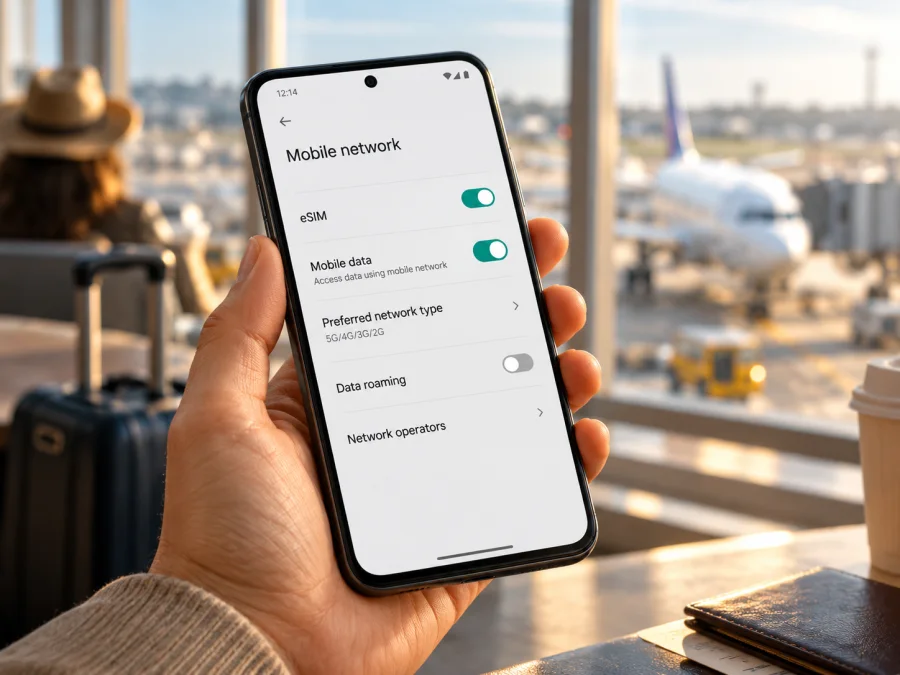
Rakuten Big-S eSIM: compatibility, setup, and travel data guide
If you own a Rakuten Big-S and want to use an eSIM for mobile data abroad, the first answer is encouraging but needs an important qualification: the phone has built-in eSIM hardware, and Rakuten Mobile specifies eSIM as its SIM type. Its official materials also say the device accepts one eSIM type at a time and does not support dual SIM. That confirms the presence of eSIM technology; it does not guarantee that every travel eSIM, carrier network, or feature will work on every handset sold under this name.
The product page is for a Japan-market device sold by Rakuten Mobile, and sales have ended. Its listed carrier features are focused on Rakuten Mobile in Japan. The key checks before buying a travel data plan are therefore the exact model and software in your hand, whether the device is free of a carrier restriction, whether it can add a third-party eSIM profile, and whether the provider’s local partner network supports the phone’s bands and required services.
The name in this guide follows the request, Rakuten Big-S. Rakuten Mobile’s specification uses the styling “Rakuten BIG s.” Do not confuse the Big-S with the separate Rakuten BIG, Rakuten BIG (C), Rakuten Hand, or another similarly named model. Those are different devices, and their specifications do not establish compatibility for this phone.
Rakuten Big-S at a glance
| Item | What is documented for Rakuten Big-S | What it means for a traveller |
|---|---|---|
| SIM type | eSIM only | There is no physical SIM slot to use as a fallback. |
| SIM capacity | One eSIM type/profile can be used; dual SIM is not supported | Plan how you will use your existing number and travel data before removing or changing profiles. |
| Original market | Rakuten Mobile’s Japan-market Rakuten Original product | A Japanese model name or an eSIM label alone does not prove compatibility with another country’s carrier. |
| Sales status | Rakuten Mobile marks the product as discontinued | Used devices may have different ownership, software, or provisioning histories. |
| Operating system shown in specifications | Android 10 | Menus and current app behavior can vary by installed updates and software build. |
| Network bands in official specification | LTE bands 1, 3, 4, 5, 7, 12, 17, 18, 19, 26, 38, 41, 42; 5G n77 and n257 | A travel provider or local network must use compatible bands; eSIM capability alone is not enough. |
| Carrier voice support shown by Rakuten | Rakuten VoLTE supported; docomo, au, and SoftBank VoLTE not listed as supported | Treat this as a data-first travel device unless the intended carrier confirms voice service. |
| Dual SIM | Not supported | The device cannot be assumed to keep two lines active as many newer phones can. |
These details describe the listed Rakuten Mobile product. They do not verify every second-hand handset, carrier variant, software build, or firmware modification. If your device has a different model number, a modified operating system, or came from an unverified seller, use the checks below before relying on it abroad.
Does Rakuten Big-S support eSIM?
Yes: the official Rakuten Mobile specification identifies Rakuten Big-S as an eSIM-only phone. The manufacturer’s support information says the device uses eSIM and does not support dual SIM. This is stronger evidence than a generic Android menu or a third-party compatibility list: the device was designed with an embedded SIM rather than a removable SIM card.
For a travel plan, the practical answer is: the hardware supports eSIM, but the provider must confirm that your exact handset and destination are supported. Rakuten’s own network setup does not guarantee that a third-party profile will install, that a local partner will accept the phone, or that voice and SMS will work. Travel plans are often data-focused.
There is no need to guess based on the phone’s appearance. Check its model number in Android settings or on the original product label, then compare it with the official Rakuten Big-S specification. The product page lists model number 3917JR. If your handset does not identify as this model, stop and verify that variant separately; a related name is not sufficient evidence.
Market, carrier, and software differences
Rakuten Big-S is a device sold in Rakuten Mobile’s Japanese product range, rather than a globally standardized phone with many documented country editions. Rakuten lists a single official product specification for the model and states that sales have ended. Public product information identifies eSIM-only operation, one usable eSIM type, and no dual-SIM function. It does not establish an official international edition with interchangeable SIM hardware.
A second-hand phone may have an outdated build, carrier restrictions, or a repair history; a listing may also use “Big-S” loosely. Ask for the model number and proof that the handset can reach mobile-network settings. Do not rely on a seller title or another phone’s screenshot.
Rakuten’s official network specification lists several LTE and 5G bands, but band overlap is only one part of compatibility. Local operators can require supported carrier settings, voice-over-LTE provisioning, or other network features. The listed VoLTE compatibility specifically names Rakuten, while other major Japanese carriers are not listed as supported. That does not by itself settle data operation on a particular foreign network. It does mean you should not assume that calls, SMS, 5G, or all local carrier functions will work simply because an eSIM profile installs.
If the handset was bought through Rakuten Mobile, the company says its devices are supplied SIM-free. A device bought elsewhere may have different restrictions. Confirm the status with the seller or original carrier if there is any doubt. “SIM-free” and “eSIM-compatible” also answer different questions: the first concerns a carrier restriction; the second concerns built-in capability. You need both an eSIM-capable handset and permission for it to register on the intended network.
The specification lists Android 10. Menus and app requirements may change with software updates, so check your installed version against the travel provider’s current requirements. Unofficial firmware cannot safely guarantee eSIM support.
Check your own handset before purchase
Run these checks over Wi-Fi. Menu names may vary by software build.
- Confirm the model. Open Settings → About phone and compare the model number with Rakuten BIG s, model 3917JR. If it differs, research that exact variant.
- Find eSIM controls. In Settings → Network & internet / Mobile network / SIMs, look for Add eSIM, Download a SIM, or Add mobile plan.
- Look for an EID. Check Settings → About phone → SIM status. You can also enter
*#06#in the dialler; some builds show an EID with the IMEI. Do not share the EID, IMEI, or activation code publicly. - Confirm restrictions. Ask the seller or original carrier whether the phone is SIM-free and permits third-party eSIM profiles. An EID does not establish that every profile is allowed.
- Check the destination. Ask the travel provider which partner networks and bands its plan uses and whether Rakuten Big-S is supported. Verify coverage, validity, data allowance, activation timing, tethering, and voice or SMS terms.
A missing menu needs investigation, but a visible EID is not a compatibility guarantee either. Check your device for the exact handset before checkout.
What to do if EID or “Add eSIM” is missing
Start with the model number: a similar Rakuten name is not enough. Install available system updates, restart, and check the mobile-network settings again over Wi-Fi. Rakuten Big-S is eSIM-only, so a physical SIM tray should not be treated as a backup or proof of eSIM support.
If the correct model still shows no eSIM controls or EID, ask the seller or Rakuten Mobile support to confirm the device identity. Share identifiers only through a private support channel. If an EID is present but a travel provider rejects the phone, ask whether the issue is software, profile restrictions, carrier policy, or destination network support. Avoid repeatedly scanning single-use codes or deleting a profile while troubleshooting.
Install and activate an eSIM
Use the Android steps for a travel profile. The provider’s account activation is separate from Rakuten’s original Japanese network setup. Keep Wi-Fi connected, and check when the plan’s validity begins before installing or enabling it.
Before installation
- Confirm provider support for the exact model and destination.
- Review coverage, data, validity, start condition, tethering, voice/SMS, and cancellation terms.
- Charge the phone and connect to reliable Wi-Fi.
- Retrieve the profile through the provider’s app, QR code, or manual details. If the QR code is on this phone, display it on another screen or use a supported direct-install method.
Add the profile
- Open Settings → Network & internet or Mobile network.
- Tap Add eSIM, Download a SIM, or the equivalent option.
- Scan the provider’s QR code or enter the supplied activation details. Check the displayed plan before continuing.
- Allow the download to finish without closing settings or disconnecting Wi-Fi.
- Label the line clearly, then enable it at the time recommended by the plan instructions. Some plans start at installation; others start on first network connection.
Kaspersky eSIM Store’s Android installation guide shows general steps; use Rakuten Big-S labels if they differ. The iOS installation guide applies to iPhones, not this Android phone.
Select data and connect
In mobile-network settings, enable the travel profile and select it for mobile data. Keep your home line enabled only if the device and plan allow it and you understand any roaming charges. Enable data roaming for the travel profile only when the provider’s instructions require it. At your destination, turn Wi-Fi off briefly and test a webpage. If there is no service, confirm the plan is active, data is assigned to it, and the selected network is supported. Automatic network selection is a sensible first choice; try a named network manually only on the provider’s advice.
Kaspersky eSIM Store is an app and website where you can choose, arrange, and activate an eSIM with a mobile-data plan for an international trip. It is not a network operator. Availability and performance depend on the plan and its local network.
Use Rakuten Big-S for mobile data abroad
A travel eSIM can provide mobile data for maps, messaging, bookings, translation, and email without swapping a physical SIM. Because Rakuten Big-S is eSIM-only, plan how you will handle your usual line before departure. Download offline maps and essential documents in case the phone cannot register on a local network.
For a short trip, match the data allowance and validity to your dates. Video calls, streaming, hotspot use, and automatic photo backups can consume more data than navigation or messaging. Check usage in Android and the provider’s account; counters can differ, so use them as estimates. For a multi-country route, confirm every destination is included and check top-up rules and expiry.
The official specification lists LTE bands 1, 3, 4, 5, 7, 12, 17, 18, 19, 26, 38, 41, 42 and 5G n77, n257. Band overlap alone does not ensure service: carrier settings, provider approval, local coverage, and supported network features matter. Rakuten lists VoLTE for Rakuten, while other named Japanese carriers are not listed as supported. Treat voice and SMS as unconfirmed unless your chosen provider confirms them. Many travel plans are data-only; messaging apps can call over data when available.
Check whether tethering is allowed by the selected plan. Rakuten’s hardware page describes hotspot capability for its own service, but that does not establish that every travel plan permits it. Use a strong hotspot password and switch sharing off when finished.
To browse currently displayed travel plans, visit the Kaspersky eSIM Store. It is the homepage for checking current options, not a specific country tariff or a compatibility guarantee for Rakuten Big-S.
Common problems and checks
- The profile will not download: confirm Wi-Fi, that the code belongs to this purchase, and that it has not already been used. Follow the provider’s setup flow; contact support before requesting a replacement code.
- No signal after installation: confirm the travel profile is enabled and selected for mobile data. Toggle airplane mode, restart, and move to a place with reception. Try a named partner network manually only if the provider directs you to do so.
- Signal but no data: check mobile data and, if required, data roaming for the travel profile. Verify the plan is active and valid in this country. Enter an APN only when the provider supplies the exact setting.
- Wrong line is selected: review Android’s SIM and mobile-data settings. Rakuten Big-S does not support dual SIM, so simultaneous use of a home line and travel profile should not be assumed.
- The provider rejects the phone: share the exact model number and Android version privately. Ask whether the restriction concerns eSIM capability, software, carrier restrictions, bands, or a tested-device list.
- Data works but calls or SMS fail: the plan may be data-only, and Rakuten lists limited VoLTE support for this phone. Confirm voice service separately and keep another way to receive account-verification messages.
- Menus differ: Android and provider app screens vary by build. Use the instructions for the exact device and contact the provider before factory-resetting or deleting a profile.
Practical scenarios
- Before departure: verify the model, EID or add-eSIM control, carrier status, destination, validity start, data allowance, and tethering terms. Save setup instructions securely; do not share activation codes.
- On arrival: use Wi-Fi if needed, enable the travel profile, select it for mobile data, and follow the provider’s roaming instructions. Test a webpage before depending on maps; download offline maps in advance.
- Keeping your usual number: because Rakuten Big-S does not support dual SIM, do not expect both lines to remain active. Confirm how to restore your existing profile before changing or deleting it. If simultaneous lines are essential, consider a device that explicitly supports dual SIM and eSIM.
- Hotspot use: check that the plan allows tethering, set a strong hotspot password, monitor usage, and turn sharing off when finished.
FAQ
Can Rakuten Big-S use a travel eSIM?
The device has eSIM hardware and is specified as eSIM-only. A particular provider must still confirm that the exact handset, software, and destination network are supported.
Does it take a physical SIM or support two lines?
Rakuten Mobile lists eSIM as the SIM type and says dual SIM is not supported. Do not count on a physical SIM fallback or two active lines.
Will 5G work abroad?
Rakuten lists bands n77 and n257. The local network must use a compatible band and allow the phone to register; check the provider’s destination-specific support.
Does an EID guarantee service?
No. It indicates eSIM identity information, but installation and network access also depend on profile acceptance, carrier restrictions, software, bands, and local coverage.
Are calls and SMS included?
Do not assume so. Many travel plans provide data only. Check the plan and local carrier support before relying on ordinary calls, SMS, or verification codes.
What should I confirm before paying?
Check the model number, EID or eSIM menu, restriction status, Android version, provider compatibility, destination, validity start, data amount, and tethering or voice conditions.
Final checklist: verify first, then choose a travel eSIM
Rakuten Big-S is officially an eSIM-only phone, but that fact is only the starting point for travel use. It is a discontinued Japan-market Rakuten Mobile model, its documented configuration does not provide dual SIM, and its listed carrier voice support is limited. A travel eSIM may be a practical way to prepare mobile data, provided the exact handset and destination are accepted by the plan provider.
Before purchasing, match the model number, check the EID or add-eSIM screen, confirm there is no carrier restriction, and ask whether the plan supports this model on a local partner network. Then compare the destination, data allowance, validity, activation timing, and tethering or voice conditions. Kaspersky eSIM Store is an app and website where you can choose, arrange, and activate an eSIM with a data plan for an international trip; availability and network performance depend on the selected plan and its local network.
If the provider confirms your Rakuten Big-S is compatible, install the profile over Wi-Fi, label it clearly, and select it for mobile data when the plan should begin. If support cannot be confirmed, avoid buying a plan on assumption alone. Browse the Kaspersky eSIM Store for currently displayed travel options, and use the provider’s compatibility guidance to decide whether one fits your device and route.


