
Travel connectivity guide
Ras Al Khaimah eSIM for Mobile Internet
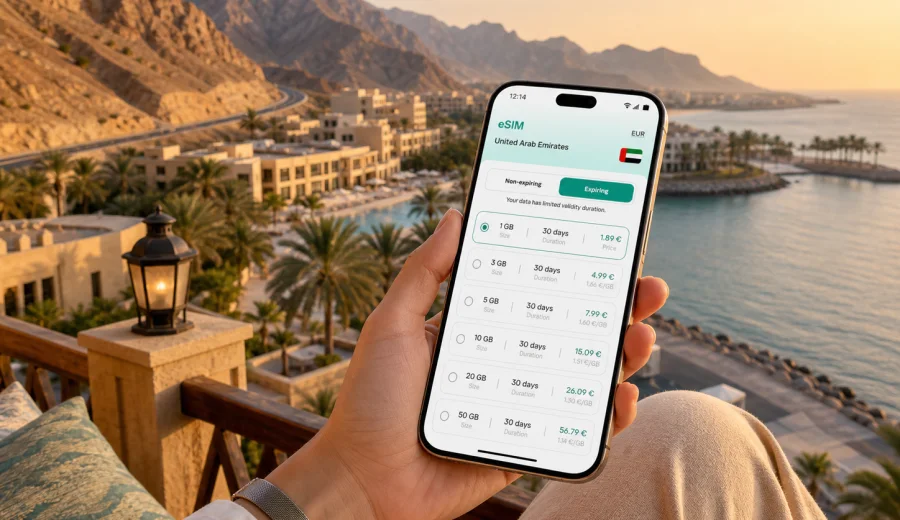
Ras Al Khaimah eSIM: mobile connection and internet for your trip
Ras Al Khaimah is a different kind of United Arab Emirates trip. Many visitors come for beach resorts, Jebel Jais mountain roads, desert stays, golf weekends, business meetings, or a quieter base away from the busiest parts of Dubai. The distances are manageable, but the travel pattern often changes during the day: a hotel on the coast in the morning, a taxi to the old town, a drive toward the mountains, a restaurant booking at night, and maybe a transfer to another emirate the next day.
That is exactly where eSIM can be useful. With a compatible phone, you can prepare mobile internet before you travel and avoid making your first task after arrival a search for a physical SIM card. A travel eSIM does not replace every mobile service: it is mainly for mobile data, and regular calls or SMS are included only if the selected plan says so. For maps, ride apps, hotel messaging, work email, messengers, and digital bookings, however, mobile data is usually the part travelers need most.
This guide explains how to use eSIM for Ras Al Khaimah, how to estimate data needs, what to check before buying, and how Kaspersky eSIM Store can help you choose, arrange, and activate an eSIM plan for mobile internet during a trip to the United Arab Emirates.
Why eSIM is useful in Ras Al Khaimah
Ras Al Khaimah is easy to enjoy when your phone is ready for movement. You may need maps to find a resort entrance, mobile data to confirm a taxi pickup, and messaging to coordinate with a tour provider. In mountain areas, on long resort roads, or between emirates, it is also easier to travel when your phone already has a data plan selected for the destination.
An eSIM is a digital SIM profile installed on a compatible device. Instead of inserting a plastic SIM card, you add the eSIM profile to the phone and choose it for mobile data. For a traveler, the practical value is simple: you can prepare your internet setup before departure or shortly after arrival, then use mobile data for common travel tasks.
In Ras Al Khaimah, this can help in several moments:
- Arrival and transfers: check driver messages, terminal instructions, hotel directions, and booking confirmations.
- Local movement: use maps, taxi apps, translation, restaurant searches, and parking details.
- Resort stays: stay online outside hotel Wi-Fi areas, by the beach, at a golf course, or during excursions.
- Mountain routes: navigate toward Jebel Jais, check meeting points, and keep tour confirmations available.
- Business trips: handle email, chat, calendar updates, and video call backups when Wi-Fi is inconvenient.
- Trips across the UAE: keep the same data setup when moving from Ras Al Khaimah to Dubai, Sharjah, Ajman, Fujairah, or Abu Dhabi, as long as the plan covers the United Arab Emirates.
The important point is not that eSIM makes travel complicated technology. It is the opposite: eSIM can remove one physical errand from the trip, so you can focus on transport, hotel check-in, meetings, and the route ahead.
Ras Al Khaimah travel scenarios where mobile data matters
The city and emirate mix resort travel, local districts, ports, mountains, and roads toward other UAE destinations. A good mobile internet plan should fit the way you will actually move.
| Travel situation in Ras Al Khaimah | Why mobile internet helps | Data use level |
|---|---|---|
| Hotel check-in and beach resort stay | Messages, maps, booking apps, light browsing | Low to medium |
| Jebel Jais day trip | Navigation, meeting points, weather checks, photo backup later | Medium |
| Business visit | Email, calendar, messenger calls, files, hotspot for a laptop if allowed | Medium to high |
| Family holiday | Maps, rides, restaurant searches, messaging, entertainment for children | Medium to high |
| UAE multi-city route | Navigation between emirates, hotel changes, ride apps, translation | Medium |
| Short stopover | Basic maps, ride coordination, messaging, online check-in | Low |
If your hotel Wi-Fi is strong, you may use eSIM mostly outside the property. If you plan to work from different locations, use maps all day, upload photos frequently, or share a hotspot with another device, choose a larger data allowance. The right plan depends on your behavior, not only on the number of days.
Arrival: airports, transfers, and the first hour online
Travelers reach Ras Al Khaimah in different ways. Some arrive through Ras Al Khaimah International Airport. Many others land in Dubai, Sharjah, or Abu Dhabi and continue by car, hotel transfer, taxi, or intercity route. In each case, the first hour matters because you are confirming where to go, who is meeting you, and whether the schedule has changed.
Mobile internet can help with:
1. Checking hotel transfer messages before leaving the terminal.
2. Sharing your live location with family or colleagues.
3. Opening maps before the car leaves the airport area.
4. Confirming the resort address, not just the hotel brand name.
5. Checking road time if your arrival is late at night or during a busy travel period.
6. Finding the correct entrance for large beachfront resorts.
If you install an eSIM before departure, keep the activation instructions available offline or in your email. Some eSIM plans start their validity period only after the profile connects to a supported local network, while others may have different rules. Always read the selected plan conditions before you travel.
Local movement: hotels, districts, taxis, and navigation
Ras Al Khaimah travel is often point-to-point. You may move between Al Hamra, Mina Al Arab, Al Marjan Island, the city center, a mall, a business venue, a beach club, and mountain roads. Walking is useful in some local areas, but many routes are easier by car or taxi, especially in hot weather.
Mobile data supports the small decisions that make the day smoother:
- comparing pickup points for taxis and transfers;
- checking whether a restaurant or activity requires a reservation;
- opening a map when resort roads look similar;
- messaging a driver if the lobby has several entrances;
- translating short phrases when needed;
- checking email or documents between meetings;
- using a messenger instead of regular calls if your eSIM plan is data-only.
A city article about Ras Al Khaimah should not treat the whole UAE as one identical destination. Dubai has a metro-heavy pattern; Abu Dhabi has its own business and cultural routes. Ras Al Khaimah is more about resorts, road transfers, mountain trips, and quieter city movement. Your mobile internet setup should match that rhythm.
How much data do you need for Ras Al Khaimah?
Data use varies widely, but you can make a practical estimate before choosing a plan. The table below is not a guarantee; it is a planning guide for typical travel behavior.
| Trip style | Typical phone use | Suggested approach |
|---|---|---|
| 1-2 day stopover | Maps, messaging, ride coordination, light browsing | Choose a smaller plan if you will use hotel Wi-Fi for heavy tasks |
| 3-5 day resort stay | Daily maps, messaging, restaurant search, some social media | Choose a medium plan and keep video streaming on Wi-Fi |
| 1 week holiday | Navigation, messaging, photo sharing, booking apps, family coordination | Choose more data, especially if several people rely on your hotspot |
| Business trip | Email, files, messenger calls, calendars, backup hotspot | Choose a plan with enough margin and check hotspot terms |
| UAE road route | Maps between emirates, hotel changes, bookings, messaging | Choose a UAE or regional plan that fits the whole route |
To reduce unnecessary data use, download offline maps before departure, update apps on Wi-Fi, disable automatic cloud backups on mobile data, and save hotel addresses in notes. These steps are simple, but they can make a smaller plan last longer.
Choosing an eSIM plan for Ras Al Khaimah
For a Ras Al Khaimah trip, the first choice is coverage area. A city-specific plan is usually not needed; what matters is that the plan works in the United Arab Emirates and covers your route. If you will also visit nearby countries on the same journey, compare whether a regional plan is more suitable than a single-country plan.
When you compare options, check:
- Destination: the plan should include the United Arab Emirates for Ras Al Khaimah.
- Validity period: match it to the full trip, including arrival and departure days.
- Data allowance: choose enough for navigation, messaging, work, and app use.
- Start rules: confirm when validity and data usage begin.
- Device support: your phone or tablet must support eSIM and be unlocked.
- Hotspot use: if you plan to share data, check whether the selected plan allows it.
- Calls and SMS: assume the plan is for mobile data unless the plan terms clearly say otherwise.
Kaspersky eSIM Store helps you compare available plan details before you arrange the eSIM. After you review the destination, data size, validity, and price, you can choose a plan that fits the way you will use mobile internet in Ras Al Khaimah.
If you are planning the trip now, you can choose an eSIM plan for the United Arab Emirates and prepare mobile internet for Ras Al Khaimah before you leave.
Practical setup checklist before departure
It is better to prepare your eSIM while you still have stable Wi-Fi at home, in the office, or at the hotel before a transfer. Use this checklist before you fly or start the drive to Ras Al Khaimah.
- Check that your device supports eSIM and is not locked to one carrier.
- Confirm that the selected plan covers the United Arab Emirates.
- Read the validity period and the moment when usage starts.
- Keep the QR code or installation details available.
- Install the eSIM profile while you have reliable internet.
- Label the eSIM clearly, for example "UAE data" or "Travel eSIM".
- Keep your primary SIM for calls or banking messages if you need it.
- Turn off heavy cloud backup on mobile data.
- Download hotel addresses, booking confirmations, and offline maps.
Before buying, check your device to make sure it supports eSIM. Some models differ by region, and some phones are locked by a carrier even when the model generally supports eSIM.
How to install and activate eSIM for a Ras Al Khaimah trip
Installation is usually a short process, but do it calmly and read each screen. The exact steps depend on your device and operating system version.
1. Choose a plan for the United Arab Emirates or for the region that covers your full route.
2. Complete the plan arrangement in Kaspersky eSIM Store.
3. Open the installation details from your profile, app, or email.
4. Add the eSIM profile to your phone while connected to Wi-Fi.
5. Set the eSIM as the line for mobile data when you are ready to use it.
6. Enable data roaming for the eSIM if the instructions for the selected plan require it.
7. Wait a few minutes for the phone to connect to a supported local network.
8. Test a map or browser page before leaving the airport, hotel, or meeting venue.
For device-specific steps, use the Android installation instructions or the iOS installation instructions. Keep your original SIM active if you need regular calls, SMS, or bank verification messages during the trip.
Data planning by Ras Al Khaimah itinerary
Different Ras Al Khaimah itineraries create different internet habits. A traveler staying mainly at a beachfront resort may only need mobile data outside the property. A business visitor with meetings in several locations may rely on mobile data more often. A family driving toward the mountains may need maps and messaging throughout the day.
Resort and beach stay
For Al Marjan Island, Al Hamra, Mina Al Arab, or beachfront hotel areas, hotel Wi-Fi may cover many indoor tasks. Use eSIM for rides, maps, beach club bookings, restaurant searches, and communication outside the property. If you plan to stream video, download large files, or upload many photos, do it on Wi-Fi whenever possible.
Jebel Jais and mountain route
For Jebel Jais, plan before you leave the coast. Save the route, meeting point, and booking details. Mobile data is useful for navigation and messaging, but mountain areas can vary by local network conditions. Do not rely on mobile internet as your only copy of essential route details. Keep offline directions and enough battery.
Business trip
For business travel, mobile data is often a backup as much as a primary connection. You may need email after a meeting, a messenger call from a lobby, or a hotspot for a laptop if your plan and device allow it. Choose more data than a pure leisure traveler would, and check the hotspot terms before assuming you can share the connection.
Multi-emirate route
Ras Al Khaimah is often combined with Dubai, Sharjah, Ajman, Fujairah, or Abu Dhabi. If your plan covers the United Arab Emirates, it can support movement across emirates under the selected plan conditions. For a route that includes another country, compare a regional option before choosing.
eSIM, roaming, hotel Wi-Fi, and local SIM cards
There is no single best option for every traveler. The right choice depends on trip length, phone support, budget, and how much control you want before arrival.
| Option | Best for | Things to consider |
|---|---|---|
| Travel eSIM | Preparing mobile data before arrival, avoiding a physical SIM errand | Requires compatible unlocked device; usually data-focused |
| Standard roaming | Keeping your existing carrier setup simple | Costs and allowances depend on your home carrier |
| Hotel Wi-Fi | Large downloads, video calls from your room, app updates | Not useful during transfers, taxi rides, excursions, or beach movement |
| Local physical SIM | Longer stays or travelers who specifically need a local SIM arrangement | Requires time, availability, and the usual local purchase process |
Many travelers combine options. For example, use eSIM for maps and rides during the day, hotel Wi-Fi for heavy downloads, and the original SIM for banking SMS if needed. This balanced approach is often more practical than expecting one option to solve every communication need.
What to avoid when using mobile data in Ras Al Khaimah
Small setup mistakes can waste time or data. Avoid these common problems:
- Do not wait until the taxi queue to read the installation instructions for the first time.
- Do not assume every eSIM includes phone calls or SMS.
- Do not install the profile on one device if you actually need it on another.
- Do not delete an eSIM profile unless you are sure it can be reinstalled under the selected plan terms.
- Do not leave app updates, cloud photo backup, and video autoplay enabled on mobile data.
- Do not rely only on online maps for mountain or desert routes; save key information offline.
- Do not assume a plan works in another country unless that country is listed in the plan details.
If something does not work immediately, check the selected mobile data line, data roaming setting for the eSIM, APN instructions if provided, and whether the device has connected to a supported local network. Connection can take several minutes.
Quick answers for travelers
Is eSIM good for Ras Al Khaimah?
Yes, eSIM can be useful for Ras Al Khaimah if your device supports it and the selected plan covers the United Arab Emirates. It is especially practical for airport transfers, hotel navigation, ride apps, messaging, maps, and trips to Jebel Jais or other emirates.
Can I install eSIM before I travel?
In many cases, yes. You can usually install the eSIM profile while you still have Wi-Fi, then choose when to use it according to the selected plan instructions. Check the plan terms because validity rules can differ.
Does eSIM include a local phone number?
Usually no. Travel eSIM plans are commonly focused on mobile data. Regular calls and SMS are included only if the selected plan terms clearly say so. For calls and messages, many travelers use internet-based apps over mobile data.
Can I use eSIM for a laptop?
You may be able to share mobile data from your phone if your device and selected plan allow hotspot use. Check the plan details before relying on hotspot for work, especially for long video calls or large files.
Should I choose a UAE plan or a regional plan?
Choose a UAE plan if your trip is only within the United Arab Emirates. Consider a regional plan if the same journey includes other countries and the regional option covers all destinations you need.
Final preparation for Ras Al Khaimah
Before you leave, make your phone part of the travel plan, not an afterthought. Confirm that your device supports eSIM, choose a data allowance that matches your route, save installation details, and keep essential addresses offline. For Ras Al Khaimah, this is especially useful because the best parts of the trip may involve movement between beaches, resorts, the city center, and mountain roads.
Kaspersky eSIM Store is an app and website where you can quickly choose, arrange, and activate an eSIM with a suitable plan for mobile internet in an international trip. For Ras Al Khaimah, select the United Arab Emirates as the destination, review the data allowance and validity period, and prepare the eSIM before arrival if that fits your travel schedule.
When you are ready to plan your connection, choose an eSIM plan for your Ras Al Khaimah trip and set up mobile internet for the United Arab Emirates before you travel.