Travel connectivity guide
Realme GT 8 Pro eSIM: compatibility and setup
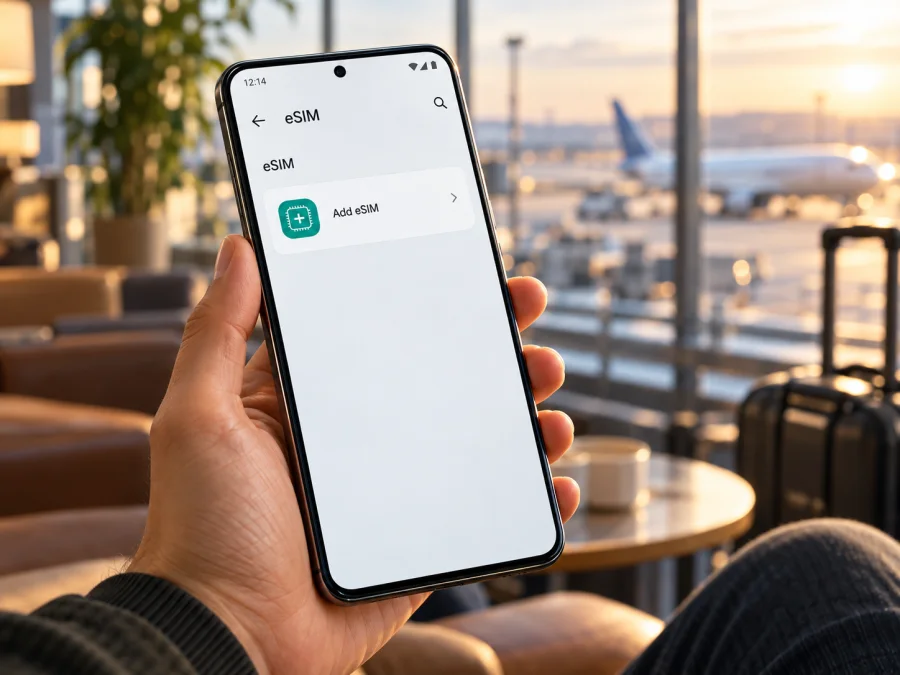
Realme GT 8 Pro eSIM: compatibility, setup and travel use
If you are planning a trip and want to use a travel eSIM with the Realme GT 8 Pro, confirm the capability on your exact handset before choosing a data plan. The official realme specification pages reviewed for India and Europe list two Nano SIM card slots, but do not list eSIM. On the available evidence, eSIM support is not confirmed for the Realme GT 8 Pro, so you should not assume that every phone sold under this name can download an eSIM profile.
That distinction matters: having 5G, two physical SIM slots, or an Android setting that mentions SIM management does not prove that a phone has an eSIM. Retail listings may use “dual SIM” differently, and imported devices can have different software, hardware, or certification for a particular sales market. Treat the EID and the phone’s own add-eSIM function as the practical checks. If neither is present, a travel eSIM cannot be installed on that handset through ordinary settings.
Quick answer
For Realme GT 8 Pro, the most accurate answer from current manufacturer information is not confirmed. realme’s published India and Europe specifications identify two Nano SIM slots and do not identify an eSIM, and the official pages reviewed do not establish a different eSIM-capable regional variant. This is not proof that every unit in every market is physically identical; it means that an eSIM should not be promised on the basis of the model name alone.
Before buying, check the phone you actually have. Look for an EID in About device or Status information, then look in mobile-network settings for an option such as Add eSIM, Add mobile plan, or Download a SIM. Menu names vary by realme UI and Android version. A visible EID together with a working add-eSIM flow is much stronger evidence than a seller’s generic “dual SIM” claim. If the options are missing, ask realme support to verify the exact model number and sales region; do not buy a plan on the assumption that a software update will add eSIM hardware.
Realme GT 8 Pro at a glance
| Item | What the official specifications reviewed say | Why it matters for eSIM |
|---|---|---|
| Model name | Realme GT 8 Pro | This guide covers only this named model, not another GT model or a similarly named edition. |
| SIM hardware in the India and Europe pages | Two Nano SIM card slots | The published descriptions specify physical SIM slots and do not list eSIM. |
| Mobile network | 5G NR bands are listed on the regional spec pages | 5G capability alone does not show that a device can provision an eSIM. |
| Software | realme UI 7.0 is shown on the pages reviewed | Menu wording and network options can vary with software and region. |
| Regional configuration | realme notes that memory and storage options vary by country and region; network service also depends on carrier deployment | Check the exact market version and local operator requirements rather than extrapolating from another region. |
| eSIM status | Not confirmed in the manufacturer specifications reviewed | Verify EID and an add-eSIM control on the device before purchasing a plan. |
The table deliberately separates what the manufacturer lists from what can be concluded. A specifications page that lists two Nano SIM slots does not necessarily describe every firmware build or every sales channel in the world. At the same time, an eSIM is not established by omission, by a third-party product page, or by a picture of a SIM tray. The safest buying decision is based on the exact unit in your hand and confirmation from the manufacturer or seller for its model code and market.
Regional versions and operator restrictions
Phone makers can sell devices with the same retail family name in more than one country. Variants can differ in supported bands, SIM configuration, software, approvals and enabled network features. realme notes that some configurations vary by country and region, and that live network functions depend on operator deployment. This makes it important to check your own version; it does not establish that any specific Realme GT 8 Pro variant has eSIM.
The official India and Europe pages checked list two Nano SIM slots and do not list eSIM. This does not settle every market or future firmware release. For an imported phone, check its model code in Settings → About device and ask realme or the seller whether that exact model and sales region can download an eSIM profile and display an EID.
Carrier locks are a separate issue. A handset may support eSIM hardware yet be restricted to a particular carrier or account. Conversely, an unlocked phone may still have no eSIM capability. If an add-eSIM option appears, confirm that the phone is not locked and that the travel plan’s provider accepts the model and market version. A travel data plan’s coverage and activation rules depend on that plan and its local network partners, not on the phone’s 5G label alone.
Check eSIM compatibility on your own phone
Use these checks before you order an eSIM plan. Keep a Wi-Fi connection available if you need to contact support or download a profile.
1. Find the exact model code
Open Settings → About device (or the similarly named About phone page). Write down the full model number, software version and sales region shown on the box, receipt or seller’s listing. Do not share device identifiers publicly. A model family name alone may not distinguish regional configurations.
2. Search settings for eSIM controls
Open Settings → Mobile network or SIM cards & mobile networks and look for Add eSIM, Add mobile plan, Download a SIM, or a QR-code setup option. You can also use the Settings search field and search for “eSIM.” The precise path depends on realme UI and may change after an update.
An option that opens a profile-download flow is useful evidence. A menu for adding a physical SIM, managing two SIM cards, choosing a preferred SIM, or turning on 5G is not an eSIM control. If the only action is to insert or scan a physical card, stop and verify the handset before purchasing.
3. Look for an EID
Check Settings → About device → Status, SIM status, or IMEI information. Some Android builds expose the EID in the same area as IMEI details. You may also be able to open the phone dialler and enter *#06#; if the device supports eSIM, the information screen may show an EID as well as one or more IMEI numbers. This code does not work on every model or software release, so a missing result is not a standalone diagnostic.
An EID is the identifier associated with an eSIM-capable device. If no EID appears, there is no add-eSIM menu, and realme or the seller cannot confirm support for the exact model code, treat the handset as incompatible for eSIM purchases. If an EID is present but the menu is absent, check for a carrier restriction or ask realme support whether the current market firmware enables eSIM.
4. Confirm the outcome before purchase
Use both checks when possible: an EID and a visible eSIM download option. Confirm that the phone is unlocked, has up-to-date software, and can use the network bands offered for your destination. A plan page or support agent can help with plan requirements, but it cannot add eSIM capability to a phone that lacks it.
Compatibility checklist
- [ ] The Settings page identifies the device as Realme GT 8 Pro and shows its exact model code.
- [ ] The phone displays an EID or realme has confirmed eSIM support for this model code and market.
- [ ] Mobile network settings offer an eSIM profile download or add-eSIM flow.
- [ ] The handset is unlocked or the relevant carrier confirms that another provider’s eSIM can be used.
- [ ] The plan supports the destination and the phone’s network bands.
- [ ] You have reliable Wi-Fi and access to the QR code or manual activation details.
If you are still unsure, check your device compatibility before buying. For this model in particular, the public manufacturer specifications reviewed do not confirm eSIM, so do not treat a “dual SIM” label as a substitute for the checks above.
If the handset passes the checks: install an eSIM
The steps below apply only if your own Realme GT 8 Pro shows eSIM support and the plan is compatible. Android menu names differ by device, region and software version. Keep the QR code on another screen or print it so the phone’s camera can scan it.
Install from a QR code
- Connect to Wi-Fi. Keep the phone online until the profile has downloaded and the setup is complete.
- Open SIM settings. Go to Settings → Mobile network (or the closest equivalent).
- Choose Add eSIM. Select the eSIM or mobile-plan option. If the only available flow asks you to insert a physical SIM, stop; that does not install an eSIM.
- Scan the provider’s QR code. Use the phone’s camera within the eSIM setup screen. If offered, enter the activation details manually exactly as provided.
- Confirm the download. Review the plan label and accept the download. Wait for the profile to install; do not close the setup midway.
- Name the line. Choose a clear label such as “Travel data” so you can distinguish it from your regular SIM.
- Choose when to use it. If you want to wait until arrival, keep the new line turned off until then, unless the plan’s instructions say activation must start before departure.
- Select mobile data. At your destination, turn on the travel line and choose it as the mobile-data SIM. Keep your usual SIM selected for calls or messages if that is your preference and if your carrier terms allow it.
- Set data roaming if required. Some travel eSIMs require roaming on for their profile to connect. Follow the plan’s activation instructions. Check the selected data line carefully so roaming charges do not apply to your regular SIM.
- Wait for registration. Allow several minutes for the device to register. If service does not start, check the plan’s APN and network-selection instructions before deleting or reinstalling the profile.
The Android installation guide explains the general QR installation flow; its screen names may differ from realme UI. The iOS installation guide is for iPhone and is not the setup path for this Android phone. Keep the eSIM QR code private and do not post it in a forum or send it to someone you do not trust. In many cases a QR code is intended for one installation, and deleting a profile may mean that you need the provider’s help to install it again.
Set up data for a trip
Before leaving, read the plan details for the covered destination, data allowance, validity period, activation trigger, supported network and any top-up rules. A country-specific plan is intended for the stated country; a regional plan may cover several places, but verify every border crossing on your route. Do not infer coverage from a map or from the phone’s 5G bands. Actual access depends on the plan and the local network where you are.
When you are ready to use the eSIM, enable the profile and select it for mobile data. If the plan’s instructions require data roaming, enable roaming for that profile. On a dual-SIM phone, disable data switching or automatic fallback if that could move data to your primary line. Keep your normal SIM available for services you rely on only if you understand your carrier’s roaming terms. A data-only travel eSIM generally does not provide a regular phone number, voice calling or SMS unless the individual plan expressly says otherwise; internet messaging and calling apps can work over the data connection.
Kaspersky eSIM Store is an app and website where you can choose, arrange and activate an eSIM with a mobile-data plan for an international trip. Check the plan’s current destination and terms before proceeding. If you are still comparing options or need to review available destinations, browse the Kaspersky eSIM Store. The homepage is a general place to explore; it is not a claim that a particular country tariff, price or network is available on every plan.
When you arrive
Keep Wi-Fi on while you enable the travel line and select it for mobile data. Check that the primary SIM is not selected for roaming data, then allow time for registration and test a webpage. If you cross a border, confirm that the plan includes the next destination. For a limited allowance, download maps over Wi-Fi and monitor data use in Settings.
Common problems and what to check
“Add eSIM” is missing
First confirm the exact model code and software version. Search Settings for “eSIM,” inspect the SIM status page for an EID, and restart after installing any available official system update. If the EID and menu remain absent, ask realme support or the original seller to confirm support for that exact sales-market device. Do not assume that resetting network settings or installing a carrier app will create an eSIM function.
An EID is visible, but the QR code will not install
Connect to stable Wi-Fi, check that the QR code is for the correct plan and has not already been used, and make sure the device has not reached its profile limit. Scan from the phone’s built-in eSIM setup screen rather than a general camera app. If the plan gives manual activation details, copy them carefully. If the message reports that the device is locked, incompatible or unable to add a plan, contact the seller or plan support with the exact error text; do not send the QR image publicly.
The profile installs but there is no data
Confirm that the eSIM is switched on and selected for mobile data. Check the plan’s start date or activation trigger, destination coverage, remaining allowance and validity. Enable data roaming for the travel line only when its instructions require it. If the provider specifies an APN, enter it exactly as supplied and save it as the active APN. Then toggle airplane mode briefly or restart the phone and allow registration time.
Calls or texts do not arrive on the travel line
Check whether the plan is data-only. Most travel data eSIM plans are for internet access and do not add a phone number or conventional voice and SMS service. Keep your usual SIM selected for calls or verification messages if needed, and check its roaming charges with your carrier. Messaging and internet calls may work through apps when data is active.
Data is using the wrong SIM
Open SIM settings and confirm the mobile-data selection. Turn off automatic data switching if available, and check that the regular SIM is not allowed to use roaming data unintentionally. On arrival, verify the setting again; some Android versions may prompt you to choose a default SIM after a change.
Frequently asked questions
Does Realme GT 8 Pro support eSIM?
The official realme India and Europe specifications reviewed list two Nano SIM slots and do not list eSIM. Support is therefore not confirmed for the Realme GT 8 Pro by those official pages. Check the EID, the add-eSIM menu and the exact model code on your own phone before buying a plan.
Can a software update add eSIM?
Do not count on it. A software update can change menus or enable a feature only where the device hardware and regional configuration support it. If the phone has no EID and no add-eSIM flow, ask realme whether that exact model code has eSIM hardware before you purchase.
Does 5G mean the phone can use an eSIM?
No. 5G describes a mobile network capability. eSIM support requires a compatible embedded SIM configuration and software provisioning option. Check the EID and the phone’s own eSIM download flow separately.
Can I use two numbers at the same time?
The pages reviewed list two Nano SIM slots. Actual combinations depend on the device version; do not assume that an eSIM can be added or that three lines can be active. Check the manual for the exact model code.
Should I buy a travel eSIM before checking compatibility?
No. Verify that the exact handset can add an eSIM and is unlocked before purchase. If Realme GT 8 Pro does not show an EID or add-eSIM option and support cannot confirm it, use a supported physical SIM or Wi-Fi alternative instead of buying a profile that cannot be installed.
Before you choose a travel eSIM
Start with the device, not the plan: identify the exact Realme GT 8 Pro model code, check for an EID, and confirm that its mobile-network settings include an eSIM installation flow. The realme specifications reviewed for India and Europe list two Nano SIM slots without confirming eSIM, so treat compatibility as unresolved until your own handset or realme support verifies it. Then make sure the phone is unlocked and that the plan covers every destination on your route.
If the checks pass, compare the plan’s destination, data amount, validity and activation instructions, install it over Wi-Fi, and select it deliberately for mobile data when you are ready to travel. Kaspersky eSIM Store can help you choose, arrange and activate an eSIM plan for mobile internet during an international trip. If the Realme GT 8 Pro does not pass the checks, choose a compatible device or another connectivity option first. That simple verification prevents a last-minute setup problem and keeps your travel-data choice grounded in the handset you actually own.


