
Travel connectivity guide
eSIM for Reunion: mobile internet guide
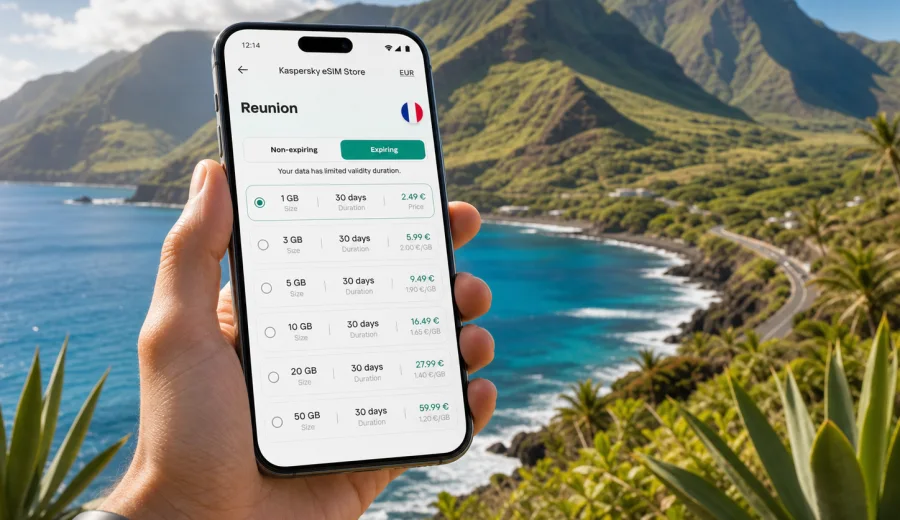
eSIM for Reunion: mobile connection and internet for a smoother island trip
Reunion is compact on the map, but it is not a simple "beach only" destination. A typical trip can move from the airport near Saint-Denis to coastal hotels, mountain villages, volcanic viewpoints, hiking trails, surf spots, rental-car routes and ferry-style day logistics between different parts of the island. For that kind of itinerary, mobile internet is not just a convenience. It helps you navigate winding roads, check weather windows, coordinate arrivals, translate local information, book restaurants, call ride services through apps and keep travel documents close at hand.
An eSIM can make this easier because it lets you prepare mobile data for Reunion without looking for a physical SIM card after arrival. You choose a suitable data package before the trip or once you have Wi-Fi, install the digital SIM profile on a compatible phone and use mobile data abroad according to the selected tariff terms. The result is a more predictable setup: you know the data allowance, validity period and destination before you start relying on your phone on the island.
Kaspersky eSIM Store is a site and app where you can quickly choose, arrange and activate an eSIM with a suitable tariff for mobile internet during an international trip. It is especially useful when you want to handle the connection step calmly, before the first drive from the airport or the first hike into the hills.
Why mobile internet matters in Reunion
Reunion combines urban areas, mountain roads and outdoor routes in a small territory. That mix changes how travelers use data. In a capital-city weekend, you might only need maps, messages and reservations. In Reunion, the phone often becomes a daily planning tool.
Common mobile data tasks include:
- navigating from Roland Garros Airport to Saint-Denis, Saint-Gilles, Saint-Pierre or Cilaos;
- checking road conditions before driving into the cirques or toward volcanic viewpoints;
- using weather apps before hikes, beach visits or sunrise viewpoints;
- saving tickets, bookings, insurance documents and rental-car details;
- messaging hosts, guides, restaurants and fellow travelers;
- translating menus, signs and practical instructions;
- sharing location with family or a travel companion;
- using maps when routes pass through areas where Wi-Fi is not available.
Public Wi-Fi can help in hotels, cafes and airports, but it is not a full travel plan. You may need data between check-in times, on the road, at trailheads or while confirming a booking from a parking area. Roaming from your home mobile operator can also work, but the final cost and included data depend on your contract. An eSIM gives you another practical option for mobile internet abroad.
What an eSIM does and does not do
An eSIM is a digital SIM profile built into many modern smartphones and tablets. Instead of inserting a plastic SIM card, you install a profile and activate it in your device settings. For travel, the most common use is mobile data in a specific country, region or group of destinations.
For a trip to Reunion, treat eSIM as a data solution. It usually does not include a standard local phone number, traditional voice calls or SMS unless those features are clearly stated in the tariff conditions. For calls and messages, most travelers use internet-based apps over mobile data.
Before choosing any eSIM tariff, check three points:
- your phone or tablet supports eSIM;
- the device is not locked to a specific mobile operator;
- the tariff conditions match your destination, data needs and trip duration.
If you are not sure whether your phone supports eSIM, use the compatibility check before purchase: check your device.
Reunion travel scenarios and data needs
Data use depends less on the country size and more on your daily habits. Reunion can be light on data if you mainly use maps and messages, or heavy if you upload videos from hikes and beaches every evening.
| Trip style | Typical route | Practical data use | What to watch |
|---|---|---|---|
| Short beach break | Saint-Gilles, l'Ermitage, Saint-Leu | Maps, restaurant bookings, messaging, light social media | Avoid video auto-play on mobile data |
| Hiking trip | Mafate viewpoints, Salazie, Cilaos, volcano routes | Offline maps plus weather, route checks, location sharing | Download maps over Wi-Fi before remote days |
| Road trip | North coast, west coast, south coast and inland roads | Navigation, fuel stops, parking, translation, cloud documents | Keep enough data for navigation near the end of the trip |
| Workation | Hotel, apartment or coworking-style stay | Email, calls, messaging, tethering when allowed | Check whether hotspot use is supported by the chosen tariff |
| Family trip | Airport, hotel, beaches, attractions | Messaging, maps, entertainment, photo backup | Put video streaming and backups on Wi-Fi |
A light user may be comfortable with a smaller data allowance if they download maps in advance and keep streaming on Wi-Fi. A traveler who uses live navigation every day, uploads photos, joins video calls or shares a hotspot should choose a larger package or plan for a top-up if available under the selected conditions.
How to estimate data before departure
You do not need a perfect calculation. A simple estimate is enough to avoid choosing a package that is too small.
Use this checklist:
1. Count the number of travel days in Reunion.
2. Decide whether you will drive daily or stay mostly in one area.
3. Check whether your accommodation offers reliable Wi-Fi.
4. Decide if you will stream video, upload many photos or join video calls.
5. Add a buffer for arrival day, airport transfers and unexpected route changes.
As a rough planning habit, keep essential tasks separate from entertainment. Maps, messages, email and bookings usually use far less data than short-form video, cloud backup and high-resolution photo uploads. If you want predictable mobile internet during the trip, avoid using the last part of your allowance for entertainment before a transfer or hiking day.
Practical preparation before flying to Reunion
The best time to prepare an eSIM is before you need it. You can install it while you still have stable home Wi-Fi, then activate mobile data according to the instructions for the chosen tariff. Some eSIM profiles begin validity only after connecting to a supported network at the destination, while others may have different activation rules. Always read the specific terms before you confirm the purchase.
Pre-trip checklist:
- update your phone system before departure;
- make sure you know your device passcode and account password;
- confirm that your device supports eSIM and is unlocked;
- keep your primary SIM active if you need banking SMS or calls;
- download offline maps for the main routes;
- save accommodation addresses and booking numbers;
- disable automatic cloud backup on mobile data;
- check whether data roaming must be enabled for the eSIM profile.
This small preparation step matters in Reunion because some of the best parts of the island are away from hotel Wi-Fi. You do not want your first setup attempt to happen in a parking area, after a long flight, with low battery.
Choosing an eSIM tariff for Reunion
When comparing options, focus on the conditions you can actually use: destination, data volume, validity period, price, activation rules and whether the package fits your travel style. A larger data package is useful only if your trip and habits justify it. A shorter validity period is fine for a weekend, but it may be inconvenient for a two-week itinerary with several outdoor days.
For a practical starting point, match the tariff to your main scenario:
- Arrival and short stay: enough data for maps, messages, transport, bookings and light browsing.
- Outdoor route: enough data for weather, navigation, emergency messaging and route changes, with offline maps as backup.
- Remote work: a larger data allowance, plus careful checking of hotspot and video-call needs.
- Family use: more data if several people rely on one phone for navigation, reservations and entertainment.
- Island road trip: choose a validity period that covers every transfer day, not only hotel nights.
If you want to prepare the mobile internet step before departure, you can choose an eSIM tariff for your trip to Reunion through Kaspersky eSIM Store and review the available data packages, validity periods and conditions for the destination.
When to install and activate eSIM
Installation and activation are related, but they are not always the same moment. Installation adds the eSIM profile to your phone. Activation depends on the selected tariff rules and device settings. In many travel scenarios, the calm approach is to install the profile before departure over stable Wi-Fi, then switch on the eSIM data line when you are ready to use it at the destination.
General setup flow:
1. Choose Reunion as the destination and select a suitable data package.
2. Complete the order and open the eSIM installation details.
3. Install the eSIM profile on your compatible device.
4. Name the line clearly, for example "Reunion data".
5. Keep your regular SIM for calls or SMS if you still need it.
6. On arrival, select the eSIM line for mobile data.
7. If required by the instructions, enable data roaming for the eSIM line.
8. Test maps, messaging and browsing before leaving the airport or hotel Wi-Fi.
For detailed device steps, use the official setup pages: Android installation instructions and iOS installation instructions. The exact menu names can differ by phone model and system version, so follow the instructions for your device type.
How to use mobile data wisely on the island
Reunion rewards active travel. That also means your phone may work harder than usual. Navigation, photos, weather checks and messages can quietly use data throughout the day. A few settings can keep the package useful for longer.
Before a driving day:
- download the main map area over Wi-Fi;
- save the hotel, trailhead, beach and restaurant locations;
- check the route while still connected to Wi-Fi;
- close apps that refresh in the background;
- keep a power bank in the car or daypack.
Before a hiking day:
- store offline maps and route notes;
- check weather early, not only at the trailhead;
- share your plan with someone if appropriate;
- avoid relying on mobile data as your only safety tool;
- keep enough battery for the return route.
During the trip:
- use Wi-Fi for large app updates and cloud backups;
- reduce video quality if you stream on mobile data;
- turn off automatic media downloads in messaging apps;
- monitor data use in your phone settings;
- top up or adjust your usage before the allowance runs low.
These habits do not require technical knowledge. They simply keep the eSIM package focused on travel tasks: finding places, confirming plans, staying reachable and avoiding unnecessary data drain.
eSIM, roaming and local SIM: practical comparison
There is no single best option for every traveler. The right choice depends on your phone, budget, trip length and tolerance for setup tasks.
| Option | Strengths | Possible limits | Best fit |
|---|---|---|---|
| eSIM for Reunion | Can be prepared before arrival, no plastic SIM, clear data package and validity | Requires compatible unlocked device; usually data-focused | Travelers who want mobile internet ready for the trip |
| Home operator roaming | Keeps your usual SIM active and can be simple to use | Cost and data allowance depend on your home plan | Short trips where your roaming package is already suitable |
| Local physical SIM | May suit longer stays or users who need local telecom options | Requires store visit, ID or setup steps depending on local rules | Travelers comfortable handling SIM purchase after arrival |
| Public Wi-Fi only | No mobile data purchase needed | Limited availability, less useful on roads and outdoor routes | Very light users with hotel-based plans |
For many visitors, eSIM is attractive because it separates the travel data task from the rest of the arrival routine. You do not need to spend the first hour looking for a store or comparing unfamiliar offers while tired. You can focus on getting to your accommodation and checking that maps and messages work.
Device compatibility: do not skip this step
The most common eSIM issue is not the country. It is the device. Some phone models support eSIM only in certain regions, and some devices are locked by a mobile operator. A compatible model also needs a stable internet connection during installation.
Check this before purchase:
- your exact phone model supports eSIM;
- the device is unlocked for use with another mobile data line;
- you can access the phone camera or manual entry flow for installation;
- you have enough battery and stable Wi-Fi during setup;
- you understand that an activated eSIM profile may not be transferable to another device.
If you are traveling with another person, check each phone separately. Two phones with similar names can have different eSIM support depending on model variant and purchase region.
Common mistakes to avoid
Small setup mistakes can create unnecessary stress. Most are easy to prevent.
Avoid these:
- buying a tariff before checking device compatibility;
- waiting until a remote area to install the eSIM profile;
- deleting the eSIM profile because the phone does not connect immediately;
- turning off the wrong SIM line and missing banking messages;
- using mobile data for automatic backups on the first day;
- assuming the package includes voice calls or SMS without checking the terms;
- choosing a validity period that ends before the return transfer.
If something does not work right away, slow down before changing settings repeatedly. Check which line is selected for mobile data, whether data roaming is required for the eSIM line, whether airplane mode is off and whether the device has had a minute to register on a local network.
Quick answers for trip planning
Is eSIM useful for Reunion?
Yes, eSIM can be useful for Reunion if you have a compatible unlocked device and want mobile internet for maps, messaging, bookings, translation and travel planning without buying a physical SIM card after arrival.
Can I install eSIM before I travel?
In many cases, you can install the eSIM profile before departure using Wi-Fi. Activation and validity rules depend on the selected tariff, so read the conditions before purchase.
Does eSIM replace my regular phone number?
Usually no. Travel eSIM packages are commonly used for mobile data. Your regular SIM can often stay active for calls or SMS, depending on your device settings and home operator conditions.
How much data do I need in Reunion?
A light traveler may need only maps, messages and browsing. A road-trip, hiking or workation traveler should consider a larger allowance because navigation, photo uploads, video calls and hotspot use can increase data use quickly.
Can I use eSIM for hotspot sharing?
It depends on the selected tariff and device settings. Check the package conditions before relying on hotspot use for a laptop or another traveler.
Should I still download offline maps?
Yes. Offline maps are a sensible backup for any island itinerary with mountain roads, outdoor routes or long driving days. They also reduce mobile data use.
Final preparation for your Reunion connection
Before you leave, make your phone part of the travel plan, not an afterthought. Check eSIM compatibility, choose a data package that matches your route, install the profile over stable Wi-Fi and keep the installation instructions available offline. Once you arrive, test mobile data while you still have time to adjust settings calmly.
Kaspersky eSIM Store helps you handle that preparation through a site and app where you can choose, arrange and activate an eSIM with a suitable tariff for mobile internet abroad. If Reunion is your next destination, prepare an eSIM tariff for your trip to Reunion before the first airport transfer, coastal drive or mountain route.