
Travel connectivity guide
Rijeka eSIM: Mobile Internet for Croatia Travel
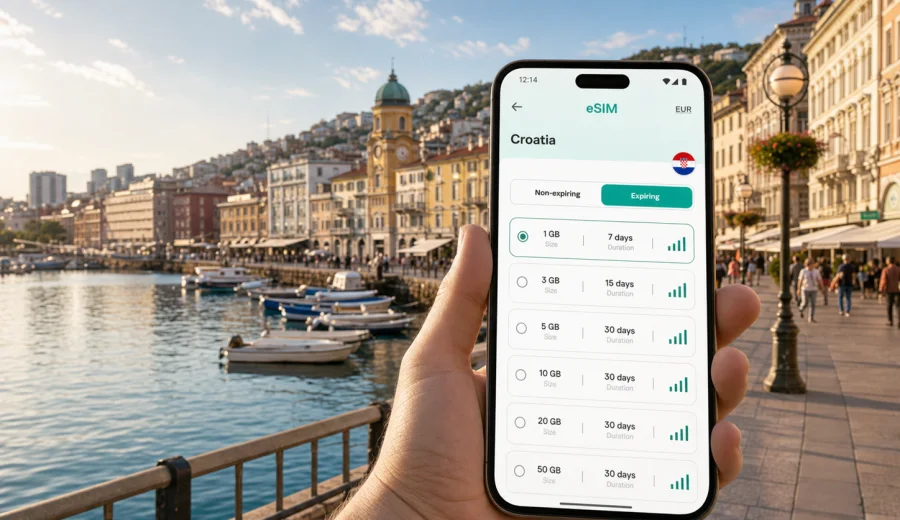
Rijeka eSIM: mobile connection and internet for a trip to Croatia
Rijeka is a practical city for travelers: a port on Kvarner Bay, a gateway to islands, Istria, Zagreb, and the northern Adriatic coast, and a place where many trips start with a transfer rather than a long stay. That makes mobile internet especially useful. You may need maps before reaching your hotel, messaging while moving between the bus station and the waterfront, a booking app on Korzo, or a ferry timetable before heading toward Krk, Cres, or Rab.
An eSIM can help you prepare mobile internet for Rijeka without buying a physical SIM card after arrival. Instead of looking for a mobile shop during your first hour in the city, you can choose a suitable data plan for Croatia, install the eSIM on a compatible device, and use mobile data for navigation, messages, ride apps, restaurant searches, and work tasks.
This guide focuses on real Rijeka travel scenarios: arriving at Rijeka Airport on Krk island, taking a bus into the city, walking the center, staying near the harbor, using maps around Trsat, working from a hotel, and planning day trips along the coast.
Why mobile internet matters in Rijeka
Rijeka is compact in the central area, but your trip may still involve several moving parts. The airport is outside the city on Krk island, the port area is close to the center, the bus and rail connections can shape your route, and many visitors use Rijeka as a base for nearby towns and islands.
Mobile internet is useful from the first minutes of the trip because it supports:
- navigation from Rijeka Airport, the bus station, the train station, or the ferry area;
- hotel check-in messages and booking confirmations;
- maps for Korzo, the waterfront, Trsat Castle, and hillside streets;
- taxi, ride, parking, and public transport apps where available;
- ferry, bus, and regional route checks before day trips;
- messenger calls if your eSIM plan includes data but not a local phone number;
- remote work, video calls, and file access from a hotel or cafe;
- translation, restaurant menus, and local search during walks.
Public Wi-Fi can help in hotels or cafes, but it is not always available at the moment you need it. With an eSIM data plan, you can reduce dependence on open Wi-Fi networks and keep essential travel tools available while you move around the city.
Rijeka travel situations where eSIM is especially useful
| Situation in Rijeka | Why mobile data helps | Practical tip |
|---|---|---|
| Arrival at Rijeka Airport | The airport is on Krk island, so transfer planning matters immediately. | Keep your eSIM ready before landing or install it while you still have Wi-Fi. |
| First transfer to the city | You may need maps, bus information, taxi details, or hotel messages. | Save the hotel address offline, then use mobile data for live navigation. |
| Staying near Korzo or the port | The center is walkable, but streets, piers, and stops can be confusing on arrival. | Use a map pin for your hotel and another for the bus or ferry point. |
| Trsat and hillside routes | Walking routes and road routes can differ. | Check the route before starting uphill or ordering a ride. |
| Business trip | Calls, emails, documents, and meeting locations may change during the day. | Choose a data allowance that covers work apps, not only maps. |
| Trips to Opatija, Krk, or Istria | You may leave the city and still need mobile internet for regional travel. | Pick a Croatia plan that matches the full route, not just central Rijeka. |
Arrival: what to prepare before you reach the city
If Rijeka is your first stop in Croatia, prepare connectivity before you travel. The first hour can be the most inconvenient time to solve mobile internet: you may have luggage, a late arrival, or a transfer waiting. An eSIM is useful because the preparation can happen before the trip, while you still have stable Wi-Fi at home or at your departure airport.
Before departure, do this:
1. Check that your phone supports eSIM and is not locked to one mobile operator.
2. Choose Croatia as the destination for the data plan.
3. Compare data volume and validity period with the real length of your trip.
4. Install the eSIM profile while connected to Wi-Fi.
5. Keep your primary SIM active if you need calls or SMS from your usual number.
6. Set the eSIM as the data line when you are ready to use mobile internet in Croatia.
If your route includes several countries, check whether a country, regional, or broader travel plan fits better. For a city article about Rijeka, the important point is that the plan should cover Croatia and the areas you expect to visit from the city.
How much data do you need for Rijeka?
There is no single correct data allowance. A weekend city break with maps and messages uses much less data than a work trip with hotspot use and video meetings. Think about your behavior rather than choosing by city name alone.
| Traveler profile | Typical mobile internet use | What to consider |
|---|---|---|
| Weekend visitor | Maps, messenger, restaurant search, tickets, light browsing | A smaller data package may be enough if hotel Wi-Fi covers streaming. |
| Island or coast explorer | Navigation, ferry checks, photos, routes, shared locations | Allow extra data for travel days away from hotel Wi-Fi. |
| Business traveler | Email, documents, calendar, calls, file sharing | Choose more data and a validity period that covers delays. |
| Family trip organizer | Maps, bookings, messaging, children’s entertainment, hotspot use | Hotspot and video can use data quickly, so check plan conditions. |
| Digital nomad stopover | Work apps, calls, cloud files, navigation | Combine hotel Wi-Fi with mobile data for movement and backup. |
As a simple rule, maps, messaging, and ticket checks are relatively light. Video, cloud backups, social media uploads, and hotspot sharing can consume much more. Before buying a plan, review the plan details, including data volume, validity period, destination coverage, and whether top-ups are available.
Choosing an eSIM data plan for Rijeka
For a trip to Rijeka, choose a plan by destination, route, duration, and expected data use. The city is in Croatia, so the country landing page for Croatia is the right place to start if Rijeka is your main destination. If you will continue to Slovenia, Italy, Bosnia and Herzegovina, or other nearby countries, compare whether a regional option is more convenient for your full itinerary.
Use this checklist:
- Destination: the plan should include Croatia.
- Duration: the validity period should cover arrival day, travel days, and possible delays.
- Data volume: match the allowance to maps, messaging, work, and media use.
- Device support: check eSIM compatibility before purchase.
- Activation timing: understand when the plan starts and when data begins to count.
- Voice and SMS: do not assume a data eSIM includes a phone number.
- Hotspot: if you plan to share data with a laptop or another device, check the plan conditions.
Kaspersky eSIM Store is an app and website where you can choose, arrange, and activate an eSIM with a suitable data plan for mobile internet in an international trip. For Rijeka, you can review the available Croatia options and choose an eSIM data plan for your trip to Rijeka after comparing volume, duration, and route needs.
A practical Rijeka data plan scenario
Imagine a four-day trip: arrival through Rijeka Airport, two nights near Korzo, one day around Trsat and the waterfront, and one day trip to Opatija or Krk. Your mobile internet needs are not limited to the city center. You need data at the airport, during the transfer, while walking, and while checking regional routes.
For that kind of trip, a plan should cover:
- arrival navigation and hotel communication;
- maps and local search for central Rijeka;
- messenger calls over data if you need to contact someone;
- ticket, ferry, or bus checks for a day trip;
- enough validity to include the return transfer.
If you are traveling for work, add a margin for email attachments, cloud documents, and video calls. If you are traveling mostly for leisure and will use hotel Wi-Fi for heavy tasks, a lighter plan may be enough.
Install eSIM before the trip or after arrival
Installation is usually easiest before departure, because you can use a stable Wi-Fi connection and avoid doing setup while handling luggage. After purchase, follow the instructions in your profile or app. You may need to scan a QR code or complete the setup steps directly on the device.
For device-specific setup, use the official Kaspersky eSIM Store guides: Android installation instructions and iOS installation instructions. Keep the instructions available before you travel, especially if you plan to install the eSIM at the airport or in a hotel lobby.
General setup flow:
1. Connect to Wi-Fi.
2. Add the eSIM profile on your phone.
3. Keep your usual SIM as the line for calls and SMS if needed.
4. Set the eSIM as the line for mobile data when you are ready.
5. Enable data roaming for the eSIM if the plan instructions require it.
6. Test that mobile data works before relying on it for transfer or navigation.
Do not delete the eSIM profile unless you are sure you no longer need it. Depending on the plan and device, an activated eSIM may not be transferable to another phone.
Check device compatibility before buying
Not every phone, tablet, or laptop supports eSIM. Some devices also have regional or operator restrictions. Before choosing a data plan for Rijeka, check your device compatibility and make sure the device is not locked in a way that prevents eSIM use.
Check these points:
- your device model supports eSIM;
- the operating system is up to date enough for eSIM setup;
- the device is not carrier-locked;
- you can access Wi-Fi during installation;
- you know which SIM line should handle mobile data;
- you understand whether your primary SIM is still needed for bank codes, calls, or SMS.
This is especially important for business travelers. If your company phone is managed by an organization, eSIM settings may be restricted. Check before the trip rather than discovering the problem at the airport.
Using eSIM around Rijeka districts and routes
Central Rijeka is easy to walk, but the useful places for travelers are spread across different zones. Around Korzo and the old center, mobile internet helps with navigation, restaurant searches, opening hours, and messaging. Along the waterfront and port area, it helps with meeting points and onward travel. Around Trsat, it helps with route choice because walking paths, stairs, and roads can lead to different travel times.
For hotels and apartments, mobile data is useful during check-in. Many apartments rely on message-based instructions, building codes, or digital key details. If you arrive outside standard reception hours, having data on your own phone is more convenient than searching for Wi-Fi.
For remote work, do not treat mobile data as a full replacement for a reliable hotel or office connection. It is best used as a flexible travel layer: email on the move, maps between meetings, backup connection for urgent tasks, and messenger access when cafe or hotel Wi-Fi is unstable.
Rijeka as a base for nearby trips
Many visitors use Rijeka as a base rather than a single-city destination. Opatija is nearby along the coast, Krk is connected by road, and Istria, Zagreb, and other Croatian destinations can fit into a wider route. If you plan this kind of trip, choose mobile internet for the route, not only the hotel location.
Useful travel patterns:
- Rijeka plus Opatija for a coastal weekend;
- Rijeka plus Krk for airport arrival and island time;
- Rijeka plus Istria for a road trip;
- Rijeka plus Zagreb for a city-to-city itinerary;
- Rijeka as a port stop before continuing along the Adriatic.
In each case, data helps with maps, parking, transport updates, accommodation messages, and keeping family or colleagues informed. If your route remains inside Croatia, a Croatia data plan is usually the most direct starting point. If the route crosses borders, compare the destination coverage before you buy.
What eSIM does and does not replace
An eSIM data plan is mainly about mobile internet. It can help you stay online without a physical travel SIM, but it may not include a local phone number, voice calls, or SMS unless those are clearly included in the selected plan terms.
That means:
- you can usually use messengers, maps, email, and web services through mobile data;
- ordinary calls and SMS may still depend on your primary SIM or another service;
- bank confirmations may arrive on your usual number, so plan dual-SIM settings carefully;
- emergency calling rules depend on your device, local networks, and active SIM settings;
- plan conditions can differ, so read the details before purchase.
This framing is important. Kaspersky eSIM Store helps you choose, arrange, install, and activate an eSIM data plan for travel. It is not a mobile network operator and should not be treated as a replacement for all mobile services in Croatia.
Quick preparation checklist for Rijeka
Use this checklist a day or two before departure:
- Save your hotel address and arrival instructions.
- Download offline maps for Rijeka and the Kvarner area as a backup.
- Check your phone supports eSIM.
- Choose a Croatia data plan with enough validity for the whole stay.
- Install the eSIM while connected to Wi-Fi.
- Keep the QR code or app access available until setup is complete.
- Decide whether your usual SIM or eSIM should be the default data line.
- Turn off automatic cloud backups on mobile data if you want to save traffic.
- Keep roaming settings aligned with the eSIM instructions.
- Test messenger and map access before leaving the airport or hotel.
Common mistakes to avoid
The most common eSIM problems are not about Rijeka itself. They are usually setup and planning issues.
Avoid these mistakes:
- buying a plan before checking device compatibility;
- choosing a validity period that ends before the return transfer;
- assuming a data plan includes a Croatian phone number;
- installing the eSIM only after leaving reliable Wi-Fi;
- deleting the eSIM profile too early;
- using mobile data for large video uploads without checking your remaining allowance;
- forgetting that a cross-border route may need broader destination coverage.
If you want to keep data use predictable, disable automatic photo backup on mobile data, download playlists and maps before the trip, and use hotel Wi-Fi for heavy files. Keep mobile data for the moments when mobility matters: navigation, messages, transport, and urgent work.
FAQ: eSIM and mobile internet in Rijeka
Is eSIM useful for a short stay in Rijeka?
Yes, especially if you arrive by airport transfer, need maps, or use Rijeka as a base for nearby trips. Even a short stay can involve hotel messages, walking routes, restaurant searches, and transport checks.
Should I install the eSIM before flying to Croatia?
In most cases, yes. Installation is easier on stable Wi-Fi before departure. You can then set the eSIM for mobile data when you are ready to use it in Croatia, following the plan instructions.
Can I use eSIM for calls in Rijeka?
Many travel eSIM plans are data-focused. You can use messenger calls over mobile data, but ordinary voice calls and SMS may not be included unless the selected plan terms say so.
Is public Wi-Fi enough in Rijeka?
Hotel and cafe Wi-Fi can be useful, but it may not help during transfers, walks, check-in, or day trips. A data eSIM gives you a separate option for mobile internet while moving around.
What if I visit Opatija, Krk, or Istria from Rijeka?
If your route stays in Croatia, check Croatia plan options. If your route crosses into another country, review the destination coverage and consider whether a regional plan is more suitable.
Can I share eSIM data with a laptop?
Hotspot availability depends on the device and plan conditions. If you need laptop data for work, check the plan details and choose enough data for calls, documents, and uploads.
Choose mobile internet for your Rijeka trip
Rijeka is a city where mobile internet helps most during movement: arrival from Krk island, transfers into the center, walks between the waterfront and Korzo, routes up to Trsat, hotel check-in, and day trips along the Kvarner coast. Preparing an eSIM before the trip can make those moments simpler because you do not need to search for a physical SIM card as soon as you arrive.
Before you go, check device compatibility, choose a data volume and validity period that match your itinerary, and install the eSIM while you have Wi-Fi. Then use mobile data for the travel tasks that matter most: maps, messages, bookings, transport, and work when you need it.
To prepare in advance, open Kaspersky eSIM Store and choose a suitable eSIM data plan for Croatia for your Rijeka trip.