Travel connectivity guide
Rincon eSIM: Mobile Data for Your Puerto Rico Trip
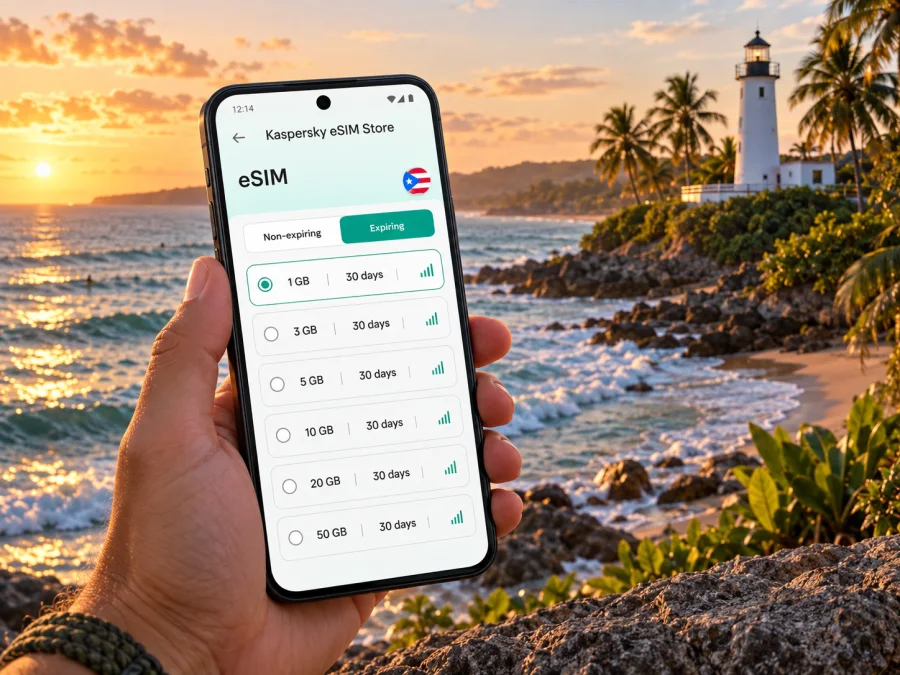
Rincon eSIM: mobile connection and internet for a west-coast stay
Rincon is a small coastal town on Puerto Rico’s western edge, known for surf breaks, sunsets, and a relaxed pace. It is not a city where every stop sits a few blocks from the next: beaches, guesthouses, restaurants, and the town center are spread along the coast and inland roads. A reliable mobile connection can make the practical parts of a visit easier, from coordinating an airport pickup to checking a route after an afternoon at the water.
An eSIM is a digital mobile plan installed on a compatible phone. For a trip to Rincon, it can give you mobile data for maps, messages, bookings, and everyday browsing without swapping out your usual physical SIM. Think of it as one part of the travel setup, alongside a saved address, an offline map, and a plan for getting around.
Get oriented before you arrive
Rincon is on Puerto Rico’s western edge. Visitors come for the shoreline and surfing, but beaches, guesthouses, restaurants, and the town center are spread along the coast and inland roads. A place described as “near the beach” may still involve a drive or a walk along roads without continuous sidewalks. Save your accommodation’s exact pin and check the route from the airport on your ticket.
Rafael Hernández Airport (BQN) is in Aguadilla, north of Rincon; Luis Muñoz Marín International Airport (SJU) is in the San Juan area, across the island. Compare the full journey, including ground transport, arrival time, and connections. Road times change with traffic, weather, and destination, so check a live route on the day.
Before departure, save your lodging address and check-in instructions, flight number and airport code, pickup details, key meeting points, and an offline map of the west coast. Keep a host’s contact details in a note you can open without data. A map pin helps with the final turns; a written address is useful if a driver asks you to confirm the destination.
The arrival journey: airport, car, and first stop
Rincon has no large international airport within the town. If you collect a rental car, confirm the pickup location and hours. For a transfer, agree on the exact meeting point and a backup plan before leaving the terminal. Share delays when you can, but make sure the driver also has your flight details and destination.
Before setting out, compare the accommodation pin with its written address and review the last turns. Local roads may be narrower than the main highway; set navigation before driving, and ask a passenger to handle changes. If the route becomes unclear or data drops, pull over safely before checking the map.
A pre-arranged ride can simplify a late arrival or unfamiliar drive. Keep the driver’s name, meeting place, and check-in instructions offline. Mobile data helps with updates, but it is not a replacement for a clear pickup arrangement.
Moving around Rincon
Rincon’s points of interest are spread out rather than packed into a walkable downtown grid. A rental car gives many visitors more flexibility for reaching beaches, dining spots, and lodging, especially when visiting several places in a day. If you do not plan to drive, ask your accommodation which transport options are practical for your dates and exact location; availability can vary.
Rincon Pueblo is a useful point of orientation for errands and local services. Along the coast, well-known places include Domes, María’s, Sandy Beach, Steps, and the Tres Palmas area. These are distinct map destinations: access, parking, terrain, and the kind of visit differ. Confirm the exact pin and return journey, particularly if you plan to stay for sunset.
| Day plan | Prepare with your phone |
|---|---|
| Beach visit | Save the correct access point and return route |
| Several coastal stops | Keep a list of pins; search before driving |
| Dinner away from lodging | Confirm the venue and arrange the return ride |
| Surf lesson or activity | Save the provider’s meeting point and booking message |
A navigation app cannot tell you whether an entrance is open, parking is available, or sea conditions are suitable. Follow local signs and provider instructions. Use the phone to coordinate and orient yourself, not as a substitute for local judgment around water or roads.
Choose the right base for your plans
Accommodation in Rincon ranges from the town center to coastal and quieter inland settings. Compare the actual address with the activities you expect to do, check parking, and plan how you will return after dinner or an evening at the beach. For a surf-focused visit, confirm where lessons or board rentals meet and how you will reach the shore. For a work trip, ask about the desk, power outlets, Wi-Fi, and backup workspace.
Before booking, check:
- Address: Can you identify the entrance precisely on a map?
- Transport: Will you rent a car, arrange rides, or stay close to one area?
- Connectivity: What does the host say about Wi-Fi, and do you need mobile data as a backup?
- Schedule: Do check-in hours fit your flight and onward journey?
A short distance on a map may still be inconvenient on foot if the route lacks a comfortable pedestrian path. Ask the host how visitors reach groceries, restaurants, and the coast instead of assuming that straight-line distance means an easy walk.
Mobile data for maps, messages, and a flexible day
Mobile internet in Rincon is useful for directions, reservations, pickup messages, and letting someone know you have reached a meeting point. Estimate your needs from your habits: navigation and messaging usually use less data than video calls, streaming, or frequent photo uploads. Background app activity and backups can also affect usage.
Before choosing an eSIM plan, check the destination, data allowance, validity period, activation conditions, and any device or network restrictions. If you will travel elsewhere in Puerto Rico, confirm that the plan terms fit the full itinerary. Coverage depends on local networks and geography; do not assume service at every beach, road, or indoor location.
You can compare eSIM options for a trip to Puerto Rico once you know your dates and likely data use. Kaspersky eSIM Store is an app and website where travellers can select, arrange, and activate an eSIM with a suitable plan for mobile internet abroad. Review the terms before choosing, and keep your usual number available if you rely on it for calls or verification messages.
Download maps, playlists, and large files over Wi-Fi before leaving. For work or video meetings, check your accommodation’s connection in advance and prepare a backup; mobile data is useful for messages but does not guarantee a stable call. These are planning guidelines rather than promised data amounts: apps differ, and you can review your phone’s data controls during the trip.
Prepare your eSIM before travel
Set it up while you have a reliable internet connection. First, check whether your phone supports eSIM and confirm that it is not carrier-locked. Choose a plan that fits your destination, dates, data allowance, and activation terms. Installation and activation may happen at different times, so read the instructions for your plan.
Kaspersky eSIM Store helps travellers choose, arrange, and activate an eSIM through its app or website. Device steps vary, so follow the relevant Android installation instructions or iOS installation instructions. Know which SIM is selected for mobile data and whether the travel eSIM requires data roaming. Keep your home SIM available if you need its number for calls or verification codes.
Before you leave
- [ ] Confirm eSIM support and that the phone is not carrier-locked.
- [ ] Check destination, validity, and activation conditions.
- [ ] Save installation details, lodging address, and pickup information.
- [ ] Download the map and pack a charging cable or power bank.
A day in Rincon, with connectivity in mind
After arriving at BQN and collecting a car, check the lodging pin and send an update before driving. On arrival, save the parking location and ask your host which access point they recommend. The next day, you might visit the Punta Higüero lighthouse and Domes area, then choose another stop based on local conditions. Save each pin in advance and agree on a precise meeting point with friends or an instructor; a beach name alone may not identify the right entrance.
For an evening by the coast, check the route home and pickup plan before sunset. If a work call or booking change interrupts the day, use a connection you have already checked rather than relying on an unspecified beach signal. A flexible itinerary, charged phone, and offline addresses are often more useful than trying to schedule every stop.
Short stopover or business visit
For a brief visit, choose one area or activity instead of trying to cover several beaches in opposite directions. Keep the lodging address, check-in contact, meeting pin, and return transport details in one note. For a business trip, allow a buffer for the drive, ask about Wi-Fi and workspace, and keep important documents available offline. An eSIM provides another option for routine mobile-data tasks, but does not guarantee a particular speed or indoor coverage.
If you continue elsewhere on the island, check your next route, ground transport, and plan validity before leaving. Confirm that the eSIM destination and terms include each planned location, and leave enough time to return to your departure airport.
Day trips from Rincon
Rincon can be a base for exploring Puerto Rico’s west and northwest, but every extra stop adds road time. Choose a manageable route, confirm activity details with the provider, and leave room for traffic, weather, and time spent at each stop. Save the itinerary and lodging pin before departure, charge your phone, and share your approximate schedule with someone in your group.
| Before leaving | Why it helps |
|---|---|
| Save stops in order | Reduces last-minute searching |
| Check the return route | Helps set a realistic departure time |
| Keep the lodging pin and host number | Makes changes easier to coordinate |
| Review eSIM status and charge | Keeps essentials ready when you need directions |
Offline maps and written addresses are especially useful if reception changes along the way.
Common questions
Is Rincon easy to explore without a car?
It depends on where you stay and what you want to visit. Beaches, lodging, and restaurants are spread out, so ask your host about transport for your dates. If you plan to visit several places, compare a rental car with the alternatives available to you.
Will mobile internet work at every beach?
Do not assume so. Reception varies with location, terrain, buildings, and the network used by a plan. Download maps and keep key details offline; treat data as helpful support rather than guaranteed coverage.
Can I use an eSIM for navigation and messaging?
A data-focused eSIM can support internet-based maps and messaging when the plan is active and a local network is available. Check its terms and your settings. Traditional calls and SMS may continue through your usual SIM, depending on your setup and service.
Should I install the eSIM before flying?
Many travellers prepare it over reliable Wi-Fi before departure, then follow the plan’s activation instructions. Check the specific conditions for your plan and device, and keep installation details accessible.
What if I fly into San Juan?
SJU is across the island from Rincon. Plan the onward drive or transfer as a substantial part of your itinerary, allow for delays, and compare the full door-to-door journey through BQN and SJU.
A simple Rincon connectivity plan
For a stay in Rincon, prepare three layers: mobile data for directions and messages, offline copies of addresses and reservations, and a clear transport plan for the places you want to visit. Choose an eSIM based on your itinerary and expected use, verify the device and plan conditions, and remember that signal availability can vary along Puerto Rico’s west coast.
Before departure, choose an eSIM plan for your Puerto Rico trip through Kaspersky eSIM Store, the app and website for selecting, arranging, and activating an eSIM for mobile internet abroad. Review the plan details, install it using the instructions for your phone, and arrive with your accommodation pin and first route ready. That preparation leaves more room to enjoy Rincon’s coast at your own pace.


