
Travel connectivity guide
Rio de Janeiro eSIM for mobile internet
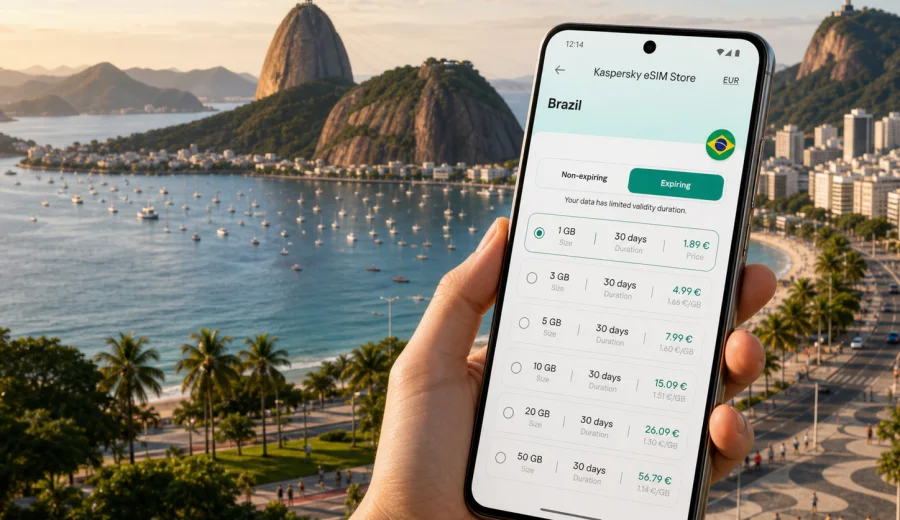
Rio de Janeiro eSIM: mobile connection and internet for your trip
Rio de Janeiro is a city where mobile internet becomes useful almost immediately. You may need a map before leaving the airport, a ride-hailing app for the transfer to Copacabana, a messenger to contact your hotel in Ipanema, or a browser to check the weather before going up to Christ the Redeemer. An eSIM can help you prepare mobile internet for Rio de Janeiro without looking for a physical SIM card after a long flight.
This guide focuses on practical travel scenarios in Rio: arrival at the airport, movement between districts, beach days, business meetings, stopovers, hotel check-in, navigation, and short trips from the city. The goal is simple: understand when an eSIM is useful, how to choose a data plan, what to check before purchase, and how Kaspersky eSIM Store can help you select, set up, and activate an eSIM for a trip to Brazil.
Why mobile internet matters in Rio de Janeiro
Rio is scenic, spread out, and very dependent on location-based services. The distance between Galeao International Airport and the South Zone beaches is significant, and traffic can change the best route during the day. Mobile data helps you compare transport options, follow the route, message your accommodation, and avoid relying only on public Wi-Fi.
Typical moments when you may need internet in Rio:
- after landing at Galeao International Airport or Santos Dumont Airport;
- while ordering a taxi or ride-hailing transfer;
- when checking the safest route to a hotel, apartment, office, or event venue;
- during metro, bus, ferry, or light rail journeys;
- when using digital tickets, booking confirmations, or QR codes;
- while translating menus, signs, or messages;
- when sharing your location with family, colleagues, or travel partners;
- during beach days, walking routes, and day trips.
An eSIM is especially practical if your phone supports dual SIM use. You can keep your regular SIM for calls or banking messages where needed, and use the travel eSIM profile for mobile data. Conditions depend on your device, your home operator, and the selected eSIM plan, so it is worth checking these details before departure.
Arrival: airports, transfer, and the first hour online
Rio has two main airports used by international and domestic travelers. Galeao International Airport is the larger international gateway, while Santos Dumont Airport is close to the city center and often used for domestic flights. In both cases, mobile internet can reduce uncertainty in the first hour.
| Arrival scenario | Why mobile data helps | Practical tip |
|---|---|---|
| Galeao International Airport | The transfer to the South Zone can take time, and route choice matters. | Activate mobile data for your eSIM before leaving the terminal if the plan conditions allow it. |
| Santos Dumont Airport | The airport is close to downtown, but traffic and meeting points can still be confusing. | Share your live location with the driver or host when pickup points are crowded. |
| Late arrival | Hotel reception, building access, and ride details may be time-sensitive. | Keep booking details and maps available offline, then use mobile data for updates. |
| Stopover | You may need quick navigation rather than a full local setup. | A smaller data allowance may be enough if you only need maps and messages. |
If you install the eSIM before travel, check whether the plan begins its validity period after installation, after activation, or after first connection to a supported network. This detail can vary by plan. If you prefer to activate after landing, make sure you still have enough internet access at the airport to complete the final steps, such as using airport Wi-Fi or another active connection.
City movement: beach districts, downtown, and viewpoints
Rio travel often moves between very different areas in one day. You might start with breakfast in Ipanema, visit Christ the Redeemer, continue to Santa Teresa, meet someone near Centro, and return to Copacabana in the evening. This is exactly the kind of route where mobile internet is more than a convenience.
Mobile data helps with:
- comparing travel times between metro, taxi, ride-hailing, and walking;
- checking whether a viewpoint is affected by weather or crowds;
- navigating from a metro station to a hotel or restaurant;
- contacting a guide or host if the meeting point changes;
- keeping payment apps, ticket wallets, and booking emails accessible;
- using translation tools when you need quick practical phrases.
For beach neighborhoods such as Copacabana, Ipanema, Leblon, Botafogo, and Flamengo, mobile internet is useful for short decisions: finding the correct kiosk, checking a restaurant reservation, locating an ATM inside a shopping center, or ordering a ride after sunset. In Centro, Lapa, and Santa Teresa, it helps with routes across older streets, hills, stairways, and one-way traffic patterns.
How much data may you need in Rio?
There is no single perfect data allowance for every traveler. The right choice depends on trip length, work needs, social media habits, navigation style, and whether your hotel has stable Wi-Fi. Still, you can estimate your usage before choosing an eSIM plan.
| Trip style | Likely mobile internet use | What to consider |
|---|---|---|
| Weekend stopover | Maps, rides, messaging, boarding passes, light browsing. | A compact plan can be enough if you avoid long video streaming. |
| Beach holiday | Navigation, restaurant search, photo sharing, messenger calls, weather checks. | Choose more data if you upload many videos or use cloud backup. |
| Business trip | Email, calendar, ride-hailing, work chat, video calls if Wi-Fi is weak. | Leave a buffer for hotspot use and unexpected schedule changes. |
| Multi-city Brazil route | Rio plus Sao Paulo, Brasilia, Salvador, or Foz do Iguacu. | Pick a Brazil plan or a regional option that matches the whole route. |
| Family trip | Multiple travelers, shared planning, kids' entertainment, frequent location sharing. | Each device may need its own setup unless you plan to use hotspot where allowed. |
As a practical baseline, maps and messaging usually use modest amounts of data, while video, cloud photo backup, online meetings, and streaming can consume much more. If you rely on mobile data for remote work, choose a plan with enough margin rather than using the smallest possible allowance.
Before you buy: compatibility and device checks
Not every phone or tablet supports eSIM, and some devices may be locked to a mobile operator. Check this before you purchase any travel plan. A compatible device should support eSIM installation, allow mobile data through the eSIM profile, and be unlocked for use with another network profile.
Use this quick checklist:
- confirm that your exact phone model supports eSIM;
- check that the device is not locked to your home operator;
- update the operating system before travel if an update is pending;
- keep your regular SIM active only if you need it for calls, SMS, or banking messages;
- understand how to switch mobile data between SIM profiles;
- make sure you can access email or your account during setup.
You can also check your device before choosing a plan. This is particularly important if you travel with an older phone, a device bought through an operator contract, or a regional model with different eSIM support.
Choosing an eSIM plan for Rio de Janeiro
For a city article, the destination may be Rio de Janeiro, but the plan should match the country or region where the phone will connect. For Rio, choose a plan for Brazil unless your route requires broader regional coverage. This matters if you plan to land in Rio, work there for several days, then fly to Sao Paulo or continue to another Brazilian city.
When comparing plans, look at:
- country or regional coverage;
- data allowance;
- validity period;
- whether top-up is available;
- when validity starts;
- whether hotspot use is allowed by the selected plan and device;
- installation and activation instructions;
- support options if setup does not go as expected.
At this point in planning, you can use Kaspersky eSIM Store to choose a mobile internet option for a trip to Brazil. Review the available data amounts and validity periods, then select the option that fits your Rio schedule, onward route, and expected app usage.
Practical Rio scenarios where eSIM helps
Hotel check-in and apartment access
Many Rio stays use digital communication before arrival: door codes, receptionist messages, parking instructions, proof of booking, or building access details. Mobile internet helps you read those messages outside the hotel, especially if the entrance is not obvious or the host asks you to confirm arrival time.
Beach day in Copacabana or Ipanema
On a beach day, you may not want to carry printed information or depend on a cafe Wi-Fi network. Mobile data helps you find your group, save a meeting point, check weather changes, order a ride, and pay attention to transport updates when you leave the beach area.
Christ the Redeemer and Sugarloaf Mountain
Viewpoint plans are sensitive to weather, lines, ticket times, and transport. A travel eSIM can help you check booking confirmations, coordinate with a guide, choose the next route, or change plans if visibility is poor.
Business meetings and conferences
If you travel to Rio for meetings, mobile internet is a backup for calendar updates, work chat, email, document access, and ride-hailing. Hotel and venue Wi-Fi may be available, but a separate data connection can help when you move between offices, event spaces, restaurants, and airports.
Short trips from Rio
Some travelers use Rio as a base for Petropolis, Niteroi, Buzios, Angra dos Reis, Paraty, or Ilha Grande connections. A Brazil eSIM plan can be useful beyond the city if the selected plan covers your route and local network conditions support service in the places you visit. Do not assume performance will be identical in every location; terrain, buildings, and local networks can affect the connection.
How to install and activate an eSIM
The exact steps depend on your phone model and operating system, but the basic flow is similar. First, choose a plan for the country or route. Then install the eSIM profile on a compatible device. After that, activate the profile according to the plan instructions and select it for mobile data when you want to use it.
General setup sequence:
1. Check that your phone supports eSIM and is not operator-locked.
2. Choose Brazil or the relevant regional direction for your trip.
3. Select a data allowance and validity period.
4. Complete the order and open the eSIM details in your account, app, or email.
5. Install the eSIM profile using the on-screen flow or QR code.
6. Set the eSIM profile as the mobile data line when you are ready to use it.
7. Enable data roaming for the eSIM profile if the instructions for your plan require it.
8. Test basic browsing, maps, and messaging before you depend on the connection.
For device-specific steps, use the Android installation guide or the iOS installation guide. Keep another internet connection available during installation, because your phone may need to download and register the eSIM profile before it can use mobile data.
What to prepare before flying to Rio
A few minutes of preparation can prevent most connection problems. Do this before you leave home, when you still have stable Wi-Fi and access to your accounts.
Pre-trip checklist:
- save your hotel address in offline maps;
- keep airport, hotel, and transport confirmations available offline;
- check whether your phone can store more than one eSIM profile;
- decide which SIM profile will handle mobile data in Brazil;
- disable automatic cloud backup on mobile data if you want to save traffic;
- download translation packs if you use translation apps;
- confirm whether your bank or airline sends SMS codes to your regular number;
- keep the eSIM QR code or installation details accessible.
If you use dual SIM mode, label your profiles clearly, for example "Home SIM" and "Brazil eSIM". This makes it easier to avoid using the wrong data line and to keep roaming costs under control.
Data-saving tips for a smoother trip
Rio is a visual city, and it is easy to use more data than expected on photos, reels, video calls, and live maps. You do not have to avoid these apps completely, but it helps to control background activity.
Useful settings:
- turn off automatic app updates on mobile data;
- pause cloud photo and video backup until Wi-Fi is available;
- download offline map areas for Rio and nearby routes;
- lower video streaming quality when using mobile data;
- restrict background data for apps you do not need during the trip;
- use hotel Wi-Fi for large downloads, then switch back to mobile data when moving around.
For navigation, start the route while you have a stable signal and keep the map open. For ride-hailing, check the pickup point carefully, because airports, shopping centers, and beach roads can have specific meeting zones.
eSIM, roaming, local SIM, and Wi-Fi in Rio
Travelers usually compare four options: international roaming from a home operator, a local physical SIM, public Wi-Fi, and travel eSIM. Each can work, but they fit different situations.
| Option | Strength | Limitation |
|---|---|---|
| Home roaming | Familiar number and simple setup. | Costs and conditions can vary widely by operator and package. |
| Local physical SIM | Can be useful for longer stays. | You may need to find a store, understand local conditions, and replace or add a SIM card. |
| Public Wi-Fi | Useful in hotels, cafes, airports, and offices. | Coverage is limited to specific locations and quality can vary. |
| Travel eSIM | Can be prepared before departure and used without a physical SIM card. | Requires a compatible, unlocked device and a plan that fits your route. |
An eSIM is not a full replacement for every mobile service. Many travel eSIM plans are focused on mobile data and may not include a regular phone number, voice calls, or SMS unless stated in the plan conditions. For calls and messages, travelers often use internet-based apps.
Rio-specific route planning with mobile data
For a first visit, group your plans by area to reduce unnecessary transfers. Rio traffic can be slow, and some journeys are easier when you combine nearby places.
Example route logic:
- South Zone day: Copacabana, Ipanema, Leblon, Lagoa, Arpoador.
- Viewpoint day: Christ the Redeemer, Sugarloaf Mountain, Urca, Botafogo.
- Culture and nightlife day: Centro, Lapa, Santa Teresa, Museum of Tomorrow area.
- Beach and nature day: Barra da Tijuca, Joatinga, Tijuca Forest routes if appropriate for your plans.
Mobile internet helps you adapt these plans during the day. If rain affects a viewpoint, you can switch to a museum or restaurant. If a transfer takes longer than expected, you can message the next booking. If you split from travel partners, location sharing makes regrouping easier.
Frequently asked questions
Can I use eSIM as soon as I land in Rio de Janeiro?
Usually you can use the eSIM after it is installed, activated according to the plan instructions, and connected through a supported local network. Setup details and timing depend on the selected plan, device, and local network conditions.
Do I need a Brazil plan for Rio?
For Rio de Janeiro, choose a plan that covers Brazil. If your trip includes several countries in South America, compare whether a regional option is more suitable for the full route.
Will an eSIM give me a local Brazilian phone number?
Many travel eSIM plans are data-focused and do not include a regular phone number, voice calls, or SMS unless the plan conditions state otherwise. You can often use internet-based calling and messaging apps over mobile data.
Can I keep my regular SIM active?
On many dual SIM phones, yes. You can keep your regular SIM for calls or messages and select the eSIM for mobile data. Check your phone settings and home operator roaming conditions before travel.
What if I run out of data during the trip?
Check the plan details to see whether top-up is available. If not, you may need to choose another suitable plan. Monitor data use during the trip, especially if you stream video or use mobile hotspot.
Is public Wi-Fi enough in Rio?
Hotel, airport, and cafe Wi-Fi can be useful, but it is tied to specific places. Mobile internet is more practical when you are moving between districts, waiting for a ride, checking maps, or changing plans outside.
Choose an eSIM plan before your Rio trip
If Rio de Janeiro is on your itinerary, prepare mobile internet before the moments when you need it most: airport arrival, hotel check-in, transfers, beach days, meetings, and day trips. Kaspersky eSIM Store is an app and website where you can choose, set up, and activate an eSIM with a suitable data plan for travel.
Before purchase, check device compatibility, review the data allowance and validity period, and understand when the plan starts. Then choose an eSIM plan for Brazil so your Rio de Janeiro trip is easier to navigate from the first day.