Travel connectivity guide
Road Town eSIM: Mobile Internet for Tortola
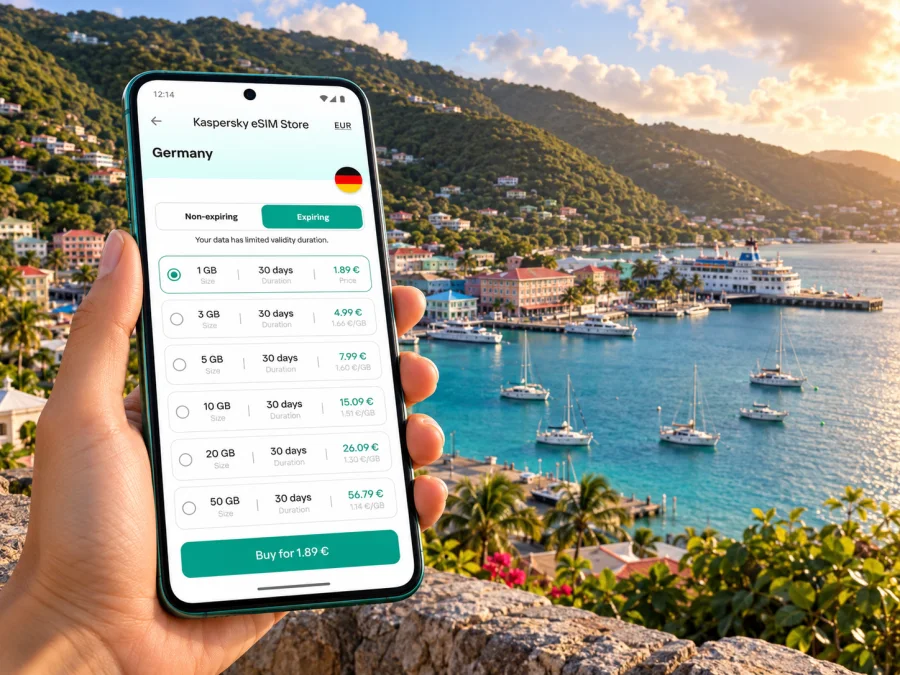
Road Town eSIM: mobile connection and internet for a Tortola trip
Road Town is the capital of Tortola in the British Virgin Islands (BVI). A mobile connection can help you check ferry information, find a waterfront meeting point, contact your accommodation and navigate beyond the town centre. An eSIM may be useful for mobile internet, provided your device supports it and the selected plan covers your route.
This guide covers arrival, moving around Road Town, ferry travel and practical checks for choosing a travel eSIM. Signal, plan coverage and ferry operations can vary, so confirm current details before relying on them.
What to expect from Road Town
Road Town sits on Tortola, the largest island in the BVI. It is both the territory’s capital and a working town, with the harbour and waterfront bringing together ferries, businesses, shops and visitor services. Green hills rise close behind the coastal centre.
Mobile internet is useful for practical tasks: confirming a terminal, messaging a driver, checking a route on foot or sharing a change of plans. If you stay outside the centre, save directions for the final part of your transfer.
Terrance B. Lettsome International Airport is on Beef Island, connected to Tortola by the Queen Elizabeth II Bridge; it is not in Road Town. Some itineraries also involve a connecting flight or ferry from another Caribbean island. Check your ticket and the operator’s current departure point, since the BVI has several ports of entry.
A useful planning distinction is:
- Road Town is the town and ferry hub on Tortola.
- Tortola is the island where Road Town, the airport connection and several other settlements are located.
- The British Virgin Islands are an archipelago, so an itinerary that leaves Tortola may involve another ferry, a boat transfer or a separate local transport arrangement.
An eSIM plan labelled for the British Virgin Islands should be checked against your complete route. A country or territory label alone does not tell you whether a plan includes service on every island, aboard a boat, or while travelling through another jurisdiction.
Where mobile internet helps around the town
The main reason to prepare data is to reduce friction between separate parts of a trip. A map is useful in town, but ferry timings, accommodation messages, online check-in and onward transport can all require a connection at different moments. Your normal home SIM may still be useful for calls or account verification; a travel eSIM can be set as the data line if its terms suit your trip.
| Situation | What a connection can help you do | What to prepare offline |
|---|---|---|
| Leaving the ferry terminal | Open directions, contact your host or driver, and check where to meet | Save your accommodation address and meeting point |
| Walking around the waterfront | Find a business, confirm opening information, or send an update | Keep a screenshot of any reservation or ticket |
| Moving between town and an outlying stay | Follow a route and coordinate a pickup | Download an offline map area where your map app allows it |
| Preparing for a ferry | Recheck a departure notice, message companions, and retrieve a booking | Save the booking reference and departure terminal |
| A short business visit | Join a call where service and data conditions permit, and exchange documents | Download key files and keep a local copy of meeting details |
| A day away from Tortola | Check onward arrangements when coverage is available | Confirm return transport and keep essential details accessible offline |
These are common uses, not a promise of signal everywhere. Service can vary indoors, around hills, offshore or during congestion. Keep bookings and addresses accessible offline, especially when a connection is time-sensitive.
Arrival: give yourself a connected first hour
If you arrive by ferry, confirm the exact exit or pickup point with your accommodation. The terminal, waterfront and central streets are close, but luggage, heat or an uphill route can change a short walk into a less convenient one. Agree on a recognisable meeting point before boarding.
From Beef Island, arrange the onward transfer to Tortola before landing. A data connection helps with messages and directions but is not a substitute for a pickup plan when time is tight.
A simple arrival checklist:
- Save the name and full address of your accommodation, plus a telephone or messaging contact.
- Keep your ferry or flight confirmation accessible without a connection.
- Identify the precise pickup location with your host or driver; “the waterfront” may be too broad.
- Turn on the travel eSIM only when you intend to use it and have reviewed its activation instructions.
- Confirm which SIM is selected for mobile data and whether data roaming is required for that eSIM.
- If the phone does not connect, use Wi-Fi where available, check the line settings and follow the plan provider’s troubleshooting steps.
Prepare these details before a late arrival, carry a charged phone or power bank, and keep the address in a second form.
Getting around Road Town and Tortola
Road Town’s centre is compact, but Tortola is hilly and spread out. A map helps with direction, though gradients, weather, luggage and your accommodation’s location can make a short route inconvenient on foot. Ask your host whether a walk is practical and arrange a taxi when appropriate.
If driving, download a map in advance, set the route while parked and follow local signs. Save both the live destination and a fallback: a screenshot, written address and booking reference.
When meeting a driver near the harbour, agree on a specific landmark or entrance rather than relying on a moving map pin alone.
Ferries and onward island trips
Road Town is a ferry hub for trips to places such as Spanish Town on Virgin Gorda, Peter Island and St Thomas in the US Virgin Islands. Other services may use different Tortola terminals. Routes, operators and schedules change; confirm the terminal and sailing directly with the ferry operator, then check again on travel day.
A BVI travel plan may not include another territory, and land-based service may be unavailable offshore. Do not assume your data plan works aboard a boat or after arriving in the US Virgin Islands. Check the included destinations, roaming rules and exclusions in its terms.
Before leaving Road Town for a ferry, use this checklist:
- Confirm the sailing date, departure time, terminal and check-in instructions with the ferry company.
- Check whether your route is direct or includes a stop, and verify the return departure separately.
- Keep your ticket, identification and booking details accessible offline.
- Download maps for the destination if you will need them immediately after arrival.
- Check whether the mobile plan covers every territory on the route, not only the BVI.
- Keep enough battery for the transfer and the first part of your onward journey.
For a day trip, focus on data for checking the dock, contacting your host, locating a pickup or reviewing a changed departure. Allow for schedule changes, and estimate streaming or photo uploads separately.
Choosing an eSIM for Road Town
A useful travel eSIM is a plan whose stated destination, allowance and validity match your actual itinerary. Start with the length of your stay and the tasks you expect to do. Navigation, messaging, email and occasional browsing usually require less data than video calls, streaming or uploading large files. These are planning categories rather than guaranteed consumption figures: apps differ, and automatic photo backups can use more data than expected.
Kaspersky eSIM Store is an app and website that helps you choose, arrange and activate an eSIM with a suitable plan for mobile internet while travelling abroad. Before selecting an option for Road Town, review the current details shown for the British Virgin Islands: covered destinations, data amount, validity period, price, activation conditions and any restrictions. The list and terms available at the time you book are what matter; do not assume that a plan includes voice calls, SMS, every neighbouring island, or service on a ferry unless the details say so.
You can review eSIM options for the British Virgin Islands and compare the current terms with your dates and route. If you will travel onward beyond Tortola, check that each destination is explicitly included. If you cannot confirm coverage for one leg, keep another way to get essential information, such as a local connection, Wi-Fi at your accommodation, or offline maps and tickets.
Estimate your data needs
Think in terms of what you will actually do rather than choosing a plan by habit:
| Travel pattern | Likely data use | Helpful preparation |
|---|---|---|
| Weekend in central Road Town | Maps, messages, booking details and light browsing | Turn off automatic media backups over mobile data |
| Several days on Tortola | Navigation, transport coordination, email and social updates | Download maps and accommodation details in advance |
| Work meetings | Email, documents and occasional calls over apps | Test your work tools before travel and keep files offline |
| Island hopping | Rechecking routes, tickets and messages across several stops | Verify every territory and plan validity before purchase |
| Frequent video or photo uploads | Potentially substantial data use | Use Wi-Fi for large uploads where appropriate and check the allowance often |
The list is a guide for estimating, not a promise that a certain number of gigabytes will last a fixed number of days. App settings, video quality and the number of connected devices can change consumption quickly. Check your phone’s data-usage screen during the trip and disable background use for apps that are not needed.
Confirm device compatibility before purchase
Your phone must support eSIM and be eligible to use a different network. Support can vary by exact model and country or region of sale, even when two phones share a product name. Some devices are also locked to a carrier. Check the manufacturer’s information for your exact device variant, look for an eSIM or “Add eSIM” option in the cellular settings, and confirm that the phone is unlocked. You can check whether your device is compatible before choosing a plan.
If you are travelling with a tablet, laptop or secondary phone, do not assume that its eSIM can be shared with your main handset. Check the plan’s supported device type and tethering rules. If hotspot use matters for work, verify that it is permitted and test your setup before departure. Keep the device that will receive the eSIM with you during installation; many eSIM profiles are intended for installation on one device and may not be transferable after activation.
Keep your primary number available
A data-focused travel eSIM is not automatically a replacement for your usual phone number. If you need calls or SMS to your regular number, keep your primary SIM active if your phone permits dual SIM use, and choose the travel eSIM for data. Review your home operator’s roaming charges before departure. Set the correct line for mobile data and make sure automatic switching between SIMs will not route data through an unexpectedly expensive line.
For app-based calls and messages, the travel eSIM’s data connection may be sufficient, but the service still depends on the app, the plan and network availability. Keep account verification options in mind: some services may send a one-time code to your usual number, and receiving it can depend on your home SIM and carrier settings.
Install and activate before you need directions
Whenever practical, install the eSIM while you have stable Wi-Fi and enough time to follow the instructions. The exact steps vary by phone and plan. Read the activation details supplied with your purchase: some plans begin their validity at installation, while others start when they first connect in the destination. Never rely on a general rule; use the timing stated for the selected plan.
A careful setup sequence is:
- Confirm device support, carrier-unlocked status and the plan’s destination coverage.
- Read when validity begins and whether installation needs Wi-Fi or a QR code.
- Install the eSIM using the Android setup instructions or iPhone setup instructions, as applicable.
- Label the new line clearly, such as “Travel data,” while keeping your home line recognisable.
- Before departure, leave the travel line in the state recommended by the plan instructions.
- On arrival, select it for mobile data. Enable data roaming only if the plan instructions require it.
- Allow the phone a short time to register. If it does not connect, check the selected line, mobile data setting, roaming setting and the provider’s troubleshooting steps.
Avoid deleting an eSIM profile while troubleshooting unless the plan provider instructs you to do so. A QR code or installation token may be single-use, and removing a profile can make it harder to reinstall. Save the support details and transaction information somewhere you can access if the travel line is not working.
What to do if the connection is slow or unavailable
A connection problem does not always mean the eSIM has failed. It may be a settings issue, a temporary coverage gap, a plan that has not started, or a destination that is not included. Work through the basics methodically:
- Check that the eSIM line is switched on and selected for mobile data.
- Confirm that the plan is active and its validity period has started.
- Review whether data roaming must be enabled for this specific plan.
- Move to a different spot, preferably outdoors or with a clearer view of the sky, and wait briefly for the network to register.
- Toggle airplane mode once or restart the phone if the provider’s instructions allow it.
- Check that the plan has remaining data and that your current location is included.
- Contact the relevant support channel with the device model, operating system, location and a description of the steps already tried.
Do not change advanced network settings at random or remove the eSIM profile before getting guidance. Near the waterfront, inside a building, on a hillside or offshore, the signal may differ from one place to another. Keep a local map, booking details and a way to contact your accommodation so a brief loss of data does not derail the day.
Common questions
Is Road Town in the British Virgin Islands or the US Virgin Islands?
Road Town is on Tortola in the British Virgin Islands, a British Overseas Territory. The US Virgin Islands are a separate neighbouring jurisdiction. This distinction matters if your itinerary includes St Thomas: verify that the plan explicitly covers both destinations if you expect to use mobile data on each side of the trip.
Is Road Town the same as Tortola?
No. Road Town is a town and the capital of the British Virgin Islands, located on the island of Tortola. “Tortola” refers to the island; “Road Town” refers to the town. Use the exact location name when arranging a transfer or ferry pickup.
Will a British Virgin Islands eSIM work on every island or ferry?
That cannot be assumed from the destination label alone. Review the included destinations and exclusions for the selected plan. Mobile signal can also be unavailable offshore, and a crossing to another jurisdiction may require separate coverage. Keep tickets and directions offline.
Does a data eSIM include a local phone number, calls or SMS?
Not necessarily. A data plan generally provides mobile internet, while calls and SMS may not be included unless the offer says so. You can use internet-based calling or messaging apps when data is available, and retain your usual number for regular communication if your device and home plan allow it.
What if the phone connects at the ferry terminal but not during the crossing?
A land network may not cover an offshore route, and ferry Wi-Fi or maritime connectivity should not be assumed. Keep your ticket, destination details and return plan available offline. Recheck service after arriving at the next port.
A simple Road Town connectivity plan
For most visits, the dependable approach is to prepare the phone before leaving home, confirm the transfer and ferry details independently, and use mobile data for maps, messages and changes as they arise. Check the precise eSIM destination list, validity and allowance; verify the phone’s regional variant and unlock status; and keep essential travel information offline. If you leave Tortola, plan for the possibility that network coverage and plan eligibility will change with the island or jurisdiction.
Prepare your eSIM for Road Town
Before your trip, check device compatibility and compare the current plan details with the length and route of your stay. Kaspersky eSIM Store helps you choose, arrange and activate a suitable eSIM for mobile internet abroad through its app and website. Explore eSIM options for the British Virgin Islands, then follow the plan-specific setup instructions and keep your ferry bookings and directions available offline.


