
Travel connectivity guide
Rock Sound eSIM: mobile internet for travel
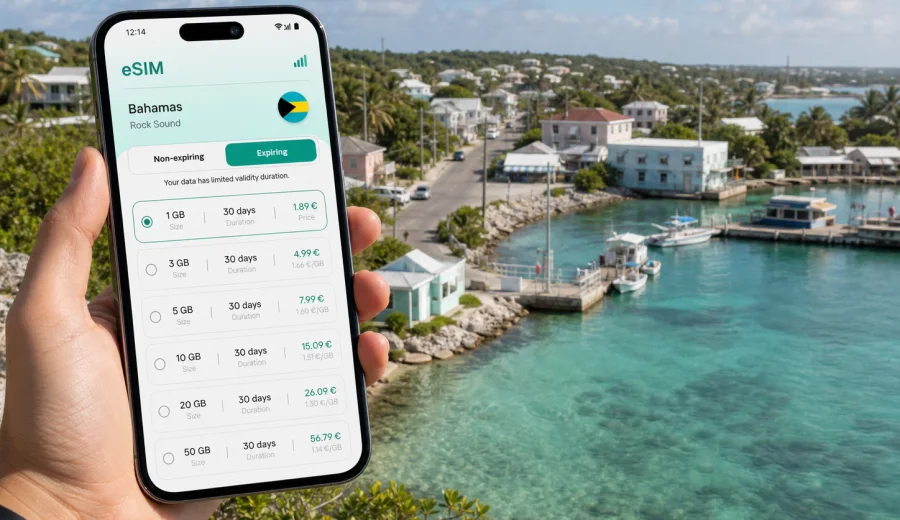
Rock Sound eSIM: mobile connection and internet for a trip to South Eleuthera
Rock Sound is one of the most practical bases in South Eleuthera: quiet enough for a slow island stay, useful enough for errands, and well placed for drives toward beaches, settlements, marinas, cottages, and small hotels along Queen's Highway. It is not a city where you want to spend your first hour looking for a SIM card or waiting for hotel Wi-Fi. Maps, taxi messages, booking details, ferry updates, and family chats become useful as soon as you land or arrive by road.
An eSIM can make that first part of the trip smoother. Instead of replacing your physical SIM card, you install a digital SIM profile on a compatible phone and use it for mobile internet in the Bahamas. Your usual number can stay in the phone for calls or messages, while the eSIM profile handles data for maps, messaging apps, email, rides, reservations, and travel planning.
This guide is focused on Rock Sound itself: airport arrival, moving around South Eleuthera, hotel check-in, work trips, stopovers, beach days, and road trips from the town. The country matters because the eSIM plan must work in the Bahamas, but the real question is local: how much mobile data do you need while you are moving through Rock Sound and nearby parts of Eleuthera?
Why mobile internet matters in Rock Sound
Rock Sound feels simple on a map, but travel days can still involve several moving pieces. You may land at Rock Sound Airport, meet a rental car contact, drive to a villa, check messages from a host, navigate to Ocean Hole, or continue toward Cape Eleuthera, Tarpum Bay, or Governor's Harbour. If you are arriving after a long flight connection, mobile internet helps you solve small problems before they become delays.
Common Rock Sound scenarios where data is useful:
- confirming airport pickup or rental car instructions;
- opening offline and live maps for Queen's Highway and side roads;
- messaging a hotel, villa host, marina, or tour contact;
- checking restaurant hours before driving across the island;
- using a banking app or travel wallet during check-in;
- sending your arrival status to family or colleagues;
- using translation, weather, email, and cloud documents;
- booking onward transport or adjusting plans after a delay.
Public Wi-Fi may be available in some hotels, restaurants, or offices, but it is not something to build the whole trip around. In Rock Sound, the most useful moments for internet often happen between fixed Wi-Fi points: on the road, outside the airport, near the harbor, at a beach access, or while you are waiting for someone to meet you.
Rock Sound arrival: when an eSIM helps first
The first hour after arrival is usually where a prepared eSIM gives the clearest benefit. If you install the eSIM before departure, you can switch to the data profile after landing and wait for the device to register on a local network. Connection timing depends on the phone, the chosen plan, and the local network, so it is better to prepare calmly than to do every step under travel pressure.
For Rock Sound Airport arrivals, mobile data can help with:
| Arrival task | Why data helps |
|---|---|
| Meeting a driver or rental car contact | You can message if the flight is early, late, or bags take longer. |
| Finding the route to lodging | Maps reduce wrong turns on unfamiliar island roads. |
| Checking access instructions | Villas and cottages may send gate codes, key box details, or exact landmarks. |
| Updating family or colleagues | Messaging apps work without relying on airport Wi-Fi. |
| Reviewing documents | Booking references, insurance files, and flight details stay accessible. |
If you arrive by road from another Eleuthera settlement, the same logic applies. Rock Sound may be one stop in a wider island route rather than the start of the trip. In that case, eSIM data is useful for navigation, changing restaurant plans, checking beach conditions, or coordinating with people in different cars.
How Rock Sound differs from a large-city trip
In a major city, you might rely on metro apps, rideshare services, dense public Wi-Fi, and many mobile shops. Rock Sound is different. The pace is slower, distances are larger than they appear, and many useful places are spread along the island rather than concentrated in one downtown grid.
That changes how you should think about mobile internet:
- navigation matters more than public transport apps;
- messaging matters more than walk-in service counters;
- hotel or villa communication can be more important than city attraction tickets;
- data reliability while driving is more useful than high-volume streaming;
- backup access to documents is more useful than constant social posting.
For many visitors, the best eSIM plan for Rock Sound is not the largest possible plan. It is the plan that covers the Bahamas, lasts for the whole stay, and gives enough data for maps, messages, check-ins, work needs, and a reasonable buffer.
Choosing data for a Rock Sound trip
Start with your itinerary, not with a random data number. A weekend stopover, a family villa stay, and a work trip with video calls all use mobile internet differently.
Use this quick estimate:
| Trip style | Typical data use | What to consider |
|---|---|---|
| Short stopover or 1-2 nights | Low to moderate | Maps, messages, bookings, weather, light browsing. |
| Beach holiday of 4-7 days | Moderate | Navigation, photos, messaging, restaurant searches, occasional video. |
| Remote work or business trip | Higher | Email, documents, hotspot use, calls through apps, cloud tools. |
| Island road trip | Moderate to higher | Maps, route changes, shared locations, research while moving. |
| Family or group travel | Variable | One person may become the navigation and booking hub for everyone. |
Before choosing a plan, check four points:
1. The plan must include the Bahamas as the destination.
2. The validity period should cover the whole Rock Sound stay, including arrival and departure days.
3. The data amount should match your real habits, especially if you use video, maps, cloud backup, or hotspot.
4. Your phone must support eSIM and must not be locked in a way that prevents another mobile data profile from working.
For a calm travel setup, it is usually better to choose before departure, install when you still have stable Wi-Fi, and leave activation timing to the instructions for the selected plan. Some plans start counting validity when installed, some when connected, and conditions can differ, so read the plan details before you confirm.
Where mobile data is useful around Rock Sound
Rock Sound is not only a point on the map. It is a base for practical island movement. Mobile internet helps most when you are connecting several small tasks across the day.
Typical local uses include:
- opening maps between Rock Sound Airport, the settlement, and your hotel or villa;
- checking the route toward Tarpum Bay, Wemyss Bight, Cape Eleuthera, or Governor's Harbour;
- sending photos or location pins to people traveling with you;
- contacting a property manager if the road entrance is not obvious;
- checking weather before a beach plan or boat-related activity;
- finding grocery stops, fuel, restaurants, or marina services;
- keeping work email available without sitting in a lobby;
- using internet-based calls and messages when ordinary calls are not included in the eSIM plan.
eSIM plans for travel are usually focused on mobile data. They do not automatically include a local phone number, SMS, or standard voice calls unless the selected plan says so. For many Rock Sound visitors, that is fine because messaging apps, internet calls, email, and booking platforms cover most travel communication.
Preparing your phone before you travel
The easiest Rock Sound eSIM experience starts before the flight or ferry connection. Install the eSIM while you have stable home or hotel Wi-Fi, keep the QR code or account access available, and label the eSIM profile clearly so you know which line is for travel data.
Before buying a plan, check your device. Your phone or tablet needs eSIM support, and some devices vary by region or by carrier lock status. A compatible model can still fail to add a new eSIM if it is locked to one carrier or if the device settings do not allow another mobile plan.
A practical pre-trip checklist:
- update your phone operating system if an update is already due;
- confirm that your device supports eSIM;
- confirm that your device is not carrier-locked;
- keep your main SIM active if you need your usual number for banking or verification messages;
- install the eSIM over a stable Wi-Fi connection;
- save your booking details offline as a backup;
- understand when plan validity starts;
- check whether data roaming needs to be enabled for the eSIM profile.
If your route includes more than Rock Sound, choose a plan that fits the full Bahamas itinerary, not only the first night. For example, a traveler using Rock Sound as a base for South Eleuthera may need data for airport arrival, local driving, restaurant searches, and a day trip north. A traveler connecting onward to another island may need data across multiple travel days.
Choosing an eSIM plan for Rock Sound through Kaspersky eSIM Store
Kaspersky eSIM Store is an app and website where you can choose, arrange, and activate an eSIM with a suitable mobile data plan for an international trip. For Rock Sound, the destination to choose is the Bahamas, because the city is in the Bahamas and the plan needs to match the country where you will use mobile internet.
When you are ready to compare options, you can choose an eSIM plan for your trip to Rock Sound and review the available Bahamas plan details before you travel. Look at data volume, validity period, price, activation conditions, and any limitations shown for the selected plan.
This is the point where practical planning matters. Do not choose only by the lowest data amount if you will be the person handling maps, group messages, hotel coordination, and work email. Also do not choose a very large package just because the trip feels important. Match the plan to the actual number of days and the type of mobile use you expect in South Eleuthera.
Step-by-step setup before arrival
Use this setup flow when you want the eSIM ready before you reach Rock Sound:
1. Check that your device supports eSIM and is not locked to one carrier.
2. Choose the Bahamas as the travel destination.
3. Select a data amount and validity period that match the whole stay.
4. Complete the plan arrangement in the Kaspersky eSIM Store app or website.
5. Install the eSIM profile while connected to stable Wi-Fi.
6. Label the new line, for example "Bahamas data" or "Travel eSIM."
7. Keep your regular SIM available if you need your normal number.
8. After arrival, select the eSIM profile for mobile data.
9. Wait a few minutes for the phone to register, if needed.
10. Check that maps and messaging apps work before leaving the airport or hotel.
For device-specific setup details, use the Android installation guide or the iOS installation guide. The exact settings names can differ by phone model and operating system version, so follow the instructions for your device and the prompts shown on screen.
Local movement: airport, Queen's Highway, hotels, and beaches
Rock Sound travel often means driving. Queen's Highway is the main road spine through Eleuthera, and many stays involve short local drives rather than dense public transport. Mobile internet helps with navigation, but you should still prepare for variable conditions by saving key addresses and screenshots before you leave Wi-Fi.
Useful travel habits:
- download an offline map of Eleuthera before the trip;
- pin your hotel, villa, airport, and planned beach stops;
- save check-in instructions as screenshots;
- keep the host's phone number and messaging contact in one place;
- charge the phone before long drives;
- carry a power bank if you will use maps and camera heavily;
- avoid starting large app updates on mobile data.
For hotel stays, eSIM data is useful even if the hotel has Wi-Fi. It can cover the gap between airport arrival and check-in, help you communicate from the road, and provide a backup when you are away from the property. For villa stays, it can be even more useful because the first check-in may depend on messages, codes, landmarks, or instructions sent by the host.
Managing data during the stay
Good data habits matter on an island trip. You may not notice background usage until the plan is already lower than expected.
Use these settings to stretch the plan:
1. Turn off automatic cloud photo backup on mobile data.
2. Disable automatic app updates over mobile data.
3. Download music, maps, and documents before travel.
4. Use hotel Wi-Fi for large uploads when it is available and trustworthy.
5. Lower video quality in streaming and meeting apps.
6. Check data usage in your phone settings every day or two.
7. Keep messaging and maps prioritized over entertainment if the plan is small.
For a short Rock Sound stop, careful use may matter more than plan size. For a longer South Eleuthera stay, a larger allowance may be worth considering if you will navigate daily, use video calls, or share a connection with a laptop.
Common mistakes to avoid
Avoid these problems before they interrupt the trip:
- buying a plan without checking that it covers the Bahamas;
- waiting until airport arrival to discover the phone does not support eSIM;
- installing the eSIM while using unstable public Wi-Fi;
- assuming the eSIM includes voice calls or SMS;
- leaving mobile data assigned to the wrong SIM profile;
- letting cloud backup use the plan in the background;
- choosing a validity period that ends before departure day;
- deleting an eSIM profile before you are sure you no longer need it.
If something does not work immediately, start with the basics: confirm the eSIM is installed, select it for mobile data, check whether data roaming must be enabled for that profile, restart the phone if needed, and make sure the selected plan is active according to its conditions. If questions remain, support can help you work through installation or activation steps.
FAQ
Is eSIM useful for a trip to Rock Sound?
Yes. eSIM can be useful in Rock Sound because many travel tasks depend on mobile data: airport arrival, navigation, host messages, hotel check-in, restaurant searches, weather, and communication during drives around South Eleuthera.
Should I choose Rock Sound or the Bahamas when selecting a plan?
Choose the Bahamas. Rock Sound is in the Bahamas, so the eSIM plan needs to match the country where you will use mobile internet. The city helps define your travel scenario, but the plan destination is the Bahamas.
Can I install the eSIM before I arrive?
In many cases, yes. It is often easier to install the eSIM before departure while you have stable Wi-Fi. Check the selected plan conditions so you understand when validity starts and when the plan should be activated.
Does an eSIM include a local phone number in Rock Sound?
Not usually, unless the selected plan explicitly says so. Travel eSIM plans are commonly focused on mobile data. You can use internet-based calls and messaging apps through the data connection.
Can I keep my regular SIM active?
Yes, on many compatible dual-SIM phones you can keep your regular SIM for your usual number and use the eSIM profile for mobile data. Device behavior varies, so check your settings before travel.
What if I am also visiting other parts of Eleuthera?
Choose a Bahamas plan that covers the full route and the full trip duration. If you drive from Rock Sound toward other settlements, beaches, or marinas, mobile data remains useful for maps and messages outside the town.
How much data do I need?
For maps, messages, bookings, and light browsing, a modest plan may be enough for a short stay. If you use video calls, hotspot, cloud backup, or heavy social media, choose more data and manage background usage carefully.
Choose an eSIM plan before your Rock Sound trip
Rock Sound is easier to enjoy when your phone is ready for the practical parts of travel: arrival messages, maps, check-in details, weather, restaurant searches, and communication during drives around South Eleuthera. Before you go, check that your device supports eSIM, choose a plan that covers the Bahamas, and install it while you still have reliable Wi-Fi.
You can choose an eSIM plan for the Bahamas through Kaspersky eSIM Store and prepare mobile internet for your Rock Sound trip in advance. Review the plan details, install the eSIM on a compatible device, and keep your travel data ready for the moments when hotel Wi-Fi is not enough.