
Travel connectivity guide
Romania eSIM: Mobile Internet Travel Guide
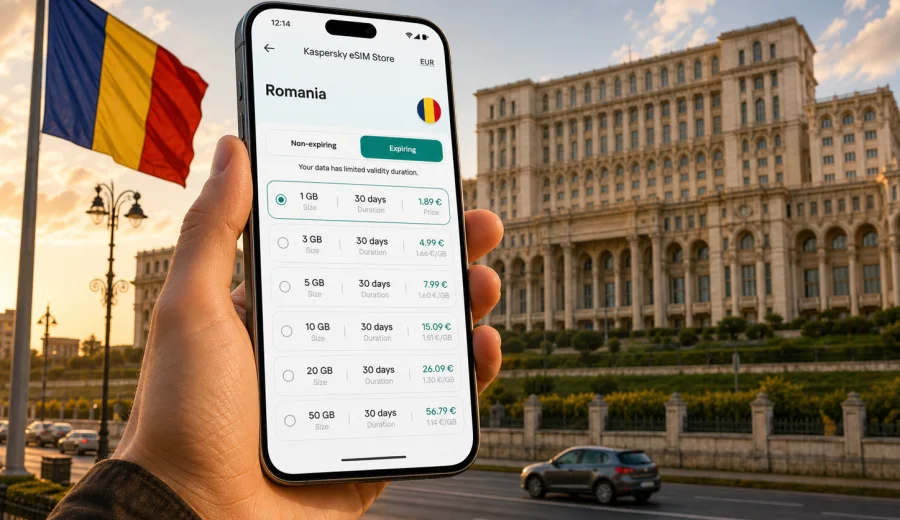
eSIM for Romania: mobile connection and internet for your trip
Romania is an easy country to explore if your phone is ready before you land. Bucharest, Cluj-Napoca, Brasov, Sibiu, Iasi, the Black Sea coast and the mountain roads of Transylvania all depend on the same practical travel habit: you need mobile internet for maps, tickets, hotel messages, ride apps, banking alerts and calls through messengers. An eSIM helps you prepare that connection without looking for a physical SIM card after arrival.
This guide explains how to use an eSIM for Romania, how to choose a data package, what to check before payment and how to avoid common setup mistakes. The focus is mobile internet for a trip, not a local phone number. In most travel scenarios, an eSIM is used for data, while regular calls and SMS remain on your primary SIM unless the selected tariff says otherwise.
Why eSIM is useful in Romania
Romania combines city breaks, business travel, mountain routes and cross-border itineraries. You may arrive at Bucharest Henri Coanda International Airport, take a train to Brasov, drive through the Carpathians, spend a weekend in Cluj-Napoca or continue to Bulgaria, Hungary or Moldova. In each case, mobile data helps you make decisions without waiting for hotel Wi-Fi.
An eSIM is useful because it can be prepared before the trip. You choose a destination, check the amount of data, review the validity period and install the digital SIM profile on a compatible phone. When the trip starts, you can switch mobile data to the eSIM profile and keep your main SIM in the device for calls, banking messages or two-factor authentication.
The main benefits are practical:
- no need to search for a store selling physical SIM cards after landing;
- easier access to maps, translation, taxi apps and booking messages;
- clearer control over a prepaid data package;
- less dependence on public Wi-Fi in airports, cafes and hotels;
- the option to keep your usual number active on the primary SIM.
eSIM does not remove every travel variable. Local network conditions, the selected package, your device model, roaming-data settings and coverage in remote areas still matter. That is why it is better to treat eSIM as a planned travel tool: check compatibility first, select the tariff that matches your itinerary and install it while you still have a stable internet connection.
When mobile internet matters most in Romania
Many travelers underestimate the first hour after arrival. That is when mobile data is often most useful: you need to message the host, open a boarding-pass archive, check the taxi pickup point, translate directions or confirm a train schedule. Public Wi-Fi may be available, but it is not always convenient, stable or comfortable to use with personal accounts.
Typical Romania travel scenarios include:
| Scenario | Why mobile data helps | What to prepare |
|---|---|---|
| Arrival in Bucharest | Maps, taxi apps, accommodation messages | Install eSIM before departure and keep QR details accessible |
| Road trip in Transylvania | Navigation, weather, route changes | Choose enough data for maps and messaging |
| Business visit | Email, calls through messengers, calendar changes | Check validity period and hotspot rules |
| Black Sea holiday | Messaging, photos, bookings, transport | Estimate daily data use before choosing a package |
| Multi-country route | Data across several destinations | Compare country and regional options before payment |
For a short city break, you may need only a compact package for maps, messaging and occasional browsing. For a longer trip or a remote-work stay, the decision is different: video calls, cloud files and hotspot use can consume much more data. The right eSIM-tariff is the one that fits your real behavior, not the largest package by default.
What an eSIM for Romania includes
In the context of Kaspersky eSIM Store, an eSIM is a digital SIM profile for mobile internet in a foreign trip. You choose a destination and a suitable data package, install the eSIM on a compatible device and activate it according to the instructions. The details can vary by tariff, so always review the data amount, validity period, destination and price before payment.
Most travel eSIM packages are intended for internet access. Unless a specific tariff clearly says otherwise, you should not expect a local Romanian phone number, regular voice calls or SMS. For many trips, that is enough: messaging apps, navigation, email, online banking notifications and travel apps all work through mobile data.
Keep these distinctions clear:
- eSIM profile: the digital SIM installed on your phone;
- data package: the amount of traffic and validity period you choose;
- activation: the step that makes the eSIM ready for use;
- mobile data line: the SIM or eSIM profile your phone uses for internet;
- primary SIM: your usual number, which can often stay active alongside eSIM.
If your phone supports dual SIM with eSIM, you can keep your home number for calls and use the travel eSIM for data in Romania. This setup is especially useful if your bank, airline or workplace sends verification messages to your regular number.
How much data you may need
Data use depends on your habits. Navigation, messaging and text browsing are usually light. Short videos, automatic photo backup, hotspot sharing and long video calls are heavier. Before choosing a package, think about the number of travel days and the apps you rely on outside the hotel.
| Use pattern | Typical activities | Practical package logic |
|---|---|---|
| Light | Maps, chat, tickets, occasional search | Choose a smaller package if the trip is short |
| Balanced | Maps, social apps, email, light photo sharing | Choose a mid-size package with enough validity |
| Heavy | Video calls, hotspot, frequent media uploads | Choose more data and check hotspot availability |
| Work trip | Email, documents, messengers, calendar tools | Prioritize validity and stable setup before arrival |
Do not forget background traffic. Cloud backups, app updates and automatic video playback can consume data quickly. Before flying, update apps on home Wi-Fi, download offline maps where useful and turn off automatic media downloads in messaging apps. These small steps help the package last longer.
How to choose an eSIM-tariff for Romania
Choosing a tariff is easier if you start with your itinerary. A weekend in Bucharest, a two-week route across Romania and a business trip with daily video calls are different data problems. The best choice depends on trip length, data volume, validity period, device compatibility and whether the plan covers only Romania or a wider route.
Use this checklist before payment:
- confirm that the destination is Romania;
- compare the data volume with your expected use;
- check the validity period and when it starts;
- review whether hotspot or tethering is important for your device setup;
- make sure your smartphone supports eSIM and is not locked by an operator;
- keep another internet connection available for installation if needed.
If your route includes more than Romania, compare the country package with regional alternatives. For example, travelers sometimes combine Romania with Hungary, Bulgaria, Serbia or Moldova. A country package can be enough for a focused trip, while a regional option may be more convenient for border crossings. The right answer depends on the countries in the itinerary and the available terms at the time of purchase.
For a direct country option, you can use Kaspersky eSIM Store to choose an eSIM-tariff for a trip to Romania and review the available data packages before you travel. Check the package details carefully: a clear match between data volume, validity and itinerary is more important than choosing by price alone.
What to check before buying
The most important check is device compatibility. Not every smartphone supports eSIM, and some phones may be locked to a mobile operator. If the device cannot install an eSIM profile, the tariff will not solve the problem. Before buying, check your device and confirm that the phone can add an eSIM.
Also check the following:
1. Your phone model supports eSIM.
2. The phone is not locked to one carrier.
3. You have a stable internet connection for installation.
4. You understand when the validity period begins.
5. You know which SIM profile should be used for mobile data.
6. You have saved access to the QR code or installation instructions.
7. Your main SIM settings will not trigger unexpected roaming charges.
The last point matters. Many phones let you choose one line for calls and another for mobile data. If you want the eSIM to handle internet in Romania, set mobile data to the eSIM profile after installation and review data-roaming settings for that profile. On some devices, roaming data must be enabled for the eSIM to work correctly abroad; follow the instructions shown for your tariff and phone.
How to install and activate eSIM
Install the eSIM while you still have reliable internet. You can use the on-screen instructions, a QR code or manual details depending on the device and the available installation flow. Kaspersky eSIM Store helps you prepare the eSIM through the site or app, and the purchased eSIM appears in your profile or instructions after checkout.
General setup flow:
1. Check that your phone supports eSIM.
2. Choose Romania as the destination and select a suitable data package.
3. Complete the order and open the installation details.
4. Add the eSIM profile to your phone.
5. Set mobile data to the eSIM line when you are ready to use it.
6. Follow the tariff instructions for activation and roaming-data settings.
7. Test the connection after arrival or when the package is meant to start.
For device-specific steps, use the official installation pages: Android eSIM installation guide and iOS eSIM installation guide. It is better to read the relevant guide before departure, especially if this is your first eSIM.
Avoid deleting the eSIM profile unless you are sure it is no longer needed. Some eSIM profiles cannot simply be moved to another phone after activation, and reinstalling may depend on the tariff conditions. If something does not work, check device compatibility, mobile data line, roaming-data setting, airplane mode, signal, remaining data and validity before removing the profile.
Practical setup for dual SIM phones
Many travelers want to keep their usual number active and use eSIM only for internet. This is often the most convenient setup. Your primary SIM can stay available for incoming SMS or calls, while the eSIM handles data in Romania.
Suggested phone settings:
| Setting | Recommended travel logic |
|---|---|
| Mobile data | Set to the Romania eSIM profile when the trip starts |
| Default calls | Keep your primary SIM if you need your usual number |
| Default messages | Keep your primary SIM if banks or services use it |
| Data switching | Disable automatic switching if you want tighter cost control |
| Roaming data | Apply the instruction for the eSIM profile, not blindly for every SIM |
Before departure, rename your SIM profiles in the phone settings. Names such as "Home SIM" and "Romania eSIM" reduce mistakes when you are tired after a flight. After arrival, check that the phone is using the eSIM profile for mobile data before opening heavy apps.
Travel routes inside Romania
Romania is not only Bucharest. Travelers often move between cities and regions, and each route creates a slightly different internet pattern.
For Bucharest, mobile data is useful for taxi apps, metro navigation, restaurant bookings and hotel check-in messages. In Brasov and the surrounding mountain areas, maps and weather can matter more, especially if you plan day trips. In Cluj-Napoca, Timisoara or Iasi, a balanced package is often enough for city navigation, messaging and occasional work. On the Black Sea coast, photo sharing, video calls and streaming can increase data use during a longer stay.
If you plan to rent a car, download offline maps before the trip and still keep mobile data available for live traffic, route changes and accommodation messages. If you travel by train, expect moments where signal quality can vary along rural sections. eSIM helps you stay prepared, but it cannot guarantee the same experience in every building, tunnel or remote valley.
eSIM compared with roaming and local SIM cards
There are three common ways to use mobile internet in Romania: standard roaming from your home operator, a local physical SIM card or a travel eSIM. Each can be reasonable depending on your trip.
| Option | Strengths | Tradeoffs |
|---|---|---|
| Home roaming | Uses your existing SIM and number | Conditions and costs depend on your home operator |
| Local physical SIM | Can be suitable for long stays | Requires finding a store and handling local setup |
| Travel eSIM | Can be prepared before arrival and installed digitally | Requires eSIM-compatible unlocked device |
The advantage of eSIM is preparation. You can choose a package before the trip, install the profile and avoid spending arrival time comparing unfamiliar options. The limitation is also clear: you need a compatible device and must follow the activation instructions. If your phone does not support eSIM, a physical SIM or roaming package may be the practical fallback.
Common mistakes to avoid
Most eSIM problems come from simple setup details rather than from the idea of eSIM itself. Avoid these mistakes:
- buying before checking device compatibility;
- installing the profile on the wrong phone;
- deleting the eSIM profile too early;
- leaving mobile data assigned to the home SIM;
- forgetting to review roaming-data settings for the eSIM line;
- starting heavy app updates on mobile data;
- choosing a validity period shorter than the trip;
- assuming that a data eSIM includes a regular phone number.
If your connection does not start immediately after arrival, wait a few minutes, check signal, toggle airplane mode, confirm the active data line and review the instructions. If the phone still does not connect, contact support with the device model, destination, tariff name, screenshots of relevant settings and a short description of what you already tried.
Quick preparation checklist
Use this list a day or two before departure:
- update your phone operating system if needed;
- confirm eSIM support and operator unlock status;
- choose the Romania package that matches your trip length;
- install the eSIM while connected to stable Wi-Fi;
- save installation details in a place you can access offline;
- download offline maps for key routes;
- turn off automatic app updates over mobile data;
- decide which SIM handles calls, messages and data;
- check messenger and banking access before leaving;
- pack a charger or power bank for long travel days.
This preparation usually takes less time than solving a connection problem at the airport. It also gives you a fallback: if one setting needs attention, you can fix it calmly before the trip starts.
FAQ about eSIM in Romania
Does an eSIM for Romania give me a Romanian phone number?
Usually no. Travel eSIM packages are mainly for mobile internet. Regular voice calls and SMS are not included unless the selected tariff explicitly says so. For calls and messages, use internet-based apps or keep your primary SIM active.
Can I install eSIM before arriving in Romania?
In many cases, yes. Installing the profile before departure is convenient because you can use a stable Wi-Fi connection. Activation and data use depend on the package terms, so follow the instructions shown for the selected tariff.
Should I remove my physical SIM?
Usually you do not need to remove it. On many phones, the physical SIM can stay in the device while the eSIM handles mobile data. Check your phone settings to avoid using the wrong line for data roaming.
Can I use hotspot with an eSIM?
Hotspot availability can depend on the selected tariff and device settings. If you plan to share internet with a laptop or another phone, review the package conditions before payment and monitor data use closely.
What if I travel from Romania to another country?
Check whether your package covers only Romania or a wider region. If the route includes several countries, compare available regional options before buying. Do not assume that a country package will work in neighboring destinations.
What happens when the data is used up?
The answer depends on the package. You may need to top up, choose another package or switch to another connection method. Keep an eye on remaining data in your profile or app so the end of the package does not surprise you during navigation or work.
Final advice before your Romania trip
An eSIM is most useful when it is prepared, not rushed. Check your device, choose a package that matches the number of travel days, install the profile on stable Wi-Fi and make sure mobile data is assigned to the right line. Keep your primary SIM available if you need your usual number for banking messages, calls or account verification.
For a focused country trip, Kaspersky eSIM Store helps you prepare an eSIM-tariff for mobile internet in Romania before departure. Review the data amount, validity period and activation instructions, then set up the eSIM on a compatible device so maps, bookings, messages and travel tools are ready when you need them.