
Travel connectivity guide
Rosario eSIM for mobile internet
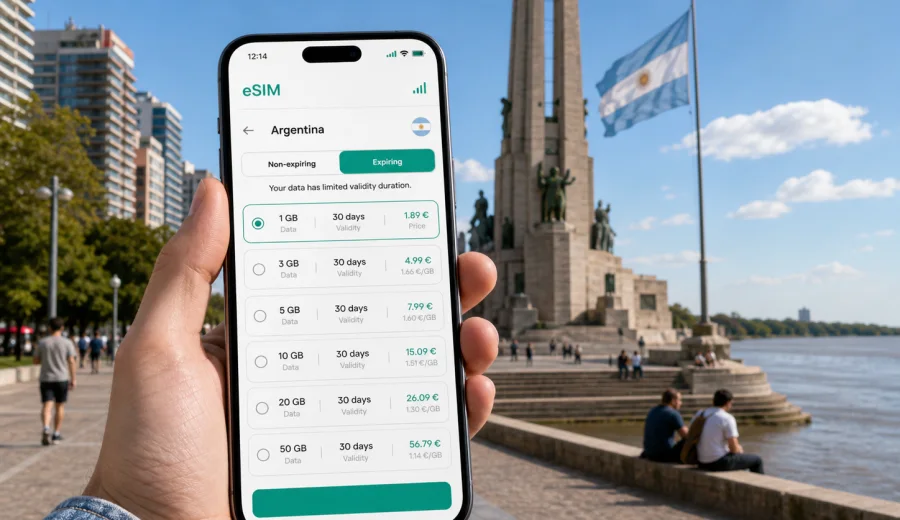
Rosario eSIM: mobile connection and internet for a city trip
Rosario is a city where mobile internet quickly becomes part of the trip. The airport is outside the center, the long-distance bus terminal is in a busy urban area, and many useful places are spread between the Parana riverfront, the National Flag Memorial, Boulevard Orono, Avenida Pellegrini, Pichincha, Puerto Norte, parks, hotels and business districts. A Rosario eSIM helps you keep maps, messaging, ride apps and booking tools available without searching for a physical SIM card shop after arrival.
This guide is about mobile connection and internet in Rosario, Argentina. It is written for travelers who want a practical setup for arrival, city movement, hotels, business meetings, weekend plans, stopovers and trips from Rosario to other parts of the country. The focus is the city: where you will need data, how to prepare an eSIM, how much data may be enough, and which phone settings are worth checking before the first transfer.
Why mobile data matters in Rosario
Rosario is easy to enjoy, but it is not a compact resort where every useful place is next to your hotel. You may land at Rosario - Islas Malvinas International Airport, cross town to the center, visit the riverfront, meet friends in Pichincha, have dinner on Pellegrini, work from Puerto Norte and then return late. In each of those moments, a working data connection can save time.
Mobile internet is useful in Rosario for:
- confirming the route from the airport or bus terminal to your hotel;
- checking addresses around the National Flag Memorial and the waterfront;
- messaging a host, driver, colleague or travel group;
- using map navigation between districts;
- comparing transport options before moving with luggage;
- translating menus, booking notes or local instructions;
- checking event times, restaurant hours and reservation details;
- managing work email or calls between meetings;
- planning a day trip or onward travel in Argentina.
An eSIM is a digital SIM profile that can be installed on a compatible phone without inserting a physical card. In travel use, it is mainly a mobile data solution. It does not automatically include an ordinary phone number, voice calls or SMS unless the selected plan clearly says so. For most city visitors, the main value is practical internet access for maps, messages, reservations and travel apps.
Before you go: quick eSIM checklist
Prepare the connection while you still have stable Wi-Fi. That is easier than troubleshooting in an airport arrivals area, hotel lobby or bus terminal.
| Check | Why it matters for Rosario |
|---|---|
| Device supports eSIM | Not every phone or tablet can install an eSIM profile. Check your device before choosing a plan. |
| Phone is not carrier-locked | A locked device may not allow another data profile. |
| Data amount fits the trip | A weekend of maps and messages needs less data than a work trip with hotspot use. |
| Validity covers all dates | Include arrival and departure days, not only full sightseeing days. |
| Installation is done on Wi-Fi | Home, office or hotel Wi-Fi is better than installing while standing outside the terminal. |
| SIM settings are clear | Decide which line handles mobile data and which line handles calls or messages. |
Arrival in Rosario
Rosario - Islas Malvinas International Airport is northwest of the city center. After landing, you may need to message your hotel, check the route into town, confirm a pickup point, or adjust plans if your flight is late. Airport Wi-Fi can help with a first message, but it is not something to rely on for the whole transfer.
If you arrive by long-distance bus, Terminal de Omnibus Mariano Moreno is another place where mobile data helps immediately. You can confirm your hotel address, decide whether to take a taxi, share your live location with someone, or check which direction to walk before leaving the terminal area.
Travelers arriving by car also benefit from mobile data. It supports navigation around access roads, parking searches and last-minute route changes. This is useful if your destination is not downtown but Funes, Granadero Baigorria, Villa Gobernador Galvez, Puerto Norte or another nearby area connected to Rosario.
Districts and travel scenarios
Different parts of Rosario create different internet needs. Around the National Flag Memorial and the riverfront, you may use maps, photo backup and meet-up messages. In Pichincha and Pellegrini, restaurants, nightlife and ride coordination matter more. In Puerto Norte and business hotels, mobile data is often a backup for meetings and work.
| Area or scenario | Typical online task | eSIM planning tip |
|---|---|---|
| National Flag Memorial and downtown | Walking routes, opening hours, photo sharing | Keep data for maps and messages; postpone large uploads until Wi-Fi. |
| Parana riverfront and Parque Espana | Navigation, meet-up points, ride apps | Save your hotel address and use live routing when plans change. |
| Pichincha | Restaurants, nightlife, transport back to hotel | Keep battery and data available for the return trip. |
| Puerto Norte | Meetings, hotel work, restaurant bookings | Choose enough data for email, maps and calls over messaging apps. |
| Avenida Pellegrini | Food, cafes, local movement | Data helps when plans shift between lunch, meetings and evening routes. |
| La Florida and northern waterfront | Parks, beach, longer local rides | Check transport before leaving and keep a route ready for the way back. |
The goal is not to be online every minute. The goal is to have a reliable way to solve travel tasks when you need a decision: which route, which entrance, which ride, which address, which meeting point or which backup plan.
Choosing an eSIM plan for Rosario
The right data plan depends on your stay and habits. A light traveler who uses maps, messaging and occasional browsing can manage with a smaller package. A business traveler who joins calls, downloads documents and uses hotspot mode should choose more data and check the plan conditions carefully.
As a practical model:
- 1-3 GB can suit a short weekend if you mostly use maps and messaging.
- 5 GB is more comfortable for several days of navigation, bookings, banking apps and travel admin.
- 10 GB or more is useful for work trips, cloud documents, frequent calls over messaging apps or hotspot use.
Do not choose only by price. Check data amount, validity period, destination coverage, activation rules and whether tethering is allowed under the selected plan. If Rosario is one stop in a wider Argentina route, make sure the plan fits the whole trip, not just your first hotel.
Kaspersky eSIM Store is an app and website where you can quickly choose, arrange and activate an eSIM with a suitable data plan for mobile internet during an international trip. If Rosario is your main stop, you can prepare an eSIM plan for Argentina before you travel and keep the setup ready for arrival, hotel check-in and local movement.
Installing the eSIM
Installation depends on your phone and operating system, so use the correct guide for your device. Install the profile on stable Wi-Fi, keep the QR code or activation details available, and check which line is selected for mobile data before you leave for the airport.
For step-by-step setup, use the Android installation guide or the iOS installation guide. Some devices may require data roaming to be enabled for the eSIM profile; follow the conditions and instructions shown for your selected plan.
Do not delete an installed eSIM profile unless you are sure it is no longer needed. On many devices, an eSIM profile cannot simply be moved to another phone after activation. If you change phones shortly before departure, repeat the compatibility check and install the plan on the device you will actually carry in Rosario.
Transport, hotels and work
Transport decisions in Rosario often happen in small moments: leaving the airport, getting across town for dinner, finding the right entrance to an event, or returning to a hotel after a late meeting. Live maps and messages help more than screenshots when streets are busy, the driver takes a different route, or the meeting point changes.
Useful transport tasks include:
- checking travel time from Puerto Norte to the airport;
- sharing your location with a colleague or friend;
- confirming an address before starting a ride;
- saving your hotel as a favorite place in your map app;
- keeping a backup route if traffic or plans change.
Hotels and apartments may have Wi-Fi, but mobile data remains useful outside the room and as a backup if the Wi-Fi is slow or inconvenient. Use Wi-Fi for large updates, long video calls, entertainment streaming and cloud photo backup. Use eSIM mobile data for navigation, urgent email, ride apps, restaurant bookings, two-factor authentication and messages while moving.
For business travelers, Rosario can involve meetings in offices, hotels, cafes, event spaces and industrial or logistics areas around the city. Prepare calendar invites, addresses and documents before departure, then use mobile data for live updates. If you plan to use your phone as a hotspot for a laptop, choose more data than a sightseeing traveler would and check whether hotspot use is allowed by the selected plan.
Short visits and trips from Rosario
Some travelers visit Rosario for one day, a family event, a match, a meeting, a riverfront walk or a connection to another city. Even for a short stop, mobile data is useful because the important tasks are concentrated into a few hours: transfer, luggage, map navigation, food, messages and departure timing.
A simple one-day plan may include:
1. Save your hotel, terminal or airport address offline.
2. Keep mobile data ready for the transfer.
3. Visit the National Flag Memorial and riverfront with live maps available.
4. Use Wi-Fi for large uploads if you stop at a hotel or apartment.
5. Reserve mobile data for the route back to the terminal or airport.
Rosario can also be part of a wider Argentina itinerary. You may continue toward Buenos Aires, Santa Fe, Cordoba or other regional destinations. Before leaving the city, check that your eSIM plan remains valid and appropriate for the route. Save tickets, addresses and booking confirmations locally in case coverage, battery or app access becomes inconvenient during travel.
Data-saving habits
You can make a modest eSIM plan last longer by changing a few settings before the trip.
- Download offline maps for Rosario and nearby routes while on Wi-Fi.
- Disable automatic app updates over mobile data.
- Pause cloud photo backup until you are on Wi-Fi.
- Lower video call quality if you must call from mobile data.
- Send compressed photos instead of large video files.
- Save restaurant, hotel and venue addresses in advance.
- Monitor which apps use background data.
These habits matter most if you are outdoors along the riverfront, moving between neighborhoods, or taking day trips where hotel Wi-Fi is not available. They also help if your data plan needs to cover both Rosario and other Argentine destinations.
FAQ: eSIM and mobile internet in Rosario
Do I need an eSIM for Rosario if my hotel has Wi-Fi?
Hotel Wi-Fi helps in the room, but it does not cover airport arrival, city movement, restaurant searches, ride apps, walking routes or urgent messages. An eSIM is useful as mobile internet outside fixed Wi-Fi locations.
Can I install the eSIM after arriving in Rosario?
You may be able to install it after arrival if you have stable Wi-Fi, but preparation is easier before travel. Installing in advance reduces pressure at the airport, bus terminal or hotel reception.
Does an eSIM include calls and SMS?
Travel eSIM plans usually focus on mobile internet. Ordinary phone number, voice calls and SMS are not included unless the selected plan clearly says so. You can use internet-based messaging and calling apps over mobile data.
How much data should I choose for a weekend in Rosario?
For light use, 1-3 GB may be enough. If you expect frequent navigation, social media, cloud photos, work email or hotspot use, choose more data. Match the package to your habits, not only to the number of days.
Is eSIM useful for a business trip?
Yes. It is useful for calendar access, maps, ride coordination, messaging, document checks and backup connectivity when Wi-Fi is unavailable or inconvenient. Choose a larger plan if you expect calls or hotspot use.
Should I keep my physical SIM active?
Many travelers keep their home SIM active for calls, banking messages or account verification, while the eSIM handles mobile data. Check your phone settings so the right line is used for the right task.
Prepare mobile internet for Rosario
For Rosario, mobile internet is most useful during arrival, local movement, riverfront sightseeing, business appointments, restaurant planning, transport decisions and trips beyond the city. An eSIM can reduce dependence on public Wi-Fi and physical SIM card shops, while keeping the setup manageable on a compatible phone.
Before you go, choose an eSIM plan for your trip to Argentina, check your device settings, and keep the activation instructions available. With Kaspersky eSIM Store, you can choose, arrange and activate an eSIM with a suitable data plan through the app or website, then use it for maps, messaging and practical travel tasks when you arrive. That way, your first hours in Rosario can be spent on the city, not on searching for a mobile internet solution after landing.