
Travel connectivity guide
Roseau eSIM for mobile internet in Dominica
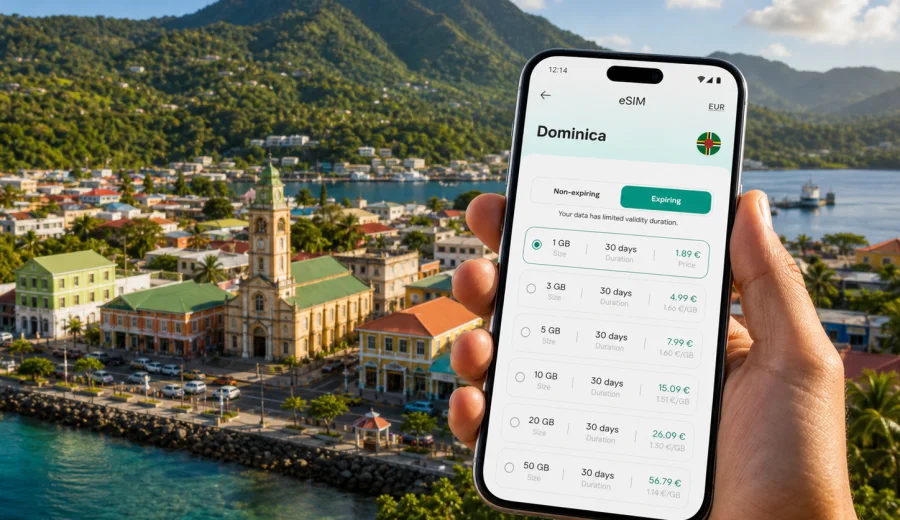
Roseau eSIM: mobile connection and internet for a trip to Dominica's capital
Roseau is a compact Caribbean capital where mobile connection matters from the first practical moment of the trip. You may arrive by ferry, cruise ship, a transfer from Douglas-Charles Airport, or a road journey from another part of Dominica. Soon after arrival, you may need maps, hotel messages, taxi coordination, booking details, weather updates, and mobile internet for travel apps. An eSIM helps you prepare that online access before the city day begins.
This guide is focused on Roseau, not on a general trip to Dominica. It covers arrival, movement around the waterfront and city center, hotels, business visits, short stopovers, and day trips that start from the capital.
Why mobile internet matters in Roseau
Roseau is walkable, but the city works best when you can coordinate as you move. Around the ferry terminal, cruise area, market, government district, botanical gardens, and hotel streets, plans often depend on messages and maps rather than fixed schedules. For longer transfers, visitors usually use taxis, hotel drivers, private transfers, tours, or local transport.
Mobile internet is useful in Roseau when you need to:
- confirm a hotel check-in near the waterfront or city center;
- share your location with a driver or tour guide;
- find a walking route through narrow streets;
- check ferry, cruise, or airport transfer details;
- message a restaurant, dive center, or tour operator;
- use translation, banking, or currency apps;
- stay reachable during a business visit.
Roseau is also a common base for Trafalgar Falls, Morne Bruce, the Roseau Valley, Champagne Reef, Scotts Head, and other nearby routes. A travel eSIM does not replace local advice, but it helps you keep the day organized from your phone.
What an eSIM gives you during a Roseau trip
An eSIM is a digital SIM profile installed on a compatible phone or tablet. In travel scenarios, it is commonly used for mobile data. You choose a destination and a data package, install the eSIM, and then use it for internet access according to the selected plan conditions.
For Roseau, the main benefit is preparation. You can set up the eSIM before departure, keep your usual SIM in the phone if your device supports dual SIM use, and switch mobile data to the travel eSIM when the trip starts. This is helpful if you arrive outside shop hours, have a tight cruise stop, or prefer not to spend the first hour looking for a physical SIM card.
Many travel eSIM data plans do not include a regular phone number, voice calls, or SMS unless the plan terms say otherwise. For calls and messages, you can often use internet-based apps through mobile data. Always check the exact conditions before purchase.
Roseau arrival scenarios where eSIM helps
| Travel moment in Roseau | What you may need online | Why preparation helps |
|---|---|---|
| Ferry or cruise arrival | Maps, pickup messages, hotel route | You can coordinate as soon as you leave the terminal area |
| Airport transfer to Roseau | Driver contact, route updates, hotel messages | The road to the capital is long enough for plans to change |
| First city walk | Live maps, restaurant search, banking app | You are not limited to lobby or cafe Wi-Fi |
| Hotel check-in | Booking confirmation, email, payment app | Essential documents stay available on arrival |
| Day trip from Roseau | Weather, tour messages, group chat | You can confirm pickup and return details |
| Business visit | Email, calendar, document access | You have a separate data option for work tasks |
Choosing an eSIM data plan for Roseau
The right eSIM data plan depends less on the size of Roseau and more on how you use your phone. A traveler who checks maps and messages needs less data than someone who uploads video, joins online meetings, or shares hotspot access with a laptop.
Use these criteria before choosing:
- Destination: Roseau is in Dominica, so choose a plan that covers Dominica.
- Duration: match validity to arrival, city stay, day trips, and departure.
- Data volume: allow extra data for maps, video calls, photo uploads, and app updates.
- Activation timing: check when the validity period starts and when data usage begins.
- Device support: confirm that your phone or tablet supports eSIM and is not locked to one operator.
- Hotspot needs: if you plan to share data with a laptop, check whether tethering is allowed by the selected plan.
How much data might you need?
These examples are for planning only. Real usage depends on app settings, video quality, cloud backup, map downloads, and background updates.
| Trip style | Typical online behavior | Planning approach |
|---|---|---|
| Cruise day in Roseau | Maps, messages, restaurant search | A smaller package may be enough if you avoid streaming |
| Long weekend | Navigation, taxis, hotel apps, light uploads | Choose a moderate package and disable automatic backups |
| Business trip | Email, documents, calls, hotspot backup | Choose more data and test setup before departure |
| Nature-focused week | Tours, weather, photo uploads, route checks | Plan extra data for uploads and map use |
| Multi-island route | Dominica plus other Caribbean stops | Compare country and regional options before buying |
To keep usage under control, download offline maps before departure, set cloud backup to Wi-Fi only, stop automatic app updates over mobile data, and avoid high-resolution video unless your data allowance is large enough.
Roseau areas where being online is useful
Near the waterfront, mobile internet helps with taxis, ferry details, cruise schedules, restaurants, and meeting points. Around the market and city center, maps help with small streets and walking routes. On the roads toward Morne Bruce, Trafalgar Falls, or the Roseau Valley, messages and weather checks can matter more than browsing.
For hotels and guesthouses, an eSIM is useful as a backup. Accommodation Wi-Fi may be available, but it can be slow, busy, password-protected, or limited to certain areas. With a travel data plan, you can keep essential apps available during check-in, early tour pickups, work calls, and late arrivals.
For business visitors, Roseau concentrates offices, government buildings, banks, and meeting venues. A separate travel data option helps you keep email, maps, calendars, and messaging available while moving between appointments.
Prepare before you land or dock
The best time to prepare mobile internet for Roseau is before the trip, while you have stable Wi-Fi. Check the device, choose the destination, install the eSIM, and keep the setup instructions available. If the plan conditions allow installation before activation, you can do the careful part at home and switch data settings when the trip starts.
Before you travel:
1. Confirm that your device supports eSIM.
2. Check that the device is not locked to a single mobile operator.
3. Choose Dominica as the destination for your Roseau trip.
4. Review data volume, validity period, price, and plan conditions.
5. Install the eSIM while you have reliable Wi-Fi.
6. Keep your primary SIM active if you still need your regular number.
7. Make sure mobile data uses the intended SIM after arrival.
If you want to prepare the data plan before the city starts demanding your attention, you can prepare an eSIM data plan for Dominica through Kaspersky eSIM Store and then use it for your Roseau itinerary according to the selected plan conditions.
Installing eSIM for a Roseau trip
Installation is usually a short process, but it is worth doing carefully. After choosing a plan, the eSIM profile appears in your account or app flow, and you follow the device instructions to add it to your phone. Keep Wi-Fi available during installation because the phone needs internet access to download and set up the profile.
For device-specific steps, use the official guides: Android eSIM installation instructions and iOS eSIM installation instructions. The exact menu names can differ by device model and operating system version, so follow the guide for your platform and the prompts on your screen.
After installation, label the eSIM clearly, for example "Dominica data" or "Travel eSIM." This makes it easier to select the right SIM for mobile data when you arrive in Roseau. On some devices, data roaming must be enabled for the travel eSIM profile; check the plan instructions and your phone settings before assuming the connection is ready.
Check compatibility before purchase
Not every phone or tablet supports eSIM, and some compatible devices may be locked by a mobile operator. Before choosing a plan, check your device and confirm that it can use eSIM for mobile data in a travel scenario.
Compatibility checklist:
- the device supports eSIM;
- the operating system is up to date enough for stable setup;
- the device is not carrier-locked;
- you have Wi-Fi for installation;
- you can access the account or email used for purchase;
- you understand which SIM will be used for mobile data.
If you use a dual SIM phone, check calls, messages, and mobile data separately. You may keep your regular SIM for calls or SMS while using the eSIM for data, depending on your phone and operator settings.
Transport, taxis, and local movement
Roseau travel is practical and close-range. You may walk between the waterfront, market, botanical gardens, offices, and restaurants. For longer moves, taxis, hotel drivers, private transfers, tours, and local transport are common. In these situations, mobile internet helps most with coordination.
Useful online tasks while moving around the city:
- send your live location to a driver;
- check the walking route back to the hotel;
- confirm the address of a restaurant or meeting venue;
- message a tour operator if the pickup point changes;
- check weather before heading inland;
- keep booking documents available without printed copies.
Because Roseau sits between the coast and steep green hills, a route may look short on the map but take longer in traffic or rain. Keep extra time for transfers, especially before a ferry, tour, meeting, or airport journey.
Cruises, ferries, and short stopovers
If you have only a few hours in Roseau, mobile internet is mainly about speed. You do not want to spend the first part of the stop searching for Wi-Fi or solving account access issues.
For a short visit, prepare:
- a saved meeting point near the terminal;
- ship, ferry, or tour details stored offline;
- a map of the waterfront and city center;
- a messaging plan for your group;
- enough mobile data for navigation and confirmations;
- a battery plan, because maps and camera use drain power quickly.
A smaller data package may be enough for a cruise day if you avoid streaming. The main value is having internet available when the schedule is tight.
eSIM compared with roaming, Wi-Fi, and a local SIM
There is no single best option for every traveler. Roaming keeps your usual SIM active, but costs depend on your operator. Hotel Wi-Fi is useful for large downloads, but it is not always available while moving around Roseau. A local physical SIM can suit long stays, but it takes time and a SIM slot. A travel eSIM is prepared before arrival and works without a physical card, provided your device is compatible and the selected plan fits your needs.
Quick Roseau mobile internet checklist
1. Choose Dominica as the destination for Roseau.
2. Pick data volume based on real phone habits.
3. Match validity to arrival, stay, day trips, and departure.
4. Confirm eSIM support and carrier unlock status.
5. Install the eSIM with Wi-Fi before travel if possible.
6. Label the eSIM so you can identify it quickly.
7. Keep Android or iOS installation instructions available.
8. Download offline maps and booking documents.
9. Switch mobile data to the eSIM when the trip begins.
10. Monitor data use during city walks, transfers, and day trips.
Common questions about eSIM in Roseau
Can I use eSIM for mobile internet in Roseau?
Yes, if you choose a plan that covers Dominica and your device supports eSIM. Roseau is the capital of Dominica, so the relevant destination is the country plan for Dominica rather than a separate city plan.
Does an eSIM include a local phone number?
Many travel eSIM data plans focus on mobile internet and may not include a regular phone number, voice calls, or SMS. Check the selected plan conditions. For calls and messages, you can often use internet-based apps over mobile data.
Is eSIM useful for a cruise stop in Roseau?
Yes, especially if you need maps, pickup messages, booking confirmations, or group coordination during a short visit. Prepare the eSIM before the stop so you do not lose time after disembarking.
Choose mobile internet for your Roseau trip
Roseau rewards travelers who can move flexibly: confirm a pickup, change a route after rain, message a hotel, check a ferry time, or navigate from the waterfront to a meeting point without waiting for Wi-Fi. An eSIM data plan helps you prepare that practical layer of mobile internet before the city day begins.
With Kaspersky eSIM Store, you can choose a destination, review the data volume and validity period, install the eSIM on a compatible device, and manage the plan through the site or app. Before buying, check compatibility, read the plan terms, and make sure the selected option fits your Roseau itinerary.
If Roseau is on your route, choose an eSIM data plan for your trip to Dominica and prepare mobile internet for arrival, city movement, hotel stays, business tasks, and day trips from the capital.