Travel connectivity guide
Rosia Bay eSIM: Mobile Internet in Gibraltar
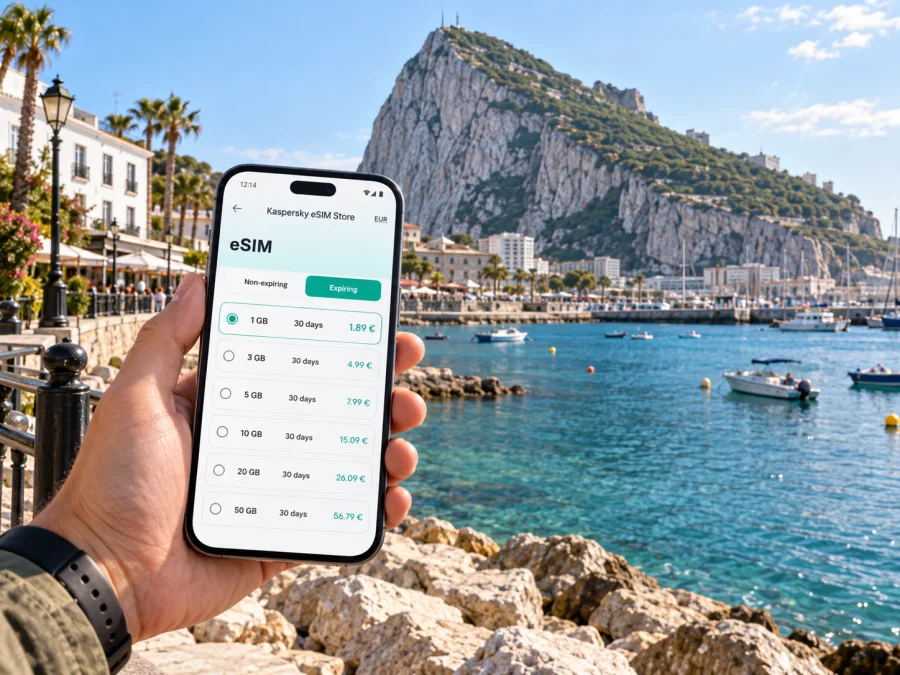
Rosia Bay eSIM: Mobile Connection and Internet for Your Visit
Rosia Bay is a small coastal part of Gibraltar where the Rock, the harbour and traces of maritime history shape the visit. It is not a separate city with a conventional downtown: most practical plans connect the bay with nearby Rosia Road, the South District, the centre of Gibraltar or the southern tip of the peninsula. A dependable mobile connection helps you join those places into one manageable day, check directions as streets rise and turn, and keep plans available when you leave a hotel or café.
An eSIM can be useful if you want mobile internet on your phone without changing its physical SIM. Before your trip, choose a plan for Gibraltar that suits the length of your stay and likely data use, then install it on a compatible, unlocked device. It can support maps, messages, ride and transport planning, and online check-ins; it does not replace a regular phone number unless a plan explicitly says otherwise.
Where Rosia Bay fits into a Gibraltar itinerary
Rosia Bay sits on Gibraltar’s western side, south of the central waterfront. The name is most useful as a destination point rather than as a broad district boundary. When you search for accommodation or plan a walking route, check the exact address and the entrance shown on the map: “near Rosia Bay” may mean a short walk along Rosia Road, while an address farther up the Rock can involve a steep climb.
The bay is also a place to pause and look back at Gibraltar’s maritime past. The battered HMS Victory was brought into Rosia Bay after the Battle of Trafalgar in 1805, with Admiral Nelson’s body aboard. The history is tied to a real harbour setting rather than a large museum complex, so allow time to read any interpretation available on site and to notice how the shoreline and Rock frame the anchorage.
Use Rosia Bay as one stop in a route, not as the only point you enter into navigation. A day might combine the bay with the nearby southern neighbourhoods, continue toward Europa Point, or head north toward the central streets and waterfront. These are different journeys: the south has long views and a quieter residential feel, while the centre concentrates shops, services and onward transport. Check walking time and elevation for each leg rather than relying on distance alone.
Arriving and getting oriented
Gibraltar’s airport is close to the land crossing and the built-up centre. Your onward journey to a place around Rosia Bay depends on the time of arrival, luggage, traffic, and the exact accommodation address. If you arrive by air, first confirm the route from the terminal to your lodging and whether a taxi or public transport best fits your arrival. If you enter Gibraltar overland, allow for the border crossing and check the current route before setting off.
A simple arrival sequence keeps the first hour predictable:
- Save your accommodation address and a map pin before leaving home.
- Keep the full address and a nearby recognizable street or landmark available offline.
- Once you have a connection, check the live route and any service updates before boarding or walking.
- Confirm the final approach on the map. Roads near the Rock can bend, narrow or climb, and the closest point on a map may not be the most convenient entrance.
- After check-in, download or cache the walking area you expect to use, especially if you plan to go toward the southern end of Gibraltar.
Mobile data is most valuable at decision points: finding the correct exit, confirming a stop, comparing two possible routes, or messaging your host when your arrival time changes. You do not need to keep a map open continuously. Looking up the route before you leave and checking it again at intersections can conserve battery and data.
Moving between the bay, the centre and the south
Walking gives you flexibility around Rosia Bay, but Gibraltar is hilly and compactness can be misleading. Check elevation and the actual entrance on your map, wear shoes suited to uneven pavements, and leave extra time if you are carrying bags or walking in warm weather.
Public buses link the southern area with central locations. Routes and timetables can change, so check current information before setting out. Confirm the stop name and direction of travel; nearby stops may serve opposite directions. A taxi can simplify a late arrival or a journey with luggage. Give the driver an exact address or nearby landmark and check where the vehicle can stop if the final road is narrow.
| Trip | Check before setting out |
|---|---|
| Airport or border to lodging | Current route, luggage options and exact entrance |
| Rosia Bay to central Gibraltar | Bus direction, stop location and return route |
| Bay to a southern viewpoint | Elevation, access and daylight |
Keep three map pins ready: your accommodation, Rosia Bay and your next stop. At intersections, compare the mapped public road with the slope and avoid shortcuts across private grounds. For several stops, weigh the time and effort of walking against a bus or direct taxi; weather and traffic may change the best choice.
Choosing mobile internet for a Rosia Bay stay
A city-level itinerary does not require a special “Rosia Bay” plan. Select a destination that covers Gibraltar, then estimate data use from the way you travel. A visitor who mainly checks maps and sends messages may need a different allowance from someone who uploads photos, uses video calls for work, or streams media away from Wi-Fi. Review the plan’s destination, data amount, validity period, activation conditions and other terms before purchase.
If you are visiting Gibraltar as one stop on a wider trip, check each destination and border crossing in your route. A plan for Gibraltar may not automatically cover neighbouring Spain or other countries. Confirm the included geography explicitly and consider whether you need one plan for one destination or a regional option that lists all intended locations.
Kaspersky eSIM Store is an app and website where you can choose, order and activate an eSIM with a suitable plan for mobile internet on an international trip. You can review eSIM plan options for Gibraltar before travel and compare the listed data allowance and validity with your expected stay. The plan’s terms determine where and when it can be used; check those details rather than assuming that every plan has the same conditions.
Estimate the data you will use
Think in activities as well as days. Maps, messages and email are usually lighter than video calls, media streaming or large photo uploads. Download entertainment and documents on Wi-Fi, review automatic backups, and check your phone’s data-usage screen on the first day. If use is higher than expected, pause background sync and reserve mobile data for navigation and essential communication.
Prepare your phone before leaving
Before ordering, confirm that your phone supports eSIM and is not restricted by a carrier lock. Support can vary by model and region, so check the exact device. Check whether your device supports eSIM before purchase.
A data-focused travel eSIM usually does not replace your regular number or include voice calls and SMS unless its terms say so. You may be able to keep your usual SIM active for calls while selecting the eSIM for mobile data; check your home provider’s roaming charges before enabling its data line.
Before departure, confirm the plan covers Gibraltar, compare its validity with your dates, and make sure you can access the installation instructions. Save your lodging address and nearby map area, charge your phone, and decide which line will handle data. Install the eSIM over a stable internet connection and keep its order details until it works. Avoid deleting the profile while troubleshooting, as reinstalling may depend on the plan.
Installing and activating an eSIM
Screens vary by phone, but the usual process is to connect to Wi-Fi, open the order instructions, and add the eSIM in mobile or cellular settings. Label the line “Travel data,” then select it for mobile data when the plan should begin. Follow the plan’s activation rules so you know when validity starts; some devices or plans may require data roaming to be enabled for the travel eSIM.
For device-specific steps, see the Android eSIM installation instructions or iOS eSIM installation instructions. If data does not start, check that the line is enabled and selected, and confirm the destination and dates in the plan. Follow its setup guidance before changing advanced settings; contact support through your order details if the issue remains.
Where mobile internet helps around Rosia Bay
At the waterfront, a map can help distinguish the bay from Rosia Road and the streets above it. Save the bay pin before walking down, then check the return route at a safe stopping point. Along Rosia Road and in the South District, use the exact building name and entrance: an address may sit above street level, and a central map pin may not mark the correct doorway.
When heading north toward Gibraltar’s central streets or waterfront, check the route before leaving and again at a junction or bus stop. For a wider day out, treat southern viewpoints and central stops as separate legs; check elevation, access and current opening details rather than assuming the map’s shortest line is the easiest walk.
Hotels, apartments and business stays
Choose accommodation by the route from its entrance, not just its straight-line distance from Rosia Bay. Check the nearest useful bus stop, the incline, and whether the final stretch suits luggage. For an apartment, save the building name, entrance instructions and host contact details; the door may be on a different street from the map pin.
Business visitors can use mobile data for calendars, email, maps and messages between appointments. Save meeting addresses and important documents in advance, confirm whether the venue has Wi-Fi for calls, and leave a buffer for hills or a change of transport. Stop somewhere safe before handling a call or checking detailed directions.
Short stopovers and changing plans
For a brief visit, save your next address and identify how you will return to your departure point. Choose one or two stops rather than planning a long loop across the Rock. If plans change, mobile data can help you check a bus, message a contact or reroute; keep a screenshot of key directions and enough battery for the return journey. If you cross into Spain or another country, confirm that your plan covers it before relying on data.
Common questions
Is Rosia Bay a separate city?
No. Rosia Bay is a coastal area within Gibraltar. Use the exact address and map pin for accommodation or appointments, since the name does not describe a large city centre with one obvious boundary.
Is an eSIM useful if I am staying only around Rosia Bay?
It can be useful if you want mobile data for maps, messages and changing plans while you are away from Wi-Fi. Choose a plan whose Gibraltar coverage, data allowance and validity match your visit, and check the conditions before ordering.
Will a travel eSIM give me a local phone number?
Usually a data-focused travel eSIM does not replace a regular phone number or include voice calls and SMS unless the plan explicitly lists them. Messaging and internet calls may work through apps over data, subject to the app and plan conditions.
Should I install the eSIM before or after arrival?
That depends on the plan’s activation rules and your preference. Installing before departure while connected to Wi-Fi can make setup easier, but read when validity begins. If you wait until arrival, make sure you have a reliable connection and enough time to complete setup.
Can I rely on a map without mobile data?
You can prepare by saving an offline map where your map app allows it, along with key addresses. Offline maps may not provide live service updates or every search result, so a working data option remains useful when you need current directions.
What should I check if the eSIM is installed but there is no data?
Confirm that the eSIM line is enabled, selected for mobile data, and valid for the destination and date. Then follow the setup instructions for the plan; some devices may require data roaming on that line. Avoid deleting the profile before checking the guidance or contacting support.
A calm plan for Rosia Bay
Before you leave, make sure you can answer four questions: where exactly are you staying, how will you reach it with your luggage, which places around Gibraltar do you want to visit, and what data allowance fits those plans? Save the important addresses, check transport close to departure, and leave room for slopes and short pauses along the way.
Rosia Bay rewards a slower visit: take in the water, the Rock and the harbour’s history, then use the rest of your day to connect the southern coast with the centre or another part of Gibraltar. A prepared eSIM can make maps and messages easier to reach as you move between those stops, while the plan details and your phone settings remain under your control.
Choose an eSIM plan for your trip
Kaspersky eSIM Store lets you use its app or website to choose, order and activate an eSIM with a suitable plan for mobile internet abroad. Review the data allowance, validity and destination coverage, then follow the setup instructions for your device. Choose a plan for your Gibraltar trip before you travel so your arrival in Rosia Bay can begin with the practical details already in hand.


