Travel connectivity guide
Rotterdam eSIM: Mobile Data for City Travel
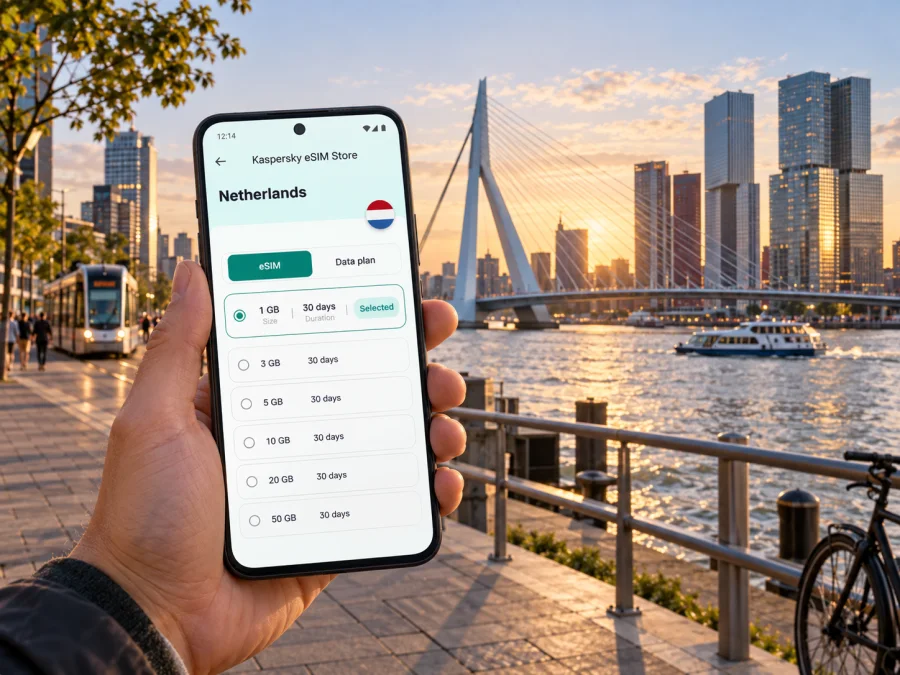
Rotterdam eSIM: mobile connection and internet for your city trip
Rotterdam is a city of broad quays, compact historic pockets, striking modern buildings and busy transport interchanges. A working mobile connection can make the first hours simpler: check your hotel address, follow directions from the airport, meet a colleague near Rotterdam Centraal or find your way back after an evening along the Maas. An eSIM gives your compatible phone a way to use mobile data without inserting a physical travel SIM. You can prepare it before leaving and use it for maps, messages, bookings and other online tasks during your stay.
The city is easy to approach as a set of connected neighbourhoods rather than one sightseeing circuit. A day may begin at Rotterdam The Hague Airport, continue by public transport into the centre, cross the river for a meeting in Kop van Zuid and finish around the Markthal or Witte de Withstraat. For each move, your phone can hold the next address, a transit search, a reservation or a message. Planning mobile data before departure helps keep those small tasks together when you need them.
The first hours after arriving
Rotterdam The Hague Airport is northwest of the city centre. Your onward journey depends on your arrival time, luggage, destination and the transport option you choose. Before setting out, confirm the address of your accommodation and how its name appears in your booking. A saved address is useful if you need to show it to a driver, compare routes or continue navigating when you switch between transport modes.
If you are landing at the airport, use the airport name as the start point in your route search and check the suggested journey against the signs and current service information on site. A route may involve a connection, so keep the complete destination visible rather than relying on a remembered street name. If a colleague or host is meeting you, send a short message once you know where you are waiting. For a late arrival, verify check-in arrangements before boarding your flight; mobile data cannot replace a confirmed booking or a reception desk.
Rotterdam Centraal is a useful reference point for many visitors arriving by train or transferring through the city. It is a large interchange, and the next leg may be on foot, by tram, metro, bus, taxi or another train. Check the route to the exact entrance or street address of your hotel: places described as “central” can still be a meaningful walk from the station, especially with a suitcase. A map on your phone helps you compare the walking route with public transport without having to decide from a broad neighbourhood label.
Arrival checklist
- Save your hotel or meeting address in a note before the trip.
- Keep the booking confirmation and check-in details available offline.
- Check the current journey from the airport or station when you arrive.
- Confirm which transport stop is closest to the destination, including the street side if the route gives one.
- Send your arrival update after you have a clear place to meet.
- Keep your home SIM settings in mind if you need to receive calls or messages on that number.
These steps are useful even when the journey goes smoothly. If a platform changes, a transfer takes longer or you need to adjust a meeting point, you will have the address and booking details ready while you search for an alternative.
Getting around between Rotterdam’s districts
Rotterdam has a public transport network of metro, tram and bus routes, alongside trains and ferries on some journeys. The best option depends on where you start and finish, the time of day, the distance and whether you are carrying luggage. Use current route information for the trip you are actually making. A transport map is a good overview, while a live journey search can help with connections and walking legs.
The city’s layout makes orientation especially important. The Nieuwe Maas divides parts of Rotterdam, and a nearby point on the opposite bank may require a bridge, tunnel, ferry or a longer route through the network. A map can show the distance as short while the practical crossing takes more planning. When you make plans on both sides of the river, check the full route rather than assuming that the closest-looking street leads directly across.
| If you are going to… | Useful way to plan | What to confirm |
|---|---|---|
| Rotterdam Centraal | Search from the station’s exact entrance or your platform area | The final address and walking time with luggage |
| The centre and Markthal | Combine a map pin with the nearest transport stop | The route from the stop to the building entrance |
| Kop van Zuid | Check the crossing and the complete journey over the Maas | Whether your route uses public transport, a bridge or another connection |
| A meeting in an office district | Save the building name and street address | Reception location, entrance and meeting time |
| A late dinner or event | Plan the return journey before you set out | Current service times and another way back if plans change |
The table is a planning aid, not a timetable. Routes and services can change, and a route that looks convenient on a small screen may be less comfortable with luggage or in poor weather. Check the details shortly before leaving and leave room for the walk between the stop and your destination.
For short trips within a district, walking can be the simplest option. Keep navigation open for the final turns around construction sites, large blocks or waterfront promenades, where an address may be on a different side of a building from the one you first reach. If you are cycling, follow the route and local signs carefully and avoid handling your phone while moving. Stop in a safe place when you need to check the next turn or reply to a message.
Mobile data is also useful when plans change. You may need to compare a route, check a reservation, contact a host or tell someone that you are running late. An eSIM can keep these tasks available over a mobile data connection, subject to the coverage and conditions of the selected plan. It does not replace local transport tickets, a voice telephone number or emergency arrangements, so keep those needs separate when preparing your trip.
Choosing an eSIM plan for a Rotterdam visit
Start with the shape of your stay rather than a guess at the largest data package. A short visit with occasional maps and messaging has different needs from a week of video calls, cloud work and frequent photo uploads. List what you expect to do on mobile data, then consider the length of the trip and any onward destinations. If you will leave Rotterdam for another Dutch city, confirm that the plan applies to the full route and destination, not only to a city name.
In the Kaspersky eSIM Store app or on the website, you can choose an eSIM plan for the Netherlands for your trip, review its terms, then order and activate the selected eSIM. Compare the plan’s data allowance, validity period, activation conditions and supported destination against your itinerary. These details can differ between plans, so read the information shown for the option you select. A city name in a search phrase does not mean that a plan is limited to Rotterdam; check the stated country or regional coverage.
Match the plan to your routine
Picture a typical day: checking in, using maps between appointments, messaging a travel companion, and looking up a reservation or route in the evening. Work visits may add email, shared documents or video calls, which can use more data. Estimate your own use rather than choosing by trip length alone.
| Travel pattern | What to consider |
|---|---|
| Short city break | Maps, messaging and booking details |
| Several days in Rotterdam | How often you will search routes, share photos or use app-based services |
| Business visit | Email, meetings and file transfers over mobile data |
| Rotterdam plus other stops | Whether every destination is covered by the plan |
Navigation and text messages generally use less data than video streaming or large uploads, though app settings affect actual use. Download offline maps where available, use Wi-Fi for large updates when appropriate, and review automatic photo backups. If your itinerary extends beyond Rotterdam, compare every destination with the plan’s coverage and conditions before purchasing.
An eSIM plan is for mobile data unless its terms state otherwise. Do not assume it includes a regular phone number, voice calls or SMS. If you need your usual number for calls or verification codes, check how your home SIM works abroad and which line your phone will use for data.
Install and prepare before you travel
If possible, complete setup while you have reliable internet access and time to read each screen. Before buying, check that your device supports eSIM and is not carrier-locked. Support can vary by model, variant, market and software configuration, so confirm the exact phone you will take.
Follow the instructions for your device: eSIM installation instructions for Android or eSIM installation instructions for iOS. Read the plan terms and on-screen steps carefully. Installation and activation are separate: the profile is added to your phone during installation, while when the plan becomes active depends on its stated conditions. Do not assume that scanning a code or arriving in Rotterdam starts validity in every case.
Before departure, confirm that the device is compatible and unlocked, the plan covers your destinations, and you understand its activation and validity terms. Know where to select the eSIM for mobile data. Once in the Netherlands, follow the plan guidance; some plans may require data roaming to be enabled for that eSIM. If the connection does not appear, check that the profile is enabled, the correct data line is selected and the activation conditions have been met. Avoid deleting the profile as a first troubleshooting step.
Navigation, districts and practical city routines
Rotterdam’s destinations have different rhythms. The area around Rotterdam Centraal is useful for rail connections, while the centre, market area, waterfront and Kop van Zuid can each anchor a separate walk or outing. Save map pins for your hotel, station, meeting place and reservations. For large venues, verify the entrance in the booking details; a street address may not lead to the correct door.
The Nieuwe Maas divides parts of the city, so a place that looks close across the river may require a bridge, tunnel, ferry or a longer route through public transport. Check the complete journey before setting off, especially if you have luggage or a fixed appointment. Group nearby plans together, leave time for transfers and walks, and keep an alternative in mind if the schedule changes.
For a meeting, agree on a precise landmark or share a map pin instead of saying only “by the station” or “near the market.” If you are cycling, follow local signs and stop safely before checking your phone. A saved address is useful if mobile service is temporarily unavailable.
Hotels, business trips and stopovers
For a hotel, save its full name, address, confirmation number and check-in notes. Check the route from Rotterdam The Hague Airport or Rotterdam Centraal at the time you expect to arrive. A mobile connection helps with booking messages and directions, but it cannot replace confirmed check-in arrangements.
Business travellers may use a phone for calendars, email, meeting links and two-factor authentication. Check which tasks need mobile data, and plan large downloads or software updates before departure where possible. Follow your organization’s policies for work information and keep an alternative way to access essential documents.
If Rotterdam is a stop on a wider Netherlands itinerary, review the plan’s destinations and conditions against the whole route. Save onward tickets, accommodation details and the return route to the station or airport. For a short stopover, focus on the time available, luggage arrangements and a realistic return journey rather than trying to fit in distant attractions.
Frequently asked questions
Is an eSIM useful for a city break in Rotterdam?
It can help you use mobile data for maps, messages, bookings and apps without changing your physical SIM. Check your device, itinerary and plan terms before choosing.
Can I use the same eSIM outside Rotterdam?
Check the selected plan’s coverage description. If you add another Dutch city or country, confirm that each destination is included and that its conditions fit your trip.
Will an eSIM give me a normal phone number?
Do not assume so. Travel eSIM plans are commonly intended for data; voice calls and SMS are included only when the plan says so. Keep your regular number available if you need it for calls or verification.
Should I install the eSIM before arriving?
If the instructions allow it, setup before departure can simplify arrival. Read the activation terms first: installation and the start of validity are not necessarily the same event.
Prepare your Rotterdam connection
Before the trip, save your arrival address, check the route from Rotterdam The Hague Airport or Rotterdam Centraal, and decide how you will use mobile data during the stay. Review the eSIM plan’s destination, validity, allowance and activation terms, then follow the installation steps for your phone. Once in Rotterdam, use current route information for each journey and keep essential bookings within reach.
When you are ready, select an eSIM plan for your Netherlands trip in Kaspersky eSIM Store. Choose an option that fits your itinerary and expected data use, and check your device and plan conditions before travelling.


