
Travel connectivity guide
Rurrenabaque eSIM: Mobile Internet in Bolivia
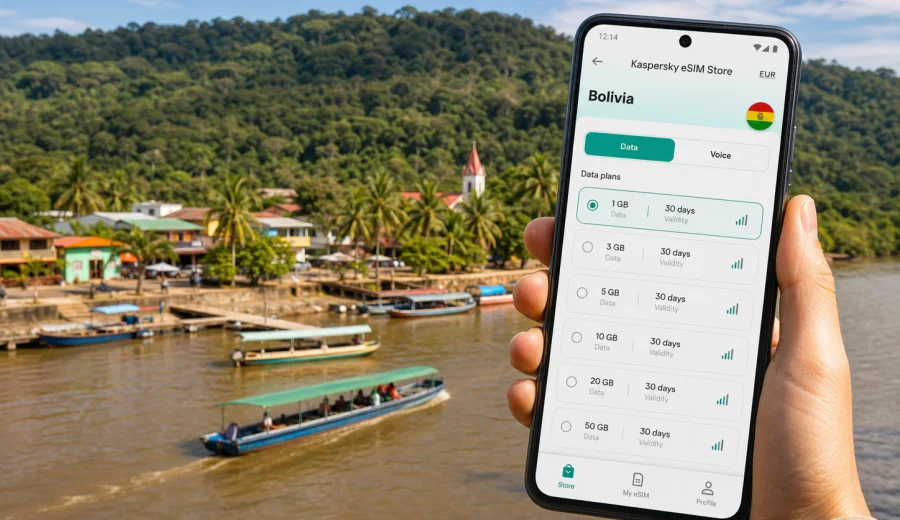
Rurrenabaque eSIM: mobile connection and internet for a Bolivia trip
Rurrenabaque is a small Bolivian travel hub where mobile internet becomes useful very quickly. You may arrive by air, by road from La Paz, or as part of a longer route through the lowlands, and the first practical tasks are usually simple: confirm your hotel, message a guide, open a map, check the riverfront location, and keep your next transfer visible. An eSIM can make that first hour easier because you do not need to look for a physical SIM card before you can use mobile data.
This guide is about using an eSIM for Rurrenabaque specifically, not just for Bolivia in general. The town sits by the Beni River and is often used as a base for Madidi National Park, pampas tours, short nature stays, and overland trips into the Amazon basin. Your internet needs may be different from a weekend in a large capital: maps, messaging, confirmations, tickets, cloud documents, and travel photos matter, while remote routes can still have patchy signal.
An eSIM is a digital SIM profile installed on a compatible phone or tablet. For travel, it is mainly used for mobile data, so you can use maps, messengers, booking apps, email, translation tools, and online payments without changing your main physical SIM card. Kaspersky eSIM Store is an app and website where you can choose, arrange, and activate an eSIM with a suitable mobile data plan for a foreign trip. It helps you prepare mobile internet for your destination, while the actual network experience depends on the selected plan, local coverage, device settings, and conditions in the area.
Why mobile internet matters in Rurrenabaque
Rurrenabaque is compact, but the trip around it is not always linear. You may move between the airport area, the riverfront, guesthouses, tour offices, boat departure points, cafes, and nearby viewpoints. A working mobile connection helps you handle the details that make a small-town arrival feel predictable.
Typical uses include:
- opening offline and online maps when street names are not enough;
- messaging a hotel or tour office about check-in time;
- confirming a boat, shared transport, or pickup point;
- checking weather before a river or rainforest day;
- translating short messages in Spanish;
- keeping travel documents, tickets, and booking references accessible;
- sharing your location with a travel companion;
- using a ride, taxi, or private transfer contact where available;
- checking onward routes toward La Paz, Reyes, or other parts of Bolivia.
For many visitors, Rurrenabaque is also a place where plans change. Rain, river conditions, road timing, or tour availability can shift the day. Mobile data is not a guarantee that everything will work everywhere, but it gives you more control when you need to adjust quickly.
Arrival scenarios where an eSIM helps
The most useful moment for an eSIM is often before you have settled in. If your mobile data plan is already installed and ready to activate, you can start handling arrival tasks without waiting for hotel Wi-Fi or searching for a local shop.
| Arrival situation | What you may need online for | Why an eSIM can help |
|---|---|---|
| Landing at or near Rurrenabaque | hotel address, pickup messages, maps | You can check the next step before leaving the arrival area |
| Overland arrival from La Paz | route updates, contact with accommodation, battery planning | Long journeys can shift timing, so messaging is useful |
| Joining a tour the same day | guide contact, meeting point, equipment list | You can confirm details while moving through town |
| Late arrival | check-in instructions, food options, family updates | You rely less on finding open Wi-Fi immediately |
| Business or NGO travel | email, shared documents, calls via apps | You can keep essential communication available on arrival |
Many local arrangements in Rurrenabaque still happen through people, offices, and hotels. Mobile internet does not replace that help; it keeps your own travel information available when you need it.
City movement: maps, hotels, tours, and the riverfront
The center of Rurrenabaque is manageable on foot, but mobile data is still practical. Hotels and guesthouses can be spread between the town center, quieter streets, and river-facing areas. Tour offices, restaurants, small shops, and transport points may be close together, yet you still need a map when you arrive tired, carrying luggage, or trying to meet someone at a precise spot.
For a short stay, the most common online tasks are lightweight:
1. Save your hotel and tour office in a map app.
2. Download the Rurrenabaque area for offline backup.
3. Keep mobile data available for live location and messages.
4. Store screenshots of booking confirmations.
5. Tell a companion or family member when you leave town for a tour.
Cloud photo backup, video calls, and social media uploads can increase data use quickly. In Rurrenabaque, it is usually smarter to save large uploads for hotel Wi-Fi and keep mobile data for navigation, messages, tickets, and practical travel tools.
Choosing data volume for a Rurrenabaque trip
There is no single correct amount of mobile data. The right eSIM plan depends on your trip length, how much you use Wi-Fi, whether you travel alone, and whether you work remotely. Use the table below as a planning guide, then compare it with the conditions of the plan you choose.
| Travel style in Rurrenabaque | Likely mobile data use | Practical plan logic |
|---|---|---|
| 1-2 day stopover | low to moderate | maps, messages, check-ins, light browsing |
| 3-5 day nature trip base | moderate | tour coordination, photos, weather, booking changes |
| Remote work or business visit | higher | email, cloud files, calls through apps, hotspot use |
| Multi-city Bolivia route | moderate to high | data needed outside Rurrenabaque as well |
| Heavy photo and video sharing | high | choose more data or keep uploads for Wi-Fi |
For most travelers, the safest approach is to estimate your daily use, add a buffer for route changes, and choose a plan with a validity period that covers the full time you expect to be in Bolivia. If your route includes La Paz before or after Rurrenabaque, Uyuni, Santa Cruz, or another Bolivian destination, choose based on the whole route rather than the town alone.
What to check before you buy an eSIM plan
Before choosing a plan for Rurrenabaque, check three things: device compatibility, route coverage, and plan conditions.
- Device compatibility: your phone or tablet must support eSIM, and it should not be locked to a carrier in a way that prevents adding another profile. You can check your device before you choose a plan.
- Destination: for a city article, the relevant destination is the country the city belongs to, so Rurrenabaque uses Bolivia plans.
- Validity period: the plan should cover your arrival, your stay, and any onward travel in Bolivia.
- Data volume: include maps, messaging, travel apps, and any work needs.
- Activation rules: read when the validity period begins and whether the plan activates on installation or when it connects to a supported network.
- Calls and SMS: travel eSIM plans are commonly focused on mobile data. Ordinary phone calls and SMS are not included unless the selected plan says so.
- Roaming data setting: on some devices, mobile data for the eSIM may require data roaming to be enabled for that eSIM profile.
This checklist is especially useful for Rurrenabaque because many visitors go beyond town. When you leave for river or forest routes, signal quality can vary. Plan your essential online tasks before leaving the center, and do not rely on mobile data as the only place where your documents, meeting details, or emergency contacts are stored.
When to activate your eSIM for Rurrenabaque
You can usually prepare the eSIM before departure and keep activation timing aligned with the selected plan rules. The practical sequence is:
1. Install the eSIM profile while you still have stable internet.
2. Keep your primary SIM active for your normal number if you need it.
3. On arrival in Bolivia, set the eSIM as the mobile data line.
4. Check that data roaming is enabled for the eSIM if the instructions require it.
5. Test maps, messages, and a web page before you leave the arrival area.
If you are flying or taking a long road journey to Rurrenabaque, preparation matters. Installing the eSIM while connected to reliable Wi-Fi at home, at a hotel, or before the final leg reduces the number of things you need to solve after arrival.
For a simple starting point, you can use Kaspersky eSIM Store to prepare an eSIM plan for your Bolivia trip and then choose the data volume and validity period that match your Rurrenabaque itinerary.
Practical data-saving habits in Rurrenabaque
Small habits can make a travel eSIM last longer:
- download offline maps for Rurrenabaque and your route before arrival;
- disable automatic photo and video backup on mobile data;
- update apps on Wi-Fi only;
- use lower video quality when calling through apps;
- save hotel addresses, tickets, and tour details as screenshots;
- turn off background data for apps you do not need during the trip;
- use Wi-Fi for large uploads when the network is reliable;
- monitor remaining data in your phone settings or app profile.
These habits are useful because Rurrenabaque travel can include stretches away from strong signal. Save the essentials in advance so mobile data supports the trip instead of becoming the only place where important details live.
How to install an eSIM before a Bolivia trip
The exact steps depend on your device, operating system, and selected plan, but the core process is consistent. You choose the destination and plan, install the eSIM profile, then set it as the line for mobile data when you are ready to use it.
General installation flow:
1. Make sure your device supports eSIM and is not carrier-locked.
2. Choose a Bolivia plan with suitable data volume and validity.
3. Complete the order in Kaspersky eSIM Store.
4. Install the eSIM using the on-screen instructions or QR code.
5. Name the line clearly, for example "Bolivia data".
6. On arrival, select that line for mobile data.
7. Keep your usual SIM for calls or messages if you need your home number.
For device-specific setup, follow the Android installation guide or the iOS installation guide. Install the profile only when you can follow the instructions calmly and keep a stable internet connection during setup.
What eSIM can and cannot do in Rurrenabaque
An eSIM helps you access mobile data through a compatible device and a selected travel plan. It can support maps, live location, hotel messages, booking apps, weather checks, and internet-based calls when data is available. It does not make coverage universal, replace local emergency planning, or automatically include a local phone number.
This distinction matters in Rurrenabaque because many of the best experiences are outside the town center. Use mobile data for coordination and practical tools, but keep offline maps, saved contacts, and written meeting details.
Checklist before leaving town for a tour
Before a pampas, river, or rainforest excursion, do a quick digital check while you still have a stable connection:
- confirm the meeting point and start time;
- save the guide or office contact;
- download offline maps or route screenshots;
- tell someone your expected return date;
- charge your phone and power bank;
- turn off unnecessary background data;
- keep copies of travel documents available offline;
- check your remaining eSIM data allowance;
- make sure your hotel address is saved for return.
If the tour operator gives specific communication instructions, follow those. Mobile internet can support the trip, but local guidance should shape how you prepare for remote areas.
FAQ about eSIM and mobile internet in Rurrenabaque
Is an eSIM useful for Rurrenabaque if the town is small?
Yes, it can be useful because the main need is not distance inside town, but coordination. You may need maps, messages, booking details, hotel directions, and tour confirmations as soon as you arrive.
Should I choose a Rurrenabaque-specific or Bolivia plan?
For a city trip, choose the country destination that includes the city. Rurrenabaque is in Bolivia, so you should look at Bolivia options and check that the validity period fits your full route.
Can I use an eSIM for calls?
Travel eSIM plans are usually focused on mobile data. Ordinary phone calls and SMS are not included unless the selected plan states otherwise. You can use messaging and calling apps over mobile data when the connection is available.
When should I install the eSIM?
Install it when you have a stable internet connection and time to follow the setup steps. Many travelers prefer to install it before departure and activate mobile data on arrival, subject to the plan rules.
Choose an eSIM plan before your Rurrenabaque trip
Rurrenabaque is the kind of destination where a prepared mobile connection can make travel simpler: you can confirm a pickup, find your guesthouse, message a guide, check your route, and keep key documents available without waiting for the next Wi-Fi network. Before you travel, check that your device supports eSIM, choose a data volume that fits your itinerary, and read the selected plan conditions carefully.
Kaspersky eSIM Store helps you choose, arrange, and activate an eSIM with a suitable mobile data plan for a foreign trip. If Rurrenabaque is part of your Bolivia itinerary, you can choose an eSIM plan for travel in Bolivia before departure and keep your arrival tasks easier to manage.