
Travel connectivity guide
Saar eSIM: mobile internet for Bahrain trips
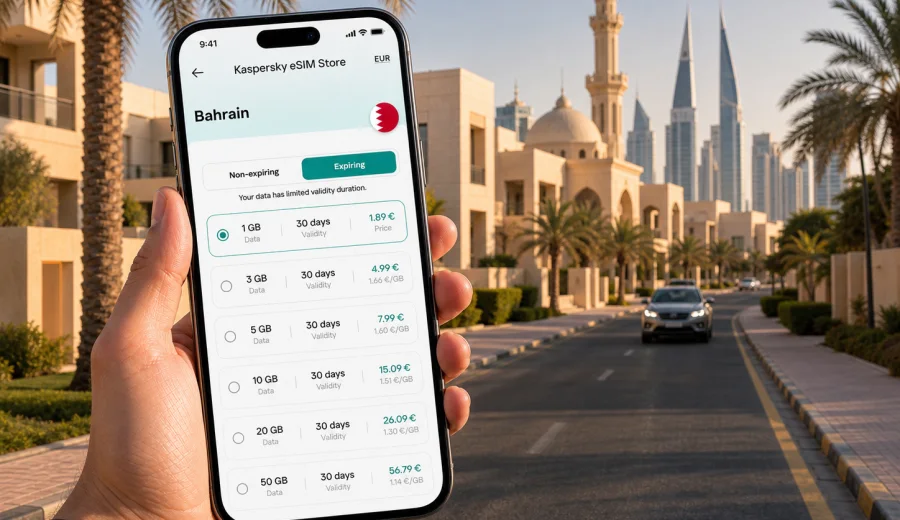
Saar eSIM: mobile connection and internet for your trip
Saar is a practical base for a Bahrain trip: calm residential streets, family visits, business stops near the western side of Manama, quick drives to Seef and Budaiya, and easy access to the island's main roads. It is not the place where you want to spend your first hour looking for a SIM counter or asking hotel staff which Wi-Fi network is stable. A working eSIM can make the small moments of the trip easier: opening maps after arrival, checking a ride-hailing app, sending your location to family, confirming a meeting time, or finding the entrance to a villa compound after dark.
This guide focuses on mobile internet and mobile connection in Saar, Bahrain. It is written for travelers who already know they need data, but want to understand how eSIM fits the actual city scenario: airport arrival, transfers, local driving, hotel stays, remote work, errands, short stopovers, and day trips from Saar to other parts of Bahrain.
Why mobile data matters in Saar
Saar is close enough to Manama to feel connected to the capital, but local movement is often car-based. You may be staying in a villa, visiting relatives, attending a school event, working from a hotel apartment, or moving between Saar, Janabiyah, Budaiya, Seef, and central Manama. In these routes, mobile data is useful less for sightseeing and more for coordination.
A data connection helps when you need to:
- confirm a pickup point after landing at Bahrain International Airport;
- use maps while driving from Muharraq or Manama toward Saar;
- message a host when a residential address is inside a compound;
- check traffic before taking Budaiya Highway or a route toward Seef;
- find cafes, clinics, supermarkets, banks, or malls nearby;
- open booking confirmations without relying on hotel Wi-Fi;
- join a work call from a serviced apartment or coworking-style cafe;
- keep family informed when your plans move between Saar and Manama.
The city pattern is simple: you move between quiet residential zones and busier commercial areas. That makes reliable mobile internet useful throughout the day, not only during tourist activities.
Arrival: from the airport to Saar
Most visitors arrive through Bahrain International Airport. Saar is not next to the terminal, so the first useful moment for data often comes before you reach your accommodation. You may need to contact a driver, open a ride app, share a live location, check the route, or message the person meeting you at the property.
If you activate an eSIM before the trip, you can land with a plan already installed on your phone and then turn on the right mobile data line after arrival. If you prefer to wait, you can still install it after landing while connected to airport or hotel Wi-Fi, but that adds one more step during a busy moment. For a short stay or a late arrival, preparing earlier is usually calmer.
For Saar specifically, save these details offline before you fly:
- the full accommodation address, including compound name if relevant;
- the phone number of your host, hotel, office, or driver;
- a screenshot of your booking confirmation;
- the name of the nearby landmark, mall, school, or main road;
- your planned route from the airport to Saar.
Offline backups are still useful, but they work best when paired with mobile data. A screenshot can tell you the address; a data connection helps you contact the driver if the pickup point changes.
Local movement around Saar
Saar is a place where many journeys are short but specific. You may be moving from a hotel apartment to a private address, from Saar Mall to a meeting, from a family home to Seef, or from a residential street to Budaiya. A city article about eSIM for Saar should not treat the trip like a generic beach holiday. The value is in local precision.
Mobile internet can help in several Saar scenarios:
| Situation in Saar | Why mobile data helps |
|---|---|
| Finding a villa or compound | Maps, live location sharing, and messages reduce back-and-forth at the gate. |
| Moving between Saar and Seef | Navigation helps compare routes and avoid unnecessary detours. |
| Visiting family or friends | Messaging apps keep everyone updated when plans change. |
| Business meetings | Calendar updates, email, cloud documents, and ride coordination depend on data. |
| Short errands | Search, maps, banking apps, and translation tools are easier with your own connection. |
| Late arrival | You can contact hosts, check the route, and confirm access instructions. |
Public Wi-Fi may be available in some hotels, cafes, and malls, but it does not help much while you are in a car, waiting outside a property, or moving between neighborhoods. A travel eSIM is mainly useful because it keeps mobile internet available between those fixed Wi-Fi points.
Saar, Manama, Seef, and Budaiya: choosing the right scope
When you choose an eSIM plan for Saar, think in terms of the whole Bahrain stay, not only the residential area where you sleep. Saar is often part of a wider daily route. You may spend mornings in Saar, meetings in Manama, evenings in Seef, and family time near Budaiya or Janabiyah.
For most travelers, a Bahrain plan is the natural scope because the trip stays within one country. If your itinerary includes Saudi Arabia, the United Arab Emirates, Qatar, or another nearby destination, check whether you need a separate plan or a regional option for that wider route. Do not assume that one country plan covers every stop in the Gulf. Always read the destination, validity, and data allowance before you activate.
Use this quick planning method:
1. List the places you expect to visit: Saar, Manama, Seef, Budaiya, Riffa, Amwaj, or another area.
2. Count your connected days, including arrival and departure days.
3. Estimate whether you will mostly use maps and messaging or also video calls and tethering.
4. Check whether your device supports eSIM before you pay.
5. Install the eSIM while you have stable Wi-Fi, then activate it according to the plan instructions.
This keeps the choice practical. You are not trying to predict every megabyte; you are matching the plan to the way you will actually move around Bahrain.
How much data is enough for a Saar stay?
Your data needs depend on behavior, not only the length of the trip. Saar can be a quiet base, but travelers often use mobile data heavily because they move by car and coordinate with people across Bahrain.
For a light user, messaging, maps, email, and browser searches may be the main tasks. A moderate user may add social media, photo uploads, cloud files, and ride apps. A heavy user may join video meetings, stream media, use hotspot for a laptop, or upload many images and videos from the trip.
Here is a practical way to think about it:
| Trip style | Typical mobile data use | Plan choice logic |
|---|---|---|
| One or two days in Saar | Maps, rides, messages, bookings | Choose enough data for arrival, local routes, and departure. |
| Family visit | Messaging, calls through apps, shared photos, errands | Pick a plan with comfortable validity, not only the smallest allowance. |
| Business trip | Email, documents, calendar, video calls, navigation | Allow extra data for work apps and possible tethering. |
| Stopover with meetings | Airport transfer, meeting coordination, route checks | Prioritize easy setup and validity that covers the full stop. |
| Multi-city Bahrain route | Saar plus Manama, Seef, Riffa, Amwaj, or Budaiya | Choose based on the total stay across Bahrain. |
If you expect long video calls, online backups, or laptop tethering, plan for more data than a map-and-messaging traveler. If your hotel has stable Wi-Fi and your phone data is mainly for movement, a smaller allowance may be enough. The important point is to choose deliberately before you are standing outside an address trying to load a map.
Preparing an eSIM plan before you arrive
Once you have a rough route, you can prepare the mobile internet part of the trip. Kaspersky eSIM Store is an app and website where you can choose, arrange, and activate an eSIM with a suitable data plan for mobile internet while abroad. For a Saar trip, the relevant destination is Bahrain, because Saar is in Bahrain and the plan choice should match the country you will use it in.
After you know your dates and expected data use, you can prepare an eSIM plan for Bahrain before you travel. This is the first point where the country landing page becomes useful: you can review plan options with the trip in mind rather than trying to decide while you are tired after a flight.
Before choosing, check four details:
- destination: the plan should cover Bahrain for a Saar stay;
- validity: the active period should include arrival, all local days, and departure;
- data allowance: the amount should match maps, messaging, work, and media use;
- activation rules: understand when the plan starts and what steps are needed on your phone.
For city travel, validity is easy to overlook. A plan that looks suitable by data volume may not fit if your arrival and departure days stretch the trip across more calendar days than expected. Include the full stay, even if the first or last day is only a transfer.
eSIM setup before a Saar trip
Install the eSIM when you have stable Wi-Fi and enough time to read the on-screen steps. Many travelers prefer doing this at home or at the hotel before they need mobile data. Keep your primary SIM available for calls or messages if you need it, and set the eSIM as the mobile data line when you want to use it for internet.
A simple setup flow looks like this:
1. Check that your smartphone supports eSIM and is not locked to one carrier.
2. Choose a Bahrain eSIM plan that matches your Saar itinerary.
3. Install the eSIM profile using the instructions provided after checkout.
4. Name the line clearly, for example "Bahrain data" or "Travel eSIM".
5. Select the eSIM for mobile data when you arrive or when the plan instructions say to activate it.
6. Keep data roaming for the eSIM line set according to the plan instructions on your device.
If you need device-specific help, use the Android instructions or the iOS instructions. The exact menu names can vary by phone model and operating system version, so it is better to follow the device path than rely on memory.
Device compatibility: check before you buy
Not every phone supports eSIM, and some devices may be restricted by the original carrier. Before you depend on eSIM for navigation in Saar, check your device and confirm that it can add an eSIM profile.
This matters especially if:
- your phone was bought with a carrier contract;
- you use an older device;
- you are traveling with a tablet or secondary phone;
- your work phone has mobile profile restrictions;
- you want to keep your home SIM active for calls while using eSIM for data.
Also check whether the eSIM plan includes only mobile data or includes any additional services. Many travel eSIM plans are data-only. For calls and messages, travelers often use internet-based apps over mobile data, but the plan details should always guide your expectations.
Practical Saar scenarios
A late arrival
You land in Bahrain in the evening, collect luggage, and need to reach a property in Saar. With mobile data ready, you can message the host, open the map, confirm the route, and share your estimated arrival. If the driver calls through a messaging app or sends a different pickup point, you are not dependent on finding public Wi-Fi.
A business morning
You are staying in Saar but meeting someone in Seef or Manama. Before leaving, you can check traffic, review the address, open your calendar, and download any last-minute documents. If the meeting changes location, you receive the update while you are on the road.
A family visit
Saar is common for family stays and private visits. Mobile data helps with everyday coordination: grocery runs, school pickups, shared locations, dinner plans, and messages between relatives. The value is not dramatic, but it is constant.
A quiet remote-work day
You may spend most of the day in an apartment or hotel with Wi-Fi, then need mobile data for a call from a cafe, a taxi ride, or a file sent while you are away from the room. In this case, your eSIM is a backup for movement and small work interruptions.
A short Bahrain route
From Saar, you may visit Qal'at al-Bahrain, Seef, Manama souqs, the waterfront, Riffa, or Amwaj. A Bahrain eSIM plan keeps the same mobile data setup across these local routes, so you do not need to change anything just because the day moves outside Saar.
What to save offline as a backup
An eSIM can reduce friction, but smart travel still includes offline preparation. Before you fly to Bahrain, save:
- your accommodation address in Saar;
- a map area for Saar and Manama;
- passport and booking screenshots stored securely on your phone;
- airport transfer details;
- the address of the first meeting or family destination;
- emergency contact numbers;
- your eSIM installation confirmation and any setup notes.
Offline preparation is useful if your battery is low, you are between connections, or you need to show details quickly. Mobile data then becomes the layer that keeps those saved details connected to real-time changes.
Common mistakes to avoid
Avoid leaving the setup until you are already in a moving car. Installing any mobile profile is easier when you are calm and connected to Wi-Fi.
Avoid choosing only by data size. A plan also needs the right destination, validity, and activation terms.
Avoid assuming hotel Wi-Fi will cover the whole trip. It helps in the room, but Saar travel often happens between private addresses, malls, roads, and meeting points.
Avoid ignoring your primary SIM settings. Decide which line handles mobile data and which line stays available for calls or SMS, if you use those services.
Avoid using video calls, cloud backups, and hotspot without watching your data allowance. These tasks can use far more data than maps and messages.
Frequently asked questions about eSIM in Saar
Is a Saar eSIM different from a Bahrain eSIM?
For a city trip to Saar, you normally choose a Bahrain eSIM plan because Saar is in Bahrain. The city helps define your travel scenario, while the country defines the relevant destination for the plan.
Can I install the eSIM before arriving in Bahrain?
Yes, you can usually install the eSIM profile before travel while you have Wi-Fi. Follow the plan instructions carefully, especially the point about when activation or validity begins.
Do I still need Wi-Fi in Saar?
Wi-Fi can be useful in hotels, apartments, offices, cafes, and malls. Mobile data is useful when you are moving, calling a ride, navigating, or coordinating outside those fixed places. Most travelers use both.
Is eSIM useful for a short stop in Saar?
Yes, especially if the stop includes airport transfer, a meeting, a family visit, or a private address. Short trips often have less time for troubleshooting, so preparing mobile data in advance can be more convenient.
Can I use the same plan outside Saar?
If the plan covers Bahrain, it is intended for use in Bahrain according to its terms. That can include routes from Saar to Manama, Seef, Budaiya, Riffa, or other local areas. If you cross into another country, check whether your plan covers that destination.
Final checklist before you travel
Before your Saar trip, make sure you have:
- chosen Bahrain as the destination for the eSIM plan;
- checked your phone's eSIM support and carrier lock status;
- installed the eSIM profile while connected to Wi-Fi;
- saved your Saar address and first route offline;
- understood when the plan validity begins;
- selected the correct line for mobile data on arrival;
- kept the installation instructions available in case you need them.
Saar is a calm place to stay, but it is much easier to move around Bahrain when your phone is ready for maps, messages, rides, bookings, and work updates. If you want to prepare before arrival, use Kaspersky eSIM Store to choose an eSIM plan for your trip to Bahrain and set up mobile internet for your Saar itinerary before you need it on the road.