
Travel connectivity guide
eSIM for Saint Barthelemy: mobile internet guide
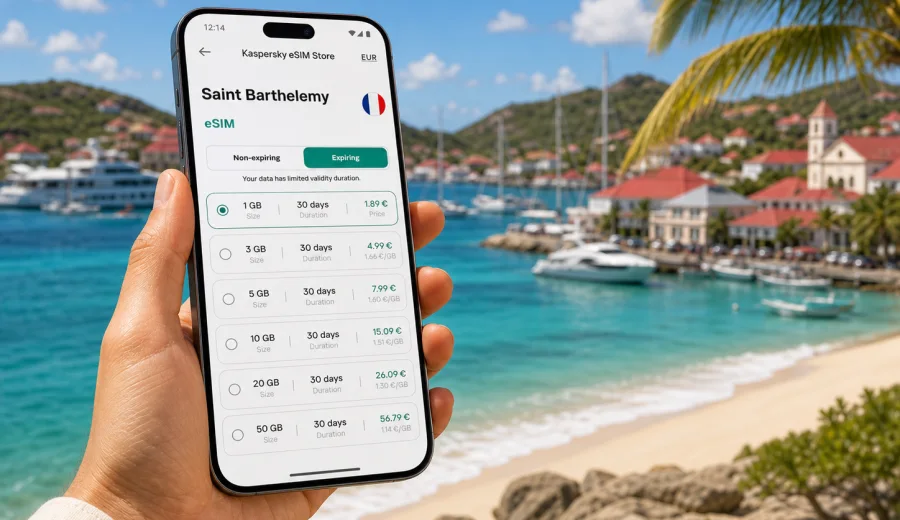
eSIM for Saint Barthelemy: mobile connection and internet for your trip
Saint Barthelemy is a compact Caribbean destination, but staying online there still needs practical planning. Many trips start with a flight connection through a nearby island, a ferry transfer, a hotel check-in in Gustavia or Saint-Jean, and a first route across narrow coastal roads. Mobile internet helps with maps, bookings, ride coordination, restaurant reservations, weather updates and messages to people travelling with you.
An eSIM can make that preparation simpler. Instead of looking for a physical SIM card after arrival, you can set up a digital SIM profile on a compatible phone and use a selected data plan for mobile internet during the trip. The key is to choose the right plan before you depend on it: check data allowance, validity period, destination, activation rules and device compatibility.
This guide explains how to prepare an eSIM for Saint Barthelemy, what to check before purchase, how much data different travel styles may need, and how Kaspersky eSIM Store can help you choose, set up and activate an eSIM plan for a trip abroad.
Why mobile internet matters in Saint Barthelemy
Saint Barthelemy is small, scenic and easy to underestimate. A traveller may move between Gustavia, Saint-Jean, Flamands, Colombier, Lorient and Grand Cul-de-Sac several times in one day. A stable mobile data setup helps because many everyday travel tasks happen on the phone:
- navigation between beaches, villas, hotels, restaurants and the harbor;
- checking ferry, flight or transfer details;
- using messaging apps for calls and coordination;
- opening reservation emails and booking confirmations;
- translating menus, messages or service details;
- checking local weather before a boat trip or beach day;
- using banking, insurance and travel apps when needed.
Public Wi-Fi can be useful in hotels and restaurants, but it is not always available exactly when you need it. You may need directions before hotel check-in, a message while waiting for luggage, or a map route when moving between beaches. With eSIM, you can reduce dependence on public Wi-Fi and prepare mobile internet before the trip.
What an eSIM does for a Saint Barthelemy trip
An eSIM is a digital SIM profile installed on a compatible smartphone or tablet. For travel, it is usually used for mobile data. It does not require a plastic SIM card, a store visit or a SIM tray exchange. You keep your main SIM for your regular number and add a separate eSIM profile for internet access during the trip.
For Saint Barthelemy, this is especially practical if your itinerary includes several short movements rather than one long stay in a single place. You may arrive through St. Maarten, take a ferry or small aircraft, and then move between accommodation, beaches and restaurants. Having data ready can help from the first hours of the journey.
The important limitation is simple: most travel eSIM data plans are for internet access. They usually do not include a local phone number, traditional voice calls or SMS unless a specific plan states otherwise. For calls and messages, travellers often use internet-based apps over mobile data.
eSIM, roaming or a physical SIM: what to compare
There is no single best option for every traveller. Compare the setup by trip length, data use, phone model and how much time you want to spend arranging mobile service after arrival.
| Option | Practical advantage | What to check |
|---|---|---|
| eSIM | Can be prepared before travel and installed without a physical SIM card | Device compatibility, plan destination, validity and activation rules |
| Home roaming | Uses your existing mobile plan and number | Daily fees, data limits, speed policy and roaming availability |
| Physical local SIM | Can be familiar for long stays if local options are convenient | Store availability, registration process, opening hours and SIM slot access |
| Public Wi-Fi | Useful in hotels, villas and restaurants | Availability, reliability and whether you want to depend on it for travel tasks |
For a short stay, an eSIM can be especially convenient because you do not have to spend the first part of the trip comparing local offers or finding a place to buy a physical card. For a longer stay, it can still work well if you choose a plan with enough data and validity for your schedule.
How much data you may need
Data use depends more on habits than on the size of the destination. Saint Barthelemy is compact, but travellers often use maps, photos, restaurant searches, messaging, cloud backups and travel apps throughout the day.
Use this rough planning table before choosing a plan:
| Travel style | Typical phone use | Suggested approach |
|---|---|---|
| Light weekend | Messaging, maps, email, occasional browsing | Choose a smaller data package and keep video streaming on Wi-Fi |
| Beach and restaurant trip | Maps, reservations, social apps, photo sharing | Pick a mid-sized plan with a validity period that covers the full stay |
| Remote work add-on | Email, cloud documents, video calls, hotspot use | Choose more data and confirm whether tethering is allowed by the selected plan |
| Family or group lead | Navigation, bookings, shared routes, messaging for several people | Add a buffer so one phone can handle more trip logistics |
| Island-hopping itinerary | Data needed before and after Saint Barthelemy | Consider whether a regional plan is more suitable than a single-destination plan |
Video, cloud backup and hotspot use can consume data quickly. Before travelling, turn off automatic photo and video backups on mobile data if you want the plan to last longer. Download offline maps, boarding passes and key documents before departure, but keep mobile data available for changes, live navigation and urgent messages.
What to check before buying an eSIM plan
Before choosing an eSIM for Saint Barthelemy, check the details that affect whether the plan fits your trip. A few minutes of preparation can prevent confusion later.
Checklist:
- your phone or tablet supports eSIM;
- the device is not carrier-locked in a way that prevents another SIM profile;
- the plan includes Saint Barthelemy as the destination;
- the data allowance is enough for your expected use;
- the validity period covers the full trip;
- you understand when the validity period starts;
- you know whether the plan is data-only;
- you have internet access available for installation;
- you know which SIM profile should be used for mobile data after arrival.
If you are not sure whether your phone supports eSIM, use the compatibility check before paying. You can check your device and confirm that your model is suitable for eSIM installation. Compatibility is especially important if you bought a phone from a specific operator or in a market where eSIM support can vary by model.
Practical scenarios in Saint Barthelemy
Different trips create different mobile internet needs. Think about the moments when losing connection would be inconvenient, not only about the total number of days.
Arrival through a nearby hub. Some travellers reach Saint Barthelemy through a connection in another Caribbean destination. Mobile data can help with transfer updates, ferry instructions, check-in messages and route planning.
Gustavia and harbor days. If you plan to walk around Gustavia, visit shops, meet a boat transfer or coordinate with accommodation, mobile internet helps keep maps, messages and confirmations available.
Beach routes. Beaches such as Saint-Jean, Gouverneur, Colombier and Flamands may involve taxis, walking sections or route changes. Offline maps are useful, but live data helps when plans change.
Villa or hotel stay. Accommodation Wi-Fi may cover many tasks, but mobile data is useful when you are away from the property, checking restaurant hours or arranging transport.
Work during the trip. If you need email, files or video meetings, treat data as a working resource. Choose a larger plan, keep Wi-Fi for heavy tasks where possible and avoid unnecessary background updates.
Choosing an eSIM plan for Saint Barthelemy
When you compare plans, do not start with price alone. Start with the trip pattern: how many days, how many people depend on your phone, how often you use maps, and whether you will stream or work from the device.
A practical selection process looks like this:
1. Define the exact dates when you need mobile data.
2. Estimate data use by activity, not only by trip length.
3. Check that Saint Barthelemy is included in the selected destination.
4. Compare data allowance and validity period together.
5. Review installation and activation instructions before departure.
6. Keep the confirmation email or app profile accessible.
If your route is focused on Saint Barthelemy, a country plan may be the most direct choice. If your journey includes nearby islands or multiple countries, compare whether a regional option fits the full route better. In Kaspersky eSIM Store, you can review available destinations and plan conditions before deciding.
For a straightforward trip, you can choose an eSIM plan for Saint Barthelemy in advance, then install the eSIM on a compatible device before you rely on it during travel.
How Kaspersky eSIM Store fits into the process
Kaspersky eSIM Store is an app and website where you can quickly choose, arrange and activate an eSIM with a suitable mobile internet plan for an international trip. The product is designed around a simple travel flow: select the destination, review plan conditions, install the eSIM and use the chosen profile for data during the trip.
This positioning matters. Kaspersky eSIM Store is not a carrier and does not own a mobile network. It helps you prepare the eSIM setup and choose a suitable plan for travel, while actual availability and connection quality depend on the selected plan, local network conditions, device settings and location.
The useful part for travellers is clarity before departure. You can compare the amount of data, validity period and destination, then install the eSIM on a compatible phone. That gives you a more predictable setup than waiting until arrival and deciding under time pressure.
How to install and activate an eSIM
Install the eSIM while you still have a reliable internet connection. Many travellers prefer to complete installation before departure and then activate or use the eSIM data profile according to the plan instructions when they arrive.
General steps:
1. Check that your device supports eSIM and is not operator-locked.
2. Choose the plan for Saint Barthelemy or for the wider route.
3. Complete the order and open the eSIM details in your profile or email.
4. Install the eSIM by following the on-screen steps or scanning the QR code.
5. Give the eSIM profile a clear name, such as “Travel data”.
6. On arrival, select the eSIM profile for mobile data.
7. If the instructions require it, enable data roaming for that eSIM profile.
8. Test messaging, maps and browsing before leaving the airport, harbor or accommodation.
For device-specific setup, use the Android installation guide or the iOS installation guide. The exact menu names can differ by phone model and operating system version, so it is worth reading the steps before the trip.
Phone settings that prevent common problems
Many eSIM issues are not caused by the plan itself, but by phone settings. Before you assume something is wrong, check the basics.
| Setting | Why it matters |
|---|---|
| Mobile data line | Your phone must use the travel eSIM profile for internet |
| Data roaming for the eSIM | Some travel eSIM plans require roaming data to be enabled |
| Primary voice line | Keep your usual SIM for calls if you need your regular number |
| Background updates | Disable large updates on mobile data to save allowance |
| Hotspot setting | Check plan conditions before sharing data with other devices |
Do not delete the eSIM profile while troubleshooting unless the instructions or support team tell you to do so. Some eSIM profiles cannot be reinstalled after removal. If you need help, keep your order details, device model and screenshots of settings available for support.
How to make your data last longer
Saint Barthelemy trips often involve photography, restaurant searches and messaging. These are manageable uses, but automatic background activity can quietly consume data.
Useful habits:
- download offline maps before departure;
- save hotel, villa, ferry and flight details offline;
- update apps while on home or hotel Wi-Fi;
- pause cloud photo backup on mobile data;
- set video apps to lower quality when using cellular data;
- use Wi-Fi for large uploads when possible;
- close navigation after the route is finished;
- monitor data use in your phone settings.
If you are travelling as a group, avoid making one phone responsible for every person’s streaming, uploads and hotspot needs unless you have chosen a plan with enough data. A travel eSIM is most useful when it is matched to realistic usage.
Quick decision guide
Use this short guide if you need to choose quickly:
- For a two- or three-day stay with light use, prioritize validity that covers the full stay and a modest data allowance.
- For a week of maps, bookings, social apps and restaurant searches, choose a plan with a comfortable data buffer.
- For remote work, video calls or hotspot use, select a larger package and keep heavy transfers on Wi-Fi where possible.
- For a route through several Caribbean destinations, compare country and regional plans before purchase.
- For a phone you have not used with eSIM before, check compatibility before paying.
The safest approach is to plan for normal use plus a small buffer. Running out of data during a transfer, check-in or route change is usually more inconvenient than choosing a slightly more suitable plan at the start.
Common mistakes to avoid
Travellers often run into the same avoidable issues:
| Mistake | Better approach |
|---|---|
| Buying before checking device support | Confirm eSIM compatibility and operator lock status first |
| Choosing only by price | Compare data, validity and destination coverage together |
| Installing at the last minute with poor Wi-Fi | Install while you have a stable connection |
| Using the wrong SIM for mobile data | Select the eSIM profile as the mobile data line |
| Leaving cloud backups on cellular data | Pause large automatic uploads |
| Deleting the eSIM profile during troubleshooting | Read instructions or contact support first |
These checks are especially useful for short island trips, where there may be less time to solve setup problems after arrival.
FAQ about eSIM and internet in Saint Barthelemy
Can I use eSIM for regular phone calls and SMS?
Many travel eSIM plans are data-only. They usually do not include a traditional phone number, calls or SMS unless the selected plan states otherwise. You can use messaging and calling apps over mobile data.
Should I install the eSIM before travelling?
In most cases, yes. Install the eSIM while you have stable internet access. Then follow the plan instructions for when to activate or start using it.
Do I need to remove my regular SIM card?
No. On many compatible phones, you can keep your regular SIM or eSIM active and add the travel eSIM for mobile data. Check your phone’s SIM settings before departure.
Will an eSIM replace hotel Wi-Fi?
It can reduce your dependence on Wi-Fi, but it does not have to replace it. Use Wi-Fi for large downloads, backups and video calls when convenient, and keep eSIM data for mobility.
What happens if I use all data before the trip ends?
Options depend on the selected plan and account settings. Check whether top-up or another plan is available before you travel, especially if you expect heavy use.
Can I use the eSIM as a hotspot?
It depends on the plan and device settings. Review the plan conditions before relying on tethering for a laptop or another traveller’s phone.
What if the eSIM does not connect after arrival?
Check that the eSIM is selected for mobile data, data roaming is enabled if required, airplane mode is off, and the phone has been restarted. If the issue continues, contact support with your device model and order details.
Prepare mobile internet before your trip
Saint Barthelemy is easier to enjoy when your phone is ready for the practical parts of travel: maps, messages, transfers, reservations and updates. An eSIM can help you prepare mobile internet without a physical SIM card, provided that your device is compatible and the selected plan fits your route, data needs and travel dates.
Before departure, check your phone, choose a suitable data allowance, install the eSIM with a stable connection and keep the setup instructions available offline. When you arrive, select the eSIM profile for mobile data and test the connection before you need it for navigation or coordination.
To prepare in advance, review eSIM plan options for Saint Barthelemy in Kaspersky eSIM Store and choose the plan that matches your trip.