Travel connectivity guide
Saint-Georges eSIM: Mobile Internet in French Guiana
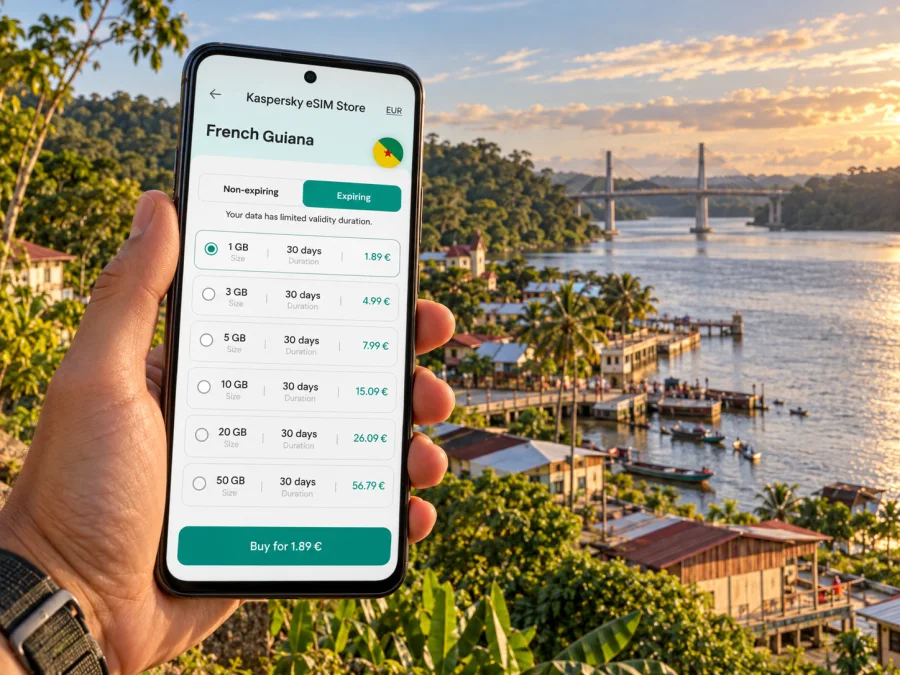
Saint-Georges eSIM: Mobile Connection and Internet for Your Trip
Saint-Georges is a small border town in French Guiana, on the Oyapock River opposite Brazil. It is a place where a working mobile connection is useful for more than looking up attractions: you may need to coordinate a transfer, confirm accommodation, check a route along the eastern road corridor, message your host, or keep plans straight while moving between the town and the river crossing. An eSIM can make mobile data easier to prepare before you travel, provided the plan you choose specifically covers French Guiana and your device supports eSIM.
The town is officially the commune of Saint-Georges in the French department and region of French Guiana, on the northeastern coast of South America. Saint-Georges is not in metropolitan France, and it is not in Brazil. The river and international bridge make the border especially visible, but the two sides have separate mobile markets. Treat your French Guiana data plan and any Brazil travel as separate coverage questions.
When mobile internet helps in Saint-Georges
Saint-Georges is a practical destination rather than a large, dense city with every service concentrated around a central transit hub. A connection is useful in the moments when small details matter: confirming the exact meeting point, checking whether a host has sent a message, saving a map before leaving a Wi-Fi zone, or contacting someone if a journey takes longer than expected.
Common travel situations include:
- Arriving from elsewhere in French Guiana. If you are travelling overland, downloaded directions and a saved address can help you follow the eastern route and find your lodging after arrival. Do not rely on live maps as your only navigation method on a long drive.
- Meeting a driver or local contact. A mobile connection makes it easier to share your location, confirm a pickup point, and update someone if your arrival time changes.
- Finding a guesthouse or service. Save the property name, address, and phone details before the trip. Smaller places may be easier to identify by a local landmark or a direct message than by searching from the roadside.
- Working between appointments. Email, messaging, cloud documents, and booking confirmations can be checked without looking for a café or hotel Wi-Fi network. For calls, use an internet calling app if your plan is data-only.
- Approaching the Oyapock crossing. A border crossing is also a network boundary. A plan that covers French Guiana does not automatically include Brazil; confirm the route and coverage terms before you cross.
Plan the arrival before you leave
Saint-Georges is linked to Cayenne and the eastern part of French Guiana by the RN2, which runs via Régina. The road journey is a very different arrival pattern from stepping out of an international terminal into a large city centre. Depending on your itinerary, you may arrive by road, by a domestic connection, or as part of a regional journey. Confirm the actual transport service and schedule for your travel dates; do not assume a particular flight or transfer operates every day.
Before departure, put these details somewhere available offline:
- The full address and contact details for your accommodation.
- The name and phone number of the person meeting you, if applicable.
- A route overview and the names of stops or towns on the way.
- Your booking confirmation and any onward transport information.
- A short message in French with the arrival time and meeting point, if that will make coordination easier.
The phone may reconnect after a long stretch without service, but that should not be your only contingency. A downloaded map, a charged power bank, and an agreed meeting plan are useful even when you expect mobile data to work.
If you are coming through Cayenne, remember that Cayenne-Félix Éboué Airport and Saint-Georges are separate points on a large territory. The onward road leg is not a quick city transfer. Check how you will reach the RN2, where the journey begins, and whether you need to stay overnight before continuing. Having your booking and directions available offline helps if you need to change plans while in transit.
Getting around town and keeping a route usable
Saint-Georges is compact compared with Cayenne, but a map is still helpful when you are looking for a particular address, public service, riverside point, or departure location. Search results can use different spellings: Saint-Georges, Saint-Georges-de-l’Oyapock, and Saint Georges de l’Oyapock may all appear in travel and administrative information. Keep the spelling from your actual reservation or local contact and save the pin before you set off.
| Before you move | What to prepare | Why it helps |
|---|---|---|
| Leaving your lodging | Save its map pin and a written address | You can return without repeating a search |
| Meeting a driver | Share a precise point, not only “the centre” | Small differences in naming can cause missed pickups |
| Going to the river or bridge area | Confirm the exact access point and current crossing arrangements | A riverfront location and an official crossing are not interchangeable |
| Travelling on the RN2 | Download a broad route and check fuel and timing with your driver | Long rural stretches call for preparation beyond live navigation |
| Moving near the border | Confirm which country your plan covers and what your phone will do | Network selection can change close to the frontier |
A simple navigation routine
Download an offline map, save your lodging and meeting points, and confirm directions against signs or advice from your driver. Keep the phone accessible only when stopped, and send an arrival update when you have a reliable connection. This works for a town walk as well as a short stop before continuing toward the border.
Staying connected near the Oyapock border
The Oyapock River marks the international boundary between French Guiana and the Brazilian state of Amapá. Saint-Georges faces Oiapoque across the river, and an international bridge connects the two sides. This setting makes cross-border plans a distinctive part of travel here, but it also means you should be exact about country coverage.
A French Guiana plan is intended for the territory stated in its terms. It should not be treated as a Brazil plan simply because the countries are close or because you can see the other bank. If your itinerary includes both Saint-Georges and Oiapoque, check whether the data plan covers both destinations, whether separate plans are needed, and what the provider’s instructions say about roaming and network selection. Border procedures and crossing access can also vary, so confirm current arrangements independently before setting out.
Near a national border, a phone may detect a network from the other side. A network name appearing on screen does not prove that data is included in your plan. Check the selected eSIM line and the plan’s coverage area before using data. If your device allows manual network selection, follow the plan’s connection instructions; the correct setting can depend on the local partner network.
A useful border-day checklist:
- Keep your passport and crossing documents accessible, as required for your route.
- Download maps and save messages before leaving town.
- Confirm the exact crossing point and current opening arrangements.
- Check French Guiana and Brazil coverage separately in the plan details.
- Avoid assuming that calls, SMS, or a phone number are included in a data-only eSIM.
- Tell your contact when you expect to cross and when you have arrived.
Choosing an eSIM plan for Saint-Georges
Start with the itinerary, not a headline data allowance. A visitor staying in Saint-Georges for a short time and checking messages may need less data than someone who regularly uploads photos, joins video calls, or streams media. Actual usage depends on your apps and habits, so estimate from your recent mobile use and leave a reasonable margin for navigation and unexpected changes.
Check these plan details before you complete an order:
- Coverage destination. Confirm that the plan explicitly includes French Guiana. A listing for France, Europe, or the Caribbean should not be assumed to cover this territory unless its terms say so.
- Validity period. Match the plan’s active duration to your trip. Check when validity begins: on installation, activation, or first connection, according to the plan terms.
- Data amount. Consider maps, messaging, browsing, photo uploads, and work calls. Video and cloud backups can use data quickly; Wi-Fi can be used for large uploads when available.
- Network and device conditions. Read any stated network, roaming, or activation requirements. Service depends on the compatible device and local network conditions.
- Tethering and other features. If you intend to connect a laptop or another device, confirm whether hotspot use is supported by that specific plan.
- Voice and SMS. Do not expect a local number or standard calls unless those features are clearly listed. Data-based messaging and calls can work through internet apps when the other person is reachable there.
- Price and renewal terms. Review the final amount, data allowance, expiry, and any renewal conditions before purchase.
Kaspersky eSIM Store is an app and website where you can select, order, and activate an eSIM with a suitable mobile data plan for an international trip. The plan’s destination, data amount, validity, and conditions are shown for you to review. To compare available options for this destination, choose an eSIM data plan for French Guiana. The destination is French Guiana; Saint-Georges is the city you are visiting, not a separate country plan.
Estimate your data use
Choose an allowance based on your own habits. Messaging and occasional map checks use less data than repeated video calls, photo uploads, or streaming. Turn off unnecessary background refresh, download media before departure, and monitor usage in your phone settings. These are practical ways to avoid running through a plan unexpectedly; they do not guarantee a particular amount will last for a set number of days.
French Guiana coverage and the local operator market
French Guiana has its own mobile network market within the French regulatory framework. ARCEP, the French telecom regulator, lists operators authorized in Guyane including Digicel AFG, Free Caraïbe, Orange Caraïbe, and Outremer Télécom. That does not mean every travel eSIM can use every operator, or that signal conditions are identical across the territory. A travel plan may connect through a specified local partner, and the available network can depend on the plan and the place you are using it.
Do not infer Saint-Georges coverage from a map of metropolitan France or from a general claim about a French carrier. Check French Guiana specifically, and look for coverage information at the local level. The town, the road corridor, riverfront areas, and remote parts of the interior are different situations. Even where a theoretical coverage map indicates service, buildings, terrain, weather, network load, and local outages can affect the connection in practice.
Device compatibility and preparation
An eSIM is built into the device rather than inserted as a removable card, but support varies by exact phone model and regional variant. Two phones sold under the same model family can have different eSIM capabilities depending on the market version. A compatible device may also be carrier-locked, which can prevent activation with another provider. Check the exact model number and the manufacturer’s support information, and check whether your device supports eSIM before choosing a plan.
Before you travel, confirm that:
- Your phone supports eSIM in its specific regional variant.
- The device is not locked in a way that prevents another eSIM from being added.
- You can access a stable internet connection during installation.
- You know which line will be used for mobile data after activation.
- Your primary SIM remains set as intended for calls and texts, if you plan to keep it active.
- The plan’s data roaming setting is enabled if its instructions require it.
- Your phone software is current enough for the device maker’s eSIM setup process.
Do not delete an eSIM profile just because the connection is not immediate. First review the activation instructions, confirm the selected data line and roaming setting, and allow the device time to register. If the plan remains unavailable, contact the service support channel shown in your order details while you still have Wi-Fi or another way to get online.
Install the eSIM before the trip or after arrival
Installing the profile before you travel can make the first connection easier to manage, but activation timing depends on the specific plan. Read its terms carefully so you do not start the validity period earlier than intended. If you prefer to install after arrival, make sure you will have internet access for the setup process, such as reliable Wi-Fi.
A typical setup sequence is:
- Open your order in Kaspersky eSIM Store and review the destination, validity, and activation instructions.
- Connect to Wi-Fi and open the phone’s cellular or mobile network settings.
- Add the eSIM using the QR code or the manual details provided for that order.
- Label the new line clearly, for example “French Guiana data”.
- Select that line for mobile data when the plan should begin, and follow any stated data-roaming instructions.
- Keep your regular SIM configured for calls or messages if you need it, and check which line is selected before placing a call.
- After landing or reaching Saint-Georges, wait for registration and confirm that data works before relying on it for navigation.
For device-specific steps, follow the Android eSIM installation instructions or the iPhone and iOS eSIM installation instructions. Menu names differ by operating-system version and manufacturer, so use the on-screen prompts for your phone.
Practical scenarios
- Short town visit: Save your lodging pin and contact details, then use mobile data for messaging and occasional searches. Keep a little allowance for transport changes.
- Road trip from Cayenne: Download directions before departure and keep the booking address offline. The RN2 runs via Régina; confirm travel arrangements for your dates.
- Work visit: Prepare offline documents and check whether calls use an internet app. Arrange a backup if a video meeting is essential.
- Trip across to Oiapoque: Check Brazil coverage and border arrangements separately, and save the route before leaving Saint-Georges.
Frequently asked questions
Is Saint-Georges in France or Brazil?
Saint-Georges is a commune in French Guiana, which is a French department and region in South America. Brazil is across the Oyapock River. The international bridge links the border area, but the two sides have separate national jurisdictions and mobile coverage terms.
Does an eSIM for French Guiana cover Brazil?
Not automatically. Check the specific plan’s destination list. A plan that names French Guiana should not be treated as including Brazil unless Brazil is also listed in its terms.
Will the same coverage be available everywhere in Saint-Georges?
No mobile plan can guarantee identical reception at every address or along every road. Coverage and performance depend on the local network, the plan’s partner, the device, and conditions at the time. Check local coverage details and keep key information available offline.
Can I use an eSIM for regular phone calls?
Many travel eSIM plans are designed for mobile data and do not include a standard phone number, voice calls, or SMS. Review the specific plan details. Internet calling and messaging apps can work over data if both parties can use them.
Should I install the eSIM before I arrive?
You can install it before departure if the plan’s instructions allow it. Check when validity starts and when you should select the eSIM for mobile data. Installation requires internet access, and activation timing varies by plan.
What if my phone shows a Brazilian network near the border?
Do not assume that the network is included in your French Guiana plan. Check the country coverage and the selected data line. Follow the plan’s instructions for network selection and roaming, and use a Brazil plan if your route requires Brazilian coverage.
A calm connection plan for Saint-Georges
For a smoother visit, prepare the details that are hardest to recover on the road: lodging address, contact numbers, route notes, crossing information, and offline maps. Then choose an eSIM plan that explicitly covers French Guiana, check its validity and data conditions, and confirm that your exact phone variant can use eSIM. Treat Brazil as a separate destination if it is part of your itinerary, and use mobile data as a helpful tool alongside offline preparation.
When you are ready, review eSIM data plan options for your French Guiana trip in Kaspersky eSIM Store. Select a plan that matches your dates and expected use, follow the installation steps for your phone, and keep the confirmation available during your journey to Saint-Georges.


