Travel connectivity guide
Saint-Gilles-les-Bains eSIM: Stay Connected in Reunion
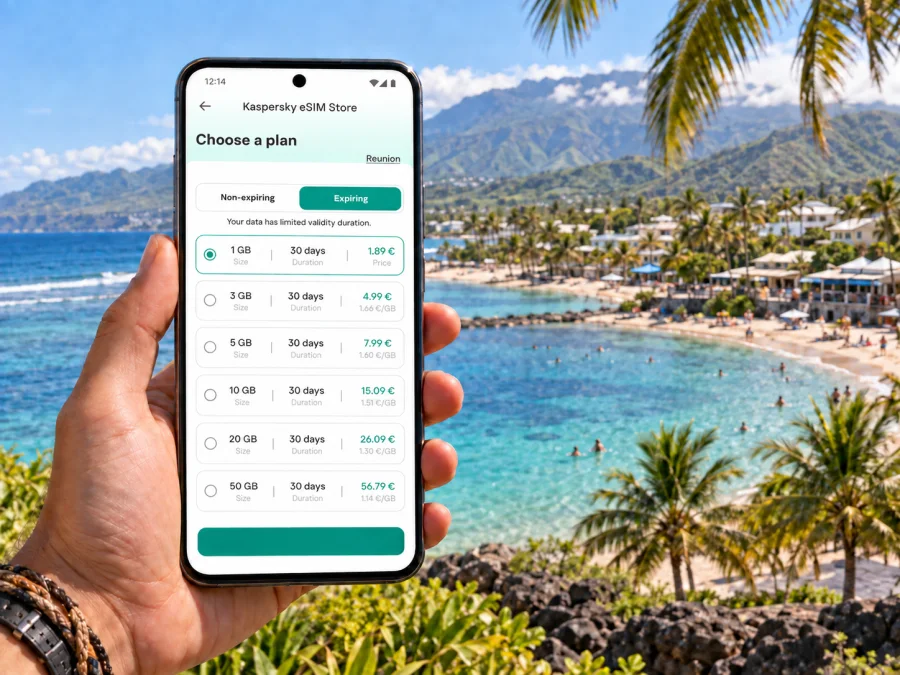
Saint-Gilles-les-Bains eSIM: mobile connection and internet for your stay
Saint-Gilles-les-Bains is a useful base on the west coast of Reunion, with the town centre, harbour and nearby beach areas shaping many visitors’ days. A mobile connection can help with the practical moments: confirming a transfer, finding your accommodation, checking a route or messaging someone when plans change. An eSIM lets you prepare mobile data without swapping the physical SIM in your phone, provided your device supports eSIM and the plan covers your destination.
This guide focuses on using mobile internet in and around Saint-Gilles-les-Bains: arriving from Roland Garros Airport, moving between the coast and town, choosing a place to stay and planning day trips. Transport schedules, road conditions and plan terms can change, so check current details for your dates.
When mobile internet helps in Saint-Gilles-les-Bains
Accommodation listings may use Saint-Gilles-les-Bains for places spread across a wider coastal area. Before booking, check the map for the distance to the centre, harbour, beach or nearest bus stop. A property name or “beachfront” description may not make the route to restaurants and services obvious. A map and a message to the host can clarify the entrance, parking and check-in arrangements.
Mobile data is useful for everyday travel tasks:
- reopening a booking or check-in message while on the way;
- checking a map between your accommodation, the centre and the harbour;
- confirming a pickup point with a driver or travel companion;
- checking transport information before leaving the hotel;
- looking up a place’s opening hours or translating a short message;
- sharing your location when meeting near a beach, café or restaurant.
These tasks often come up when you are carrying bags or away from hotel Wi-Fi. A connection can make them easier, but reception depends on your device, plan, local network and surroundings. Save addresses, booking references and essential directions offline as a backup.
From Roland Garros Airport to the west coast
A common arrival point for visitors to Reunion is Roland Garros Airport in the north of the island. Decide before landing whether you will rent a car, use a scheduled coach connection or meet a prearranged transfer. The airport publishes information about Car Jaune services along the western coastal area and lists a daily Jetcar OI shuttle connection to Saint-Gilles-les-Bains. Departure times, service days and journey details can change, so check current information for your travel date rather than relying on an old timetable.
Mobile data can help you reopen a booking, contact a driver, confirm a stop name or follow the route after leaving the terminal. For a rental car, keep pickup instructions accessible before reaching the desk. If someone is meeting you, agree on a specific location and share it in a message. Confirm late-night arrangements directly; do not assume a transfer or bus will be available at every arrival time.
Save the accommodation address exactly as the property provided it, including building or entrance details. A map pin may not show which gate to use. Keep the host’s contact and booking reference somewhere accessible offline in case your connection is delayed.
Getting around town and nearby beaches
A day in Saint-Gilles-les-Bains often involves short journeys: a walk around the centre, a meal near the harbour, time by the water, then a return to your hotel or another beach. The best option depends on the time, luggage and where you are staying. Check whether a route is genuinely walkable and note crossings or roads that may be busy.
Local and regional buses serve the Saint-Paul area. Kar’Ouest lists routes connecting locations around Saint-Gilles and Saint-Paul, while Car Jaune links the airport with coastal stops. Maps are helpful for orientation, but routes and operating hours can be revised. Check current operator information, especially for early departures, late returns, weekends and public holidays. If a bus is important to your plan, note the stop and return option before leaving a place with Wi-Fi.
| Journey | Check before setting out |
|---|---|
| Airport to Saint-Gilles-les-Bains | Service day, departure point, luggage details and arrival stop |
| Hotel to the centre | Actual walking route, crossings and property entrance |
| Beach visit | Return transport, pickup point and route back after sunset |
| West-coast day trip | Directness, frequency and last practical return |
| Driver pickup | Exact meeting point and a backup contact method |
Use this as a checklist rather than a promise of a particular departure. Allow extra time if you have a reservation, tour or onward connection.
Choose an eSIM plan around your itinerary
Start with the places you will visit. A stay based in Saint-Gilles-les-Bains may include drives or excursions elsewhere on the island. Check that the plan’s listed destination includes Reunion and every other place on your route. Do not rely on the town name alone; compare the destination and coverage terms shown for the plan.
Estimate data from your own routine. Someone who checks messages and maps occasionally will use data differently from someone who uploads videos, joins long video calls or streams entertainment. Hotel Wi-Fi can help with larger downloads, but treat it as a supplement if you need directions or messages while out.
| Travel pattern | Planning approach |
|---|---|
| Short stay near one beach | Estimate the days you need data and routine map and messaging use |
| Several stops around the coast | Allow for navigation, opening-hour searches and pickup coordination |
| Rental-car itinerary | Download maps first; use data for live checks and messages |
| Work trip | Match the allowance and validity to calls, files and work applications |
| Stopover or multi-destination route | Confirm coverage at every destination, not only Reunion |
Kaspersky eSIM Store is an app and website where you can choose, arrange and activate an eSIM with a suitable plan for mobile data during an international trip. Plans have their own destinations, data allowances, validity periods and prices. Review those details before choosing. To compare options for Reunion, view eSIM plans for your trip to Reunion.
Install and prepare the eSIM
Install the eSIM with a stable internet connection and enough time to follow the setup steps. Depending on the plan and device, installation may use a QR code or an in-app process. Follow the instructions provided with your purchase and keep the installation details until the eSIM appears in your phone settings.
Use the Android eSIM installation instructions or the iOS eSIM installation instructions. Before choosing a plan, check whether your device supports eSIM and whether it is carrier-unlocked. Support can vary by model, regional version and operator, so a similar-looking phone is not sufficient proof.
A careful setup sequence:
- Connect to reliable Wi-Fi and open the activation instructions.
- Add the eSIM profile using the method provided for your device.
- Label the line “Travel data” or another name you will recognise.
- Keep your usual number enabled if needed, and review that line’s roaming settings.
- Select the travel eSIM for mobile data when the plan should be used.
- Check any data-roaming instruction for the eSIM, then confirm the selected data line.
- After arrival, allow the phone to register and follow the instructions if it does not connect.
Check when validity begins. Some plans start at installation, while others start when the eSIM first connects in the destination; the rule depends on the plan. Read the terms before setup so the timing fits your dates. If you install before departure, keep the profile on your phone and follow the plan’s timing instructions rather than deleting or reinstalling it during the trip.
Plan your stay by area
Saint-Gilles-les-Bains is in the coastal west of Reunion and within the commune of Saint-Paul. For visitors, the useful distinctions are often the town centre, harbour and nearby coast. Check an accommodation’s position on a map and ask about its nearest landmark or bus stop if the listing is unclear. A location pin helps you see whether meals, shops and transport are convenient for your plans.
The lagoon at L’Ermitage and the beach areas around Boucan Canot are well-known coastal destinations in the Saint-Paul area. They can lead to different day plans: one outing may stay near a beach, while another needs a drive or bus to a separate starting point. Check local swimming guidance and conditions when you arrive; a map or photograph is not current safety information. Protect your phone from sand, heat and water, and consider a power bank for a day of navigation.
Match your connection to the kind of stay
Short stopover: save the transfer, check-in details, one nearby meal option and the return journey. Keep the next reservation offline if you leave Saint-Gilles-les-Bains the following morning.
Business visit: confirm the hotel’s work setup and download meeting files before arrival. Mobile data can support messages and maps between the hotel and meeting place, but check the allowance if your workday includes video calls.
Beach or family holiday: agree on a meeting point before separating, keep the accommodation contact available and protect your phone from sand and water. If several people need data, check each device and plan individually.
Drive from town: download maps and review the route before setting out. Live navigation is useful, but reception may vary along the way; keep a general route in mind and do not handle the phone while driving.
Quick departure checklist
- Accommodation address, check-in details and host contact are saved.
- The airport transfer or first transport option fits your arrival time.
- The current departure point and stop name are clear.
- The eSIM is installed, labelled and selected at the right time.
- Your regular line’s roaming and billing settings are reviewed.
- Offline maps and essential booking details are available.
- Your phone is charged, with a charging option for a long day.
- Your travel companion knows the meeting point and accommodation address.
Frequently asked questions
Can I travel from Roland Garros Airport to Saint-Gilles-les-Bains by public transport?
The airport publishes information about Car Jaune and a Jetcar OI shuttle connection to Saint-Gilles-les-Bains. Check current service days, times, fares and stops for your arrival date. If your flight may arrive late, confirm a backup transfer.
Do I need mobile data if my accommodation has Wi-Fi?
Wi-Fi may cover time in your room but not the journey, a bus stop or an outing. Mobile data helps with navigation, messages and bookings away from the hotel. You can also download key details for offline use and choose an allowance to match your habits.
How consistent is mobile coverage in Saint-Gilles-les-Bains?
Reception can vary between streets, buildings and travel routes. It depends on the plan, local network, device and conditions. Confirm that Reunion is included and allow for signal variation, particularly indoors or while travelling.
When should I install it?
Install with a reliable connection and time to follow the steps. Read when validity begins: the start point varies by plan. Follow the timing instructions whether you install before travel or after arrival.
What if data does not connect after arrival?
Check that the eSIM line is enabled and selected for mobile data. Review the plan’s instructions for roaming and network selection, then restart the phone if recommended. If the issue continues, use the support route provided with your purchase and keep order details available. Do not delete the eSIM profile unless instructions or support tell you to.
Get ready for Saint-Gilles-les-Bains
Save your accommodation details, decide how you will travel from the airport, check current bus information if needed and keep essential directions offline. Choose mobile data according to the places you will visit and how you use your phone, then review the plan’s destination, validity and allowance before activation.
Use Kaspersky eSIM Store on the app or website to choose, arrange and activate an eSIM with a plan suited to mobile data for an international trip. Choose an eSIM plan for your stay in Reunion, review its terms and install it using the instructions for your device before setting out in Saint-Gilles-les-Bains.


