
Travel connectivity guide
Saint Kitts and Nevis eSIM for Travel
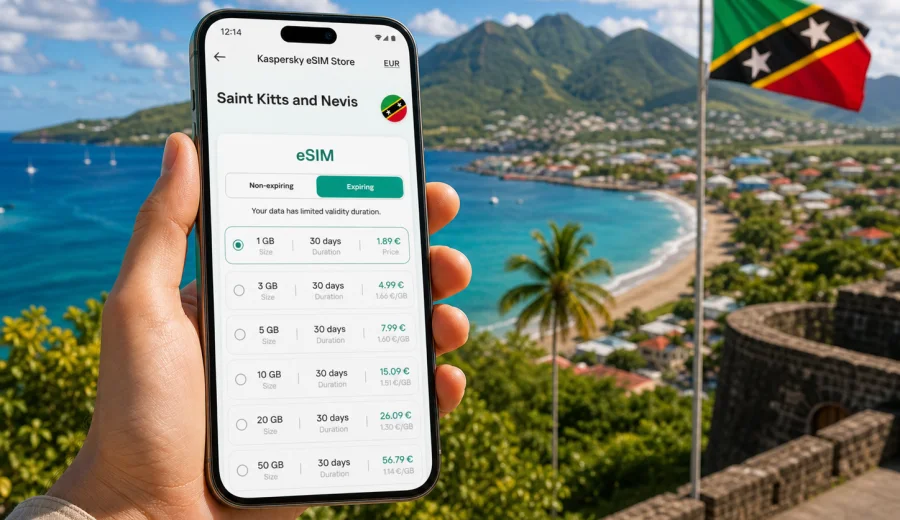
eSIM in Saint Kitts and Nevis: mobile connection and internet for your trip
Saint Kitts and Nevis is a compact two-island destination, but a trip there can include many moments when mobile internet matters: arrival at the airport, a transfer to Basseterre, a ferry between the islands, hotel check-in, restaurant bookings, beach navigation, taxi coordination, and messaging with people at home. An eSIM can make those everyday travel tasks easier because you can prepare a data plan before you leave and use mobile internet without searching for a physical SIM card after arrival.
This guide explains how to think about eSIM for Saint Kitts and Nevis, what to check before buying a plan, how much data you may need, and how Kaspersky eSIM Store can help you choose, set up, and activate an eSIM plan for a foreign trip. The focus is practical: reliable preparation, clear conditions, compatible devices, and sensible data use while traveling.
Why eSIM is useful in Saint Kitts and Nevis
Saint Kitts and Nevis is often visited for beaches, sailing, resorts, hiking, business meetings, weddings, cruises, and island-hopping itineraries. Many travelers move between several locations rather than staying in one place all day. Mobile internet can be useful as soon as you need maps, messaging, a ride, a restaurant reservation, or a document from your email.
An eSIM is a digital SIM profile installed on a compatible smartphone or tablet. Instead of inserting a plastic SIM card, you add the eSIM to your device and use it for mobile data. In most travel scenarios, this is especially convenient because you can keep your regular SIM active for calls or bank messages while using the eSIM profile for data abroad.
For Saint Kitts and Nevis, eSIM can help with:
- navigation from Robert L. Bradshaw International Airport or Vance W. Amory International Airport;
- checking ferry times, hotel details, and booking confirmations;
- using messengers, email, maps, and translation tools;
- coordinating transfers, excursions, and restaurant bookings;
- reducing dependence on public Wi-Fi in airports, cafes, ports, and hotel lobbies;
- keeping data costs more predictable by choosing a prepaid plan with visible terms.
An eSIM is not a magic guarantee of signal in every building, beach, or mountain road. Local network conditions, terrain, device support, and the selected plan still matter. The advantage is preparation: you can choose a data plan before the trip, understand the allowance and validity period, and avoid spending the first hour of your visit looking for a mobile shop.
Where mobile internet matters most during the trip
Saint Kitts and Nevis is small enough that travelers often underestimate how many online tasks happen in a normal day. The need for internet is not only about posting photos. It is also about keeping the trip organized when plans change.
| Travel moment | Why mobile data helps |
|---|---|
| Arrival | Open hotel address, contact a transfer driver, check messages, use maps. |
| Inter-island movement | Follow ferry information, coordinate pickup, keep tickets and confirmations accessible. |
| Beach and resort days | Message your group, check weather, manage bookings, use digital payments where accepted. |
| Hiking or sightseeing | Use offline and online maps, share location, look up opening hours. |
| Business travel | Join messages, email, calendar updates, and cloud documents without waiting for Wi-Fi. |
| Departure | Check flight updates, transport timing, and boarding documents. |
If you travel with family or colleagues, mobile internet also becomes a coordination tool. One person may go to the beach while another handles a meeting or errand. Messaging apps, shared maps, and reservation confirmations make that easier, but they all depend on data access.
eSIM compared with roaming, public Wi-Fi, and local SIM cards
There is no single best option for every traveler. The right choice depends on trip length, device compatibility, how much data you use, and how comfortable you are arranging connectivity after arrival. The table below gives a practical comparison.
| Option | Good for | What to check |
|---|---|---|
| eSIM data plan | Travelers who want to prepare mobile internet in advance and avoid a physical SIM card. | Device support, plan validity, data allowance, activation rules, whether calls/SMS are included. |
| Home operator roaming | Short trips where your operator has a clear roaming package. | Daily roaming price, data limits, speed rules, bill shock controls. |
| Public Wi-Fi | Hotel rooms, cafes, and planned work sessions. | Availability, security, login requirements, stability, whether you can use it while moving. |
| Local physical SIM | Longer stays or people who need local voice services. | Store location, opening hours, registration process, device SIM slot, plan terms. |
For many visitors, eSIM works best as the planned data layer: you arrive with a profile ready on your phone, then use hotel Wi-Fi when convenient. That combination can help keep mobile data for maps, messaging, and tasks outside the hotel, while Wi-Fi handles heavier use such as long video calls or cloud backups.
What to check before buying an eSIM plan
Before you choose an eSIM plan for Saint Kitts and Nevis, start with the device. eSIM requires both hardware support and software support. Some phones also have carrier locks that can prevent adding another mobile profile.
Use this checklist before purchase:
- Confirm that your phone or tablet supports eSIM.
- Check that the device is not locked to a single operator.
- Make sure your operating system is up to date enough to install and manage eSIM profiles.
- Decide whether you will keep your primary SIM active for calls and SMS.
- Check when the plan validity starts and how long it lasts.
- Review whether the plan is data-only or includes other services.
- Make sure you will have internet access during installation if the eSIM is not installed before travel.
If you are not sure whether your device supports eSIM, use the compatibility window before choosing a plan: Check your device. This step is worth doing early because an eSIM plan cannot help if the phone cannot install or use an eSIM profile.
How much data do you need for Saint Kitts and Nevis?
Data needs vary widely. A traveler who mainly uses maps and messaging may need much less than someone who uploads video, works remotely, or uses mobile hotspot for a laptop. Instead of guessing, estimate your usage by daily behavior.
| Usage style | Typical activities | Practical guidance |
|---|---|---|
| Light | Messaging, maps, email headers, booking checks. | Choose a smaller allowance and use hotel Wi-Fi for photos and updates. |
| Standard | Maps, social media, web browsing, messaging, occasional photo uploads. | A mid-size plan usually gives more flexibility for a week-long trip. |
| Heavy | Video calls, cloud files, hotspot, frequent uploads, streaming. | Consider a larger allowance and control background app usage. |
| Family or work backup | Several devices or laptop tethering in short sessions. | Check hotspot support in your device and plan conditions before relying on it. |
For a beach and sightseeing trip, maps and messengers usually matter more than constant streaming. If you plan to hike, sail, work from a resort, or move between both islands, add a buffer. Running out of data at the end of the day can be more inconvenient than choosing a slightly larger plan at the start.
Choosing a plan through Kaspersky eSIM Store
Kaspersky eSIM Store is an app and website where you can quickly choose, arrange, and activate an eSIM with a suitable data plan for mobile internet during a foreign trip. It is designed around the travel task: select a destination, compare plan details, check the data allowance and validity period, then install the eSIM on a compatible device.
When selecting a plan, focus on four details:
1. Destination: choose Saint Kitts and Nevis or a regional option if your itinerary includes nearby countries.
2. Data volume: match the allowance to your actual online habits.
3. Validity period: make sure the plan covers the full trip, including arrival and departure days.
4. Activation conditions: read when the plan starts and what steps are needed on your device.
If you want to prepare mobile internet before departure, you can choose an eSIM plan for Saint Kitts and Nevis and review the available options for your trip. The link should be used as a planning step, not as a substitute for checking your phone: device compatibility and plan conditions still matter.
Suggested data planning scenarios
Use these scenarios as a practical starting point. They are not strict rules, because app behavior, video quality, cloud backups, and hotspot use can change consumption quickly.
A short resort stay
If you are staying mostly at one resort and expect reliable Wi-Fi there, the eSIM can serve as your outside-the-hotel data connection. Keep mobile data for transfers, maps, messaging, booking confirmations, and short browsing. Disable automatic media downloads in messengers and update apps over Wi-Fi only.
Island-hopping between Saint Kitts and Nevis
If your itinerary includes ferries, day trips, beaches, and moving between hotels or ports, choose a plan with enough buffer for maps and coordination. Save hotel addresses and key confirmations offline as well, because connectivity can vary by location and building.
Remote work or business travel
For work, check your calendar, file access, authentication apps, and video-call needs before choosing the data size. If you plan to use your phone as a hotspot, test the hotspot feature at home and review whether your device and selected plan allow it. For long calls and large files, use trusted Wi-Fi where possible and keep mobile data as a backup.
Cruise stop or very short visit
For a one-day stop, the main value is quick access when you leave the port area: maps, messaging, tickets, and transport. You may not need a large data allowance, but you do need the eSIM installed and ready before the day begins.
How to install and activate an eSIM
The exact installation flow depends on your phone model and operating system, but the general sequence is similar: choose a plan, complete the setup process, install the eSIM profile, select it for mobile data, and enable the required settings for travel.
For detailed device steps, follow the official installation pages: Android installation guide and iOS installation guide. It is often easiest to install the eSIM before leaving home while you still have stable Wi-Fi. Activation and data use can depend on the plan terms, so read the instructions shown during setup.
Basic setup checklist:
- Install the eSIM while connected to a stable internet connection.
- Give the eSIM profile a clear name, such as Travel Data or Saint Kitts.
- Keep your primary SIM for calls and SMS if you need bank messages or regular phone access.
- Set the eSIM as the mobile data line when you want to use the travel plan.
- Turn off data roaming on the primary SIM if you want to avoid accidental roaming charges.
- If required by the plan or device, enable data roaming for the eSIM profile.
- Check that maps, messengers, and email use the intended data line.
Do not delete the eSIM profile after installation unless the instructions say it is safe to do so. In many cases, an installed eSIM profile cannot simply be moved to another phone after activation.
Practical settings for better control
A little preparation can stretch your data allowance and reduce surprises. Before you fly, review the apps that use mobile data in the background.
Recommended settings:
- Download offline maps for Basseterre, Charlestown, your hotel area, and planned routes.
- Turn off automatic app updates over mobile data.
- Disable cloud photo and video backup on cellular data.
- Limit high-resolution video streaming when away from Wi-Fi.
- Set messengers not to auto-download large videos.
- Use low-data mode if your phone offers it.
- Keep important addresses, tickets, and booking references available offline.
These small settings are useful in Saint Kitts and Nevis because many travel tasks are short but time-sensitive. You may only need a map for five minutes, a message to a driver, or a confirmation number at the front desk. Saving data for those moments is usually more valuable than spending it on background uploads.
What eSIM does and does not include
Travel eSIM plans are often focused on mobile data. Unless the terms of a specific plan say otherwise, you should not assume that the plan includes a local phone number, traditional voice calls, or SMS. For most travelers, this is fine because messaging apps, email, maps, and booking tools work over data.
Before choosing a plan, check:
- whether the plan is data-only;
- whether tethering or hotspot use is allowed by your device and plan conditions;
- whether the validity period begins at purchase, installation, or first network connection;
- whether top-up is available;
- what happens when the data allowance is used;
- whether support is available if installation or activation does not go as expected.
If you need regular phone calls to local numbers, a local SIM or roaming option from your home operator may still be relevant. If you mainly need internet-based communication, an eSIM data plan is usually the simpler travel setup.
Common mistakes to avoid
Many eSIM issues happen before the trip, not during it. Most can be avoided with a short checklist.
| Mistake | Better approach |
|---|---|
| Buying before checking device compatibility | Confirm eSIM support and carrier unlock first. |
| Installing at the airport with weak Wi-Fi | Install at home or at the hotel over a stable connection. |
| Using the wrong SIM for data | Label the travel eSIM and set it as the mobile data line. |
| Leaving background backups on | Disable cellular backups and app updates before travel. |
| Assuming calls and SMS are included | Read plan conditions and use internet-based apps if the plan is data-only. |
| Deleting the eSIM profile too early | Keep the profile until the trip and plan use are fully finished. |
The most important habit is to read the plan details before you rely on the eSIM. Data volume, validity, activation, and supported destination are practical details, not small print.
Quick checklist before departure
Use this checklist the day before your flight:
- Your device supports eSIM and is not locked to one operator.
- The eSIM profile is installed or you know exactly when you will install it.
- You saved setup instructions for your phone.
- Your primary SIM roaming settings are under control.
- Offline maps and hotel details are saved.
- Important apps are logged in and updated.
- Cloud backups and automatic app updates are limited on mobile data.
- You know how to switch the mobile data line on your phone.
- You have support information available in case setup questions appear.
This preparation is especially useful for trips with late arrivals or short transfers. It is easier to fix settings while you are still at home than while standing outside an airport or ferry terminal.
FAQ
Can I use eSIM in Saint Kitts and Nevis without replacing my normal SIM?
Usually, yes, if your phone supports dual SIM with eSIM. Many travelers keep their regular SIM active for calls or SMS and use the eSIM for mobile data. Check your phone settings and operator lock status before purchase.
Will the eSIM give me a local phone number?
Do not assume that it will. Many travel eSIM plans are data-only. If a plan includes calls or SMS, that should be stated in the plan conditions. For most travel communication, messengers and email can work over mobile data.
Should I install the eSIM before departure or after arrival?
Installing before departure is often more convenient because you can use stable Wi-Fi and avoid airport pressure. Activation rules can vary, so follow the instructions for the selected plan and avoid starting data use earlier than intended.
Can I use hotel Wi-Fi and eSIM together?
Yes. A practical setup is to use Wi-Fi for heavy tasks such as video calls, app updates, and cloud backups, then use eSIM mobile data for maps, messages, tickets, and transport when you are away from Wi-Fi.
What if my phone does not support eSIM?
If your device does not support eSIM, you will need another option, such as roaming from your home operator or a physical SIM where available. That is why checking compatibility before purchase is essential.
Can I use one eSIM for nearby Caribbean destinations?
It depends on the available plan and its destination list. If your itinerary includes more than Saint Kitts and Nevis, compare country and regional options carefully and choose the plan that matches your route.
Choose an eSIM plan for Saint Kitts and Nevis
A good mobile connection plan for Saint Kitts and Nevis starts before the trip: check your device, estimate your data use, review the validity period, install the eSIM correctly, and keep important travel information available offline. That preparation helps you use mobile internet for the practical parts of travel: maps, messages, bookings, transport, and support when plans change.
With Kaspersky eSIM Store, you can use the app or website to choose, arrange, and activate an eSIM plan for mobile internet in a foreign trip. Before you depart, review eSIM options for Saint Kitts and Nevis, choose a plan that matches your route and data needs, and make sure your device is ready for eSIM installation.