
Travel connectivity guide
Saint Lucia eSIM: mobile internet guide
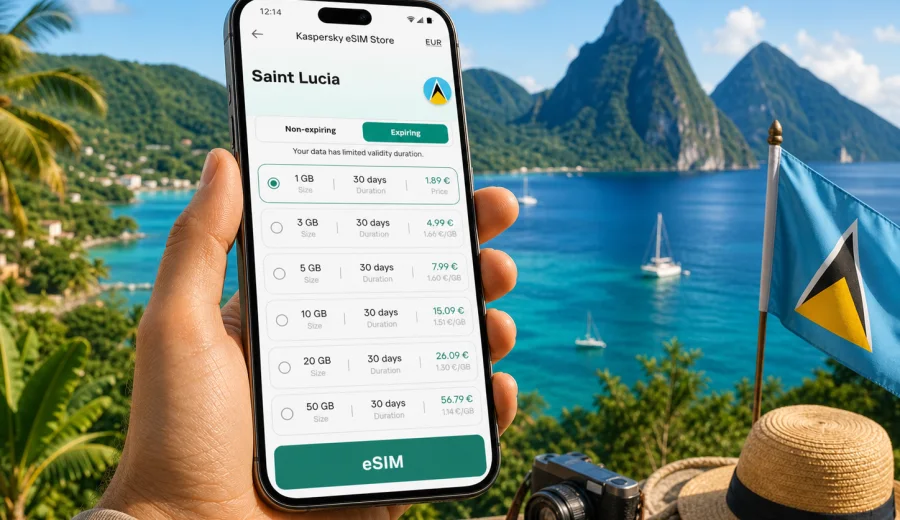
eSIM for Saint Lucia: mobile connection and internet for your trip
Saint Lucia is a compact island, but a trip here can involve many different online moments: landing at Hewanorra International Airport, finding a transfer to Castries, checking a hotel booking in Rodney Bay, navigating to Soufriere, sharing photos from the Pitons, or confirming a boat tour on the west coast. A practical eSIM plan helps you prepare mobile internet before the trip, so you do not have to rely only on roaming, public Wi-Fi, or a physical SIM card after arrival.
This guide explains how to think about eSIM for Saint Lucia, what to check before buying a plan, how much data you may need, and how Kaspersky eSIM Store can fit into your travel preparation. The focus is mobile data for travel: maps, messengers, bookings, ride coordination, email, video calls, and everyday online tasks while you are abroad.
Why mobile internet matters in Saint Lucia
Saint Lucia trips often combine resort time, coastal roads, small towns, beaches, hiking, and transfers between different parts of the island. Even if your hotel has Wi-Fi, you may still need mobile data between fixed access points. This is especially useful when you are arranging transport, checking the weather before a boat trip, using maps outside town centers, or contacting a host after a delayed flight.
A travel eSIM is useful because it is digital. You do not need to remove your main SIM card, find a store at the airport, or change your number for everyday apps. On a compatible device, you install an eSIM profile, choose it for mobile data, and keep your main SIM available for calls or messages if your home plan supports that setup.
In practical terms, eSIM for Saint Lucia is most helpful when you want:
- mobile internet soon after arrival;
- access to maps and booking apps outside the hotel;
- a separate travel data plan without changing your physical SIM;
- visible conditions before you pay, such as data volume and validity period;
- a simple way to prepare online access before a Caribbean trip.
eSIM does not replace every part of a mobile subscription. In many travel data plans, it does not include a local phone number, standard voice calls, or SMS unless the specific plan conditions say otherwise. For calls and messages, you can usually use internet-based apps over mobile data.
What an eSIM does during a Saint Lucia trip
An eSIM is a digital SIM profile built into supported smartphones and tablets. Instead of inserting a plastic SIM card, you add a profile through the device settings, usually with a QR code or an in-app installation flow. After installation, the eSIM can be selected for mobile data in the same way you would select a physical SIM.
For Saint Lucia, the most common use is travel internet. You keep your usual number for banking codes, messengers, and important contacts, while the eSIM handles data abroad. This can be cleaner than switching SIM cards and safer than depending on open public Wi-Fi for every online task.
| Travel situation | Why mobile data helps |
|---|---|
| Airport arrival | Check transfers, messages, booking details, and maps before leaving the terminal. |
| Road trips | Use navigation between Castries, Soufriere, Rodney Bay, Marigot Bay, and southern beaches. |
| Resort stays | Stay online outside hotel Wi-Fi zones, by the beach, pool, marina, or restaurant. |
| Tours and hikes | Coordinate pick-up points, weather changes, and last-minute schedule updates. |
| Work check-ins | Send email, join a short call, or access cloud files without waiting for hotel Wi-Fi. |
The exact experience depends on the chosen plan, the local network conditions, your device, and the area where you are using mobile data. Avoid treating any travel eSIM as a guarantee of identical speed in every part of the island. A better approach is to choose a data volume and validity period that match your itinerary, then keep offline backups for critical details.
Before you choose a plan
The most important preparation step is device compatibility. Not every phone supports eSIM, and some devices are locked to a mobile operator. Regional model variations can also matter. Before you pay for a travel data plan, check your device and confirm that it supports eSIM installation.
Also check these details:
- the plan destination includes Saint Lucia or the region you need;
- the data volume is suitable for your daily usage;
- the validity period covers your full stay;
- the plan starts when expected according to its conditions;
- your device can use mobile data through the eSIM profile;
- you know whether data roaming must be enabled for the eSIM on your device;
- you will have internet access during installation if the setup requires it.
If you travel with dual SIM, decide in advance which line will handle mobile data and which line will stay available for your usual calls or messages. This helps avoid confusion when you land and the phone asks which SIM should be used for different functions.
How much data do you need in Saint Lucia?
There is no single correct amount of data for every traveler. A quiet beach stay with occasional maps and messages can use much less than a workation with video calls and cloud apps. The right plan depends on how you use your phone, how often you connect to trusted Wi-Fi, and whether you share data with other devices.
Use these rough planning scenarios:
| Trip style | Typical online use | Practical data approach |
|---|---|---|
| Short leisure stay | Maps, messages, restaurant searches, booking confirmations | Choose a modest data package with validity that covers the whole stay. |
| Active island route | Navigation, taxi coordination, photo uploads, tour updates | Choose more data because you will be online away from hotel Wi-Fi. |
| Remote work | Email, documents, calls, hotspot for a laptop | Choose a larger package and keep video calls on trusted Wi-Fi when possible. |
| Family trip | Shared planning, ride apps, entertainment, messaging | Consider one plan per active device or a larger package if tethering is allowed. |
Video is usually the biggest data user. Maps, messaging, email, and web browsing are lighter. Photo backup and social media uploads can vary widely. If your plan has a fixed data allowance, turn off automatic cloud backup over mobile data and download offline maps or entertainment before the trip.
When eSIM is better than relying only on hotel Wi-Fi
Hotel Wi-Fi is convenient, but it does not cover the parts of a trip where many small decisions happen. In Saint Lucia, you may be between the airport and the north of the island, waiting for a tour pick-up, looking for a beach access point, or trying to contact a driver. Mobile internet is valuable in those moving moments.
An eSIM can be especially practical when:
- your flight arrives late and you need to message a transfer company;
- you are staying outside a large resort area;
- you plan to explore both the north and the south of the island;
- you want maps available on coastal and inland roads;
- you need data before hotel check-in;
- you prefer not to connect to open Wi-Fi networks for basic travel tasks.
Public Wi-Fi can still be useful for large downloads and long video calls. The practical goal is not to avoid Wi-Fi completely, but to have a mobile data option when Wi-Fi is unavailable, unstable, or inconvenient.
Choosing an eSIM plan for Saint Lucia
When comparing travel data options, start with three questions: where you will go, how long you will stay, and what you will do online. A traveler spending four days at a resort in Rodney Bay may need a different plan than someone driving to Soufriere, visiting the Pitons, and checking in with work every morning.
Kaspersky eSIM Store is an app and website where you can choose, arrange, and activate an eSIM with a suitable data plan for mobile internet during an international trip. It is not a mobile operator and does not own or operate mobile networks. The practical value is the preparation flow: you can review available plan conditions, choose the destination, install the eSIM on a compatible device, and manage the travel data setup through the site or app.
If you are planning your route now, you can choose an eSIM plan for your Saint Lucia trip and compare the available data volumes and validity periods before you travel. Place the plan choice next to your flight, hotel, and transfer details, because mobile internet is part of the same arrival checklist.
A simple decision checklist
Use this checklist before choosing a Saint Lucia eSIM plan:
- Trip length: count full travel days, including arrival and departure.
- Main locations: note whether you will stay in one resort area or move around the island.
- Data habits: estimate messaging, maps, browsing, uploads, calls, and hotspot use.
- Device status: confirm eSIM support and operator unlock status.
- Installation timing: decide whether to install before departure or after arrival.
- Backup access: save hotel address, transfer contacts, and booking details offline.
- Main SIM settings: decide whether your home line should remain active for calls or SMS.
For a short holiday, a smaller plan may be enough if you use mobile data mostly for maps and messages. For longer stays, route-heavy trips, or work use, a larger data volume gives more room for changes. If you are unsure, avoid building your plan around best-case Wi-Fi availability. Choose enough mobile data for the parts of the trip when you cannot control the network around you.
How to install and activate an eSIM
The exact steps depend on your device and the plan setup, but the preparation pattern is usually similar. You select a destination and plan, complete the purchase flow, add the eSIM profile to your compatible device, and then choose it for mobile data when you are ready to use it.
For device-specific setup, use the official installation pages: Android installation guide and iOS installation guide. Follow the steps for your phone model and operating system.
A practical installation sequence looks like this:
1. Check that your phone supports eSIM and is not locked to one operator.
2. Choose Saint Lucia as the destination and select a plan that fits your stay.
3. Install the eSIM profile using the available instructions, QR code, or in-app flow.
4. Label the line clearly, for example "Saint Lucia data".
5. Keep your main SIM for calls or messages if needed.
6. Set the eSIM as the mobile data line when you want to start using it.
7. Enable data roaming for the eSIM if the device or plan instructions require it.
8. Wait a few minutes for network registration if the connection is not immediate.
Do not delete an eSIM profile unless you are sure you no longer need it. Some profiles cannot simply be moved to another device after activation, and reinstallation rules depend on the specific plan conditions.
Arrival scenario: from the airport to your stay
Many visitors arrive through Hewanorra International Airport in the south, while popular stays are often in the north around Castries, Rodney Bay, or Gros Islet. Transfers can take time, and that first ride is when mobile data becomes useful. You may want to send a message, track the route, update a hotel arrival time, or check whether a tour operator has changed a pick-up location.
Before departure, save these details offline:
- hotel address and phone number;
- transfer confirmation and driver contact;
- booking references for flights and accommodation;
- a map pin for your first destination;
- emergency contact details;
- passport and insurance copies in a secure offline location.
Then use mobile data for live tasks: messages, map updates, travel time checks, and quick confirmations. This combination keeps essential information available even if the mobile signal is weak in one area or your device settings need adjustment.
Data-saving tips for Saint Lucia
Travel data goes further when your phone is set up deliberately. You do not need to restrict every app, but small changes can prevent background usage from consuming a fixed data allowance.
Recommended settings:
- Download offline maps for the main island areas before departure.
- Turn off automatic photo and video backup over mobile data.
- Update apps before you travel, not over the eSIM connection.
- Limit video streaming or switch to lower quality on mobile data.
- Use trusted Wi-Fi for large downloads and long cloud sync sessions.
- Check which apps are allowed to use mobile data in the background.
- Keep important bookings available offline as PDFs or screenshots.
If you use your phone as a hotspot, monitor data more often. A laptop can consume data quickly through software updates, cloud sync, email attachments, and browser tabs. Check whether tethering is allowed by the plan conditions before relying on it.
Common mistakes to avoid
The most common eSIM mistakes are easy to prevent:
| Mistake | Better approach |
|---|---|
| Buying before checking device support | Confirm eSIM compatibility and unlock status first. |
| Choosing too little data | Estimate navigation, messaging, uploads, and work needs honestly. |
| Installing in a hurry after landing | Install and review instructions while you still have stable internet. |
| Deleting the eSIM profile too early | Keep it until the trip is finished and the plan is no longer needed. |
| Expecting calls and SMS by default | Check plan conditions; many travel eSIM plans are data-only. |
| Letting apps sync automatically | Control backups, app updates, and video quality on mobile data. |
Another mistake is assuming one setting is correct for every phone. On some devices, data roaming must be enabled for the travel eSIM to work. This does not mean you are using your home roaming plan; it can be a required setting for the eSIM data profile. Follow the instructions for your device and plan.
eSIM, roaming, and local SIM: practical comparison
Each option can make sense depending on the trip. The best choice is the one that fits your timing, budget, device, and comfort level.
| Option | Strengths | Things to check |
|---|---|---|
| Travel eSIM | Digital setup, no physical SIM swap, useful before or soon after arrival | Device compatibility, plan destination, data amount, validity period |
| Home roaming | Uses your existing number and carrier relationship | Daily fees, data limits, speed rules, unexpected costs |
| Local physical SIM | Can be useful for longer stays or local calling needs | Store availability, registration rules, opening hours, SIM slot access |
| Public Wi-Fi | Good for large downloads when trusted and stable | Availability, privacy, reliability, need to be in range |
For many Saint Lucia visitors, an eSIM is a practical middle option: more independent than Wi-Fi, often simpler than finding a physical SIM, and easier to prepare than solving everything at the airport after a long flight. Still, you should read the conditions of the selected plan and choose based on your actual itinerary.
Quick answers about eSIM in Saint Lucia
Can I use eSIM for mobile internet in Saint Lucia?
Yes, if your device supports eSIM, is not locked in a way that prevents eSIM use, and you choose a plan that includes Saint Lucia. Availability and performance depend on the selected plan, device settings, and local network conditions.
Should I install the eSIM before flying?
You can usually prepare the installation before you travel, but activation and validity rules depend on the plan. Read the plan details before installing or activating. If the setup requires an internet connection, doing it before departure can be easier than waiting until arrival.
Will I get a Saint Lucia phone number?
Not necessarily. Many travel eSIM plans are designed for mobile data and do not include a local phone number, standard calls, or SMS. Use internet-based apps for calls and messages unless the plan conditions say otherwise.
Is eSIM useful if my hotel has Wi-Fi?
Yes, because travel decisions often happen away from the hotel. Mobile data helps with maps, transfers, tour coordination, messages, and booking changes while you are on the move.
Can I keep my regular SIM active?
On many dual-SIM phones, yes. You can keep your regular SIM available for calls or messages and use the eSIM for mobile data. Check your device settings and any costs from your home carrier before using the home line abroad.
Final preparation before your Saint Lucia trip
Treat mobile internet as part of your travel checklist, not as a last-minute technical detail. Confirm your device compatibility, choose a plan with enough data and the right validity period, save essential travel details offline, and install the eSIM while you have time to follow the instructions calmly.
Kaspersky eSIM Store helps you prepare this flow through an app and website where you can select a destination, review plan conditions, and activate an eSIM for mobile internet on a compatible device. For a beach holiday, island route, family trip, or short work check-in, the goal is the same: keep the online parts of the journey manageable.
Before you pack, choose an eSIM plan for Saint Lucia and make mobile internet one less thing to solve after landing.