
Travel connectivity guide
eSIM for Saint Martin: mobile internet guide
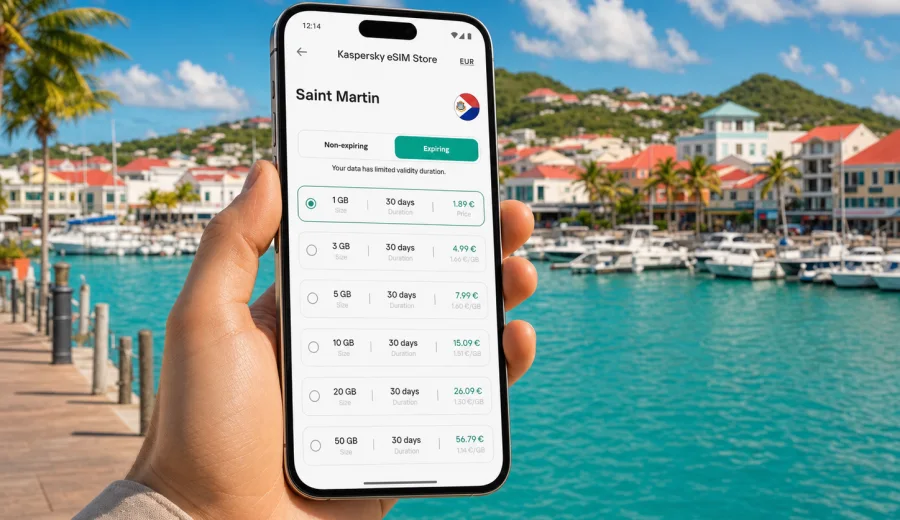
eSIM for Saint Martin: mobile connection and internet for your trip
Saint Martin is a compact Caribbean destination where mobile internet quickly becomes part of the travel plan. You may need maps after landing, messaging for hotel check-in, ride coordination around Marigot or Grand Case, restaurant bookings near Orient Bay, and photo backups after a day on the coast. An eSIM can help you prepare that connection before you look for a local shop or rely on airport Wi-Fi.
This guide explains how to use eSIM for Saint Martin, how to estimate data needs, what to check before buying a tariff, and how to install the eSIM on a compatible device. The focus is practical: mobile internet for a trip, not a general telecom overview.
Why eSIM is useful in Saint Martin
Saint Martin is small, but travel on the island is not always linear. Many visitors arrive through Princess Juliana International Airport on the Dutch side, cross to the French side for hotels or beaches, and move between coastal areas several times during the same stay. That makes early access to mobile data useful for navigation, messaging and confirmations.
An eSIM is a digital SIM profile installed on a compatible phone or tablet. Instead of inserting a physical SIM card, you add the eSIM through device settings, usually by scanning a QR code or following in-app instructions. Once installed and activated according to the tariff conditions, it can be used for mobile data in the destination covered by the selected tariff.
For Saint Martin, eSIM is especially helpful when you want to:
- check directions from the airport to Marigot, Grand Case, Orient Bay or Anse Marcel;
- message your hotel, host, driver or boat operator;
- use maps without searching for public Wi-Fi;
- keep your primary SIM for calls, banking messages or account verification;
- manage travel apps, reservations and boarding passes during the trip;
- avoid spending the first hour of the holiday looking for a physical SIM card.
eSIM does not remove the need to read tariff conditions. Coverage, available networks, validity period, hotspot use and activation timing depend on the selected tariff and local network conditions. The right approach is to choose the country or regional option that matches your route, check the data allowance, and install it on a device that supports eSIM.
Saint Martin or Sint Maarten: what to check before choosing a tariff
The island is shared by French Saint Martin and Dutch Sint Maarten. Travelers often cross the border without noticing it in daily movement, but mobile tariffs may treat territories differently. If your accommodation is on the French side and most of your route is around Marigot, Grand Case, Cul-de-Sac or Orient Bay, a Saint Martin destination tariff may be the right starting point. If you will also spend time around Philipsburg, Maho Beach or the airport area, check whether a country, island or regional option better matches your route.
Use this simple decision table before you choose:
| Travel scenario | What to look for in an eSIM tariff |
|---|---|
| Staying mainly on the French side | A Saint Martin destination tariff with enough data for your stay |
| Arriving through the Dutch side, then staying in Saint Martin | Conditions that match the territory where you will use most data |
| Splitting time between both sides of the island | A regional or multi-destination option, if it includes the places you need |
| Visiting nearby Caribbean islands | A broader Caribbean or regional tariff may be more practical |
| Short beach break of 2-4 days | Smaller data allowance may be enough if you use hotel Wi-Fi for heavy downloads |
| Remote work or frequent video calls | Larger data allowance and a longer validity period are usually safer |
The key point is not the size of the island, but the territory list in the tariff. Always read the destination coverage and conditions before payment. A few minutes of checking can prevent confusion after arrival.
How much mobile data do you need for Saint Martin?
Data use depends on habits, not only on trip length. A traveler who uses maps, messaging and occasional web browsing may need far less data than someone who uploads videos, works on calls or uses mobile hotspot every day.
Approximate data planning can look like this:
| Use during the trip | Typical data impact | Practical advice |
|---|---|---|
| Messaging, email, light browsing | Low | Works well with a smaller package |
| Maps, ride apps, restaurant searches | Low to medium | Download offline maps before departure to reduce use |
| Photo uploads and cloud backup | Medium to high | Use Wi-Fi for full-resolution backup when possible |
| Video calls | High | Choose a larger package if calls are daily |
| Streaming video | Very high | Avoid streaming on mobile data unless the package is large |
| Mobile hotspot for laptop | High | Check whether tethering is allowed by the tariff |
For a short vacation in Saint Martin, many travelers mainly need data for navigation, messaging and bookings. For a longer stay, yacht charter, family trip or remote work, it is better to leave extra room. Running out of data during a transfer, check-in or flight change is more frustrating than choosing a slightly larger package in advance.
What makes eSIM different from roaming and a local SIM card?
Roaming, physical local SIM cards and eSIM all solve the same basic problem: staying connected while abroad. The trade-offs are different.
| Option | Advantages | Things to consider |
|---|---|---|
| Home operator roaming | Uses your existing SIM and number | Price and data limits may not suit the trip |
| Local physical SIM | Can be useful for longer stays | Requires finding a shop, checking terms and inserting a card |
| eSIM for travel | Can be prepared before or soon after arrival, no physical card | Requires compatible, unlocked device and a suitable tariff |
For Saint Martin, eSIM is often convenient because the trip may involve airport transfers, border crossing on the island, and quick movement between beaches and towns. You can keep your primary SIM active for calls or authentication while using the eSIM profile for mobile data, if your device supports dual SIM mode.
eSIM tariffs for travel usually focus on mobile data. They typically do not include a regular local phone number, voice calls or SMS unless the specific tariff states otherwise. For calls and messages, you can use internet-based apps through the data connection.
Before you buy: compatibility and device checks
Not every phone supports eSIM, and not every eSIM-capable phone is ready for travel use. Before choosing a tariff, check the device model, software version and carrier lock status.
Use this checklist:
- Confirm that your phone or tablet supports eSIM.
- Make sure the device is not locked to one mobile operator.
- Update the operating system before the trip.
- Check that you know where cellular or mobile data settings are located.
- Keep stable internet access available for installation.
- Save your QR code or installation instructions somewhere accessible.
- Decide which SIM will be used for calls and which one for mobile data.
If you are not sure whether your device can use eSIM, check your device before you choose a tariff. Compatibility is the first practical step: without it, even a well-matched tariff cannot be installed.
How to choose an eSIM tariff for Saint Martin
Choose the tariff by route, length of stay and expected data use. Do not select only by the smallest number on the page. A tariff that fits the trip should cover the right destination, have enough data, remain valid for the whole stay, and match how you use your phone.
For Saint Martin, check these points in order:
1. Destination: confirm that Saint Martin is included in the selected tariff.
2. Route: if you will spend time on both sides of the island or nearby islands, compare the destination list carefully.
3. Data volume: estimate maps, messaging, browsing, uploads and hotspot use.
4. Validity period: match the number of days to your arrival and departure.
5. Activation rules: see when the validity period starts and how installation works.
6. Hotspot: check whether sharing data with a laptop or another device is allowed.
7. Top-up or extra data: see what options are available if you need more data.
Once you know your route and data needs, you can choose an eSIM tariff for Saint Martin and review the available options before your trip. Kaspersky eSIM Store is an app and website where you can choose, arrange and activate an eSIM with a suitable mobile data tariff for travel; the conditions shown for the selected option should guide the final decision.
Practical Saint Martin scenarios
Different trips need different data planning. Use these examples as a quick guide:
| Scenario | Likely data needs | eSIM planning tip |
|---|---|---|
| Weekend near Orient Bay or Grand Case | Maps, messages, bookings, light browsing | A smaller package may work if hotel Wi-Fi handles uploads |
| Family holiday | Navigation, group chats, photo sharing, entertainment during transfers | Choose more data if one phone will be used as a hotspot |
| Remote work stay | Video calls, cloud tools, email, hotspot | Pick a larger allowance and keep Wi-Fi for heavy tasks |
| Island-hopping route | Maps and messages across several destinations | Check whether a regional option includes every stop |
Do not assume that every beach, road or building will have the same network quality. Local coverage depends on terrain, indoor conditions and available networks. Test important apps before you rely on them for a transfer or meeting.
Installation: how to set up eSIM before or during the trip
Installation steps vary slightly by device, but the general logic is simple: choose the tariff, install the eSIM profile, select it for mobile data, and activate it according to the instructions.
A practical setup flow:
1. Connect to stable Wi-Fi.
2. Open the website or app and choose the Saint Martin tariff that matches your trip.
3. Complete the purchase process.
4. Follow the installation instructions shown after purchase or sent to you.
5. Add the eSIM profile to your device.
6. Name the profile clearly, for example "Saint Martin data".
7. Before departure, keep your home SIM as the default line for calls if needed.
8. On arrival, set the eSIM as the mobile data line and turn on data roaming for that eSIM if the instructions require it.
9. Test mobile data with a map or browser page.
For device-specific setup, use the Android installation guide or the iOS installation guide. Follow the steps for your device carefully and avoid deleting the eSIM profile unless the instructions or support team advise it.
What to know about calls, SMS and your primary SIM
Travel eSIM is mainly about mobile internet. Unless the selected tariff states otherwise, do not expect a local phone number, ordinary voice calls or SMS. If you need bank messages or calls on your home number, keep your primary SIM active and check your home operator's roaming rules.
On many modern phones, you can use your primary SIM for calls and texts while the eSIM handles mobile data. Rename the travel profile clearly so you can see which line is active.
Troubleshooting if mobile data does not work
If the eSIM is installed but mobile internet is not working, check the basics first: the eSIM must be selected for mobile data, data roaming may need to be enabled for that eSIM, and the tariff must include the place where you are trying to connect. Restarting the device can also help. If the issue remains, gather the tariff name, device model and screenshots of cellular settings, then contact support.
Quick planning checklist for Saint Martin
Use this list a day or two before departure:
- Phone supports eSIM and is not carrier-locked.
- Saint Martin route is clear, including any time on the Dutch side.
- Tariff destination list, data volume and validity period are checked.
- eSIM installation instructions are saved.
- Primary SIM roaming settings are reviewed.
- Offline maps are downloaded.
The first hour after arrival is when you are most likely to need mobile data for transport, check-in and navigation.
FAQ: eSIM and mobile internet in Saint Martin
Should I install the eSIM before flying to Saint Martin?
Often, yes. Installing before departure can make arrival easier, especially if you need maps or messages immediately. Check the activation and validity rules first.
What if I cross between Saint Martin and Sint Maarten?
Check the destination list in the tariff before you travel. The island has two territories, and tariffs may define coverage by destination or region.
Is public Wi-Fi enough for a Saint Martin trip?
Wi-Fi can help at hotels, restaurants or airports, but it is not always available when you need navigation, messaging or transport. eSIM can reduce dependence on public Wi-Fi during transfers and daily movement.
Choose eSIM for your Saint Martin trip
Saint Martin is easier to enjoy when mobile internet is handled before the first transfer, beach route or booking change. With a compatible device, a suitable tariff and a few minutes of preparation, eSIM can give you a practical way to stay online without searching for a physical SIM card after arrival.
Use Kaspersky eSIM Store to review the available options, compare data volume and validity, and prepare an eSIM tariff for Saint Martin before you travel. Check your device, read the tariff conditions, install the eSIM carefully, and keep your mobile connection ready for the trip.