Travel connectivity guide
Saint Petersburg eSIM: Mobile Internet Guide
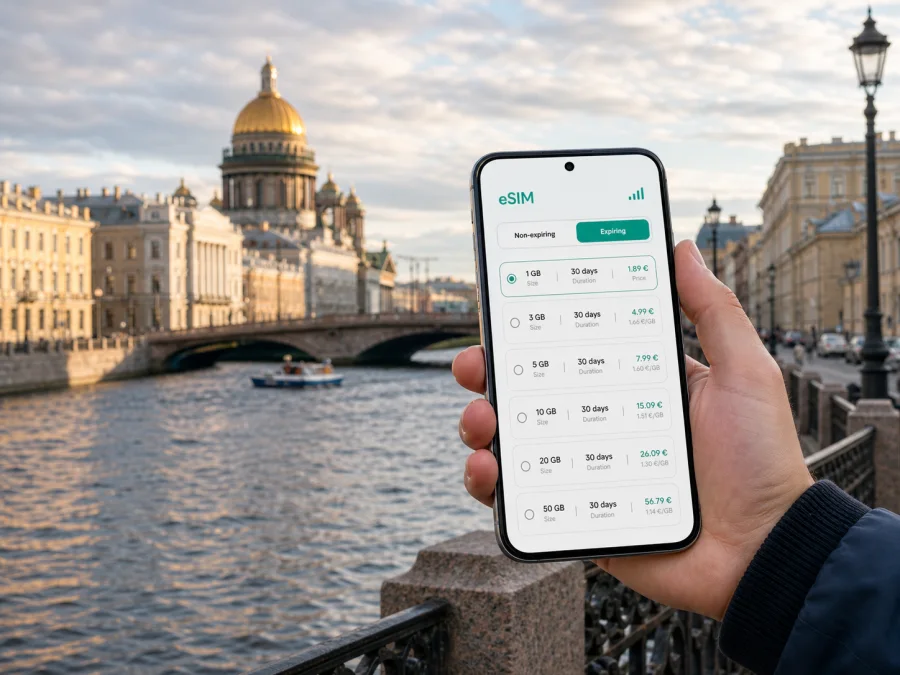
Saint Petersburg eSIM: mobile connection and internet for your trip
Saint Petersburg is a city where a reliable mobile connection is useful from the first hour of a visit. You may need to find the right airport transfer, check a hotel message, translate a sign, order a ride, follow a walking route through several districts, or change plans when a bridge opening affects the evening. Having mobile internet ready makes those small decisions easier.
For a trip to Saint Petersburg, Russian Federation, an eSIM can be a practical way to arrange data without changing the physical SIM card in your phone. Kaspersky eSIM Store is an app and website that helps you choose, arrange, and activate an eSIM with a suitable data plan for an overseas trip. The important choice is not a generic “city package”, but a plan whose destination, data volume, validity period, and conditions match your itinerary.
Quick answer: do you need an eSIM in Saint Petersburg?
An eSIM is worth considering if you want mobile data available for navigation, transport, messages, maps, translation, and travel bookings as soon as you arrive. It is especially useful when you do not want to depend on airport Wi‑Fi or look for a physical SIM after a long journey.
Match the plan to your itinerary:
| Trip pattern | What usually consumes data | Planning focus |
|---|---|---|
| Weekend in the historic centre | Maps, messengers, tickets, restaurant searches | A compact plan with enough data for navigation and photos |
| Several days with museums and neighbourhood walks | Maps, reviews, ride bookings, translation, cloud photo backup | A medium data allowance and a validity period covering the whole stay |
| Business visit | Video calls, email attachments, documents, taxi and calendar apps | More headroom, stable access for work, and a backup charging plan |
| Stopover between flights or trains | Route checks, airport messages, transport updates | A plan activated at the right time and tested before leaving |
| City plus day trips | Navigation outside the centre, tickets, messages, photos | Confirm that the destination and validity suit the complete route |
An eSIM in this travel setup normally provides mobile data rather than a conventional local phone number. Voice calls and SMS are not included unless the selected plan says otherwise; messengers can handle calls and messages over data.
Plan the connection before leaving
Start with the device, then the destination, and only then the amount of data. This order prevents a common mistake: choosing a plan first and discovering later that the phone is locked or cannot use eSIM technology.
1. Check the phone
Your smartphone must support eSIM and must not be restricted to one operator. The exact menu names vary by manufacturer and operating-system version. If you are not sure, check your device compatibility before you buy or install anything.
Also check the practical details:
- update the operating system while you still have a dependable connection;
- charge the phone and carry a power bank if you expect a long arrival day;
- keep the physical SIM active if you need its number for calls, banking codes, or account recovery;
- decide which line will be used for mobile data.
2. Match the plan to the itinerary
Look at the number of days, the areas you will visit, and the activities that use data. A walking route is usually light on data, while video calls, cloud photo uploads, navigation with live layers, and video streaming can use much more. It is better to estimate from your habits than to choose a package solely by the number of days.
Before payment, compare the conditions shown for the destination:
- data volume and validity period;
- when validity begins—at installation, activation, or the first connection, according to the plan terms;
- whether top-ups are available and how balance management works;
- whether data roaming must be enabled for the eSIM line;
- what happens if the plan expires before the trip ends.
Arriving in Saint Petersburg: the first connection decisions
Most visitors who fly into the city arrive at Pulkovo Airport, south of the central districts. The first tasks are practical: finding a transfer, locating the accommodation, checking a host message, and confirming the route. Save the hotel address offline as a precaution.
At the airport, connect the intended data line, open a map, and confirm the destination before choosing a transfer. If you use a taxi or ride-booking app, check the vehicle details and pickup point carefully. With luggage, compare the route with the time of day instead of choosing solely by distance.
A simple arrival sequence is:
- Turn off airplane mode and wait for the eSIM line to register.
- Select the eSIM as the mobile-data line.
- Enable data roaming for that line only if required by the plan.
- Open a map and send one test message to confirm the expected data line is active.
If the first connection does not appear, do not delete the eSIM profile immediately. Check that the line is switched on, the correct data line is selected, and the settings match the plan instructions. Restart the phone if needed, then contact support through the app or website with the order information.
Moving around the city without losing your route
Saint Petersburg rewards walking, but its scale, water crossings, and changing weather make a mixed transport plan more comfortable. The historic centre is easy to explore in sections, while longer trips may involve the metro, buses, trams, or a taxi. Live maps are useful for choosing between walking and transport, especially when a bridge, road, or station makes a seemingly short route less convenient.
Metro and surface transport
The metro is useful for crossing larger distances and reaching areas beyond the central walking routes. Surface transport helps when your destination is not close to a metro entrance. Check the route before leaving a hotel or café, because a few minutes of planning can save a detour.
Keep these habits in mind:
- pin the hotel and next destination before you set out;
- download the area in your map app when offline access is available;
- use the current route and allow extra time for transfers, weather, and luggage;
- keep battery use under control and carry a charger.
Choosing a district and staying connected
The right area to stay depends on the kind of visit you are planning. Connection needs also change with the district: a leisure traveller may use data mostly outdoors, while a business traveller may need it inside a hotel, coworking space, or meeting venue. Consider the whole daily route rather than judging an area only by its distance from one landmark.
| Area | Suitable for | Mobile-data moments to expect |
|---|---|---|
| Tsentralny District | First-time sightseeing, Nevsky Prospect, museums | Maps, tickets, restaurant searches, and messages |
| Admiralteysky District | Historic architecture, theatres, embankments | Walking routes, rides, events, and weather |
| Petrogradsky District | Peter and Paul Fortress, quieter central base | Cross-river navigation and transport planning |
| Vasileostrovsky District | Island routes, museums, waterfront | Bridge-related route changes and return planning |
| Moskovsky District | Airport-side stays and stopovers | Transfers, booking messages, and timed routes |
| Primorsky or Vyborgsky areas | Longer stays or work visits outside the centre | More transport planning |
Thick walls, underground spaces, and crowded venues can affect a connection, so keep important reservations and addresses available offline.
For a plan suited to your route, you can prepare an eSIM for a trip to Saint Petersburg. Select the destination and review the available data volume, validity, and conditions before completing the order.
Install and activate eSIM step by step
The safest time to install an eSIM is usually before departure, when you have Wi‑Fi and time to read the instructions. Activation timing depends on the selected plan, so check its terms rather than assuming that installation immediately starts the validity period.
Before installation
Confirm that the device is compatible and not operator-locked, using the device compatibility check if needed. Connect to reliable Wi‑Fi and keep the order confirmation or QR code accessible if required. Decide which line will handle calls and SMS and which will handle data. Do not remove the profile after installation unless support or the plan terms tell you to do so.
For the device-specific process, follow the Android eSIM installation instructions or the iOS eSIM installation instructions. The wording of the menus can differ by device model, but the general flow is to add a mobile plan, scan or enter the supplied details, label the line, and choose the data settings.
After installation
Give the eSIM a clear label, such as “Travel data”. In Saint Petersburg, turn on the line, choose it for mobile data, and enable data roaming for that line if required. Keep automatic data switching disabled unless you want the phone to change lines.
Test the connection with a small action: load a map area, refresh a booking message, or send a text through a messenger. If that works, check the balance or remaining data in the app or website before starting a long day. This is more useful than testing with a large video or a full photo backup.
Practical scenarios in Saint Petersburg
A business trip
Separate work needs from sightseeing needs. Email, document downloads, two-factor authentication, and video meetings can consume more data than ordinary map use. Download files before travelling where possible, carry a charger, and check the data line before a meeting begins.
An eSIM gives you a mobile-data option; it does not replace sensible account and device protection. Confirm the name of any hotel or venue Wi‑Fi before using it for work.
A short stopover
For a stopover, prioritise clarity. Install the eSIM before the trip if the plan allows it, save the airport and accommodation details, and choose a data volume that covers the transfer, messages, maps, and a delay. Keep the next destination and return route in one note.
Trips outside the centre
Saint Petersburg is also a base for outings to places such as Peterhof, Pushkin, Pavlovsk, or Kronstadt. These are separate destinations with different travel times and transport arrangements. Before setting out, confirm the return route, save the departure point, and check that the selected plan covers the complete trip.
A compact pre-departure checklist
Use this list the day before you leave:
- [ ] The phone supports eSIM and is not operator-locked.
- [ ] The destination, data volume, and validity period fit the Saint Petersburg itinerary.
- [ ] The eSIM order details and installation instructions are accessible.
- [ ] The phone, power bank, and primary SIM are charged.
- [ ] The hotel address, airport details, and first route are available offline.
- [ ] The eSIM is labelled clearly in the phone settings.
- [ ] You know which line is selected for mobile data.
- [ ] You know whether data roaming must be enabled for the eSIM.
- [ ] Important bookings and contacts are also available offline.
FAQ
Can I install an eSIM before arriving in Saint Petersburg?
Installation can often be prepared before departure with a compatible phone and reliable Wi‑Fi. Check when validity starts before activation.
Will an eSIM give me a local phone number?
Not normally. This travel setup is intended for mobile data; ordinary calls and SMS are not included unless the plan says so. Keep your primary SIM for number-dependent services and use messengers over data when appropriate.
Should I turn off my regular SIM?
Not necessarily. Keep it active for calls or SMS if needed, but select the travel eSIM for data and disable automatic data switching. Check your home operator’s roaming conditions.
What if the connection does not start after landing?
Check that the eSIM line is enabled, selected for data, and configured according to the plan instructions. If data roaming is required, enable it for that line only. Restart and contact support with the order details if the issue remains.
How much data should I choose for a city break?
There is no single correct amount. Estimate from your normal habits, add the days of any trip outside the centre, and choose a plan whose validity covers the itinerary. Video calls, photo uploads, and streaming require more headroom than maps and messages.
Can I use the same eSIM for a trip to another country afterward?
That depends on the destination and plan terms. Check the coverage and validity rather than assuming that a plan for Russian Federation applies elsewhere. If your route crosses borders, plan the data connection for the full route.
Stay ready for the city
Saint Petersburg is easier to experience when the phone supports the day instead of controlling it. Prepare the connection before the airport, keep your key addresses offline, choose a plan that reflects your actual use, and check the data line whenever you change from a hotel network to mobile data. Those habits leave more attention for the city’s rivers, bridges, museums, theatres, and neighbourhood streets.
When your route is clear, choose an eSIM plan for your Saint Petersburg trip through Kaspersky eSIM Store, review the conditions, and install it on a compatible device before you set out.


