
Travel connectivity guide
Saint Vincent and The Grenadines eSIM Guide
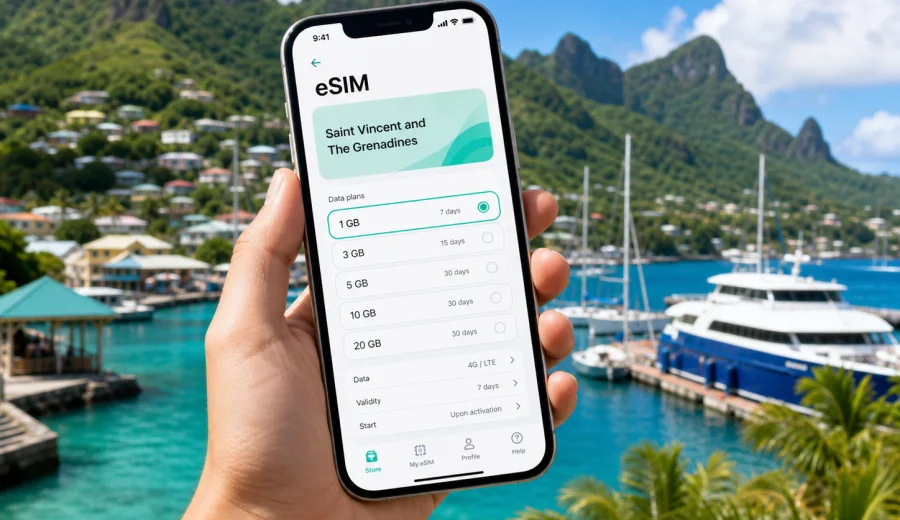
eSIM in Saint Vincent and The Grenadines: mobile connection and internet for your trip
Saint Vincent and The Grenadines is a country where travel often means moving between one main island, smaller Grenadine islands, ferry terminals, coastal roads, hotels, beaches, marinas, and airports. Mobile internet can be useful from the first minutes after arrival: for maps, transfer details, hotel messages, ferry schedules, banking alerts, translation, weather checks, and contact with family or colleagues.
An eSIM can make this easier because you do not need to find a physical SIM card shop after landing. You choose a suitable eSIM tariff for your trip, install the digital SIM profile on a compatible device, and use mobile data when the plan is active and local network conditions allow it. This guide explains how to prepare mobile connection and internet for Saint Vincent and The Grenadines with eSIM, what to check before you pay for a tariff, and how to avoid common mistakes during installation.
The focus here is practical travel use. eSIM is mainly about mobile data. It usually does not include a local phone number, voice calls, or SMS unless a specific tariff says otherwise. For calls and messages, most travelers use internet-based apps over mobile data.
Why eSIM can be useful in Saint Vincent and The Grenadines
Saint Vincent and The Grenadines is not a single-city destination. Many trips include Kingstown, Argyle International Airport, beaches on Saint Vincent, short stays on Bequia, sailing routes near Mustique or Canouan, and day trips around the Tobago Cays area. Even if your accommodation has Wi-Fi, mobile internet can help during the parts of the trip where you are outside the hotel.
Typical moments when eSIM is useful:
- checking maps from the airport or ferry port;
- messaging a hotel, boat operator, driver, or host;
- confirming booking details while away from Wi-Fi;
- using banking apps for card confirmations;
- checking weather before a sea transfer;
- sharing location with other travelers;
- using translation and travel apps;
- keeping a backup connection if hotel Wi-Fi is unstable.
Travel in the islands can involve short transfers and changing plans. When your phone already has a prepared data profile, you do not need to spend your first hour looking for a SIM counter or comparing unclear roaming messages. You can focus on the next step of the route.
eSIM, roaming, and local SIM cards: what changes for a traveler
There are several ways to get online abroad. The right option depends on your phone, trip length, budget, and tolerance for setup time.
| Option | What it means | Practical point |
|---|---|---|
| Home operator roaming | You keep using your usual SIM abroad | Convenient, but pricing and data limits can vary a lot by operator and tariff |
| Local physical SIM | You buy a SIM card after arrival | Can be useful for longer stays, but requires time, a shop, and a physical SIM slot |
| eSIM for travel | You install a digital SIM profile on a compatible phone | Convenient for preparing mobile internet before the trip or soon after arrival |
| Public Wi-Fi | You connect at hotels, cafes, airports, or marinas | Helpful, but not always available when you are moving around |
eSIM is not a universal replacement for every option. It is best viewed as a flexible way to prepare mobile data for a foreign trip without changing a plastic SIM card. You still need a compatible device, an unlocked phone, and a tariff that matches your destination and travel pattern.
Where mobile data matters most during the trip
In Saint Vincent and The Grenadines, mobile data is often most valuable during transitions. You may be between airport and hotel, between islands, or between accommodation and a marina. These are exactly the times when you may not want to depend only on public Wi-Fi.
Useful travel scenarios include:
1. Arrival at Argyle International Airport. You may need maps, transport messages, hotel directions, or a ride confirmation before you reach reliable Wi-Fi.
2. Staying in Kingstown or nearby areas. Mobile data helps with navigation, restaurant searches, messages, and card confirmations.
3. Taking a ferry to Bequia or another Grenadine island. You can keep booking details, weather, and contact messages available while moving.
4. Sailing or island-hopping. Coverage and speed can vary by location, but a data profile can still be useful near populated areas, marinas, and accommodation.
5. Working remotely for short periods. eSIM can support email, messaging, documents, and light calls if your data allowance is sufficient and the connection is stable.
The key is to plan for realistic use. A travel eSIM helps you connect to mobile data, but it cannot guarantee identical speed or coverage in every bay, beach, road, or offshore area. Network experience depends on the selected tariff, device settings, local infrastructure, weather, terrain, and current load on the network.
How much data to choose
The best data amount depends on how you use your phone. A short beach break with hotel Wi-Fi may need less data than a sailing route with maps, calls, and frequent photo sharing.
| Travel style | Typical use | What to consider |
|---|---|---|
| Light use | Maps, messengers, email, booking apps | A smaller data package may be enough if you use hotel Wi-Fi for media |
| Standard holiday | Maps, messaging, social apps, web browsing | Choose a package with a buffer for transfers and days outside Wi-Fi |
| Work and calls | Email, cloud documents, video meetings | Check data volume carefully and avoid long video calls on mobile data if the package is limited |
| Family trip | Several travelers sharing updates and logistics | Each person may need their own eSIM, or one device may need enough data for occasional hotspot use |
| Island-hopping | Maps, weather, transfers, navigation, messages | Leave extra data for days when Wi-Fi is not convenient or reliable |
Video is the biggest data consumer for most travelers. Streaming, cloud backups, and automatic photo uploads can use data quickly. Before departure, it is worth turning off mobile data for heavy background apps and downloading offline maps, tickets, and hotel details.
What to check before choosing an eSIM tariff
Before you arrange an eSIM for Saint Vincent and The Grenadines, check the basics. This takes a few minutes and prevents most installation problems.
- Your phone or tablet must support eSIM.
- The device should not be locked to one mobile operator.
- You need internet access to install the eSIM profile.
- The tariff must include Saint Vincent and The Grenadines or a suitable regional option.
- The validity period should cover your travel dates.
- The data allowance should match how you plan to use maps, messages, calls, and apps.
- The rules for activation and data validity should be clear before you travel.
If you are not sure whether your device can use eSIM, check your device before you choose a tariff. Compatibility is especially important if you use an older phone, a device bought through a mobile operator, or a model with regional differences.
How Kaspersky eSIM Store fits into trip preparation
Kaspersky eSIM Store is an app and website where you can choose, arrange, and activate an eSIM with a suitable tariff for mobile internet during an international trip. The practical value is that you can compare destination, data amount, validity, and tariff conditions in one flow before you travel.
This is useful for Saint Vincent and The Grenadines because many visitors arrive with a packed transfer day. Instead of waiting until you are tired, offline, and trying to find a local option, you can prepare your mobile internet plan in advance. If your itinerary includes several islands, check whether a country-specific or regional tariff better matches your route.
When you are ready to compare options, you can choose an eSIM tariff for Saint Vincent and The Grenadines and review the available data packages, validity periods, and conditions before installing the profile on your compatible device.
Step-by-step setup before departure
The safest approach is to do the calm parts of the setup before you leave home, while you still have reliable internet and time to read the instructions.
1. Check that your phone supports eSIM and is not locked to one operator.
2. Open Kaspersky eSIM Store on the website or in the app.
3. Select Saint Vincent and The Grenadines as the destination, or choose a suitable regional option if your route covers more countries.
4. Compare data volume and validity period.
5. Arrange the selected tariff and follow the installation flow.
6. Keep your primary SIM active if you need your usual number for banking messages or calls.
7. Before departure, download offline maps, booking confirmations, and important documents.
8. After arrival, select the eSIM profile for mobile data if it has not already been activated according to the tariff rules.
If you need device-specific installation help, use the Android eSIM installation guide or the iOS eSIM installation guide. Follow the steps carefully and avoid deleting the eSIM profile after installation unless support instructions or tariff conditions say it is safe to do so.
What to do after arrival
After you land or reach your first stop, check your mobile data settings before assuming something is wrong. On many phones, the eSIM profile must be selected as the data line. In some cases, data roaming needs to be enabled for the eSIM profile because the device treats the travel data profile as roaming.
A practical arrival checklist:
- turn off airplane mode;
- choose the eSIM profile for mobile data;
- check whether data roaming must be enabled for that eSIM profile;
- wait a few minutes while the phone registers on a local network;
- restart the phone if the profile is installed but mobile data does not start;
- keep Wi-Fi available for troubleshooting if possible;
- contact support if the setup flow is complete but the device cannot connect.
Do not delete and reinstall the eSIM profile as a first step. Many eSIM profiles are designed for one installation only, and deletion can complicate recovery. It is better to check settings first and follow official instructions.
Practical scenarios for Saint Vincent and The Grenadines
Different routes need different data habits. A traveler staying in one resort may use less mobile data than someone moving between islands.
| Scenario | How eSIM helps | Data tip |
|---|---|---|
| Airport to hotel transfer | Maps, driver messages, booking checks | Keep mobile data ready before leaving the terminal |
| Kingstown stay | Navigation, payments, restaurant searches, local messages | Use Wi-Fi for large updates and mobile data for movement |
| Bequia weekend | Ferry updates, maps, accommodation contact | Download tickets and maps in advance, then use mobile data as backup |
| Sailing route | Weather checks, messaging, itinerary changes | Expect variable signal at sea and keep critical details offline |
| Remote work | Email, documents, messaging apps | Avoid large cloud sync and check data balance regularly |
| Family travel | Coordination between rooms, taxis, beaches, tours | Decide whether each traveler needs an eSIM or only the main organizer |
The most reliable plan is usually a mix: prepare eSIM for mobile data, use trusted Wi-Fi for heavy downloads, and keep important information saved offline.
How to control data use
Travel data disappears fastest when the phone behaves as if it is still on home Wi-Fi. A few settings can make the tariff last longer.
- Disable automatic app updates on mobile data.
- Turn off cloud photo and video backup until you are on Wi-Fi.
- Download offline maps before departure.
- Save music, podcasts, and boarding documents offline.
- Use lower video quality if you must stream.
- Turn off background data for apps you do not need.
- Check data usage in your phone settings during the trip.
If your phone supports dual SIM, you can usually keep your home SIM for calls or important SMS and use the eSIM for mobile data. Check labels in the phone settings so you do not accidentally use roaming data from your home operator.
Common mistakes to avoid
Most eSIM problems come from preparation gaps rather than from the eSIM concept itself. Check these points before your trip:
- buying a tariff before confirming the device supports eSIM;
- trying to install eSIM without a stable internet connection;
- choosing a validity period shorter than the actual trip;
- forgetting that eSIM data usually does not include a regular phone number;
- deleting the eSIM profile during troubleshooting;
- leaving mobile data assigned to the home SIM by mistake;
- allowing video apps, backups, or updates to consume the package quickly;
- assuming coverage will be identical on every small island, beach, hill road, or offshore route.
For Saint Vincent and The Grenadines, the last point matters. The country includes mountainous areas, small islands, coastal roads, and sea routes. A practical traveler prepares for strong mobile convenience, but still keeps bookings, maps, and key phone numbers available offline.
Short travel checklist
Use this quick checklist before departure:
- Confirm your phone supports eSIM.
- Check that the device is unlocked.
- Choose a tariff for Saint Vincent and The Grenadines or a suitable regional route.
- Read the data amount, validity period, and activation conditions.
- Install the eSIM while you have stable internet.
- Save the installation email or QR details where you can access them.
- Download offline maps and travel documents.
- Label the eSIM profile clearly in your phone settings.
- Set the eSIM as the mobile data line when you are ready to use it.
- Keep support details available in case you need help.
This preparation is especially useful if your itinerary starts with a transfer, ferry, or late arrival, when local options may be less convenient.
FAQ about eSIM for Saint Vincent and The Grenadines
Does eSIM give me a local phone number?
Usually no. Travel eSIM tariffs are mainly for mobile internet. Voice calls and SMS are not included unless the selected tariff explicitly says so. For calls, many travelers use messaging apps over mobile data.
Can I install eSIM before flying?
In many cases, yes. Installation usually needs an internet connection, so doing it before departure can be convenient. Read the activation conditions because some tariffs start counting validity at installation, while others start when the eSIM first connects to a supported network.
Can I keep my usual SIM active?
On many dual-SIM phones, yes. You can keep your usual SIM for your regular number and select the eSIM for mobile data. Check your phone settings carefully to avoid unintended roaming charges from your home operator.
What if I visit another Caribbean country too?
If your route includes another country, compare the available country and regional options. A single-country tariff may be suitable for Saint Vincent and The Grenadines only, while a regional option may better fit a multi-country Caribbean trip. Always check the destination list and tariff conditions before arranging the plan.
Is eSIM enough for remote work?
It can help with email, messaging, documents, and light work tasks if the connection is stable and the data allowance is sufficient. For long video calls or large file transfers, use trusted Wi-Fi when possible and keep mobile data as a flexible travel connection.
What should I do if mobile data does not start?
Check that the eSIM profile is installed, selected for mobile data, and allowed to use data roaming if required by the phone settings. Wait a few minutes, restart the device, and make sure you are in an area with mobile signal. If the problem continues, contact support and do not delete the eSIM profile unless instructed.
Final advice for a smoother trip
Saint Vincent and The Grenadines rewards travelers who plan the practical details early. Mobile internet is one of those details. With eSIM, you can prepare a data profile before the trip, reduce dependence on public Wi-Fi, and stay more organized during transfers, island visits, and everyday travel tasks.
Before you go, check device compatibility, choose a data amount with a realistic buffer, read the validity rules, and install the profile while you have stable internet. For a calm start to the trip, review eSIM options for Saint Vincent and The Grenadines in Kaspersky eSIM Store and choose the tariff that fits your route, travel dates, and expected mobile internet use.