Travel connectivity guide
Sainte-Anne eSIM: Mobile Internet in Martinique
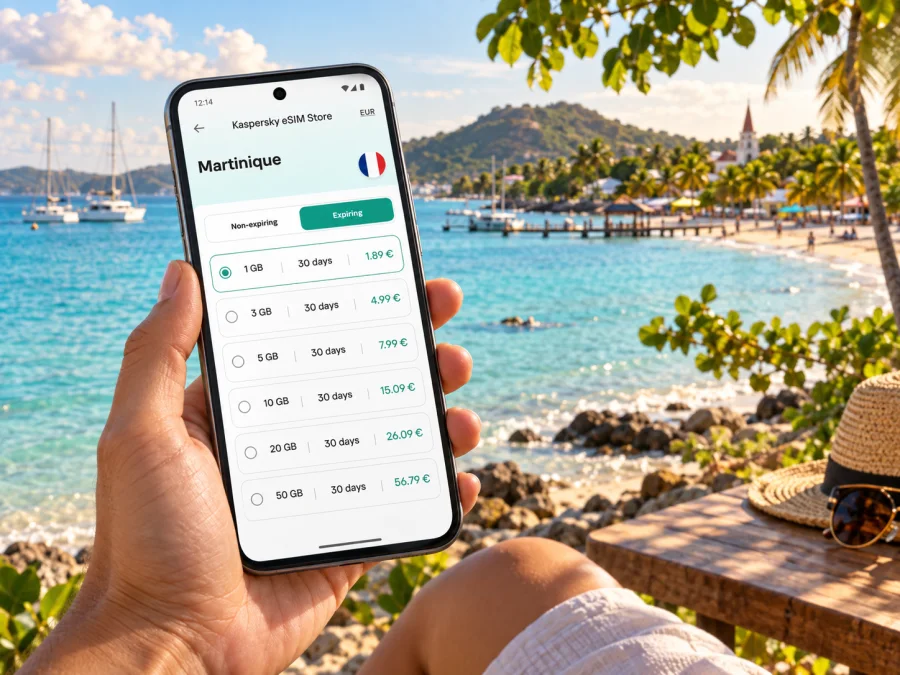
Sainte-Anne eSIM: Mobile Connection and Internet for Your Martinique Trip
Sainte-Anne is a small coastal town at the southern end of Martinique, known for its beaches, the village waterfront and easy access to the peninsula’s changing shorelines. A phone with mobile internet can help you orient yourself after arrival, confirm a transfer, find your accommodation, check a route to the beach or share plans while you are out for the day. An eSIM lets you prepare that data connection without changing the physical SIM in your phone.
The town is not a large urban centre with every service gathered around a transit hub. Days here often involve moving between the village, a beach, a restaurant, a rental and another point on the southern peninsula. That makes a little planning useful: save key addresses, know where your mobile data will come from, and keep a route available if reception or battery becomes unreliable.
Getting to Sainte-Anne and finding your first route
Most international visitors arrive at Martinique Aimé Césaire International Airport in Le Lamentin, then continue south by road. Sainte-Anne is not next to the airport, so plan for a separate transfer rather than expecting to step off a flight and walk to your hotel. The drive time can vary with traffic, road conditions, your exact destination and the transfer arrangement. Confirm the pickup point, price and arrival instructions with your accommodation or driver before travel.
Once you have a local data connection, use your preferred map app to compare the route to the village centre, Pointe Marin or your lodging. Save the accommodation address in its original format as well as a map pin: a pin is convenient for navigation, while a written address is useful if you need to show the destination to a driver. If a host sends check-in instructions through a messaging app, download or screenshot the essential details before leaving the airport.
A simple arrival checklist:
- Confirm whether your transfer is private, shared, or arranged by the accommodation.
- Keep the driver’s name and pickup instructions somewhere accessible offline.
- Check whether the destination is in the village, near Pointe Marin, or farther along the peninsula.
- Download an offline map of the area before the journey if your app supports it.
- Keep your phone charged; a car navigation session, messages and photos can use battery quickly.
If you collect a rental car, review the vehicle pickup instructions and fuel policy before leaving the airport area. Set the first destination while parked, not while driving. Roads away from the main routes may be narrower or less familiar than what you are used to, so allow time, follow signs and use navigation as a guide rather than a substitute for attention. If a route looks unclear, stop somewhere safe to check it.
Getting around the village and the southern peninsula
Sainte-Anne works best when you think in small travel zones. The village centre is a practical base for everyday errands and a slower walk around the waterfront. Pointe Marin lies by the entrance to the town and is a distinct beach stop. Other outings, including the Salines area, Cap Chevalier and Anse Michel, require their own route planning. They belong to the same southern itinerary, but should not be treated as if they were all around one corner.
The official Martinique tourism information describes Anse des Salines as about five kilometres from the centre of Sainte-Anne. That is a useful reminder to check the route and transport for the day, particularly if you are carrying beach gear or travelling with children. The distance by road may not match a straight-line impression from a map. Check your specific starting point, destination and current route before setting out.
| Part of the trip | What mobile data can help you do | A useful backup |
|---|---|---|
| Village centre | Find a shop, restaurant, lodging or waterfront meeting point | Save the address and a map pin |
| Pointe Marin | Check the route and coordinate a meeting after beach time | Agree on a clear landmark before separating |
| Salines and the southern coast | Plan the day’s sequence and check the return route | Keep an offline map and note the car’s parking area |
| Cap Chevalier or Anse Michel | Confirm the exact access point and any activity booking | Screenshot directions and booking details |
| Return to your accommodation | Message your host if plans change | Keep the lodging address available offline |
A rental car or a pre-arranged driver can make it easier to combine places on the peninsula; ask your host which option suits your lodging and verify availability for the hours you need. For a work trip, confirm the hotel’s internet arrangements directly and use mobile data for directions and messages while out. For a short stopover, keep the plan modest: confirm both legs of the transfer, save the return details and choose one outing that fits the time available. If you are travelling from Sainte-Anne to another part of Martinique, check the full route and return plan before setting off.
Which places around Sainte-Anne suit your plans?
The coastline is the reason many visitors choose Sainte-Anne, but the best plan depends on how you want to spend the day. Pointe Marin is close to the village and is a natural option when you want a beach outing without making it the only stop. The Salines area is a separate excursion on the southern tip. Around Cap Chevalier, the shoreline and access points call for checking the destination carefully before you set off. Mobile maps are useful for getting oriented, but a local host can clarify which entrance or parking area best suits your plans.
Think about these differences when you organize an outing:
- A slow morning near the village: keep the route simple and leave time for a meal, errands or a walk by the waterfront.
- A beach day at Pointe Marin: bring what you need for several hours, set a meeting point and avoid relying on your phone as the only way to coordinate.
- A visit to Les Salines: check the full journey from your lodging, not just the distance from the village centre. Decide how you will return before you go.
- A coastal outing toward Cap Chevalier or Anse Michel: confirm the precise place name and access details with your host or activity provider; similar beach names can be easy to mix up in a search.
- A day combining several stops: group nearby places together and leave room for the drive and parking rather than trying to follow a tightly timed city itinerary.
Coverage and mobile data performance can vary with the location, local network conditions, the phone and the surroundings. Beaches, roads, buildings and terrain do not create identical conditions. If you have an important booking or need to find your way back, save the information offline and keep a way to contact your driver or host. That is a sensible backup even when your eSIM is active.
Choose data for the way you will use your phone
There is no single data allowance that suits every stay in Sainte-Anne. A traveller who mostly saves maps and sends occasional messages will use data differently from someone who uploads video, joins work calls or streams content. Estimate your habits over the whole trip, then compare the allowance and validity period shown for the Martinique option. Check when the tariff starts, how long it remains valid and what happens when the included data is used. The available terms are the ones to rely on when choosing.
To compare eSIM options for a trip to Martinique, start with the length of your stay and your likely use rather than choosing by the largest number alone. If your journey also includes other destinations, check that the selected option matches the full route. The city name can guide your travel planning, but the relevant destination page is for Martinique.
The Kaspersky eSIM Store app and website help you choose, arrange and activate an eSIM with a suitable tariff for mobile internet during an international trip. The plan terms, including allowance and validity, depend on the option selected. An eSIM for data should not be assumed to include a regular local phone number, voice calls or SMS; check the individual terms. Messaging and internet calls may work through apps when you have data and the relevant app is available to you.
Prepare your device before leaving
An eSIM is a digital SIM profile installed on a compatible device. Before selecting a plan, check whether your device supports eSIM and confirm that it is not locked in a way that prevents using another carrier profile. Compatibility can depend on the model and regional version, so check the actual device rather than relying only on a product family name. It is also worth confirming that you can access the email address or account used for the purchase while travelling.
Install and activate the eSIM according to the instructions for your device. The exact screens vary by operating system and model, so follow the steps displayed for your phone and the plan you selected. These guides explain the device-side process: eSIM setup for Android and eSIM setup for iOS.
Before your trip, consider this sequence:
- Update your phone while you have a reliable connection and enough battery.
- Make sure the device is compatible and available for use with an eSIM profile.
- Review the selected tariff’s destination, data allowance, validity and activation instructions.
- Install the profile at the time specified by the instructions; do not assume installation and activation are always the same step.
- Label the travel line clearly in your phone settings so you can recognize it later.
- Decide which line should use mobile data and review data roaming settings as directed by the plan instructions.
- Keep your usual number available for services you still need, while checking with your home operator about its roaming settings and charges.
- Save confirmation details and essential travel addresses offline.
If you prefer to wait until arrival to install or activate, first confirm that the plan permits that sequence and that you will have a suitable connection to complete setup. Instructions can differ between plans and devices. Avoid deleting an eSIM profile simply because the connection is not working; review the plan guidance and settings before taking an action that may be difficult to reverse.
A compact preparation checklist
Use this checklist the evening before your transfer or beach day:
- [ ] The travel eSIM is installed or ready to install according to its instructions.
- [ ] You know which line is selected for mobile data.
- [ ] The Martinique tariff’s allowance, validity and activation conditions are clear.
- [ ] Your accommodation address, host contact and transfer details are saved offline.
- [ ] The map pin matches the intended Sainte-Anne location.
- [ ] You know how you will get back from the beach or outing.
- [ ] Your phone is charged and any essential booking details are accessible without a connection.
If you are preparing for several destinations, review each part of the itinerary and the relevant plan conditions. A tariff for Martinique should be selected for the actual days and data use you expect in Sainte-Anne and elsewhere on the island. Do not assume that a package’s name alone answers every question about coverage, calls, validity or activation.
Frequently asked questions
Is Sainte-Anne a good place to use an eSIM?
An eSIM can be useful if you want mobile data for maps, messages, bookings and other online tasks while travelling around Sainte-Anne. Its usefulness depends on device compatibility, the plan you choose and local network conditions. Keep offline information for important routes and arrangements.
Should I install the eSIM at home or after arriving?
Follow the instructions for the selected plan and device. Some steps may be completed in advance, while activation timing can depend on the plan. Review the conditions before travelling so you know when to install, which line to use for data and what to do after landing.
Will mobile data work at every beach or road?
No plan should be treated as a promise of identical service at every point. Reception can vary with location, network conditions, device and surroundings. Download what you need, share the day’s plan and keep key details offline.
What should I do if maps stop loading?
If you prepared an offline map, use it to continue to a known landmark or safe stopping place. Check that mobile data is enabled for the travel eSIM and that the selected plan is active according to its instructions. If needed, reconnect where service is available and contact your host or driver. Do not troubleshoot while driving.
Keep your Sainte-Anne days simple to navigate
A little preparation makes it easier to enjoy the village and the coastline without spending the day solving phone and route problems. Confirm how you will get from the airport to your lodging, save the address, separate nearby stops from longer excursions and keep an offline backup for important information. Use mobile data for the decisions that matter on the move: finding the correct place, contacting your host, checking a booking and adjusting the route.
Kaspersky eSIM Store is an app and website for choosing, arranging and activating an eSIM with a tariff suited to mobile internet during an international trip. Before you leave, choose an eSIM option for your Martinique stay, check its terms and prepare the compatible device by following the setup guidance. Then keep your saved routes and transfer details close at hand as you explore Sainte-Anne.


