
Travel connectivity guide
Salinas Ecuador eSIM for mobile internet
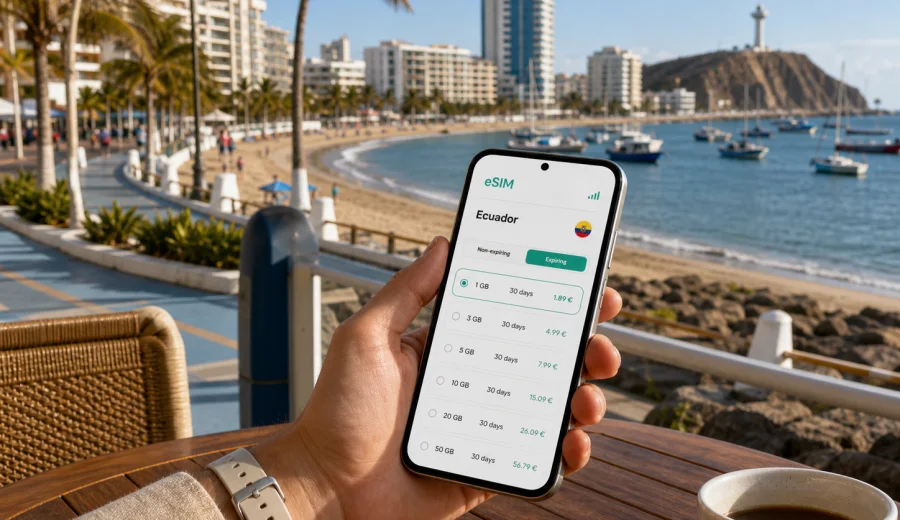
Salinas eSIM: mobile connection and internet for your Ecuador beach trip
Salinas is a compact coastal city, but it is not a place where mobile internet is only useful for posting beach photos. Travelers use data from the first transfer: checking the road from Guayaquil, messaging a hotel or apartment host, finding the right entrance near the malecon, calling a taxi after dinner, or planning a short trip to La Chocolatera, Punta Carnero, La Libertad, Santa Elena, Ayangue, or Montanita.
An eSIM helps you prepare mobile data before you reach the coast. With a compatible unlocked phone, you can choose a data plan for Ecuador, install the eSIM over Wi-Fi, and use mobile internet during the trip according to the selected plan conditions. For Salinas, that means fewer interruptions between airport, road transfer, beach, restaurant, hotel, and side-trip moments.
This guide is about Salinas as a city destination. Ecuador matters because the country determines the correct eSIM destination and plan page, but the practical focus stays on arrival, local movement, navigation, hotels, business tasks, short stays, beach days, and trips from Salinas.
Why mobile internet matters in Salinas
Salinas looks easy on a map: waterfront hotels, beaches, a malecon, Chipipe, San Lorenzo, and nearby towns connected by main roads. In practice, the trip often includes many small decisions. You may need to confirm a transfer, check a route, send a live location, find a pharmacy in La Libertad, or message a guide before heading toward a viewpoint.
The most common online tasks are simple but time-sensitive:
- navigating from Guayaquil or the bus terminal to Salinas;
- confirming hotel check-in, apartment entry, or parking details;
- using maps around San Lorenzo, Chipipe, Santa Elena, and La Libertad;
- coordinating taxis, private transfers, or pickup points near the beach;
- checking weather, sunset timing, and sea conditions where available;
- finding restaurants, supermarkets, pharmacies, and tour offices;
- using messaging apps for calls if your travel eSIM plan is data-only;
- keeping work email and documents available during a business stay.
Hotel Wi-Fi can help indoors, but it does not help when you are between places. A prepared eSIM gives you mobile data for the gap between a lobby and a taxi, a beach and a restaurant, or a side trip and the ride back.
Arrival: get online before the coast
Many visitors reach Salinas through Guayaquil and continue by road to the Santa Elena Peninsula. That transfer is usually the first moment when mobile connection matters. You may need to message a driver, follow the route, share your arrival time, or check whether your first stop is Salinas, La Libertad, or Santa Elena.
If you rent a car, mobile data helps with navigation, fuel stops, and hotel parking directions. If you travel by bus, it helps you coordinate the final part of the route and confirm where to get off. If you are meeting family, a host, or a tour organizer, messaging apps are often the fastest way to stay aligned.
Before leaving for the coast, prepare this small checklist:
- save your hotel or apartment address in your map app;
- download the Guayaquil to Salinas area for offline backup;
- keep booking confirmations available offline;
- save accommodation and transfer contacts;
- install the eSIM while connected to stable Wi-Fi;
- charge the phone before the road segment;
- check that mobile data is assigned to the eSIM line when you are ready to use it.
The goal is not to depend on mobile data for everything. The goal is to avoid solving connectivity in the least convenient place: outside a terminal, in a parking area, on the highway, or after dark near an unfamiliar pickup point.
Where eSIM data helps in Salinas
Salinas is built around short movements. You may not need data every minute, but you will probably use it many times per day. This is where an eSIM can be efficient: maps, messages, weather checks, payment confirmations, restaurant searches, and occasional photo uploads.
| Area or route | Why mobile internet helps | Practical note |
|---|---|---|
| Malecon and San Lorenzo | Walking routes, restaurants, hotel messages | Useful for evening plans and meeting points |
| Chipipe | Beach navigation and ride coordination | Helpful when you split the day between beaches |
| La Chocolatera | Maps, photos, driver updates | Save the route offline as a backup |
| La Libertad | Shopping, pharmacies, supermarkets | Useful for errands outside the resort zone |
| Santa Elena | Services, buses, local routes | Helpful when moving between towns |
| Punta Carnero | Beach route and sunset planning | Check return transport before staying late |
| Guayaquil to Salinas | Transfer updates and navigation | Keep data ready before leaving the city |
If you are staying near the malecon, you may rely on Wi-Fi more often. If you are in an apartment farther from restaurants, planning day trips, or traveling with children, mobile data becomes more important because every route change needs quick coordination.
Choose data by trip style
Different Salinas trips use data differently. A weekend visitor near the hotel needs less than a remote worker or a family moving around the peninsula every day.
| Trip type | Typical data need | What to prioritize |
|---|---|---|
| Weekend beach break | Low to moderate | Maps, messages, restaurants, photos |
| One-week vacation | Moderate | Daily navigation, bookings, weather, social apps |
| Family apartment stay | Moderate to high | Several errands, rides, entertainment, shared planning |
| Business visit | Moderate | Email, documents, messaging, hotspot if allowed |
| Surf or coast route | Moderate | Maps, weather, transport, guide messages |
| Guayaquil stopover plus Salinas | Low to moderate | Transfer coordination and short city navigation |
If you mostly use hotel Wi-Fi and keep mobile data for movement, a smaller package may be enough. If you upload videos, use video calls, back up photos, or share data with a laptop, choose more data and check whether tethering is allowed in the selected plan.
Compatibility and installation
Before buying an eSIM plan, confirm that your phone supports eSIM and is not locked to one carrier. Some models vary by region or carrier settings, so it is better to check this before departure. You can use the internal compatibility check here: Check your device.
The setup is usually straightforward, but exact screens vary by device. Kaspersky eSIM Store is an app and website where you can choose a destination, arrange an eSIM with a suitable mobile data plan for a foreign trip, and follow the installation flow. If you use Android, review the Android installation instructions before leaving Wi-Fi. If you use an iPhone, open the iOS installation instructions and check which line will be used for mobile data.
Use this setup checklist:
1. Confirm eSIM support and carrier unlock status.
2. Choose Ecuador as the destination for your Salinas trip.
3. Select data volume and validity for the full route.
4. Install the eSIM over reliable Wi-Fi.
5. Label the line clearly, for example "Ecuador data".
6. Keep your main SIM active if you need calls or SMS codes.
7. Check whether data roaming must be enabled for the eSIM line.
8. Read when plan validity starts.
Many travel eSIM plans are data-only. They can support internet-based calls and messages through apps, but they may not include a regular phone number, voice calls, or SMS unless the selected plan says so. Keep your usual number available if you rely on banking, airline, or workplace verification messages.
When to choose an Ecuador eSIM for Salinas
The practical time to prepare an eSIM is before you leave home or while you still have reliable Wi-Fi. Install first, then activate or start using the plan according to its terms. This avoids trying to fix settings during arrival, in a hotel queue, or while a driver is waiting.
If your itinerary combines Guayaquil, Salinas, La Libertad, Santa Elena, Montanita, or Ayangue, plan for the full Ecuador route rather than only the nights in Salinas. You can review mobile data options for an Ecuador trip through Kaspersky eSIM Store and choose a plan that fits your expected use. A city article uses the country destination page because the eSIM plan is selected for Ecuador, not for a separate Salinas-only page.
How much data do you need?
Data use depends more on behavior than on the city. Salinas has a predictable pattern: maps during movement, messaging throughout the day, weather checks before beach time, restaurant searches in the evening, and occasional work or photo uploads.
| Activity | Light use | Heavier use |
|---|---|---|
| Maps and navigation | Low | Moderate if used all day |
| Messaging | Low | Moderate with photos or voice notes |
| Email and documents | Low to moderate | Higher with attachments |
| Social media | Moderate | High with video uploads |
| Video calls | High | Very high |
| Streaming | High | Very high |
| Laptop hotspot | Moderate to high | Very high |
For a short beach break, a smaller data plan can cover maps, messages, and practical searches. For a week with remote work, uploads, side trips, and frequent movement, consider more data. For a family, do not assume one phone can cover everyone unless the plan allows hotspot use and the data amount is realistic.
Ways to control data in Salinas:
- download offline maps before leaving Wi-Fi;
- turn off automatic app updates on mobile data;
- pause cloud photo backup until Wi-Fi is available;
- use lower video quality for calls;
- keep travel documents saved offline;
- monitor remaining data in your phone settings or account area;
- avoid using mobile data for long streaming sessions unless your plan has enough allowance.
Transport, hotels, and local movement
Salinas is close to La Libertad and Santa Elena, so a normal day can include several towns. You might buy groceries in La Libertad, visit Chipipe in the morning, return to San Lorenzo for dinner, then plan a viewpoint visit the next day. Mobile internet helps you make these short moves without memorizing every route.
For local transport, keep your hotel or apartment saved as a favorite location. Send your live location when meeting a driver near a beach entrance. Screenshot your address in case signal varies. Check the return route before staying late at quieter beaches or viewpoints. If you rent a car, data helps with route changes and parking searches. If you use taxis or buses, it helps you confirm pickup points and destination names.
Accommodation Wi-Fi can vary by building, room position, router load, and time of day. A travel eSIM should not be treated as a guaranteed replacement for fixed Wi-Fi, but it can be a useful backup for maps, messaging, urgent email, and quick document access.
For business or remote work, plan three layers: confirm accommodation Wi-Fi before booking, keep eSIM data ready for backup, and save key files offline before calls or deadlines. If you need to use a laptop, check tethering rules and data volume before relying on hotspot mode. One long video meeting can use more data than a full day of maps and messages.
Beach days and side trips
A beach trip still involves practical communication. You may check weather changes, coordinate a meeting point, message family, find transport back to the hotel, or adjust plans when the malecon is crowded. Location sharing is especially useful if your group splits between the beach, a cafe, and an apartment.
Before a beach day, charge the phone, save the hotel address offline, agree on a meeting point, and keep mobile data available for the return trip. A waterproof pouch is useful if the phone will be near sand or water. Avoid relying on public Wi-Fi for sensitive accounts, and use mobile data for essential messages when possible.
Side trips from Salinas can include La Chocolatera, Punta Carnero, Ballenita, Ayangue, Montanita, Olon, and other stops along the coast. These routes take you away from hotel Wi-Fi, so data helps with maps, weather, restaurant searches, guide messages, and return transport. Before leaving, check battery level, remaining data, offline maps, and your expected return time.
Quick comparison: roaming, local SIM, and eSIM
| Option | Good for | Possible drawback |
|---|---|---|
| Home roaming | Keeping your usual number active | Costs and limits may be less predictable |
| Local physical SIM | Longer stays with local phone needs | Requires a shop visit and setup time |
| Travel eSIM | Mobile data without a physical SIM swap | Requires a compatible unlocked device |
For Salinas, a travel eSIM is practical when your main need is mobile internet. You can prepare before the coast, keep your regular SIM in the phone, and use data for maps, messages, bookings, transport, and side trips. Read plan terms carefully because validity, data amount, activation rules, tethering, and refund conditions depend on the selected tariff.
FAQ: eSIM and mobile internet in Salinas
Is Salinas a good city for using an eSIM?
Yes, if your phone supports eSIM and is not carrier-locked. Salinas involves short movements between beach areas, hotels, restaurants, viewpoints, and nearby towns. Mobile data helps with maps, transport, messages, and travel updates.
Should I install the eSIM before arriving in Ecuador?
It is usually better to install it before departure or while you have reliable Wi-Fi. Then activate or start using it according to the plan rules. This reduces setup stress during arrival.
Can I use an eSIM for calls?
Many travel eSIM plans are data-only. You can use internet-based calls and messages through apps, but a regular phone number, voice calls, and SMS are not included unless the selected plan says so.
Is hotel Wi-Fi enough in Salinas?
Hotel Wi-Fi may be enough inside your room, but it will not help when you are in transit, on the beach, meeting a driver, or taking a side trip. An eSIM gives you mobile data for those gaps.
What should I check before choosing a plan?
Check device compatibility, destination, data amount, validity period, activation rules, refund conditions, and hotspot support if you need it. Do not assume every plan has the same terms.
Can one Ecuador eSIM cover Guayaquil and Salinas?
Choose an Ecuador plan that matches your route, including Guayaquil, Salinas, and any coastal side trips. The destination is the country, even when the article focuses on one city.
Final checklist before your Salinas trip
Before you leave for the coast, make sure you have:
- an eSIM-compatible unlocked phone;
- an Ecuador data plan selected for your full route;
- the eSIM installed over stable Wi-Fi;
- Android or iOS setup instructions reviewed if needed;
- hotel, apartment, and transfer contacts saved;
- offline maps for Guayaquil, Salinas, and the Santa Elena Peninsula;
- mobile data settings checked for the eSIM line;
- your main SIM available if you need calls or SMS.
Salinas is easiest when small logistics stay simple. With mobile internet prepared, you can move from airport or bus terminal to the coast, find your hotel, coordinate beach plans, check routes to nearby towns, and keep travel messages flowing without searching for Wi-Fi at every stop.
To prepare your trip, use Kaspersky eSIM Store to choose an eSIM data plan for Ecuador before you travel or while you still have reliable Wi-Fi. Select the data amount and validity period that fit your Salinas itinerary, install the eSIM on a compatible device, and keep your mobile connection ready for the moments when the city plan changes.