
Travel connectivity guide
San Andres eSIM: Mobile Internet Guide
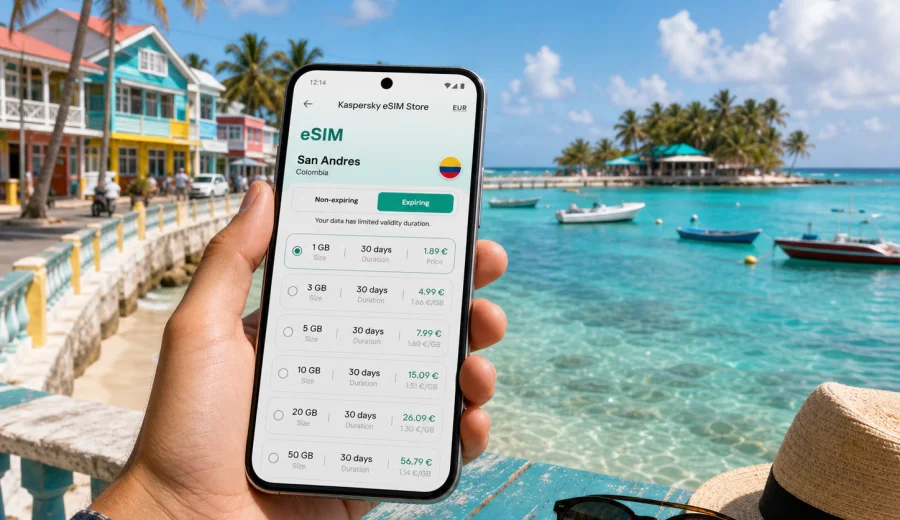
San Andres eSIM: mobile connection and internet for your Colombia trip
San Andres is the kind of island destination where mobile internet starts to matter before you reach the beach. You may need maps at Gustavo Rojas Pinilla International Airport, a message to your hotel near Spratt Bight, a taxi pickup confirmation, a ferry or tour update, or a quick check of restaurant hours before the afternoon changes with the weather. An eSIM can make those first practical moments easier because you do not need to search for a physical SIM card after arrival.
For many travelers, the main reason to prepare mobile connection in San Andres is control. The island is compact, but your day can move between the airport, the hotel zone, the waterfront, beaches, viewpoints, diving centers, boat trips, and local restaurants. With mobile internet on your phone, you can open maps, use translation, manage bookings, check payment confirmations, and stay in contact with people traveling with you.
Kaspersky eSIM Store is an app and website where you can quickly choose, arrange, and activate an eSIM with a suitable data plan for mobile internet during an international trip. It is not a mobile operator and it does not replace a local phone number. It helps you prepare an eSIM data plan for your destination, install it on a compatible device, and use mobile data while you travel.
Why an eSIM is useful in San Andres
San Andres looks simple on a map, but the travel scenarios are varied. You may spend one day around the main beach and the next day moving between San Luis, Rocky Cay, La Loma, West View, Hoyo Soplador, and the marina. If you join a boat trip, the meeting point can change. If you rent a golf cart, scooter, or mule, you will probably rely on navigation. If you work remotely for part of the day, you may need a backup to hotel Wi-Fi.
An eSIM is useful because it gives you a mobile data option without adding another physical card to your phone. You can install the eSIM before departure or after arrival, depending on your device and the instructions for the selected plan. Once the eSIM profile is ready and mobile data is assigned to it, your phone can use data from that plan in the destination where the plan applies.
Common San Andres situations where mobile internet helps:
| Travel moment | Why mobile data helps |
|---|---|
| Airport arrival | Open your hotel address, message the transfer driver, check a reservation, or use a ride app if available. |
| Hotel check-in | Retrieve booking emails and payment confirmations without relying only on lobby Wi-Fi. |
| Beach days | Share your location with friends, check weather changes, and keep maps available while moving between beaches. |
| Island loop | Navigate between San Luis, Rocky Cay, La Loma, West View, and other stops. |
| Boat tours | Confirm meeting times, contact the tour provider, and keep digital tickets available. |
| Remote work | Use mobile data as a backup when Wi-Fi quality changes during calls or file uploads. |
| Departing the island | Check flight status, airport transfer timing, and documents before leaving for the terminal. |
Arrival at Gustavo Rojas Pinilla International Airport
San Andres airport is close to the main town area, so the trip from the terminal to many hotels can be short. That does not make mobile data less important. The first hour after landing is when travelers often need several online actions at once: contacting a host, opening a map, checking a driver name, messaging family, and confirming where to pick up keys or meet a tour desk.
If you prepare an eSIM before your flight, keep these arrival steps simple:
1. Install the eSIM profile while you still have reliable internet at home, at your hotel before departure, or on airport Wi-Fi.
2. Keep your primary SIM active for calls or SMS if you need it, but set mobile data to the eSIM profile when you are ready to use it.
3. Check whether data roaming must be enabled for the eSIM profile. Some eSIM plans require it for mobile data to work correctly.
4. Avoid deleting the eSIM profile after installation unless support or the plan instructions tell you to do so.
5. Save essential addresses offline as a backup, especially your hotel name, booking reference, and airport transfer details.
Getting around the island with mobile internet
San Andres is often explored in short, flexible movements rather than long city commutes. You may walk along the waterfront, take a taxi, rent a small vehicle for the island loop, join a boat tour, or move between beaches and restaurants. A data connection helps you adjust when plans change.
For navigation, mobile internet is useful even if you already know the general direction. Island roads can be easy to follow, but stops, viewpoints, beaches, and parking points may not be obvious on a first visit. If you use maps, messenger location sharing, or digital confirmations, a prepared data plan reduces the need to ask for Wi-Fi every time you pause.
For transport, mobile data helps with:
- checking the route from the airport to your hotel;
- sending a live location to a driver or travel companion;
- confirming pickup times for tours and rentals;
- checking opening hours before crossing the island;
- comparing walking time with taxi time;
- finding your way back after sunset;
- keeping documents and booking emails available.
How much data might you need in San Andres?
The right data volume depends on how you travel. A short beach break with hotel Wi-Fi in the evenings may need less data than a remote-work trip or a stay with daily navigation and video calls. Because eSIM plans usually show data amount and validity period before purchase, you can choose based on your real habits instead of guessing at the airport.
Here is a practical way to think about usage:
| Traveler type | Typical mobile data use | What to consider |
|---|---|---|
| Light user | Maps, messaging, restaurant searches, boarding passes | A smaller plan may be enough if hotel Wi-Fi is reliable. |
| Active traveler | Navigation, tour messages, photo sharing, translation, ride coordination | Choose more data if you move around the island daily. |
| Family or group lead | Shared documents, multiple bookings, live location, frequent messaging | Extra data gives more flexibility when others rely on your phone. |
| Remote worker | Email, cloud files, calls, hotspot as backup | Check whether tethering is allowed by the selected plan and choose a larger data volume. |
| Short stopover traveler | Airport, transfer, one beach visit, flight updates | Validity period may matter as much as data volume. |
Choosing an eSIM data plan for San Andres
For a trip to San Andres, choose the plan by destination first. The city belongs to Colombia, so a Colombia eSIM data plan is the relevant country option when your itinerary is focused on the island. If your trip continues to mainland Colombia or other countries, compare the country, regional, and global options available for your route.
Before choosing a plan, check four details:
1. Destination coverage: the plan should apply to Colombia if San Andres is your destination.
2. Data amount: estimate maps, messaging, browsing, uploads, and work needs.
3. Validity period: match the plan length to the full stay, including arrival and departure days.
4. Device support: make sure your phone or tablet supports eSIM and is not locked to another carrier.
When you are ready to prepare mobile internet for the island, you can choose an eSIM data plan for your San Andres trip through the Colombia destination page in Kaspersky eSIM Store. Review the plan details before purchase, including data volume, validity, destination, and any conditions that affect activation or mobile data use.
Device compatibility before you travel
Not every phone supports eSIM, and some devices may be locked by a carrier. This is one of the most important checks to make before paying for a data plan. A compatible device should support eSIM profiles, allow mobile data through the selected eSIM, and have no restrictions that prevent adding another mobile plan.
Before the trip, check your device and confirm these points:
- your exact phone model supports eSIM;
- your device software is up to date enough for eSIM installation;
- the phone is not carrier-locked in a way that blocks additional plans;
- you have a stable internet connection for installation;
- you can receive any account emails or QR-code instructions needed for setup;
- you understand whether the eSIM should be activated before departure or after arrival.
If you use a dual-SIM setup, decide which line will handle mobile data and which line will remain available for calls or SMS. Many travelers keep their home SIM active for bank codes or emergency calls and assign mobile data to the travel eSIM. Check your phone settings carefully so data is not accidentally routed through an expensive roaming option.
How to install and activate an eSIM
The installation process depends on your device and the selected plan instructions, but the general flow is simple: choose a destination and plan, complete the order, install the eSIM profile, then set mobile data to that profile when you are ready to use it. You can follow the Android installation guide or the iOS installation guide if you want device-specific steps.
A practical setup sequence:
1. Connect to stable Wi-Fi before installation.
2. Open the eSIM details in your account, email, or app.
3. Install the eSIM profile by following the QR-code or manual instructions.
4. Give the eSIM a clear label, such as San Andres data or Colombia trip.
5. Keep your main SIM for calls if you need it.
6. Set mobile data to the eSIM profile when you want to start using the plan.
7. Enable data roaming for the eSIM if the plan instructions require it.
8. Test maps or a browser page after arrival.
Do not remove the eSIM profile after installation unless you are sure it is no longer needed. Some profiles cannot be reinstalled after deletion. If something does not work immediately, check the selected data line, roaming setting, APN instructions if provided, and whether the plan has been activated according to its conditions.
Wi-Fi, work, stopovers, and onward routes
Hotel Wi-Fi is useful for large uploads, app updates, and long calls from your room. Mobile data is more practical when you are outside: walking to the beach, checking a restaurant, confirming a boat tour, or finding the way back after sunset. Use trusted Wi-Fi when it is stable and save eSIM data for movement, navigation, and time-sensitive messages.
For business trips or remote work in San Andres, choose more data than you would for a casual beach break. Check whether hotspot use is allowed by the selected plan, keep important files offline, and use hotel Wi-Fi as a backup when it is reliable. Many travel eSIM plans focus on data, so use internet-based calling apps if voice calls and SMS are not included in the plan details.
For short stays and stopovers, validity period matters as much as data volume. A plan should cover arrival, beach time, hotel transfer, tour messages, and departure. If San Andres is part of a wider Colombia route through Bogota, Cartagena, Medellin, or another city, check that the selected plan covers the full itinerary and lasts until the final travel day.
Quick answers about eSIM in San Andres
Is an eSIM useful if my hotel has Wi-Fi?
Yes, because hotel Wi-Fi helps mostly when you are at the property. An eSIM data plan is useful for maps, transport, messages, tours, and flight updates while you are outside.
Can I use an eSIM for regular phone calls and SMS?
Many travel eSIM plans are data-only. Check the plan details. If calls and SMS are not included, use internet-based messaging and calling apps over mobile data.
What should I do if mobile data does not work after arrival?
Check that the eSIM is selected for mobile data, data roaming is enabled if required, airplane mode is off, and the plan has been activated according to its conditions. If needed, contact support with your device model and order details.
Final preparation checklist
Before you leave for San Andres, review the essentials:
- Choose a data plan for Colombia if San Andres is your destination.
- Confirm the data amount and validity period.
- Check eSIM compatibility and carrier-lock status.
- Install the eSIM while you have stable internet.
- Save installation instructions and booking details.
- Label the eSIM clearly in your phone settings.
- Decide which SIM will use mobile data.
- Keep your hotel address and airport details offline.
- Bring a power bank for long beach or boat days.
- Use trusted Wi-Fi for large uploads when possible.
This preparation keeps the connection task small, so the trip can stay focused on the island: the waterfront, beaches, diving, food, hotels, and the easy movement between them.
Prepare your San Andres eSIM before you go
San Andres is easier to enjoy when your phone is ready for the practical parts of the trip. With an eSIM, you can plan mobile internet before arrival, keep maps and messages available, and reduce your dependence on public Wi-Fi while moving around the island.
Kaspersky eSIM Store helps you choose, arrange, and activate an eSIM with a suitable data plan for international travel. Before you fly, review the available Colombia options, check your device compatibility, and prepare an eSIM data plan for your San Andres trip so your mobile connection is ready when you need it.