
Travel connectivity guide
San Francisco eSIM for mobile internet
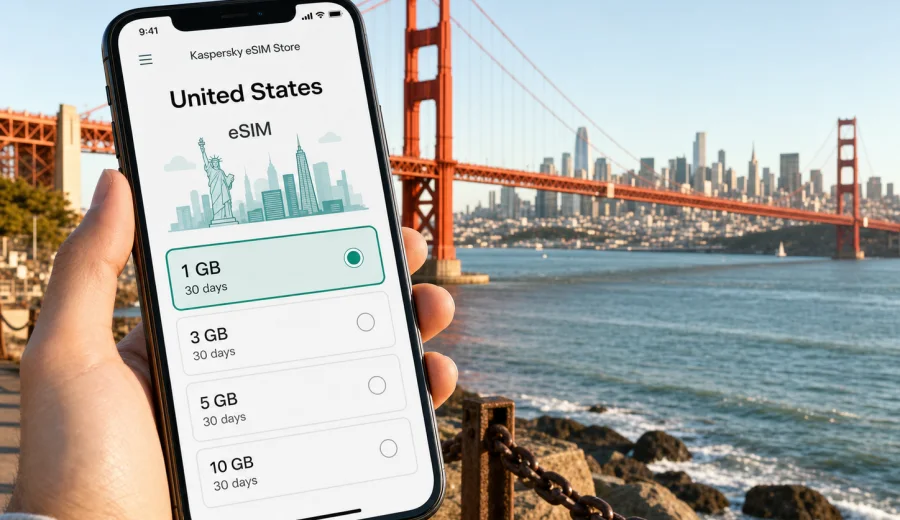
San Francisco eSIM: mobile connection and internet for your trip
San Francisco is a city where mobile internet starts mattering before you reach your hotel. You may land at San Francisco International Airport, take BART toward downtown, call a rideshare from the curb, check a hotel message near Union Square, or open a map while walking toward the Embarcadero. In each of these moments, a working data connection is more useful than a travel extra: it helps you move, confirm bookings, compare routes, and stay in touch without depending on airport Wi-Fi or a physical SIM card shop.
An eSIM can be a practical way to prepare mobile internet for San Francisco if your phone supports it. Instead of replacing your main SIM card, you install a digital SIM profile and use it for mobile data during the trip. Kaspersky eSIM Store is an app and website where you can choose, set up, and activate an eSIM with a suitable data plan for international travel. The key is to pick the right destination, data allowance, and validity period before your itinerary becomes busy.
Why mobile internet matters in San Francisco
San Francisco is compact on a map, but the city can feel fragmented when you are moving between hills, waterfront areas, business districts, parks, conference venues, and airport connections. A short route may involve walking, BART, Muni Metro, buses, cable cars, ferries, or rideshare pickups. Reliable access to mobile data helps you adjust when fog changes a sightseeing plan, a meeting moves to another neighborhood, or a restaurant sends a reservation update.
For many visitors, mobile internet is most important in these city moments:
- arrival at SFO, Oakland, or San Jose airports;
- transfer planning between BART, Muni, Caltrain, ferries, and rideshare;
- navigation on steep streets and one-way blocks;
- checking hotel entry instructions and booking messages;
- scanning tickets, passes, and event confirmations;
- using maps around Fisherman's Wharf, North Beach, Chinatown, SoMa, and the Mission;
- coordinating with colleagues during a conference or business trip;
- sharing a hotspot with a laptop when hotel Wi-Fi is slow or paid;
- planning day trips to Silicon Valley, Sausalito, Muir Woods, Napa, Sonoma, or Monterey.
Public Wi-Fi can be helpful at airports, cafes, hotels, and conference venues, but it is not always available when you need a route change on the street. An eSIM does not replace good travel planning, but it can reduce the number of moments when you must stop and search for a network.
Arrival scenarios: from airport to the city
Most international visitors reach San Francisco through San Francisco International Airport. SFO is south of the city, and many travelers continue by BART, taxi, hotel shuttle, or rideshare. If your eSIM is installed before departure, you can usually switch to the eSIM data line after landing, wait for local network registration, and open maps, transit apps, or booking emails before leaving the terminal.
Oakland and San Jose can also be part of a Bay Area itinerary. Oakland is convenient for the East Bay and some downtown San Francisco routes, while San Jose is common for Silicon Valley trips. If you plan to move between these airports, the city, and nearby business hubs, choose a plan for the United States rather than thinking only about the first landing point. A city trip often turns into a regional Bay Area route.
The first hour after arrival is the wrong moment to discover that your device is not eSIM compatible, that your phone is locked to a carrier, or that you need Wi-Fi to complete installation. Prepare the eSIM profile while you still have stable internet at home or at the hotel, then activate mobile data when you are ready to use the plan according to its conditions.
San Francisco routes where eSIM is useful
| Situation in San Francisco | Why mobile data helps | Practical note |
|---|---|---|
| BART from SFO to downtown | Check the right train, transfers, and station exits | Save your hotel address offline too |
| Walking in hilly neighborhoods | Maps help with realistic walking routes | A short distance can include a steep climb |
| Rideshare pickup | Curb locations and driver messages can change | Keep mobile data active until you are seated |
| Conference day in SoMa or Moscone area | Calendars, badges, and meeting updates may be digital | Carry a power bank for long days |
| Ferry or waterfront plans | Schedules and weather can affect timing | Check updates before leaving the hotel |
| Day trip outside the city | Navigation and messaging are useful between stops | Confirm that your chosen plan covers the country or region you need |
San Francisco is also a city of micro-itineraries. You might start near the Ferry Building, walk the Embarcadero, take a streetcar, meet friends in North Beach, and end the day near Japantown or Hayes Valley. Each move involves small decisions: which route is faster, where to meet, whether a venue is still open, and how long it will take to cross town. Mobile data keeps these decisions simple.
Choosing data for a San Francisco trip
The best eSIM plan for San Francisco depends on how you use your phone, not only on the length of the trip. A traveler who uses maps, messaging, and restaurant bookings needs less data than someone who joins video calls, uploads large files, uses cloud documents, or shares a hotspot with a laptop.
Use this practical estimate before choosing a plan:
- Light use: maps, messages, email checks, tickets, and occasional browsing.
- Moderate use: maps, social media, photo uploads, ride-hailing, restaurant searches, and daily video clips.
- Heavy use: work calls, cloud files, hotspot use, streaming, frequent uploads, and long navigation sessions.
If your trip includes several United States cities, a longer conference, or a road route across California, check both the data allowance and validity period. A plan that looks comfortable for three days in San Francisco may feel tight if you add Silicon Valley meetings, a Napa weekend, or a drive down the coast.
Where city focus changes the way you use data
San Francisco is not a generic United States stop. Its geography affects how you use your phone. Hills can make walking routes longer than expected. Waterfront plans can depend on fog, wind, and ferry timing. Business visitors often move between downtown, SoMa, Mission Bay, Palo Alto, Mountain View, and San Jose. Tourists often combine city districts with Golden Gate Park, the Presidio, Alcatraz departures, Sausalito, or wine-country excursions.
This means your mobile internet plan should match the real shape of your days:
1. If you stay mostly downtown, you may rely on maps, transit, messaging, and restaurant apps.
2. If you attend a large event, you may need extra data for schedule changes, QR codes, chats, and hotspot backup.
3. If you drive outside the city, navigation and route updates become more important.
4. If you travel with family, messaging and location sharing can use more data than expected.
5. If you work remotely, choose a larger data allowance and avoid assuming hotel Wi-Fi will be enough.
Before you leave, you can choose a suitable eSIM plan for a San Francisco trip in the United States and compare the available data volume, validity period, destination, and price. This is especially useful if you want the eSIM ready before landing rather than solving connectivity during the first hour in the city.
Installation before departure or after arrival
For a smoother San Francisco arrival, install your eSIM while you still have reliable Wi-Fi. After you select a plan, the eSIM profile may appear in your account or app, and you can follow the instructions for your device. If you need platform-specific setup steps, use the Android installation guide or the iOS installation guide.
A simple preparation sequence looks like this:
1. Confirm your phone supports eSIM and is not locked to a carrier.
2. Choose the United States as the destination for your San Francisco trip.
3. Select a data allowance and validity period that match your itinerary.
4. Install the eSIM profile while connected to stable Wi-Fi.
5. Keep your primary SIM active if you still need your usual number for calls or messages.
6. After arrival, select the eSIM for mobile data and follow any device prompts.
7. If the plan instructions require data roaming for the eSIM line, enable it for that line only.
Do not delete the eSIM profile casually after installation. Depending on the profile and plan conditions, an activated eSIM may not be transferable to another device. If something does not work as expected, check the instructions first and contact support if you need help.
Check device compatibility before you buy
Not every phone or tablet supports eSIM, and some devices sold through carriers may be locked. Before choosing a plan, check your device and confirm that eSIM is available in your phone settings. This step is especially important if you use an older device, a company-managed phone, or a model bought for a specific mobile operator.
Also check these details:
- your device supports eSIM in the country where it was purchased;
- the phone is not restricted by a carrier lock;
- the operating system is up to date enough for eSIM setup;
- you have internet access for installation;
- you understand when the plan validity period starts;
- you know whether voice calls and SMS are included or whether the plan is data-only.
Many travel eSIM plans focus on mobile data. If ordinary voice calls or SMS are important, read the plan conditions carefully. You may still use internet-based messengers and calling apps over mobile data, but that is not the same as receiving a local phone number.
Practical data-saving tips in San Francisco
San Francisco is a good city for mixed connectivity: use mobile data when you are moving, and use trusted Wi-Fi when you are safely settled at your hotel or office. That balance can help your data allowance last longer.
Try this checklist:
- Download offline maps for the Bay Area before the trip.
- Save hotel addresses, booking references, and meeting locations in an offline note.
- Disable automatic photo and video uploads on mobile data.
- Update apps before departure, not on arrival.
- Use lower video quality if you need to stream.
- Turn off background refresh for apps you will not use during the trip.
- Keep the eSIM selected only for mobile data if your primary SIM remains active for calls.
- Monitor data use after the first full day and adjust habits early.
For work trips, be realistic about hotspot use. A laptop can consume data quickly through cloud sync, software updates, video calls, and large attachments. If you expect to work from cafes, coworking spaces, or client offices, choose a plan with enough margin.
Business travel, conferences, and remote work
San Francisco and the wider Bay Area remain common destinations for technology meetings, finance, healthcare, education, and startup events. Business visitors often move between hotels near Union Square, offices in the Financial District, venues in SoMa, and meetings down the peninsula. A data-ready phone helps with calendar changes, authentication apps, ride updates, and last-minute address checks.
For a business trip, prepare these items before flying:
- install the eSIM profile before travel if possible;
- save backup codes or confirm your authentication app works offline;
- keep a charger or power bank in your bag;
- check whether your company phone allows eSIM installation;
- download meeting materials that you may need without Wi-Fi;
- avoid using mobile hotspot for large operating system or app updates.
If the trip includes both San Francisco and Silicon Valley, think beyond the city center. You may use data in trains, taxis, offices, hotels, and airports across the region. A United States plan is usually the logical destination choice for this kind of route.
Short stopovers and one-day visits
Some travelers see San Francisco during a long connection or a single free day between meetings. In that case, mobile data is mainly about speed and certainty. You need maps, ticket confirmations, transit timing, and messaging without spending time on a local SIM errand.
For a stopover, keep the setup simple:
1. Install the eSIM before your flight.
2. Save your route from the airport to the city and back.
3. Keep your airline app and boarding pass accessible.
4. Use mobile data for maps, transport checks, and important messages.
5. Avoid high-data activities unless your plan has enough allowance.
If your visit is only a few hours, you may not need a large data package. If you will return through the United States later in the trip, a longer validity period may be more useful than a very short plan.
Neighborhoods and local movement
Different San Francisco areas create different connectivity needs. Around the Embarcadero and Ferry Building, you may use maps, ferry updates, and restaurant searches. In Chinatown and North Beach, walking routes and meeting points matter. Around the Mission, Castro, and Hayes Valley, you may move between cafes, shops, and evening venues. Near Golden Gate Park, the Presidio, and the waterfront, mobile data helps with route changes and return planning.
Hotels also vary. Some provide strong Wi-Fi, while others charge extra, limit speeds, or work poorly in rooms. An eSIM can be useful as a backup for check-in messages, travel documents, and urgent work tasks. It also helps when you leave the hotel early and need transport information before cafes or business centers are open.
Common mistakes to avoid
Avoid treating eSIM setup as a task for the airport curb. You may need Wi-Fi, account access, a QR code, or time for the device to register the profile. It is better to prepare in a calm setting and keep the activation instructions available.
Also avoid these mistakes:
- choosing a plan without checking that the destination is the United States;
- buying too little data for a work-heavy trip;
- assuming a travel eSIM includes a local phone number;
- deleting the eSIM profile after setup because it looks inactive;
- leaving your primary SIM as the default mobile data line by accident;
- ignoring device compatibility until after checkout;
- using public Wi-Fi for sensitive tasks when mobile data would be more convenient.
FAQ: eSIM for San Francisco
Is a San Francisco eSIM different from a United States eSIM?
For a city article, the relevant destination is the country the city belongs to. For San Francisco, choose a United States plan and check that the data allowance and validity period fit your city and regional itinerary.
Can I install the eSIM before I travel?
In many cases, yes. Installing before departure is often easier because you can use stable Wi-Fi and solve setup questions before the airport. Always follow the plan instructions because validity and activation conditions can vary.
Will an eSIM give me a local phone number?
Many travel eSIM plans are for mobile data. Voice calls and SMS are not included unless the selected plan states otherwise. You can use messaging and calling apps over mobile internet.
Can I keep my regular SIM active?
Usually, compatible dual-SIM phones let you keep your main SIM for calls or messages and use the eSIM for mobile data. Check your device settings and carrier conditions before travel.
Is eSIM useful if my hotel has Wi-Fi?
Yes, because much of the trip happens outside the hotel: airport transfer, navigation, transit, rideshare pickup, restaurant changes, event tickets, and messages while moving around the city.
What if I travel from San Francisco to another United States city?
Choose a plan that matches the destination and route. If your itinerary stays within the United States, a United States plan can cover the city article use case better than thinking of San Francisco in isolation.
Prepare mobile internet before San Francisco
San Francisco rewards travelers who can move without pausing for basic connectivity. With an eSIM-ready phone, you can prepare mobile internet before arrival, keep maps and messages available while crossing the city, and manage a business or leisure itinerary with fewer Wi-Fi dependencies.
Before you fly, check compatibility, choose the right destination, read the plan conditions, and install the eSIM while you have stable internet. Then you can use your first minutes in San Francisco for the route, hotel, meeting, or view you came for, not for a physical SIM search.
To prepare your connection, choose an eSIM plan for your trip to San Francisco in the United States through Kaspersky eSIM Store and select the data volume and validity period that fit your route.