
Travel connectivity guide
San Miguel eSIM and mobile internet guide
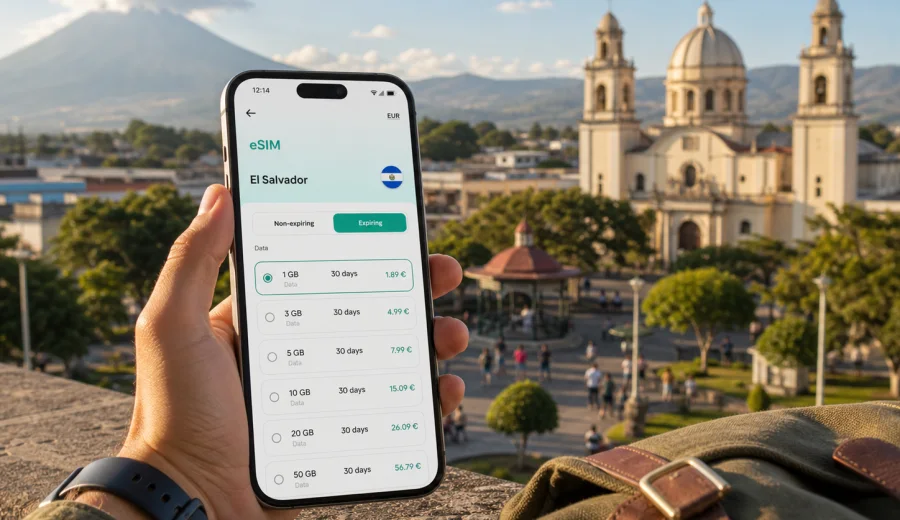
San Miguel eSIM: mobile connection and internet guide for your trip
San Miguel is one of the main bases for traveling in eastern El Salvador. It is practical, busy, warm, and useful for trips that combine city errands, business meetings, family visits, Pacific beaches, and routes toward La Union or the Gulf of Fonseca. For many visitors, the most important travel tool is reliable mobile internet for navigation, transport coordination, translation, hotel messages, banking alerts, and everyday communication.
An eSIM can make that easier because it lets you prepare mobile data before you arrive, without searching for a physical SIM card after a long transfer. This guide covers San Miguel itself: arrival, local movement, neighborhoods, transport, hotels, day trips, stopovers, and the practical moments when internet access matters most.
Why mobile internet matters in San Miguel
San Miguel is not a city where every travel decision happens in one compact tourist district. You may move between the historic center, shopping areas, residential zones, bus terminals, hotels, restaurants, clinics, offices, and roads leading out toward beaches or nearby towns. Distances can look short on a map, but heat, traffic, parking, and one-way streets can change the timing.
Mobile internet helps with simple but important tasks:
- checking the route from your hotel to the city center;
- messaging a driver before pickup;
- confirming the address of a business meeting;
- sharing your live location with family or colleagues;
- translating menu items, signs, or messages;
- keeping travel documents, bookings, and payment alerts available;
- using maps when leaving San Miguel for El Cuco, La Union, Usulutan, or San Salvador.
Public Wi-Fi can be useful in hotels, cafes, and some commercial areas, but it is not a travel plan by itself. It may not be available on the street, in a car, at a terminal, or during a short stop. A prepared eSIM gives you a data option on your own phone when you are away from fixed Wi-Fi.
San Miguel arrival scenarios
Most international visitors reach San Miguel after landing near San Salvador, then continuing east by car, shuttle, private transfer, or bus. The journey is long enough that mobile data can be useful before you even reach the city. You may need to message the hotel, follow the route, send an arrival update, or coordinate a pickup if plans change.
If you arrive overland from another part of El Salvador, the first hour in San Miguel often involves small decisions: where to get dropped off, whether to go directly to the hotel, which entrance or parking area to use, and how to navigate the city once you leave the main road. A working data connection makes those decisions less dependent on asking for directions in the street.
Common arrival tasks include:
1. Save your hotel address and booking details offline before travel.
2. Install your eSIM while you still have stable Wi-Fi.
3. Keep your primary SIM active if you need calls or banking messages.
4. Check which SIM is assigned for mobile data before leaving the airport or transfer stop.
5. Open your map app before entering a busy road section.
An eSIM used for travel data does not usually replace a normal phone number. If you need voice calls or SMS, check the details of your selected plan and keep your usual SIM available when needed. For many travelers, the practical setup is simple: your regular SIM remains for calls or messages, while the eSIM handles mobile internet.
For overnight stopovers, install the eSIM before departure and keep the setup simple. You may only need data for hotel check-in, driver messages, payment alerts, and the route out of San Miguel the next morning.
Where eSIM is most useful around the city
San Miguel rewards preparation because travel needs shift during the day. A visitor may spend the morning in the historic center, the afternoon in commercial areas, and the evening near a hotel or restaurant. Each setting has a different mobile internet use case.
| Situation in San Miguel | Why mobile data helps | Practical tip |
|---|---|---|
| Historic center and Parque Guzman | Walking routes, meeting points, photos, restaurant searches | Save the hotel location before leaving |
| Cathedral area | Navigation on foot and quick translation | Keep brightness and battery use under control in the heat |
| Bus terminals and road transfers | Route checks and arrival updates | Keep a backup contact method |
| Hotel check-in | Booking messages and document access | Download reservations in advance |
| Trips to El Cuco or the coast | Maps, weather checks, driver coordination | Start with a full battery or power bank |
Choosing data volume for a San Miguel trip
The right eSIM data allowance depends on your travel style, not only the number of days in the city. A short business stay with hotel Wi-Fi may use little mobile data. A beach-and-city trip with navigation, messaging, social apps, and hotspot use can consume more.
Use this simple planning frame:
- Light use: maps, messaging, email, ride coordination, and occasional searches.
- Medium use: daily navigation, social apps, photo uploads on Wi-Fi, restaurant searches, and some video calls.
- Heavy use: frequent video calls, cloud backups, hotspot use for a laptop, streaming, or sharing large files.
For San Miguel, many travelers underestimate transport-related data. If you are moving between the city, nearby towns, and coastal roads, maps and messaging can become daily tools. If you are traveling for work, allow extra data for video meetings, document downloads, and hotspot backup in case hotel Wi-Fi is unstable.
Before buying, also check whether your phone supports eSIM and whether it is locked to a carrier. You can use Check your device before choosing a plan. Compatibility matters because an eSIM profile is installed digitally, and a locked or unsupported device may not be able to use it.
Local movement: taxis, private drivers, buses, and walking
San Miguel is a practical city rather than a place designed only for visitors. That means transport can involve local habits, changing pickup points, and traffic that varies by time of day. Mobile internet helps you stay flexible.
For taxis or private drivers, data lets you share a precise location, send the name of the hotel, and confirm the pickup side of a street. For buses, it helps you check directions before you reach a terminal and keep someone updated about your progress. For walking, it helps you avoid unnecessary detours in hot weather.
Short local checklist:
- Pin your hotel, meeting venue, and return route.
- Keep the address in Spanish and English if you are using a messaging app.
- Take a screenshot of the route when starting a longer ride.
- Do not rely only on a single app if the address is written differently in local usage.
- Carry a power bank if you plan to use maps for several hours.
A practical eSIM setup before San Miguel
The safest time to prepare mobile internet is before the travel day. Install the eSIM over a stable Wi-Fi connection, then activate or switch mobile data according to the instructions for your selected plan. Some plans begin validity after installation, some after connecting in the destination, and conditions can vary. Always read the plan details before you confirm.
Kaspersky eSIM Store is an app and website where you can quickly choose, arrange, and activate an eSIM with a suitable mobile data plan for international travel. For a San Miguel itinerary, choose El Salvador as the destination rather than looking for a separate city plan. When you are ready to compare options, you can prepare an eSIM plan for your trip to San Miguel and review the available data amounts, validity periods, destination coverage, and prices before you travel.
Keep these settings in mind:
1. Install the eSIM while connected to Wi-Fi.
2. Label the eSIM clearly, for example "El Salvador data".
3. Set mobile data to the eSIM when you want to use the travel plan.
4. Keep your regular SIM available if you need your usual phone number.
5. Check whether data roaming must be enabled for the eSIM profile.
6. Turn off automatic cloud backup on mobile data if your allowance is limited.
If you need step-by-step setup help, use the Android installation guide or the iOS installation guide. The exact wording on your phone can vary by device model and operating system version, so follow the instructions on your screen and the details of the plan you selected.
Business trips to San Miguel
San Miguel is important for regional business in eastern El Salvador. Visitors may come for meetings, logistics, retail, healthcare, education, construction, or NGO projects. For business travel, mobile internet is not only about convenience. It helps keep the day on schedule when addresses, pickup times, or meeting rooms change.
Typical business uses:
- checking a meeting address from a car;
- sharing arrival time with local contacts;
- opening documents when away from hotel Wi-Fi;
- using a laptop hotspot for a short email or file upload;
- receiving calendar changes during the day;
- joining a voice or video call from a quiet location.
If your workday depends on video meetings or laptop hotspot use, choose more data than you would for a leisure trip. If you only need messaging, maps, and email, a smaller allowance may be enough. Keep a power bank in your work bag because heat, navigation, and screen brightness can drain a phone quickly.
Hotels, apartments, and working from the city
Many visitors rely on hotel Wi-Fi at night and mobile data during the day. This split works best when your phone is configured before arrival. During check-in, you may need to open booking emails, message a host, confirm a payment notification, or translate instructions before the Wi-Fi password is available.
For apartment stays, eSIM can be even more useful. You may need data at the door, at a security gate, in a parking area, or while waiting for a host response. If you work remotely from San Miguel, mobile data can serve as a backup for urgent messages when fixed Wi-Fi slows down.
Good habits for accommodation:
- Save the address and check-in instructions offline.
- Keep the host or hotel phone number in your contacts.
- Use hotel Wi-Fi for large updates and backups.
- Use mobile data for essential travel tasks outside the room.
- Disable automatic app updates on mobile data.
This approach protects your data allowance while keeping the phone useful throughout the city.
Day trips from San Miguel
San Miguel is a useful base for trips around the eastern part of El Salvador. Depending on your itinerary, you might go toward El Cuco and the beaches, continue to La Union, visit nearby towns, or return west toward San Salvador. These trips are exactly where mobile internet becomes more valuable than hotel Wi-Fi.
On roads outside the city, you may need maps, driver messages, weather checks, and hotel updates. If you plan coastal travel, check your route while still in the city, download offline maps as a backup, and confirm the return plan before leaving. Mobile coverage conditions can vary by area and selected plan, so do not treat any single data setup as a guarantee for every road, beach, or rural location.
Data-saving tips for San Miguel
Travel data can disappear quickly if the phone treats it like home Wi-Fi. Before using your eSIM as the main data line, turn off automatic photo backup, disable app updates on mobile data, download maps for San Miguel, save large files offline, and limit hotspot use unless your plan has enough data. Messaging, maps, email, and light browsing usually use much less data than streaming video or cloud backup.
What to check before choosing a plan
An eSIM plan should fit the trip, the device, and the way you use data. For San Miguel, review these points before payment:
| Check | Why it matters |
|---|---|
| Destination | Choose El Salvador for a San Miguel trip |
| Data amount | Maps use less data than video calls or hotspot |
| Validity period | Cover arrival, city days, side trips, and departure |
| Activation rules | Understand when plan validity starts |
| Device compatibility | Your phone must support eSIM |
| Calls and SMS | Many travel eSIM plans focus on data |
If you are unsure how much data you need, write down the main travel tasks. A weekend of maps and messaging is different from a week of laptop hotspot use.
FAQ about eSIM and mobile internet in San Miguel
Do I need a city-specific eSIM for San Miguel?
Usually no. Choose a plan for El Salvador and use it for San Miguel, subject to the selected plan conditions.
Can I install the eSIM after I arrive?
You can, but it is better to install it before travel while you have stable Wi-Fi.
Will an eSIM give me a Salvadoran phone number?
Many travel eSIM plans are designed for mobile data. Calls and SMS are included only if the plan details say so.
Is hotel Wi-Fi enough?
Hotel Wi-Fi is useful, but it does not help in a taxi, at a terminal, or while changing plans outside the hotel.
Final preparation for San Miguel
A good San Miguel connectivity plan is simple: prepare before travel, use Wi-Fi for heavy tasks, keep mobile data for movement, and check device compatibility before buying. That covers most city routes, hotel check-ins, business appointments, family visits, and trips toward the coast.
Kaspersky eSIM Store helps you choose, arrange, and activate an eSIM with a suitable data plan for international travel through its app and website. Before your trip, choose an eSIM data plan for El Salvador that fits your San Miguel itinerary, your stay length, and your expected data use.