
Travel connectivity guide
San Nicolas eSIM for mobile internet
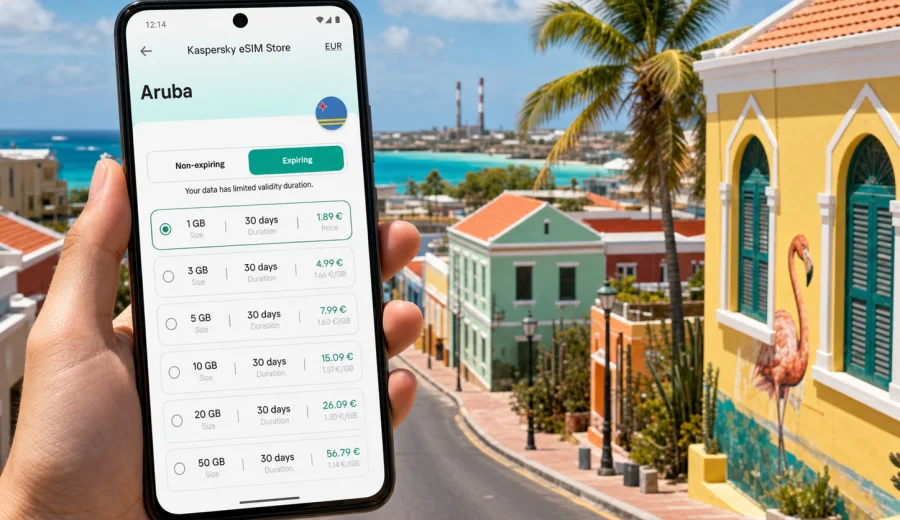
San Nicolas eSIM: mobile connection and internet for your trip
San Nicolas is a practical base for a very specific kind of Aruba trip: colorful streets, murals, local food, southern beaches, short drives to Seroe Colorado, and quieter evenings than you may find around the hotel zones near Palm Beach. It is also a place where mobile internet matters from the first hour, because many visitors arrive through Queen Beatrix International Airport near Oranjestad and then continue across the island by taxi, rental car, shuttle, or a private transfer.
An eSIM can make that route simpler. Instead of looking for a physical SIM card after landing, you can prepare a digital SIM profile before the trip, keep your regular SIM in the phone, and use mobile data for maps, ride coordination, hotel messages, restaurant searches, and beach plans. For San Nicolas, the value is not only “internet in Aruba” in a general sense. It is the ability to move around a less centralized part of the island without depending on hotel Wi-Fi or stopping your plans to solve connectivity.
Kaspersky eSIM Store is an app and website where you can choose, set up, and activate an eSIM with a suitable mobile data plan for an international trip. Before you choose a plan, check the destination, data allowance, validity period, activation details, and whether your device supports eSIM.
Why mobile internet is useful in San Nicolas
San Nicolas is compact, but your trip can involve several small movements in one day. You may start near a hotel or guesthouse, walk through the mural district, continue toward Baby Beach or Rogers Beach, look for a lunch spot, and then return after sunset. Mobile data helps with the everyday parts of that plan:
- loading maps when streets change from town blocks to coastal roads;
- messaging a driver or host before pickup;
- checking opening hours for cafes, galleries, and beach facilities;
- finding the route back from Seroe Colorado or the southern coastline;
- sharing your location with travel companions;
- confirming bookings without waiting for a Wi-Fi network;
- using translation, payment, or airline apps while away from the hotel.
In San Nicolas, the most inconvenient connectivity gap is often not a dramatic emergency. It is the small delay: the map that will not reload, the taxi message that does not send, the restaurant address that is saved in a chat you cannot open, or the boarding pass that needs data while you are already on the move. Preparing an eSIM reduces those interruptions.
Arrival in Aruba and the route to San Nicolas
Most international visitors reach San Nicolas after arriving at Queen Beatrix International Airport. The airport area is closer to Oranjestad, while San Nicolas sits in the south-eastern part of Aruba. If your first night is in or near San Nicolas, you will likely need mobile data before you reach your accommodation.
Typical arrival tasks include:
1. turning off airplane mode after landing;
2. checking messages from your hotel, host, or transfer company;
3. loading the address for San Nicolas or a nearby beach area;
4. confirming the route with a driver or rental car navigation;
5. letting family or colleagues know that you have arrived;
6. checking whether you need cash, a stop for groceries, or a dinner reservation.
If your eSIM is already installed, you can switch mobile data to the travel profile when you are ready to connect. Some plans activate when they first connect to a supported local network, while others may have different activation rules. Always read the plan details before purchase so the validity period fits your arrival time and trip length.
San Nicolas travel scenarios where eSIM helps
The best data plan is the one that matches the way you actually move through the city. A traveler staying by the beach has different needs from a business visitor who spends most of the day in meetings, and a cruise or short-stay visitor has different habits from someone spending a full week in Aruba.
| Scenario in San Nicolas | Why mobile data helps | What to consider |
|---|---|---|
| First arrival from the airport | Maps, transfer messages, hotel check-in details | Install the eSIM before departure if possible |
| Mural district walk | Navigation, photo backups, restaurant searches | Moderate data may be enough if you avoid heavy video uploads |
| Baby Beach or Rogers Beach day | Messaging, maps, ride coordination | Download key maps as a backup before leaving town |
| Business visit | Email, calendars, video-call backup, document access | Choose a data allowance that covers work apps |
| Island route from San Nicolas | Navigation to Oranjestad, Palm Beach, Arikok area, or Savaneta | Check whether your plan covers the full Aruba destination |
| Stopover or short stay | Quick setup, essential messaging, boarding-pass access | A shorter validity period may be practical |
This is why a city-focused eSIM plan decision should begin with your itinerary, not only with the number of days in the country.
How much data might you need?
Data use depends on habits, apps, background syncing, and whether you also use hotel Wi-Fi. The table below is a practical planning guide, not a guarantee.
| Travel style | Typical use in San Nicolas | Planning note |
|---|---|---|
| Light use | Maps, chat, ride coordination, email checks | Suitable for travelers who use Wi-Fi at the hotel |
| Moderate use | Maps, social media, restaurant searches, photo sharing | Often a better fit for day trips and beach plans |
| Work-focused use | Email, files, hotspot backup, calls through apps | Leave extra data for urgent tasks |
| Heavy media use | Video uploads, streaming, cloud backup | Consider a larger allowance and turn off automatic backups |
For a short San Nicolas visit, you may not need a large plan if you mainly use maps and messaging. For a longer Aruba stay with beach days, car navigation, and frequent photo sharing, a larger allowance can be more comfortable. If you plan to use your phone as a hotspot for a laptop or another traveler, check whether tethering is allowed under the selected plan conditions.
Choosing an eSIM plan for San Nicolas
For a city article, the correct destination is the country that contains the city. San Nicolas is in Aruba, so the plan should cover Aruba rather than a separate city destination. When comparing options, look at four details first:
- Destination coverage: the plan should include Aruba.
- Data allowance: choose enough data for maps, messaging, bookings, and work tasks.
- Validity period: match it to your arrival date, departure date, and possible delays.
- Activation rules: understand when the plan starts and what you need to do after installation.
It is also worth checking whether your regular SIM should remain active for calls or SMS from your home number. Many travel eSIM plans are designed for mobile data and may not include a regular phone number, voice calls, or SMS unless the specific plan says otherwise. For calls and messages, many travelers use internet-based apps over mobile data.
Before you make the final choice, check that your device supports eSIM and is not locked in a way that prevents adding another mobile profile. This step is especially important if your phone was bought through a carrier contract.
A practical setup flow before departure
The calmest time to prepare mobile internet for San Nicolas is before you are tired from the flight. You do not need to activate everything too early, but you can remove most uncertainty before boarding.
1. Confirm that your phone supports eSIM and can add a new mobile profile.
2. Choose Aruba as the destination and compare data allowances and validity periods.
3. Complete the order and save the installation details.
4. Install the eSIM while you still have a stable internet connection.
5. Keep your primary SIM for your usual number if you need it.
6. After arrival, select the eSIM profile for mobile data when you are ready to connect.
7. Monitor usage during the trip, especially if you share data by hotspot.
If you need device-specific installation help, use the Android eSIM installation guide or the iOS eSIM installation guide. The exact menu names can vary by phone model and operating system version, so follow the instructions shown on your device as well.
When to choose your Aruba eSIM plan
If San Nicolas is part of a planned holiday, choose your eSIM before the trip. You can compare the destination, validity, and data allowance with a clear head, then install the profile over your home Wi-Fi. If San Nicolas is a last-minute business stop or a short island detour, you can still set up an eSIM after arrival, but you will need an internet connection to complete the process.
For a simple starting point, you can choose an eSIM plan for your trip to San Nicolas in Aruba through Kaspersky eSIM Store. Review the plan conditions before purchase so the data amount and validity period fit your route.
This timing matters because San Nicolas is often visited as part of a wider Aruba itinerary. You may land near Oranjestad, spend time in San Nicolas, visit beaches in the south, and later move toward Palm Beach, Eagle Beach, or other parts of the island. One destination plan for Aruba is usually easier to manage than trying to solve connectivity separately in each place.
Local movement: town, beaches, and day routes
San Nicolas rewards flexible movement. You may spend the morning in town, pause for coffee, continue to the coast, and change your plan based on weather, heat, or transport. For walking in town, data helps you keep a map open between murals, small shops, and food stops. For beach routes, it helps with ride pickup points and messaging if your group splits up. For a rental car, it keeps navigation available on the road between San Nicolas, Savaneta, Oranjestad, and the resort areas in the north-west.
Useful preparation steps:
- save your hotel address in your maps app;
- download an offline map of Aruba as a backup;
- keep the eSIM installation email or app profile available;
- disable automatic photo and video cloud uploads on mobile data;
- check whether your travel apps are allowed to use mobile data.
Hotels, work, and short visits
Some travelers stay directly in San Nicolas or nearby southern areas; others visit from hotels elsewhere in Aruba. In both cases, eSIM is useful because accommodation Wi-Fi is tied to the building. Once you leave for a beach, restaurant, meeting, or airport transfer, your phone needs another way to stay online.
For business travel, choose a data allowance that covers email, maps, messaging, and file access. If you may connect a laptop, check whether hotspot use is allowed under the selected plan. For a short stopover, prioritize installation before travel, enough data for maps and messages, and saved offline copies of boarding passes and reservations.
What to check before buying
An eSIM is convenient only when the details match your device and route. Before choosing a plan for San Nicolas, review these points:
| Check | Why it matters |
|---|---|
| eSIM support | Not every phone or tablet can install eSIM |
| Carrier lock status | A locked device may not accept another mobile profile |
| Destination | The plan should cover Aruba |
| Validity period | It should cover arrival, stay, and possible delays |
| Data allowance | It should match navigation, messaging, work, and media habits |
| Activation timing | Some plans begin at first network connection; others may differ |
| Calls and SMS | Many travel eSIM plans are data-focused |
| Hotspot rules | Tethering depends on the selected plan conditions |
If anything is unclear, resolve it before relying on the eSIM for airport arrival or an important workday.
Quick data checklist
Before a beach day, work meeting, or airport transfer, check the basics:
- download maps and travel documents before leaving Wi-Fi;
- turn off automatic photo and video backups on mobile data;
- check usage daily if you are on a short plan;
- avoid a plan for the wrong destination;
- confirm that your phone supports eSIM before departure;
- do not assume the plan includes a local phone number, calls, or SMS.
Read the plan details and installation steps before you travel. A few minutes of preparation can save time when you are trying to reach San Nicolas or coordinate a beach pickup.
FAQ
Is eSIM useful if I stay mainly in San Nicolas?
Yes. Mobile data is useful for airport transfer, maps, hotel messages, beach trips, restaurant searches, and staying in touch away from Wi-Fi.
Can I install the eSIM before I fly?
In many cases, yes. Install it while you have a stable internet connection, then use it according to the selected plan’s rules.
Does an eSIM include calls and SMS?
Many travel eSIM plans focus on mobile data and do not include a regular phone number, voice calls, or SMS unless the plan states otherwise. You can often use internet-based calling and messaging apps over mobile data.
Prepare your eSIM before San Nicolas
San Nicolas is at its best when your day can stay flexible: a mural walk, a beach stop, a meal in town, or a direct transfer back to the airport. Mobile internet keeps those decisions easier because maps, messages, bookings, and travel apps remain available while you move.
Before the trip, check device compatibility, compare data, read the activation rules, and install the eSIM over a stable connection. Then you can focus on getting to San Nicolas.
To prepare mobile internet for the city and the wider Aruba route, choose an eSIM plan for San Nicolas and Aruba in Kaspersky eSIM Store and review the plan details before you travel.