
Travel connectivity guide
San Pedro de Atacama eSIM: Internet Guide
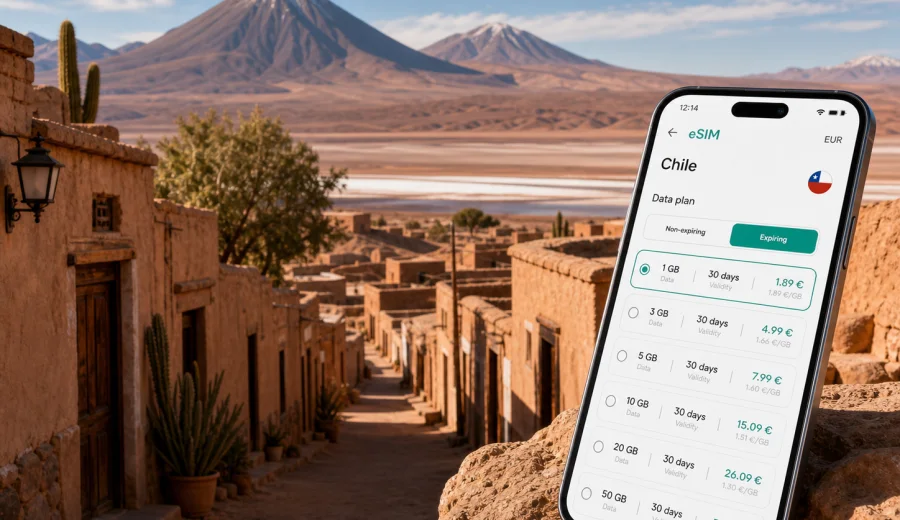
San Pedro de Atacama eSIM: mobile connection and internet for a desert trip
San Pedro de Atacama is not the kind of city where mobile internet is just a convenience. It is a desert base for airport transfers, high-altitude tours, stargazing, salt flats, geysers and long days outside town. You may spend the morning checking a pickup location near Caracoles, the afternoon navigating toward Valle de la Luna, and the evening confirming a tour time over hotel Wi-Fi.
The city is small, walkable and easy to understand once you arrive. The challenge is the wider Atacama setting around it. Transfers usually start at El Loa Airport in Calama, tours leave before sunrise, roads cross empty desert, and many plans depend on messages from agencies, drivers, hotels and travel companions. A local data connection on a compatible phone gives you a backup when public Wi-Fi is slow or unavailable.
This guide focuses on San Pedro de Atacama, not on Chile in general. It explains where mobile data matters in the city, how to plan an eSIM for arrival and excursions, what to check before buying, and how to keep your connection useful without treating it as a guarantee of coverage in every remote area.
Why mobile internet matters in San Pedro de Atacama
San Pedro de Atacama is a travel hub with a village rhythm: adobe buildings, tour offices, small hotels, restaurants, bike rentals and pickup points. Many visitors arrive with activities booked, but details can change by message: pickup windows, route notes and sunrise confirmations.
Mobile data is useful in these common situations:
| Trip moment | Why internet helps | Practical example |
|---|---|---|
| Arrival from Calama | Transfer details and driver messages | Confirm the vehicle, meeting point and arrival delay |
| First walk in town | Navigation and orientation | Find your hotel from the bus stop or main square |
| Tour pickup | Messaging and live location | Share your hotel entrance or nearby corner |
| Desert excursions | Offline maps plus occasional updates | Check saved routes, weather notes and return times |
| Restaurant and hotel planning | Reviews, menus and bookings | Reserve dinner after a late afternoon tour |
| Work or urgent tasks | Email and authentication | Receive codes, upload documents or join a call from the hotel |
The key is to treat mobile internet as part of your travel preparation. San Pedro is relaxed, but the logistics around it are precise. If your phone is ready when you land or reach town, you spend less time searching for Wi-Fi and more time handling the next step of the trip.
Arrival: Calama airport, transfers and the first connection
Most international travelers reach San Pedro de Atacama via Santiago and then fly to Calama. From El Loa Airport, the road journey to San Pedro usually takes around one and a half hours, depending on traffic, stops and transfer arrangements. This is often the first moment when mobile data becomes useful.
Before leaving the airport, you may need to:
- message a shuttle company or private driver;
- check whether your flight delay changed the transfer time;
- find a booking confirmation in email;
- tell your hotel when you expect to arrive;
- load offline maps for the first walk in town.
If your eSIM is installed before departure, you can usually switch to the travel line after arrival and start using data once the selected plan is active and the device has connected to an available network. Conditions depend on the tariff, device settings and local coverage, so keep confirmations available offline.
For a late arrival, mobile internet can be especially helpful. Streets in San Pedro are simple, but a small hotel entrance may be easier to find with a saved map and a working messaging app.
Getting around town with a data plan
San Pedro de Atacama is best handled on foot in the center. The main traveler area around Caracoles Street, the church, tour offices and restaurants is compact. Mobile data is still useful because the city works through small decisions: which agency office to visit, where the pickup point is, whether your hostel is down a side street, or which ATM and pharmacy are open.
Useful city tasks for mobile internet include:
1. Downloading or refreshing maps before leaving the hotel.
2. Checking walking routes from the bus terminal or shuttle drop-off.
3. Coordinating with a tour desk when your pickup point is not the hotel door.
4. Saving restaurant locations after sunset, when streets look more similar.
5. Using translation tools for practical conversations.
6. Managing card notifications, payment confirmations and banking checks.
Do not rely on mobile data as your only navigation layer outside town. Download offline maps, keep tour details saved, and carry pickup instructions in screenshots.
Where visitors use data most in San Pedro
San Pedro has a few zones where travelers tend to use their phones differently. In the historic center and around Caracoles Street, data helps with tour offices, restaurants, maps and messages. In hotel and hostel areas, it becomes a backup when Wi-Fi is crowded or weak. In ayllu and outskirts stays, it helps with taxi coordination and pickup confirmations. On tour routes to places such as Valle de la Luna, Laguna Cejar, Piedras Rojas, the Altiplanic Lagoons and El Tatio, save tickets, contacts and meeting times locally because coverage can be limited away from town.
Choosing an eSIM data plan for San Pedro de Atacama
The right eSIM plan depends less on the size of the city and more on how you travel around it. A three-day stopover with one tour needs less data than a ten-day desert itinerary with cloud backups, video calls and daily route planning.
Use this simple planning frame:
| Travel style | Likely data use | What to prioritize |
|---|---|---|
| Short stopover, 1-3 days | Low to moderate | Messaging, maps, transfer coordination |
| Classic 4-5 day Atacama trip | Moderate | Tour confirmations, navigation, photos shared selectively |
| Remote-work add-on | Higher | Email, cloud documents, calls from accommodation |
| Multi-city Chile route | Variable | Longer validity and enough data for transfers |
| Heavy social media posting | Higher | Larger package or careful upload timing |
For many travelers, the practical question is not "how do I get the biggest package?" but "how much data do I need before hotel Wi-Fi and offline maps cover the rest?" Messaging, maps and booking checks are light; video, cloud backup and repeated social media uploads are not.
When you compare options, look at:
- data volume in GB;
- validity period;
- destination coverage for Chile;
- whether top-up is available;
- when the validity starts;
- whether your device can use eSIM and is not locked to a carrier.
If you want to prepare before landing in Calama, you can choose a data plan for your trip to San Pedro de Atacama through Kaspersky eSIM Store, then install it on a compatible device before you travel. The site and app help you select a destination and suitable data package for mobile internet abroad, while the exact conditions depend on the tariff you choose.
Compatibility checks before you buy
An eSIM only helps if your phone or tablet supports it. Before choosing a tariff, check your device and confirm that it is not restricted by a carrier lock. This is especially important if your phone was bought with a long-term mobile contract, issued by an employer, or purchased in a market where eSIM support differs by model.
Check these points before your trip:
- your device model supports eSIM;
- the device software is up to date;
- the phone is unlocked for mobile service from other providers;
- you know where to manage SIM and eSIM settings;
- your primary SIM can remain active if you need your usual number for calls or SMS;
- you understand that many travel eSIM data plans do not include a regular phone number, voice calls or SMS unless the tariff conditions say otherwise.
For most travelers, the best setup is to keep the primary SIM available for your usual number and use the eSIM line for mobile data in Chile. On many phones, you can choose which line handles mobile data and which line remains available for calls or messages.
Installing and activating an eSIM for the trip
Install the eSIM when you have a stable connection and enough time to follow the steps calmly. Many travelers prefer to install it at home before departure and activate it according to the plan instructions.
The general flow is:
1. Choose Chile as the destination and compare available data packages.
2. Select the tariff by data volume and validity period.
3. Complete the order in the site or app.
4. Install the eSIM profile on your compatible device.
5. Set the eSIM as the mobile data line when you are ready to use it.
6. Turn on data roaming for the eSIM if the instructions for your device and plan require it.
7. Test basic browsing or messaging after the phone connects to an available network.
For device-specific setup, use the Android installation guide or the iOS installation guide. Keep the instructions available before you travel.
Practical scenarios in San Pedro de Atacama
Arrival from Calama. Install the eSIM before departure, save the transfer confirmation, and use mobile data for messages with the driver and hotel.
Three nights near Caracoles Street. A moderate data package can cover maps, restaurant searches, agency messages and basic browsing. Save heavy uploads for Wi-Fi unless you chose a larger package.
Sunrise tours. Confirm pickup details the previous evening, screenshot the time and location, and keep your phone charged overnight.
Wider Chile route. If San Pedro is only the first stop, choose validity and data volume with the wider route in mind.
Data-saving habits for the desert
Desert travel makes phone batteries and data allowances feel smaller. Long drives, early starts and constant photo taking can drain both. A few habits keep your eSIM data useful for the moments that matter.
- Download offline maps for San Pedro, Calama and main excursion areas.
- Save tour vouchers, hotel address and transfer details as screenshots.
- Disable automatic cloud photo backup on mobile data.
- Download media and translation packs before leaving Wi-Fi.
- Carry a power bank for El Tatio, stargazing tours and full-day routes.
The point is not to avoid using mobile internet. It is to reserve it for navigation, messages, bookings, banking checks and important updates instead of losing it to background sync.
For a short stopover, prepare the essentials before flying to Calama: eSIM installed, shuttle confirmation saved offline, hotel address pinned, tour agency contact saved, charger packed, and the mobile data line tested before leaving the airport area. Short trips leave less room for troubleshooting.
Trips from San Pedro: how to think about coverage
San Pedro is the base, but the headline experiences are outside town. Mobile data is often useful before and after excursions to Valle de la Luna, Laguna Cejar, Salar de Atacama, the Altiplanic Lagoons, El Tatio and stargazing sites. Remote stretches may have limited or no usable signal, so check pickup details, return estimates and packing notes while you still have a connection. A prepared eSIM gives you a better start and a smoother return, but it should sit alongside offline maps and saved documents.
Avoid the common mistakes: buying too little data for frequent uploads, forgetting device compatibility, expecting a data eSIM to include a regular phone number, skipping validity rules, depending only on live maps in remote areas, or leaving setup until the pickup van is outside.
FAQ: eSIM and mobile internet in San Pedro de Atacama
Do I need an eSIM if my hotel has Wi-Fi?
Hotel Wi-Fi may be enough for evening browsing, but an eSIM is useful for arrival, transfers, walking navigation, tour messages and backup access.
Will mobile internet work on every desert tour?
No travel data option should be treated as guaranteed in every remote area. Coverage can vary outside town, especially on high-altitude or isolated routes. Save essential information offline.
How much data should I choose?
For basic maps, messaging and bookings, a smaller or moderate package may be enough. For frequent uploads, work tasks or a longer Chile route, choose more data and suitable validity.
Can I keep my usual SIM active?
On many compatible phones, yes. You can often keep your usual SIM for your number and use the eSIM for mobile data.
Final preparation before your Atacama trip
San Pedro de Atacama rewards travelers who prepare the small things early: the transfer from Calama, the hotel address, tour pickup points, warm layers, offline maps and a mobile data plan that matches the trip. An eSIM is not a promise that every canyon, salt flat or high-altitude road will have signal. It is a practical way to make the connected parts easier: arrival, city navigation, booking checks, messages, payments and the return to town.
Before you fly, confirm that your device supports eSIM, choose a data allowance and validity period that fit your itinerary, install the profile with enough time to test your settings, and save essential documents offline. Then use mobile data where it is most useful: handling logistics quickly so the trip itself can stay focused on the Atacama.
You can prepare an eSIM data plan for Chile in Kaspersky eSIM Store before your journey to San Pedro de Atacama. Choose the destination, review the available tariff conditions, install the eSIM on a compatible device, and keep mobile internet ready for the airport transfer, the town and the wider desert route.