
Travel connectivity guide
San Salvador eSIM for mobile internet
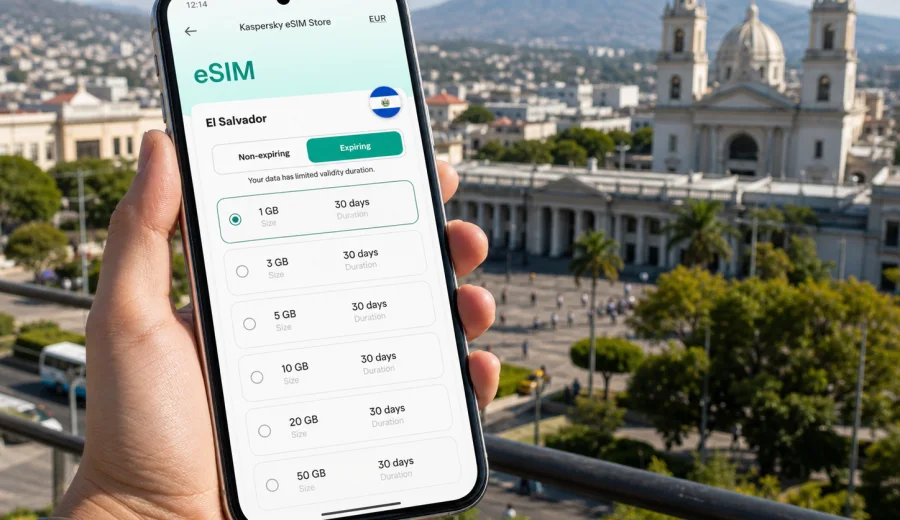
San Salvador eSIM: mobile connection and internet for your city trip
San Salvador is a city where mobile internet quickly becomes part of the trip, not a nice extra. You may land in El Salvador and go straight from the airport to a hotel in San Benito, Escalon, Zona Rosa, Santa Elena, or the historic center. You may need a map before your driver arrives, a message from the hotel before check-in, a ride-hailing app after dinner, or a video call between meetings. In these moments, an eSIM can help you get online without searching for a physical SIM card after a long flight.
For visitors, San Salvador is often both a destination and a base. The city is useful for business meetings, government appointments, regional offices, conferences, family visits, medical trips, stopovers, and short routes to nearby volcano views, coffee towns, beaches, and colonial streets. A practical mobile connection helps you move through those plans with less dependence on hotel Wi-Fi, cafe passwords, or roaming settings that you have not checked in advance.
Why mobile internet matters in San Salvador
San Salvador can be straightforward when you are prepared, but it is not a city where you want to improvise every connection. Addresses may be given by landmarks, traffic can change your route, and your daily plan may move between business districts, residential areas, restaurants, malls, government buildings, and older central streets. Mobile data gives you a practical layer of control.
Typical moments when mobile internet helps:
- confirming your hotel address before leaving the airport;
- sending your arrival time to a host, driver, colleague, or family member;
- checking map routes between San Benito, Escalon, Santa Elena, Antiguo Cuscatlan, and the historic center;
- using ride-hailing or taxi apps instead of explaining a route from memory;
- translating short messages or menu details when needed;
- checking opening hours for museums, restaurants, coworking spaces, and appointments;
- receiving banking, card, and booking notifications;
- joining work calls from a hotel, cafe, or client site;
- coordinating a day trip to El Boqueron, Suchitoto, Lake Ilopango, or the coast.
An eSIM is useful because you can prepare the mobile internet part of the trip before you arrive. You do not need to remove your main SIM card, look for a local shop during the first evening, or rely only on roaming until you have time to sort things out. You choose a data plan for the destination, install the eSIM on a compatible device, and use it for mobile data while keeping your primary SIM for calls or messages if your phone setup allows that.
Arrival: from the airport to the city
Most international visitors arrive through El Salvador International Airport, which is outside San Salvador. The drive into the city can take longer during busy periods, and the first hour after landing is when mobile internet is especially useful. You may need to message a driver, check your transfer pickup point, confirm the route to your hotel, or open a booking app before you are connected to any trusted Wi-Fi.
If you install your eSIM before the trip, keep the setup simple:
1. Install the eSIM profile while you still have stable internet at home or at your hotel before departure.
2. Name the profile clearly, for example "El Salvador data" or "Travel eSIM".
3. Keep your primary SIM active if you need normal calls or SMS from your home number.
4. On arrival, select the eSIM for mobile data and follow the plan conditions for activation.
5. Test maps and messaging before leaving the airport area.
The key point is timing. Installation and activation are related but not always the same step. Some eSIM plans start when the eSIM connects to a supported local network, while others may follow different validity rules. Check the plan details before your trip so you do not start the validity period earlier than intended.
City scenarios where eSIM is useful
San Salvador trips often involve several parts of the metropolitan area. A visitor may sleep in one district, meet clients in another, eat in a third, and take a short excursion outside the city the next morning. Mobile internet supports these movements in practical ways.
| City situation | Why mobile data helps | What to prepare |
|---|---|---|
| Airport transfer | You can contact a driver, follow the route, and confirm your hotel address | Install the eSIM before departure and keep booking details offline |
| Hotel check-in | You can show confirmations, message reception, and access email | Save reservation numbers and passport details securely |
| Business meetings | You can join calls, check calendars, and share documents | Choose enough data for work apps and backup use |
| Historic center visit | You can navigate on foot and arrange transport back | Download an offline map as a backup |
| Evening plans | You can order rides and share your live location with contacts | Keep your phone charged and use mobile data for ride apps |
| Day trips | You can coordinate pickups and check routes outside the city | Confirm whether your selected plan covers the whole country |
An eSIM does not replace sensible travel planning. It makes that planning easier to execute. You still need a charged phone, a backup address, and awareness of local conditions. But being able to open maps, message someone, or check a route at the exact moment you need it can change the rhythm of the day.
Choosing a data plan for San Salvador
For a city article, the correct destination for the plan is El Salvador, because San Salvador is inside the country. You do not need a separate city-only plan. What matters is that the plan covers your destination and matches your trip length, traffic use, and route.
Think about three questions first:
- How many days will you be in San Salvador?
- Will you mostly use maps and messages, or will you also work, upload files, and use video calls?
- Will you stay inside the city or make trips to other parts of El Salvador?
Light travelers may only need maps, messaging, email, ride apps, and occasional browsing. Business travelers often need more data because work tools run in the background and calls can consume traffic quickly. Families and groups may also use more data if one person becomes the main navigator, translator, and booking manager.
A practical way to estimate usage:
| Traveler type | Likely use in San Salvador | Planning note |
|---|---|---|
| Short stopover | Maps, messages, ride apps, booking checks | Choose a plan that fits a short validity period |
| Weekend visitor | Navigation, restaurant search, social sharing, messaging | Leave room for photo uploads and route changes |
| Business traveler | Email, calendars, calls, document access, taxi apps | Allow extra data for work apps and hotspot backup if permitted |
| Family organizer | Maps, chat groups, tickets, rides, translations | Pick a larger data allowance than a solo traveler |
| Remote worker | Video meetings, cloud files, laptop tethering if allowed | Check plan conditions for tethering and expected duration |
Avoid choosing only by price. A small plan may look efficient, but it can become inconvenient if you run out during an airport transfer, a meeting day, or a trip outside the city. At the same time, a very large plan may be unnecessary if your hotel and office provide reliable Wi-Fi and you only need mobile data between fixed locations.
Where in the city mobile connection helps most
San Salvador has several visitor zones, and each creates a different connectivity pattern.
San Benito and Zona Rosa are common for hotels, restaurants, embassies, nightlife, and business meetings. Mobile data helps with rides, location sharing, and quick changes to dinner plans. Escalon is useful for offices, shops, residential visits, and hotels; routes can vary depending on traffic, so live navigation is helpful. Santa Elena and Antiguo Cuscatlan are important for business, malls, restaurants, and meetings in the wider metropolitan area. The historic center is more walkable for sightseeing, but mobile data helps you move between landmarks, check opening times, and arrange transport after your visit.
If your trip includes the San Salvador Volcano or El Boqueron, data becomes useful before you leave the city: confirm pickup points, weather expectations, tickets if needed, and the return route. If you continue to Suchitoto, the coast, or Ruta de las Flores, you are no longer just planning city data; you are planning a country route. In that case, choose a plan for El Salvador with enough validity and traffic for the full itinerary.
A practical mid-trip setup
Once your hotel, meeting schedule, and local movement are clear, review your data use. If your eSIM plan shows usage and balance in the app or website, check it after the first full day. The first day often uses more data than expected because you are setting up maps, messages, banking notifications, weather, ride apps, and restaurant searches at the same time.
If you want to prepare before arrival, Kaspersky eSIM Store helps you choose and activate an eSIM with a suitable data plan for your destination. For San Salvador, use the El Salvador destination page to prepare an eSIM plan for your trip to San Salvador and review the available traffic volume, validity period, and conditions before you travel.
This is also the right moment to check whether one country plan is enough or whether your route needs a regional or global option. A city break in San Salvador usually points to El Salvador. A longer Central America itinerary may require more careful planning if you cross borders, because coverage and plan rules depend on the selected destination or region.
How to install and activate eSIM
Install the eSIM while you have a stable internet connection. Many travelers prefer to do this before departure because it is easier to read instructions, receive email, and troubleshoot at home than in an airport arrivals hall.
Basic steps:
1. Check that your phone supports eSIM and is not locked to one mobile operator.
2. Choose the destination and data plan for El Salvador.
3. Complete the order and open the eSIM details in the site or app.
4. Install the eSIM using the on-screen steps or QR code if provided.
5. Set the eSIM as your mobile data line when you are ready to use it.
6. Enable data roaming for the eSIM if the installation instructions or plan conditions require it.
7. Test maps, messaging, and a browser page after connection.
For detailed setup steps, use the Android eSIM installation guide or the iOS eSIM installation guide. The exact path can differ by device model and operating system version, so follow the instruction that matches your phone.
Before buying, check your device for eSIM support. This is especially important if your phone was purchased through a mobile operator, came from a market with regional eSIM limits, or has dual SIM settings you have not used before.
What eSIM does and does not include
In the context of travel, eSIM is mainly about mobile data. It helps you use the internet on a compatible smartphone without inserting a physical SIM card. Depending on your device, you may keep your regular SIM active for calls and SMS while using the eSIM for data.
Important details to remember:
- eSIM plans for travel usually focus on mobile internet, not a standard local phone number.
- Voice calls and SMS are not included unless a specific plan says otherwise.
- Messaging apps, email, maps, ride apps, and browser use work through mobile data.
- You should check whether tethering or hotspot use is allowed if you plan to connect a laptop.
- Local network performance can vary by location, building, congestion, and device settings.
- eSIM cannot always be moved to another device after activation.
Business trips to San Salvador
For business travel, the biggest value of mobile internet is continuity. You may arrive, go directly to a meeting, check into a hotel later, and still need access to calendars, email, messenger groups, maps, and cloud documents. Hotel Wi-Fi is useful, but it does not help while you are in transit or waiting outside a building.
Prepare a business trip checklist:
- Store hotel, office, and meeting addresses offline.
- Install the eSIM before departure.
- Keep a portable charger in your work bag.
- Confirm whether your plan allows hotspot use before relying on it for a laptop.
- Download key presentation files before the flight.
- Use mobile data for urgent access, and use trusted Wi-Fi for heavier uploads when available.
- Keep your primary number active if you need banking or corporate SMS codes.
For a two- or three-day business visit, choose more data than you would for a leisure weekend if you expect video calls or document transfers. If your company phone has restrictions, check eSIM support and mobile data policy before purchase.
Transport and navigation
For many visitors, the most practical eSIM use in San Salvador is transport. The city is spread out, and routes between districts can depend on traffic. Mobile data helps with live navigation and with arranging rides after meals, meetings, or sightseeing.
Before you move around the city:
1. Save the exact hotel address in your phone.
2. Save a second landmark near the hotel in case the address format is confusing.
3. Keep your destination written in Spanish if you can.
4. Check the route before entering a vehicle.
5. Share your trip status with a trusted contact when appropriate.
6. Keep enough battery for the return ride.
If you are visiting the historic center, plan your transport both ways. It is easy to focus on arrival and forget the return trip, especially if you are moving from the center to a hotel or restaurant in another district. Mobile data helps you make that return decision without searching for public Wi-Fi.
Trips from San Salvador
Many travelers use San Salvador as a base for day trips. Mobile internet can help, but the type of route matters.
El Boqueron and the San Salvador Volcano are close to the city and often fit into a half-day plan. You may use data for maps, pickup coordination, weather checks, and sharing your return time. Suchitoto is a common cultural day trip where mobile data helps with navigation, restaurant plans, and communication with a driver. Lake Ilopango can involve route checks and coordination. The Pacific coast, including surf areas, may turn a city stay into a wider country itinerary.
If you plan several trips outside the city, review the plan conditions:
- destination coverage: confirm it is valid for El Salvador, not just a different region;
- validity: choose enough days for the full route;
- data volume: allow for maps, messages, photos, and rides;
- hotspot: check whether you can share data if someone in your group depends on you;
- activation timing: understand when the plan starts.
Do not assume one travel pattern fits everyone. A conference attendee who stays around San Benito needs a different data plan from a traveler using San Salvador as a base for several day trips.
FAQ
Is eSIM useful if my hotel in San Salvador has Wi-Fi?
Yes, because hotel Wi-Fi only helps when you are on the property. eSIM mobile data is useful during airport transfers, taxi rides, meetings, restaurant visits, sightseeing, and day trips from the city.
Can I use eSIM for calls and SMS in San Salvador?
Travel eSIM plans usually focus on mobile data. Calls and SMS are not included unless the selected plan says otherwise. You can use internet-based messaging and calling apps over mobile data.
Should I install the eSIM before flying to El Salvador?
It is usually more convenient to install it before departure while you have stable internet. Activation and validity rules depend on the selected plan, so read the plan details before switching it on for mobile data.
Do I need a San Salvador-specific eSIM?
No. For a city trip to San Salvador, choose a plan for El Salvador because the city belongs to that destination. If your route includes other countries, review regional or multi-country options separately.
What if my phone does not support eSIM?
You need a compatible, unlocked device to use eSIM. If your phone does not support eSIM, you may need standard roaming, a physical SIM, or another travel connectivity option.
How much data do I need?
For maps, messaging, ride apps, and light browsing, a smaller plan may be enough. For work calls, hotspot use, cloud files, and frequent media sharing, choose more data and monitor usage during the trip.
Final travel checklist
Before you leave for San Salvador:
- check that your phone supports eSIM and is not locked to one operator;
- choose a data plan for El Salvador that matches your stay and route;
- install the eSIM with stable internet;
- save your hotel, meeting, and emergency details offline;
- understand when the plan validity starts;
- keep your primary SIM active if you need your regular number;
- pack a charger or power bank for long days in the city;
- test mobile data after arrival before leaving the airport.
San Salvador is easier to manage when your phone is ready for the first transfer, the first map search, and the first change of plans. Kaspersky eSIM Store helps you choose, install, and activate an eSIM with a suitable data plan for a trip abroad, so you can prepare mobile internet before the city starts asking for it. To plan your connection for the capital and nearby routes, choose an eSIM data plan for El Salvador before your trip.