
Travel connectivity guide
Santa Cruz eSIM: Internet in Aruba
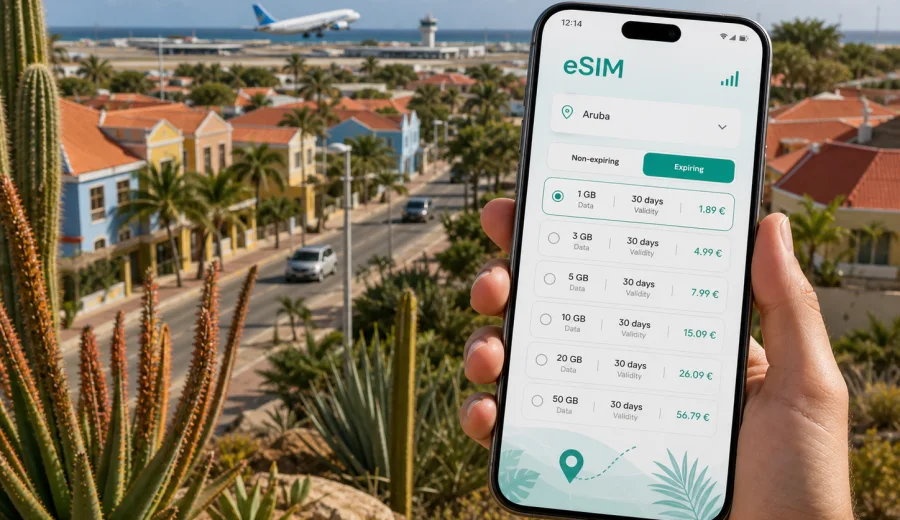
Santa Cruz eSIM: mobile connection and internet for your Aruba trip
Santa Cruz is one of the most practical bases in Aruba if your trip is not only about staying beside one resort pool. The town sits inland, close enough to Queen Beatrix International Airport, Oranjestad, beaches, local roads, and Arikok National Park to make daily movement simple, but it still feels different from the hotel strips near Eagle Beach and Palm Beach. That makes mobile internet more important, because many useful moments in Santa Cruz happen between fixed Wi-Fi points: finding your rental car desk, checking a route to a cunucu house, confirming a restaurant opening time, sharing your location with friends, or navigating toward a trail entrance before the signal changes.
An eSIM can make that part of the trip easier. Instead of looking for a physical SIM card after arrival, you can prepare a digital SIM profile on a compatible phone and use a data plan for mobile internet in Aruba. Kaspersky eSIM Store is an app and website where you can choose, arrange, and activate an eSIM with a suitable data plan for an international trip. It is useful for travelers who want clear conditions before they land: destination, data volume, validity period, and setup steps.
This guide focuses on Santa Cruz, not Aruba in general. You will find advice for arrival, local transport, hotels and guesthouses, remote work, road trips from the town, and the moments when a stable mobile connection is most useful.
Why mobile internet matters in Santa Cruz
Santa Cruz is not a dense downtown where you can walk from one cafe Wi-Fi network to another. It is a central district with residential streets, local shops, access roads, and routes toward beaches, the airport, and the national park. A mobile data connection helps you move with less friction because you can check maps, transport options, weather changes, and booking details while you are already on the road.
For many visitors, Santa Cruz is useful because it sits between several types of Aruba trips:
| Travel situation | Why Santa Cruz is convenient | Where mobile data helps |
|---|---|---|
| First night after arrival | The airport is within easy reach by car or taxi | Share your location, confirm hotel check-in, open maps |
| Nature-focused trip | Arikok National Park and inland roads are nearby | Save routes, check opening details, message your group |
| Island driving | Santa Cruz connects easily to different coasts | Navigate turns, compare fuel stops, avoid wrong detours |
| Local stay | Guesthouses and apartments may be away from resort zones | Contact hosts, order rides, find groceries |
| Mixed work and travel | Quieter accommodation can be practical for focused days | Use data as a backup when Wi-Fi is limited |
The key is not that you should be online every minute. The value is control. You can decide when to use mobile internet and when to save data, instead of depending completely on public Wi-Fi, hotel routers, or a roaming package you did not check before departure.
Arrival: from the airport to Santa Cruz
Most international visitors arrive through Queen Beatrix International Airport near Oranjestad. Santa Cruz is inland from the airport area, so your first trip usually involves a taxi, rental car, private transfer, or a ride arranged by your accommodation. This is the moment when mobile internet can prevent small problems from becoming delays.
Before you leave the terminal, you may need to:
- message your host or hotel;
- open the address in a map app;
- check the rental car pickup point;
- confirm whether your accommodation uses a gate code or self-check-in;
- find the right route if your driver asks for a landmark;
- let family or colleagues know you have arrived.
Airport Wi-Fi may help for the first few minutes, but you can lose it as soon as you walk outside or drive away. If you have already installed an eSIM profile and understand when your plan starts, you can switch to mobile data more calmly. On some phones, you may need to select the eSIM as the data line and enable data roaming for that eSIM profile, depending on the plan instructions and device settings.
Do not wait until you are standing in the sun with luggage to read setup steps for the first time. It is better to install the eSIM while you still have reliable Wi-Fi at home or in your departure airport, then activate or start using it according to the plan conditions.
Moving around Santa Cruz
Santa Cruz is best understood as a practical inland base. Streets can feel quiet, distances are short by island standards, and many trips involve a car rather than a long walk. Your exact movement pattern depends on whether you stay in a hotel, apartment, family property, or rental house.
Common local movement scenarios include:
1. Driving from Santa Cruz toward Oranjestad for shopping, restaurants, or a marina walk.
2. Going toward Eagle Beach, Palm Beach, or other west-coast beach areas for a half day.
3. Visiting Arikok National Park or inland viewpoints.
4. Returning from the coast after sunset, when familiar landmarks are less obvious.
5. Picking up groceries, pharmacy items, or fuel before a day trip.
Mobile internet is useful because a wrong turn on a small island is rarely dramatic, but it can still waste time. If your accommodation is on a quieter road, offline maps may not always give enough confidence. Live navigation, messaging, and access to booking details can make the day smoother.
For a low-stress setup, prepare three things before the first drive:
- save your accommodation address in your map app;
- save the airport and your rental car return point;
- keep your host or hotel contact visible outside email if possible.
If you are traveling with other people, decide who will keep the active data connection during drives. One reliable phone for navigation and messaging is often enough for a small group, especially if other travelers save offline maps as a backup.
Hotels, apartments, and guesthouses
Santa Cruz can appeal to travelers who want a quieter stay than the main resort areas. That often means more reliance on accommodation Wi-Fi in the evenings and more reliance on mobile internet during the day. Before booking, check whether the property is close to the type of trip you want: nature access, airport convenience, family visits, local roads, or easier drives to beaches.
Mobile data helps with accommodation tasks that are easy to overlook:
- sending arrival time updates if your flight is late;
- opening a self-check-in message when you are outside the property;
- using translation tools during local errands;
- searching for nearby groceries or takeout;
- confirming a taxi pickup point;
- staying reachable if the property Wi-Fi is weak in a room, terrace, or parking area.
If you plan to work from your accommodation, ask the property about Wi-Fi quality before you book. An eSIM data plan can be a useful backup for messaging, email, maps, and light work tasks, but you should not assume it can replace a full work connection for every video call or large upload. Network performance depends on local conditions, device settings, and the selected plan.
Which Santa Cruz travelers benefit most from eSIM?
An eSIM is especially practical when your schedule includes multiple short movements rather than one simple transfer from airport to hotel.
| Traveler type | Typical need in Santa Cruz | Practical eSIM use |
|---|---|---|
| First-time Aruba visitor | Understand roads and distances | Navigation, saved places, route checks |
| Family traveler | Coordinate pickups, beaches, groceries | Messaging, maps, shared locations |
| Nature traveler | Reach inland roads and park access points | Route review, weather checks, emergency contact |
| Business traveler | Stay reachable outside hotel Wi-Fi | Email, messenger calls, calendar updates |
| Stopover traveler | Use limited time efficiently | Transfer updates, quick route planning |
| Long-stay guest | Manage daily errands around the island | Data budgeting, repeat navigation, top-ups |
The best plan is the one that matches your actual behavior. A traveler who only needs maps and messages will use data differently from someone who uploads videos, works on a laptop through a hotspot, or streams in the car. Before choosing a plan, estimate your daily data use and check whether hotspot use is included in the conditions of the selected tariff.
Data planning for Santa Cruz and nearby trips
You do not need exact technical knowledge to estimate your data needs. Think in travel tasks.
| Trip style | Likely data use | Planning tip |
|---|---|---|
| Weekend in Santa Cruz | Maps, messages, restaurant searches | A smaller package may be enough if hotel Wi-Fi is reliable |
| One week with rental car | Daily navigation, beach searches, group chats | Choose a plan with enough data for repeated map use |
| Nature and photography trip | Routes, uploads, cloud backup, social posts | Save large uploads for Wi-Fi when possible |
| Remote work stay | Email, calls, documents, backup data | Check hotspot rules and keep video calls on Wi-Fi when you can |
| Family trip | Several phones, rides, bookings, translation | Decide whether each traveler needs a plan or one main data phone |
Once you know your itinerary, you can prepare an eSIM plan for Aruba before your Santa Cruz trip and check the available data volumes and validity periods. This is the most natural time to choose a plan: after you understand how many days you will spend on the island, how often you will drive, and whether you will rely on mobile data for work or only for travel basics.
Device compatibility before you buy
Before you choose any eSIM plan, check that your phone or tablet supports eSIM and is not locked in a way that prevents adding another mobile plan. This matters more than the destination. If the device cannot install an eSIM profile, the best travel plan will not help.
Use this quick checklist:
- your device model supports eSIM;
- your device is not restricted to one carrier in a way that blocks another plan;
- the operating system is reasonably up to date;
- you know where the mobile data, SIM, and roaming settings are;
- you have a stable Wi-Fi connection for installation;
- you understand whether the eSIM should be installed before travel or after arrival, based on plan instructions.
If you are unsure, check your device before purchase. It is also wise to keep your primary SIM active for calls or SMS if you need your usual number for bank codes, airline messages, or family contact. Many travel eSIM plans are focused on mobile data and do not include a regular phone number, voice calls, or SMS unless the plan conditions say otherwise.
How to install and activate an eSIM for Santa Cruz
The exact steps depend on your device, but the overall process is usually simple: choose the destination, select a suitable data plan, complete the order, install the eSIM profile, then activate it according to the plan instructions. After purchase, the eSIM details are available through the site or app, and you may also receive a QR code or guided setup instructions.
For device-specific steps, follow the Android installation guide or the iOS installation guide. Read the instructions while you still have reliable Wi-Fi. If your plan should start only when it connects to a local network, avoid unnecessary activation too early; if the validity period starts at installation, plan the timing carefully. Conditions can vary, so the plan details matter.
A practical setup sequence for Santa Cruz:
1. Install the eSIM before departure or in a place with stable Wi-Fi.
2. Keep your main SIM available if you need your regular number.
3. Name the eSIM line clearly, such as "Aruba data".
4. Set the eSIM as the mobile data line when you are ready to use it.
5. Enable data roaming for the eSIM if the instructions require it.
6. Test maps and messaging before leaving the airport or accommodation.
7. Monitor data use during long navigation days.
If something does not work immediately, avoid deleting the eSIM profile unless the support instructions tell you to do that. Some profiles cannot simply be reinstalled on another device after activation.
Routes, stopovers, and work scenarios
Santa Cruz is a good starting point for routes that mix local roads, inland landscapes, and coastlines. If your day includes Arikok National Park, save the entrance location, keep offline maps, and do not rely on constant signal in every rugged area. If you are going to Oranjestad, mobile data helps with parking searches, meeting points, and traffic-aware navigation. For Eagle Beach, Palm Beach, or southern drives, it is useful for group messages, route changes, and finding your way back after dark.
Business travelers can use Santa Cruz as a quieter base while staying within reach of the airport and Oranjestad. Keep accommodation Wi-Fi for large files and scheduled video meetings, and use eSIM data for email, calendars, ride coordination, maps, and urgent messages. If you plan to connect a laptop, check whether hotspot use is included in the selected plan.
Short stays need a different approach. If Santa Cruz is only a stopover, overnight stay, or two-day rental car base, install the eSIM profile before the trip if the plan conditions allow it. Your priority is reliable access to check-in details, the fastest route to accommodation, return timing for the airport, and contact with a driver, host, or colleague.
Use this final checklist before departure:
- confirm your accommodation address and save it offline;
- check whether your phone supports eSIM;
- review the data volume and validity period you expect to need;
- install the eSIM profile while you have stable Wi-Fi, if the plan instructions allow it;
- keep your main SIM available for calls, SMS, or verification codes if needed;
- download offline maps for Aruba as a backup;
- avoid large app updates and cloud backups on mobile data after arrival.
Common mistakes are easy to avoid: do not install too late, do not skip compatibility checks, do not delete an eSIM profile unless support instructions tell you to, and do not assume that a travel data plan includes voice calls or SMS. The goal is not to make the trip technical. The goal is to remove avoidable friction so Santa Cruz can work as a calm base for the rest of the island.
FAQ: eSIM and mobile internet in Santa Cruz
Is an eSIM useful if my hotel in Santa Cruz has Wi-Fi?
Yes, because hotel Wi-Fi only helps while you are at the property. Mobile data is useful during airport transfers, drives, beach trips, grocery runs, and visits to Arikok National Park or Oranjestad.
Should I install the eSIM before I arrive in Aruba?
In many cases, installing before travel is more comfortable because you can use stable Wi-Fi and read the instructions calmly. Check the plan conditions first, especially when the validity period starts.
Can I use eSIM for navigation from Santa Cruz?
Yes, if your device is compatible and the selected plan is active. It is still smart to download offline maps, especially for inland routes and nature-focused days.
Does an eSIM replace my normal phone number?
Usually no. Many travel eSIM plans are designed for mobile data. If you need calls, SMS, or verification codes on your usual number, keep your primary SIM active according to your device settings and carrier conditions.
How much data do I need for Santa Cruz?
For maps, messages, restaurant searches, and check-in details, moderate data may be enough. If you stream video, use cloud backup, work through a hotspot, or share data with other devices, choose a larger package and monitor usage.
Is public Wi-Fi enough in Aruba?
Public and hotel Wi-Fi can be useful, but it is not always available when you are driving, arriving, or meeting people. An eSIM helps reduce dependence on Wi-Fi in places where you need maps or messages immediately.
Choose an eSIM plan for your Santa Cruz trip
Santa Cruz is a practical Aruba base when you want airport access, inland routes, local accommodation, beach days, and trips toward Arikok National Park in one itinerary. Mobile internet supports that style of travel because it stays with you between the places where Wi-Fi is available.
Before departure, check device compatibility, estimate your data needs, and decide when to install and activate the eSIM. In Kaspersky eSIM Store, you can choose an eSIM plan for Aruba with a data volume and validity period that fits your Santa Cruz itinerary. Keep the setup simple, save offline backups, and use mobile data for the moments where it gives you the most control: arrival, navigation, messages, and route changes around the island.