Travel connectivity guide
Santa Rita, Guam eSIM: Mobile Data Guide
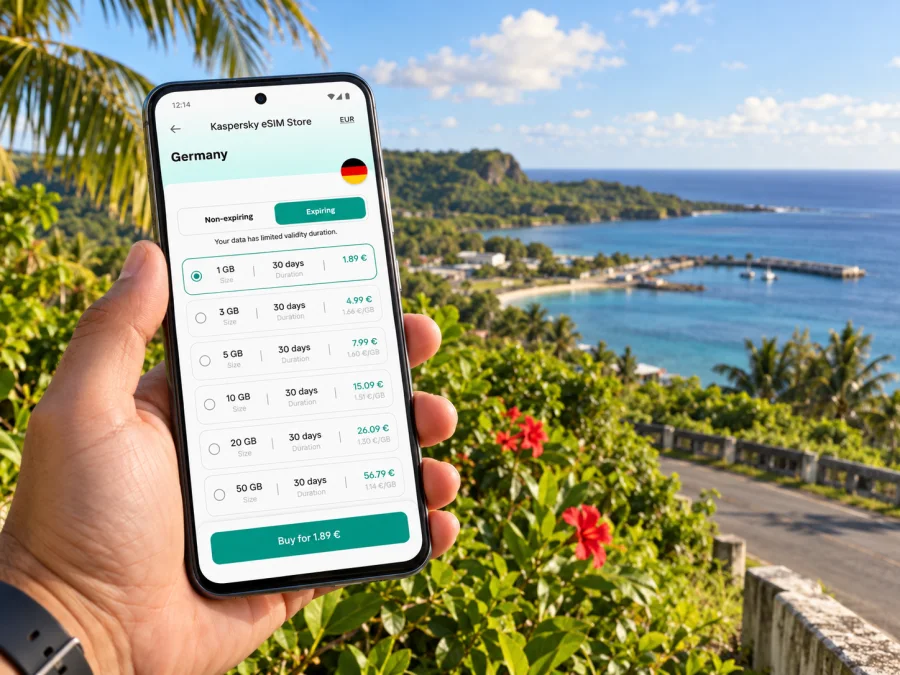
Santa Rita eSIM: mobile connection and internet for your Guam trip
Santa Rita is a municipality in southern Guam, not a separate island destination or a dense city centre. A visit here can mean staying with family, travelling for work, visiting a local community, or using the village as a base for exploring the island’s south. In each case, mobile internet is useful for checking directions, coordinating a pickup, confirming opening hours and keeping travel details available while you move between places.
Guam is a U.S. territory in the western Pacific. Its local mobile market and network coverage are specific to Guam; a plan described as “United States” or “Asia-Pacific” should not be assumed to include Guam unless the plan’s destination list says so. Check the exact destination and service terms before you pay. The same care applies to eSIM: the phone must support it, be unlocked for another provider, and match the device variant requirements.
This guide focuses on the practical connection questions that come up around Santa Rita: arrival at Guam’s airport, the trip south, getting around a spread-out island, preparing navigation and choosing a data plan that fits your stay. Coverage can vary by location, building, device and local network conditions, so keep an offline backup for essential directions.
Where Santa Rita fits into a Guam itinerary
Santa Rita, also known as Santa Rita-Sumai in municipal materials, lies in the south of Guam. The municipality includes residential and community areas as well as coastal and harbor-side surroundings. It is not the island’s main hotel district: many first-time visitors stay around Tumon or Tamuning, then travel south for a visit or a day’s drive. If your address is in Santa Rita, use the exact street or landmark in your map app rather than searching only the municipality name; a broad result may lead to the village centre instead of your destination.
Santa Rita is also a useful starting point for a southern Guam itinerary. Depending on your plans, you may drive toward Agat, Umatac, Merizo or other coastal communities, then return north. Those are separate destinations, and road conditions and mobile signal can differ along the way. Do not plan a remote outing around the assumption that a particular data connection will be continuous; download the route and check current local conditions before setting out.
Quick facts for planning
| Question | Practical answer |
|---|---|
| What is Santa Rita? | A municipality in southern Guam, sometimes named Santa Rita-Sumai in local municipal material. |
| Is it the same as Tumon? | No. Tumon is a separate area in northern/central Guam and a major visitor district. |
| Where do international visitors usually arrive? | At A.B. Won Pat International Airport (GUM), on Guam. Continue onward to Santa Rita by a pre-arranged ride, taxi, rental car or another confirmed option. |
| Is a Guam eSIM automatically included in a U.S. plan? | No assumption is safe. Check that Guam is explicitly included in the selected plan. |
| Does a data eSIM replace a regular phone line? | Usually not. Check the individual plan; a data-only plan does not provide ordinary calls or SMS unless those services are explicitly listed. |
Arriving at GUM and continuing south
A.B. Won Pat International Airport is Guam’s civilian international airport. It is not in Santa Rita, so the first leg after landing is an island transfer. The airport authority lists taxis and car-rental services among ground transportation options. Availability, pickup arrangements and hours may change, so confirm the details with your provider or host before travel, especially if you arrive late or have a tight connection.
Before boarding, save the complete destination address and a contact number in your notes. If someone is meeting you, agree on a recognizable pickup point and a backup plan in case your flight is delayed or your data connection is not ready. A working data connection makes messaging and navigation more convenient, but it should not be your only way to find the ride. Keep the booking confirmation available offline and know whether the driver expects a call, message or in-person meeting.
Public transportation options and schedules can change, and service may not match every arrival time or destination. Check a current operator or local authority timetable for the date you travel rather than relying on an old route map. For a village address away from the main corridor, confirm the last part of the trip in advance. A taxi or host pickup may be more practical when you are carrying luggage or arriving outside daytime hours.
Arrival checklist
- Save the street address, accommodation name and map pin for Santa Rita.
- Keep the host’s or driver’s number in your contacts and in an offline note.
- Confirm where and when the pickup will happen, including a plan for flight delays.
- Download an offline Guam map and the route from the airport to your destination.
- Check your eSIM installation status before you leave Wi-Fi, but activate data according to the plan’s instructions.
- Keep your home SIM available if you need its number for calls, account verification or urgent messages.
Choosing mobile data for the places you will actually visit
A city label is not always a useful measure of data needs on Guam. The right amount depends on your trip pattern: a short stay near one address uses less navigation data than several days of driving, uploading photos and working remotely. Choose a package by expected use and validity period, and read the plan’s fine print for network, activation, hotspot and fair-use conditions.
For a Guam trip, verify that Guam is the named destination. The current Guam destination page in Kaspersky eSIM Store displays plans for Guam and identifies Docomo Pacific as the local telecommunications provider for the listed options. This describes the market shown for those plans; it does not guarantee reception at every address or along every road. Recheck the provider, data allowance, validity and current conditions at checkout because plan details can change.
Kaspersky eSIM Store is an app and website where travellers can choose, purchase and activate an eSIM plan for mobile data abroad. It is a way to prepare a travel data eSIM; it is not the local network itself. To compare the destination currently listed for Guam and review its live plan conditions, browse Guam data plan options.
Match the plan to your itinerary
| Travel pattern | What to consider |
|---|---|
| One or two days, mostly at a known address | A smaller allowance may be enough if you use Wi-Fi for large downloads and keep maps offline. Check the plan’s expiry period. |
| Several days with daily driving | Allow for map searches, live traffic updates and messaging. Download maps in advance to reduce dependence on continuous data. |
| Work calls and cloud documents | Estimate video-call use separately; it can consume more data than messaging or browsing. Confirm hotspot support if you plan to connect a laptop. |
| Photos and social uploads | Upload over Wi-Fi where practical. Disable automatic cloud photo backup on mobile data if you want to manage usage. |
| A Guam stop plus another island or country | Check every destination individually. A Guam-only plan may not include Saipan, Japan, the Philippines or another stop. |
Device compatibility and regional variants
eSIM support depends on the exact device, its market variant, software and carrier policy. Two phones with the same retail name can differ by region: one may support eSIM while another uses physical SIM cards only. Some models sold in particular markets have different SIM configurations, and a phone may also be carrier-locked. Do not rely on the model name alone or on a general list copied from another country.
Check the precise model or model number in the manufacturer’s settings and support documentation, then confirm that the device is unlocked and can add another eSIM. On iPhone, the available SIM configuration can differ by purchase region and generation; Apple’s current device guidance separates eSIM-only variants from eSIM-plus-nano-SIM variants. Android menus and eligibility vary by manufacturer. Check whether your device is compatible with eSIM before choosing a plan.
If the phone is managed by an employer, bought through a carrier instalment plan, or configured for a specific market, ask the carrier or administrator whether another eSIM can be installed. An eSIM profile can be tied to one device and may not be transferable after installation. Resolve uncertainty before travel rather than deleting a profile to troubleshoot without instructions.
A pre-purchase device check
- Find the exact model number in Settings or About this phone.
- Confirm eSIM support for that regional model on the manufacturer’s official support page.
- Check that the phone is not locked to a carrier that prevents a second provider.
- Confirm the operating system is current enough for the provider’s installation method.
- Make sure you can use Wi-Fi during installation and keep access to the account or email that receives the QR code.
- If the device is dual SIM, identify which line will supply mobile data after landing.
Install before departure and connect with care
Where possible, set up the eSIM while you have stable Wi-Fi and time to read the instructions. The exact installation flow depends on the device and plan. Some eSIMs are installed by scanning a QR code, while others use an in-app or manual process. Follow the instructions included with your purchase; avoid scanning a QR code more than once if the provider says it is single-use.
For platform-specific steps, use the Android eSIM installation instructions or the iPhone eSIM installation instructions. Label the travel line clearly in your phone settings, such as “Guam data,” so it is easy to identify beside your regular SIM. Keep the home line enabled for calls or verification only if that matches your roaming preferences and charges.
A typical setup sequence is:
- Confirm the device model is compatible and unlocked.
- Purchase a plan whose destination includes Guam; review validity and activation rules.
- Install the eSIM over Wi-Fi, following the provider’s steps.
- Keep the profile installed until your trip is complete; do not remove it just to switch data lines.
- On arrival, select the travel eSIM for mobile data and enable data roaming only if the plan instructions require it.
- Turn off data roaming for your home SIM if you want to avoid unplanned charges from your home carrier.
- Test a simple webpage or message before depending on the connection for navigation.
Installing an eSIM and starting its validity are not always the same event. Read the selected plan’s activation conditions: a plan may begin at purchase, at installation, on a scheduled date or when it first connects to a supported local network. If you buy well in advance, make sure the plan’s timing matches your itinerary. Keep a screenshot of the conditions and the order confirmation in case you need to refer to them offline.
Staying oriented around Santa Rita
Navigation is especially useful when a destination is described by a local landmark, a family name or a road rather than a familiar hotel. Ask your host for a map pin and the best approach road. Compare the pin with the address, since a place name may refer to a broad area. Save multiple stops—such as accommodation, a meeting location and a fuel stop—before you begin a drive.
For a half-day visit, download the map around Santa Rita and any planned stops. For a longer island loop, save the full route and identify places where you can pause safely to review directions. Keep the phone charged; heat, screen brightness and navigation can drain a battery quickly. A car charger or power bank is useful, but never connect or adjust a device while driving.
Practical data habits
- Download map tiles and accommodation details over Wi-Fi before departure.
- Use navigation audio so you can keep your eyes on the road.
- Turn off automatic app updates and large media backups on mobile data.
- Let maps and ride coordination use mobile data; defer large uploads until Wi-Fi.
- Check the remaining allowance in the app or account during longer stays.
- Carry a power bank for full-day drives and keep the phone out of direct sun when parked.
If you are visiting for work or a short stop
Common connection issues and simple checks
If the eSIM does not connect, check that it is enabled and selected for mobile data, confirm the plan includes Guam and is within its active period, then follow the plan’s roaming instructions. Restart the phone or move outdoors if appropriate. If it still fails, check your account for activation status and contact support using the details in your order.
Avoid deleting the eSIM profile as an early troubleshooting step. Some installation codes can only be used once, and the profile may not be recoverable by scanning the same code. Keep a screenshot of any error message and note where it occurred; this helps support distinguish an installation issue from a local coverage limitation.
If data works but a regular call does not, the plan may be data-only. Use your regular mobile line for ordinary calls if your home plan and roaming settings allow it, or use an internet calling app with your existing account. Do not expect an eSIM data plan to supply a local phone number, SMS verification or emergency calling unless the terms explicitly include those functions.
Frequently asked questions
Is Santa Rita a city in Guam?
Santa Rita is a municipality in southern Guam. You may also see the municipal name Santa Rita-Sumai. For navigation, use a full street address or exact map pin instead of relying on the municipality name alone.
Does an eSIM for the United States work in Guam?
Do not assume that it does. Guam has a distinct destination entry in many plan catalogs. Check the selected plan’s listed destinations and local network conditions before purchase.
Does the Guam plan include a phone number?
The Guam options described in the destination catalog are data plans. Unless the individual plan explicitly lists voice and SMS, plan to use data-based messaging and calling apps or your existing phone line under its own terms.
Will mobile data work everywhere in Santa Rita and southern Guam?
No plan can guarantee reception in every building, road or remote area. Signal depends on the local network, terrain, structures, device bands and current conditions. Download important information and directions before travelling.
Can I install the eSIM after I land?
Often an eSIM can be installed after arrival, but Wi-Fi access and the plan’s activation rules matter. Installing it before departure over reliable Wi-Fi gives you time to resolve setup issues. Follow the specific instructions for your device and plan.
Can I use my regular number at the same time?
Many dual-SIM devices allow a home line and a travel eSIM to remain available, but the exact options depend on your model and carrier. You can usually select one line for mobile data. Check roaming charges and choose the data line deliberately.
What if my phone was purchased in another country?
Check the exact model number and regional variant with the manufacturer. SIM hardware, eSIM capability and carrier-lock rules may differ even when two devices share the same model name. Verify before buying a data plan.
Prepare for Santa Rita
A smooth visit starts with a few small checks: confirm the exact address, arrange your airport transfer, save a Guam map offline and verify that both the phone and chosen plan are suitable. Keep the plan details available after purchase, and remember that mobile coverage may vary along the island’s roads and inside buildings.
Kaspersky eSIM Store lets you use its app or website to choose, purchase and activate an eSIM plan for travel data. Review the current Guam destination, provider and conditions, then select an option that fits your stay. Explore Guam eSIM data options and install the profile before departure when practical.


