
Travel connectivity guide
Santiago eSIM for Mobile Internet in Chile
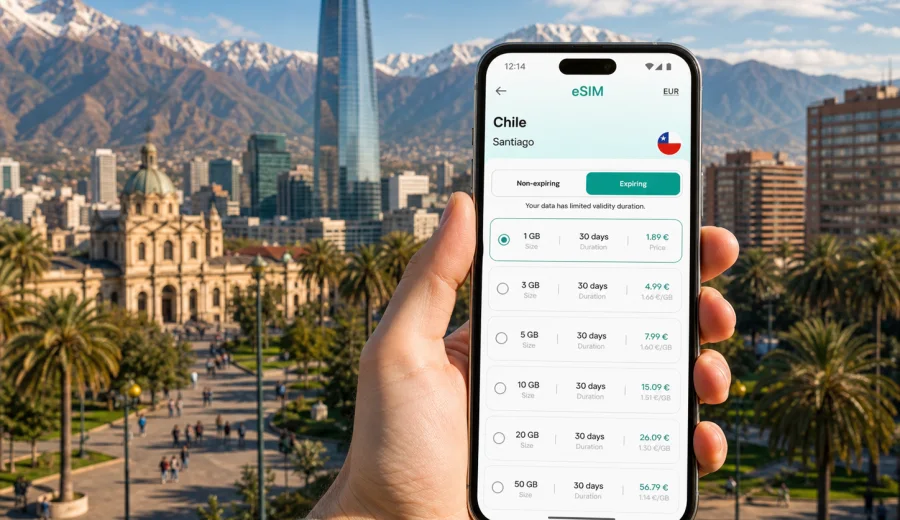
Santiago eSIM: mobile connection and internet for a Chile city trip
Santiago is a city where mobile internet becomes useful almost as soon as you land. The airport is outside the center, the metro system is efficient but can be busy, rideshare pickup points may require careful location sharing, and many hotels, offices, restaurants, and apartments are spread between different districts. If your phone is online, the first day feels more controlled: you can check your transfer, open maps, message your host, translate a menu, or confirm a meeting without searching for public Wi-Fi.
An eSIM can be a practical way to prepare mobile connection for Santiago before you travel to Chile. Instead of buying a physical SIM card after arrival, you install a digital SIM profile on a compatible device and use a selected data plan for the trip. For many travelers, that is enough for navigation, transport apps, messaging, email, hotel check-in, and day trips from the capital.
This guide focuses on Santiago rather than Chile in general. It covers the airport, city movement, districts, business scenarios, short stopovers, hotel stays, and routes from Santiago to nearby destinations. The goal is simple: help you estimate how much data you may need, when to activate your eSIM, and what to check before relying on mobile internet in the city.
Why mobile internet matters in Santiago
Santiago is organized around long east-west and north-south movements. A hotel in Las Condes can be convenient for business meetings, while museums and older streets are closer to the historic center. Bellavista, Providencia, Vitacura, Lastarria, and Barrio Italia each work differently for restaurants, nightlife, offices, and walking routes. You may cross several of these areas in a single day.
Mobile data is useful because city plans often change by the hour. A lunch meeting may move from El Golf to Providencia. A museum visit may be replaced by a cable car ride if the weather is clear. A taxi driver may ask you to confirm the exact hotel entrance. If you depend only on offline maps, you can still move around, but you lose live route updates, ride confirmations, and quick communication.
For Santiago, eSIM is especially relevant in these situations:
- Arrival at Arturo Merino Benitez International Airport and transfer to the city.
- Navigation between metro stations, hotels, offices, restaurants, and tourist areas.
- Rideshare and taxi pickup coordination where entrances and lanes are not obvious.
- Business trips that require email, calendars, video messages, and document access.
- Hotel or apartment check-in when reception instructions arrive through messaging apps.
- Day trips to Valparaiso, Vina del Mar, wineries, ski areas in season, or the Andes foothills.
- Short stopovers when you need a working phone for only a few hours but cannot waste time on a local SIM purchase.
eSIM is mainly about mobile internet. It usually does not give you a local voice number or traditional SMS unless the selected plan says so. For calls and messages, most travelers use internet-based apps. Before choosing a plan, check the exact terms: data volume, validity period, destination, activation rules, and whether top-up is available.
Arrival at Santiago airport
Most international travelers arrive at Arturo Merino Benitez International Airport, often abbreviated as SCL. The airport is northwest of central Santiago, and the trip to areas such as Lastarria, Providencia, Las Condes, Vitacura, or the historic center can take different amounts of time depending on traffic. Mobile internet helps during the first hour because you can compare transport options, follow the route, and contact the hotel if you arrive early or late.
A useful arrival sequence looks like this:
1. Before departure, install the eSIM profile while you still have stable home Wi-Fi.
2. Keep your primary SIM active if you need it for banking confirmations or calls.
3. After landing, turn on the eSIM line for mobile data according to the plan instructions.
4. Check whether data roaming must be enabled for the eSIM profile.
5. Open your map app and save the hotel address in Spanish if possible.
6. Confirm your pickup point or transfer details before leaving the terminal.
If your plan activates only when it connects to a supported local network, you can install it before the flight and start using it after arrival. If the validity period starts immediately after installation or purchase, plan the timing more carefully. The exact rule depends on the selected eSIM plan, so read the plan details before you travel.
Santiago scenarios where data usage grows
Not every traveler needs the same data volume. A weekend visitor who mainly uses maps and messaging may need far less than a consultant working from a hotel, or a family sharing directions, tickets, and restaurant bookings all day.
| Santiago scenario | Typical mobile internet use | What to plan for |
|---|---|---|
| Short stopover | Maps, rideshare, messaging, boarding updates | A small data allowance may be enough |
| Three-day city break | Maps, restaurant searches, tickets, social sharing | Moderate data with a validity period covering the stay |
| Business trip in Las Condes or Providencia | Email, calendars, files, video calls, hotspot backup | More data and careful hotspot checks |
| Family visit | Navigation, translation, shared photos, multiple devices | Higher allowance or separate plans per device |
| Santiago plus Valparaiso or wineries | Maps outside the city, route checks, bookings | Coverage and validity for Chile, not only the capital |
| Ski or Andes day trip | Navigation, weather, messaging, pickup coordination | Offline backups plus enough data for the full day |
Streaming video, cloud photo backup, video calls, and using your phone as a hotspot can consume data quickly. If you want to conserve your allowance, download offline maps, keep app updates for Wi-Fi, reduce automatic media downloads in messaging apps, and save hotel documents before you leave.
Moving around the city with an eSIM
Santiago has a useful metro network, buses, taxis, and rideshare options. Mobile internet does not replace local transport knowledge, but it makes the city easier to manage because you can check routes while moving. Metro stations can be busy at peak hours, and a short walk between a station and your destination may still require live navigation.
In the historic center, mobile data helps with walking routes between Plaza de Armas, La Moneda, museums, cafes, and nearby neighborhoods. In Providencia and Las Condes, it helps locate office towers, hotel entrances, shopping centers, and meeting points that may be inside larger complexes. Around Bellavista or Lastarria, it is useful for restaurant bookings and ride pickup after dark, when you may prefer not to wander while looking for Wi-Fi.
For a practical Santiago setup, prepare three things before you arrive:
- Save the exact hotel address and the district name.
- Download an offline map of Santiago as a backup.
- Keep mobile data ready for live route changes, rideshare pickup, and messages.
Offline maps are helpful, but they do not solve everything. Live transport updates, app-based rides, changed meeting locations, and real-time messages still need a connection. That is where an eSIM can reduce friction during the trip.
Choosing a data plan for Santiago
When you choose an eSIM plan for Santiago, choose the destination as Chile. Santiago is the city, but the plan should match the country where your device will connect. That matters if your itinerary includes the airport, the city, and trips outside the capital.
Think about your trip in four steps:
1. Length of stay. Match the validity period to your real travel dates, including arrival and departure days.
2. Data habits. Maps and messaging are light; video, hotspot use, and cloud backup are heavy.
3. Route. If you will leave Santiago, make sure the plan is suitable for Chile as a destination.
4. Device setup. Confirm eSIM compatibility and whether your phone is locked to an operator.
For a simple city break, a modest data plan can be enough if you use hotel Wi-Fi for large downloads. For a working trip, it is better to choose more data than you expect to use, especially if the eSIM will be your backup when hotel Wi-Fi is weak. For a multi-city Chile route, plan around your longest travel day, not only your time in the capital.
Once your Santiago route and data needs are clear, you can prepare an eSIM data plan for Chile through Kaspersky eSIM Store before the trip. The site and app let you review available plan conditions such as data volume, validity, destination, and price before you proceed.
What to check before buying
The most important check is device compatibility. eSIM works only on supported smartphones, tablets, or other devices, and some devices may also be locked to a carrier. Before you choose a plan, check your device and make sure the phone you will carry in Santiago can add an eSIM profile.
Use this checklist before departure:
- Your phone supports eSIM.
- Your device is not carrier-locked in a way that prevents eSIM use.
- You know which SIM line will handle mobile data.
- You understand whether the eSIM plan includes data only or also other services.
- You checked when the validity period starts.
- You saved installation details, QR code access, or account login information.
- You have a Wi-Fi connection available for installation if the plan requires it.
- Your banking, airline, and hotel apps are already signed in.
If you use a dual SIM setup, keep labels clear. For example, name your regular line "Home" and the travel eSIM "Chile" or "Santiago trip." This helps avoid accidental data roaming on your home line. On many phones, you can choose one line for mobile data and keep another line for calls or messages.
Installing and activating an eSIM for Santiago
The smoothest option is to install the eSIM before you leave home, then activate or start using it when the plan instructions say it is appropriate. You need an internet connection to download the eSIM profile, so home Wi-Fi or hotel Wi-Fi is usually more reliable than trying to do everything while standing in an airport arrival hall.
General setup flow:
1. Choose Chile as the destination and select a suitable eSIM plan.
2. Complete the order and open the eSIM details in your account, email, site, or app.
3. Install the eSIM profile using the QR code or manual details if provided.
4. Set the eSIM as the mobile data line when you are ready to use it.
5. Enable data roaming for the eSIM if the plan instructions require it.
6. Test mobile data after arrival and keep Wi-Fi available until setup is complete.
For device-specific steps, use the official setup guides: instructions for Android and instructions for iOS. The exact names of menu items can vary by device model and operating system version, so follow the instructions for your phone rather than relying on memory.
Do not delete an installed eSIM profile unless you are sure you no longer need it. In many cases, an eSIM profile cannot simply be moved to another device after activation. If something does not work, check the selected data line, roaming setting, APN instructions if any, and local network registration before removing the profile.
Local Santiago scenarios to plan for
Santiago is not one uniform travel zone. In the historic center, mobile data helps with walking routes, museum hours, and ride pickup after visits. In Lastarria and Bellavista, it is useful for restaurant searches, event tickets, and evening transport. In Providencia, Las Condes, El Golf, and Vitacura, it supports hotel check-in, office locations, calendar changes, and document access. Around the airport, it helps with flight updates, transfers, shuttle messages, and pickup instructions.
For business travel, choose enough data for email, calendars, files, messaging, and possible hotspot backup if the selected plan allows it. Save addresses for office towers before each transfer, avoid large software updates on mobile data, and use hotel or office Wi-Fi for heavy files when practical. An eSIM can be a useful backup if Wi-Fi is unstable, but for critical meetings you should still download key documents in advance.
For a short stopover, keep the setup simple. Install the eSIM before the flight if the plan rules allow it, save the airport and return terminal in your map app, and choose data based on maps, rides, and messages rather than streaming. If you are leaving the airport for only a few hours, the value is speed: you can coordinate a transfer, visit one district, and return without spending time on a physical SIM card.
For trips from Santiago, think beyond the hotel area. Many itineraries continue to Valparaiso, Vina del Mar, Cajon del Maipo, wineries in the central valley, ski areas in season, or domestic flights to other parts of Chile. Choose a plan for Chile that covers the travel days outside Santiago, download offline maps before day trips, and remember that signal conditions can vary in mountain or remote areas.
To make data last longer, download Santiago offline maps, turn off automatic app updates on mobile data, pause cloud photo backup until Wi-Fi is available, limit video autoplay, and check usage daily. Hotspot mode is convenient, but laptops and tablets can sync large files in the background, so use it carefully.
FAQ: eSIM for Santiago
Is an eSIM useful if my hotel has Wi-Fi?
Yes. Hotel Wi-Fi helps when you are in the room, but Santiago travel often happens between connected places. Mobile data is useful for airport transfer, metro navigation, ride pickup, restaurant searches, and messages on the move.
Should I choose Santiago or Chile when selecting a plan?
Choose Chile as the destination. Santiago is the city you are visiting, but your device connects according to the plan destination and local network conditions.
Can I use eSIM for normal phone calls and SMS?
Many travel eSIM plans are data-focused and do not include a standard phone number, calls, or SMS unless the plan details say otherwise. You can use internet-based messaging and calling apps over mobile data.
When should I install the eSIM?
Install it while you have stable Wi-Fi, often before departure. Activate or start using it according to the plan instructions, especially if validity timing depends on installation or first connection.
What if mobile data does not work after landing?
Check that the eSIM is selected for mobile data, data roaming is enabled if required, airplane mode is off, and the device has registered on a local network. If you still have problems, use Wi-Fi and contact support with your device and plan details.
Do I still need offline backups?
Yes. Save hotel addresses, boarding passes, maps, and essential contacts offline. eSIM is useful, but smart travel planning should not depend on a single connection method.
Final preparation before your Santiago trip
Before you fly, decide how you will use mobile internet in Santiago: airport transfer, maps, metro routes, hotel check-in, restaurant bookings, meetings, day trips, or hotspot backup. Then choose a data volume and validity period that match the real trip, not only the number of nights in the hotel.
Kaspersky eSIM Store is an app and website where you can choose, set up, and activate an eSIM with a suitable data plan for a trip abroad. For Santiago, use Chile as the destination, check your device first, install the eSIM while you have stable Wi-Fi, and keep your travel documents saved offline.
If you want mobile internet ready before arrival, choose an eSIM plan for your trip to Santiago and Chile and review the plan conditions before you travel.