
Travel connectivity guide
Sao Paulo eSIM for mobile internet
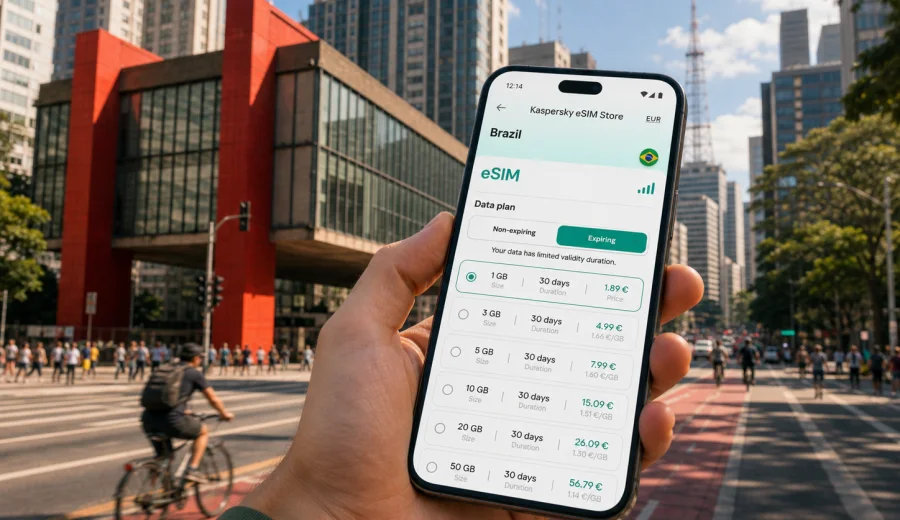
Sao Paulo eSIM: mobile connection and internet for a smoother city trip
Sao Paulo is a city where mobile internet quickly becomes part of the trip itself. You may land at Guarulhos late at night, continue to a meeting near Avenida Paulista, take a ride to Vila Madalena, or check a hotel address in Jardins. In these moments, a working data connection helps keep the day under control.
An eSIM helps you prepare mobile internet before you start moving through Sao Paulo. Instead of looking for a physical SIM card after arrival, you can install a digital SIM profile on a compatible device, choose a prepaid data plan for Brazil, and use mobile data for maps, ride-hailing, messaging, email, translation, and travel apps. Conditions depend on the selected plan, so it is worth checking the data allowance, validity period, destination, and activation rules before purchase.
This guide focuses on Sao Paulo as a city: airports, neighborhoods, business travel, public transport, hotels, short stays, and trips from the city. Brazil matters because the eSIM plan is selected for the country, but the everyday use case is local: moving through Sao Paulo without relying only on public Wi-Fi.
Why mobile internet matters in Sao Paulo
Sao Paulo is large, dense, and business-oriented. Distances can look manageable on a map but feel very different once traffic, rain, events, and peak commuting hours are involved. A stable mobile data plan helps you adapt while you are already outside the hotel.
Typical uses:
- checking traffic before leaving Guarulhos or Congonhas Airport;
- comparing ride-hailing, metro, bus, and walking options;
- confirming hotel check-in details and gate access codes;
- using translation in shops, restaurants, and reception areas;
- staying reachable on messengers;
- downloading tickets, reservations, and meeting documents;
- finding a safer route after dark;
- sharing your location with companions.
For many travelers, the most important benefit is predictable access at the moment when a decision has to be made: which terminal exit to use, whether a route is delayed, or how long it will take to reach the next district.
Arrival: Guarulhos, Congonhas, and the first connection
Most international travelers arrive at Sao Paulo-Guarulhos International Airport. Domestic routes and some regional connections may use Congonhas, which is closer to central business areas but can still require careful timing. In both cases, mobile internet is useful before you leave the terminal.
At Guarulhos, you may need data to contact a driver, check the pickup point, compare airport bus options, or send your arrival status to a hotel. At Congonhas, the trip into neighborhoods such as Itaim Bibi, Moema, Vila Olimpia, Brooklin, or Jardins can be shorter, but live traffic still matters. Peak times can change a simple transfer into a much longer journey.
With eSIM, the practical goal is to have the setup ready before this first decision point. You can install the eSIM profile before departure while you still have reliable Wi-Fi, then activate mobile data according to the plan instructions when appropriate. Before buying, check your device to make sure it supports eSIM and is not restricted by an operator lock.
Sao Paulo travel scenarios where eSIM helps
Different trips create different data needs. A short business visit is not the same as a week of museums, restaurants, shopping, and day trips. Use the table below to estimate how mobile internet may fit your Sao Paulo itinerary.
| Travel scenario | What you will likely use data for | Practical eSIM consideration |
|---|---|---|
| One-day stopover | maps, rides, messages, boarding pass | keep data for airport transfers |
| Business trip | email, calendar, route changes | match validity to meeting days |
| First visit | maps, translation, restaurants, tickets | plan for frequent district changes |
| Hotel-based work week | transport and messages outside Wi-Fi | save heavy tasks for Wi-Fi |
| Brazil route from Sao Paulo | intercity tickets, maps, weather | choose a plan for the full route |
Maps, messaging, email, and browser searches are usually moderate. Video streaming, cloud backup, social video uploads, and long video calls can use much more, so keep heavy tasks for hotel or office Wi-Fi when possible.
Neighborhoods and movement inside the city
Sao Paulo is easier to manage when you think in districts rather than single landmarks. Avenida Paulista is a reference point for museums, offices, shops, and hotels. Jardins is useful for restaurants and accommodation; Vila Madalena and Pinheiros for nightlife, cafes, and galleries; Itaim Bibi, Vila Olimpia, Brooklin, and Berrini for business; Liberdade for Japanese-Brazilian culture and food.
Routes between these areas can change during the day. A metro ride may be faster than a car during rush hour, while a ride may be easier late at night. With mobile data, you can compare options instead of committing before you understand local conditions.
Use your connection for small corrections:
- leave extra time for cross-city trips;
- check traffic before booking a ride;
- save your hotel address in maps;
- keep meeting locations in your calendar with full addresses;
- download key documents for offline access;
- keep a backup route for late arrivals.
Public transport, rides, and navigation
Sao Paulo has an extensive metro and train network, supported by buses and ride-hailing services. The metro can be efficient for many central and business routes, especially around peak traffic. Rides can be more comfortable for luggage, late arrivals, or routes with several transfers. Buses may be useful but can be harder for first-time visitors without real-time guidance.
Mobile data is useful for:
1. checking whether the metro route is faster than a car;
2. following walking directions to the correct station entrance;
3. confirming platform and transfer information;
4. booking or changing a ride;
5. sharing live location with someone waiting for you;
6. finding a nearby cafe, pharmacy, ATM, or hotel lobby when plans change.
In a city this size, the best route is often time-sensitive. If you are moving from Paulista to Faria Lima, from Pinheiros to Berrini, or from Guarulhos to Jardins, real-time data helps you avoid outdated assumptions.
Choosing an eSIM plan for Sao Paulo
When you compare eSIM options for a Sao Paulo trip, look beyond the headline data number. A practical choice depends on the length of stay, how much you move around the city, whether you use hotel Wi-Fi, and whether you plan to continue to Rio de Janeiro, Brasilia, Salvador, Curitiba, Florianopolis, or another destination in Brazil.
Before you travel, you can use Kaspersky eSIM Store to choose an eSIM data plan for your trip to Sao Paulo. Select Brazil as the destination, compare the available data allowance and validity period, and choose the option that fits your expected use. Kaspersky eSIM Store is an app and website that helps you choose, arrange, and activate an eSIM with a suitable mobile internet plan for an international trip; it is not a mobile network operator.
Use this quick decision guide:
| If your trip looks like this | Consider this approach |
|---|---|
| 1-2 days in the city | prioritize simple setup and enough data for maps, rides, and messaging |
| 3-5 days with meetings | choose a validity period that covers arrival, work days, and departure |
| A week with sightseeing | plan for frequent navigation, searches, and photo sharing |
| Sao Paulo plus another Brazilian city | choose a Brazil plan that covers your full in-country itinerary |
| Heavy mobile work | keep large files and long calls on trusted Wi-Fi when possible, and reserve mobile data for movement |
The key is to match the plan to actual behavior. If you will mainly use mobile data for transport and messages, a smaller package may be enough. If you expect to upload videos, use maps all day, or work outside Wi-Fi, choose more data and monitor usage.
How to prepare before departure
Preparing eSIM before the trip reduces pressure after landing. You do not need to solve everything at the airport while tired, carrying luggage, and trying to find transport.
Use this checklist before your flight:
- confirm that your phone supports eSIM and is not locked to one operator;
- choose Brazil as the destination for your Sao Paulo trip;
- check data allowance, validity period, price, and activation rules;
- install the eSIM profile while you have stable Wi-Fi;
- keep the installation details accessible offline;
- check whether data roaming must be enabled for the eSIM profile;
- decide which SIM will handle calls and messages, if you keep your primary SIM active;
- disable automatic cloud backups on mobile data if you want to preserve allowance.
If you need installation guidance, use the Android eSIM installation guide or the iOS eSIM installation guide. The exact steps can vary by device model and operating system version, so follow the instructions shown for your phone and keep Wi-Fi available during setup.
Using eSIM with your primary number
Many travelers keep their physical SIM or primary eSIM active for calls, banking messages, or two-factor authentication, while using a travel eSIM for mobile data. This can be convenient in Sao Paulo because it lets you keep your usual number reachable while avoiding unnecessary data roaming on the primary line.
Before you switch data lines, check your phone settings carefully:
- set the travel eSIM as the mobile data line;
- keep your primary line for calls or messages only if you need it;
- turn off data roaming on the primary line if you do not want roaming charges;
- enable data roaming for the travel eSIM only when the selected plan instructions require it;
- test messaging and maps before leaving the airport or hotel.
An eSIM data plan usually focuses on mobile internet. It may not include a local phone number, standard voice calls, or SMS unless those features are clearly included in the selected plan. For calls, many travelers use internet-based messaging apps over mobile data or Wi-Fi.
Business trips, hotels, and short stays
Sao Paulo is one of Latin America's major business centers, and many visits are built around meetings rather than sightseeing. A common day may include a hotel near Paulista, a client in Itaim Bibi, dinner in Jardins, and an early transfer to Congonhas. Mobile internet helps you adjust routes, confirm addresses, and stay reachable between fixed Wi-Fi zones.
For hotels and serviced apartments, use Wi-Fi for heavy work such as backups, updates, and long calls. Keep eSIM mobile data for the moments around Wi-Fi: finding an entrance, messaging a host, showing a booking confirmation, ordering a ride, or navigating back after dinner.
If Sao Paulo is only a stopover, prepare a compact plan: install the eSIM before departure, save airport and hotel addresses, check traffic before leaving the terminal, keep your next flight details accessible, and avoid unnecessary streaming. This matters if you need to move between Guarulhos and Congonhas, where transfer time can change quickly.
Trips from Sao Paulo and data discipline
Sao Paulo can be the starting point for trips to Santos, Guaruja, Campinas, Campos do Jordao, Rio de Janeiro, Curitiba, or Florianopolis. In that case, think about your full Brazil route rather than only the city center. Mobile internet is useful for intercity buses, domestic flights, ride pickups, weather checks, and hotel coordination. Coverage and performance can vary by location and local network conditions, so keep key documents downloaded.
To make your eSIM data allowance last longer:
- download offline map areas before the trip;
- turn off automatic app updates on mobile data;
- pause cloud photo and video backup;
- use trusted Wi-Fi for large files;
- close navigation when you no longer need it;
- monitor data use in your phone settings.
Avoid common mistakes: buying before checking compatibility, installing at the airport curb, choosing too short a validity period, using the primary SIM for mobile data by accident, assuming the eSIM includes calls or SMS, or deleting the eSIM profile before the trip ends.
FAQ: eSIM for Sao Paulo
Is eSIM useful for a short trip to Sao Paulo?
Yes. Even a short visit can involve airport transfers, ride-hailing, maps, messages, and flight updates.
Should I choose a city plan or a Brazil plan?
The article is about Sao Paulo, but the eSIM destination is Brazil. That is practical if you stay in the city and also travel elsewhere in the country.
Can I install eSIM before arriving in Brazil?
In many cases, yes. Install the eSIM profile on Wi-Fi before departure, then follow the activation rules for the selected plan.
Does a travel eSIM include a phone number?
Usually, travel eSIM data plans focus on mobile internet and may not include a phone number, voice calls, or SMS unless the selected plan says so.
Final preparation for Sao Paulo
Before you leave for Sao Paulo, make mobile internet part of your packing list. Check eSIM support on your phone, choose a Brazil data plan that matches your route, install the eSIM profile on Wi-Fi, and keep your hotel and airport details accessible offline. This gives you a calmer start when you reach Guarulhos, Congonhas, or your first neighborhood in the city.
Kaspersky eSIM Store can help you prepare a digital SIM setup for the trip through its app or website. You can select an eSIM plan for Brazil before traveling to Sao Paulo, review the data allowance and validity period, and activate the eSIM according to the plan instructions when you are ready to use mobile internet.