
Travel connectivity guide
Sarajevo eSIM: mobile internet guide
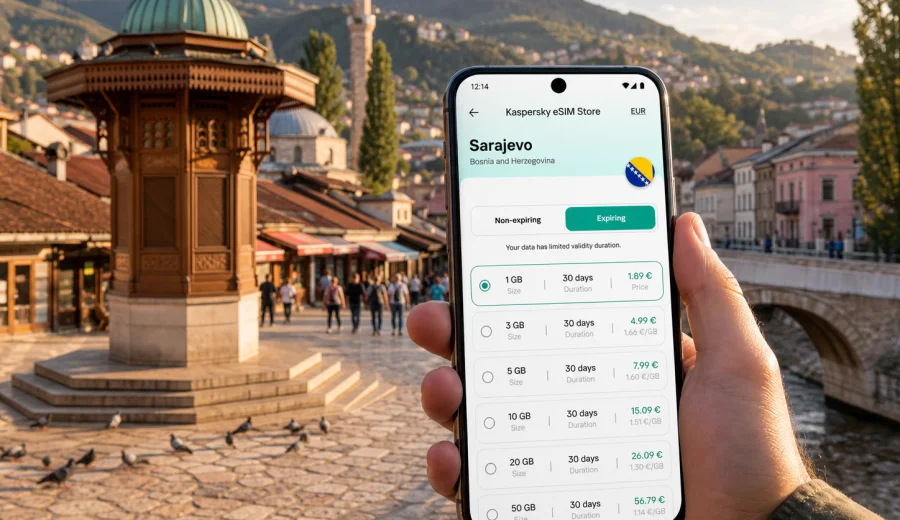
Sarajevo eSIM: mobile connection and internet for a city trip
Sarajevo is a city where mobile internet becomes useful almost immediately: at the airport, on the road into the valley, in the narrow streets around Baščaršija, at a hotel reception desk, in a taxi, or on a day trip into the mountains. An eSIM can help you prepare mobile data for the trip before you start looking for a local SIM card or relying on public Wi-Fi.
This guide focuses on Sarajevo, not on Bosnia and Herzegovina in general. It explains where an eSIM is useful in the city, how to choose a data plan for your route, what to check before purchase, and how to set up your phone so maps, rides, reservations, messaging apps, and work tools are ready when you need them.
Why an eSIM is useful in Sarajevo
Sarajevo is compact in the centre, but the city is stretched along a valley. Many practical moments depend on being online: checking a route from Sarajevo International Airport, confirming an apartment address, translating a menu, finding the right tram stop, calling a ride, or sending documents during a business visit.
An eSIM is a digital SIM profile installed on a compatible phone or tablet. For a trip to Sarajevo, it is mainly a way to use mobile internet without inserting a physical SIM card. In Kaspersky eSIM Store, you can choose the destination, review the data amount and validity period, complete the order, and activate the eSIM on a compatible device.
The biggest advantage is preparation. You can set up the eSIM before departure, keep your main SIM in the phone, and switch mobile data to the travel eSIM when the trip begins. This is especially convenient if your arrival is late, your hotel is in a residential district, or your schedule leaves little time for looking for a mobile shop.
Arrival scenarios: airport, transfer, hotel
Sarajevo International Airport is close to the city, but the first hour can still be busy. You may need to check the address format, message the hotel, follow a taxi route, or see whether traffic is slow near the centre. With a prepared eSIM, you can use mobile data as soon as the plan is active and the phone connects to a local network, subject to the selected plan and device settings.
Common arrival tasks include:
- opening your booking confirmation without using airport Wi-Fi;
- messaging a host or hotel before check-in;
- using maps for the drive toward Baščaršija, Marijin Dvor, Grbavica, Ilidža, or another district;
- checking public transport options if you do not take a taxi;
- sharing your location with colleagues, friends, or family;
- translating short instructions at the airport, hotel, or restaurant.
If you arrive in the evening, mobile data is even more useful. Shops may be closed, reception desks may ask for online forms, and a local address can be easier to confirm through a messaging app than by voice call. An eSIM does not usually include a local phone number, voice calls, or SMS unless the chosen plan states otherwise, so plan to use internet-based calls and messages when needed.
Where mobile internet helps inside the city
Sarajevo is easy to enjoy on foot, but mobile connection still matters because the city changes character from one neighbourhood to another. The old town has narrow pedestrian streets and many small turns. The central business areas are more spread out. Hillside viewpoints, museums, cafés, and hotels can require short transfers or careful walking routes.
Here are typical city moments where eSIM data helps:
| Sarajevo situation | Why mobile internet matters |
|---|---|
| Walking around Baščaršija | Maps help you move between alleys, mosques, cafés, museums, and meeting points. |
| Moving along the Miljacka River | Navigation helps connect Latin Bridge, city centre stops, hotels, and restaurants. |
| Staying near Marijin Dvor | Business addresses, office buildings, and shopping areas are easier to manage with live maps. |
| Visiting Ilidža | You may need ride apps, transport information, or directions to parks and hotels outside the centre. |
| Working from a café or hotel | Mobile data can act as a backup when Wi-Fi is slow, busy, or inconvenient. |
| Taking day trips | Routes to mountain areas, tunnel museums, or nearby towns are easier to monitor online. |
Public Wi-Fi can be useful, but it is not always available when you are moving between places. A travel eSIM gives you another option for mobile internet during the day, while still letting you decide how much data and how many days you need.
How much data to plan for Sarajevo
The right data amount depends on your habits, not only on the length of the trip. A short stopover with maps and messaging uses far less data than a week with video calls, cloud documents, photo backups, and frequent navigation.
Use this practical estimate before choosing a plan:
| Trip style | Typical use in Sarajevo | Data planning approach |
|---|---|---|
| Stopover or overnight stay | maps, messaging, hotel check-in, light browsing | choose a small data package with enough validity for arrival and departure |
| Weekend city break | maps, restaurant searches, tickets, messaging, translation | choose a balanced package for daily navigation and moderate browsing |
| Business trip | email, calendar, messaging, document access, video calls as needed | choose more data and keep hotel Wi-Fi as a supplement, not the only option |
| Family trip | multiple map searches, messaging, photo sharing, entertainment | estimate per device and avoid assuming one phone can cover every need |
| Regional route | Sarajevo plus Mostar, mountain areas, or cross-border travel | check whether the plan covers the right country or region for the whole route |
Video streaming, large app updates, cloud photo backup, and hotspot use can consume data quickly. Before travel, download offline maps, update apps on home Wi-Fi, save hotel details, and keep entertainment downloads on your device. Then your eSIM data is reserved for the moments that genuinely need live connection.
Choosing an eSIM plan for a Sarajevo trip
For a Sarajevo article, the relevant destination is Bosnia and Herzegovina. You do not need a separate city product page if the plan is sold for the country. The important point is that the selected plan must match the country where Sarajevo is located and the dates of your trip.
When comparing plans, check four details:
1. Destination coverage. Make sure Bosnia and Herzegovina is included in the plan conditions.
2. Data allowance. Match gigabytes to your expected use: navigation, messaging, email, calls through apps, and possible hotspot use.
3. Validity period. Choose a period that covers arrival, the full stay, and departure.
4. Activation rules. Read when the validity starts and what steps are needed on your device.
For a simple city break, you may prefer a smaller package if hotel Wi-Fi is reliable. For a business trip, a longer stay, or a route that includes surrounding areas, a larger package gives more room for maps, calls through apps, and work tasks. If you are travelling with another person, each traveller should check whether their own device supports eSIM and whether a separate plan is more practical.
Kaspersky eSIM Store helps you compare available options by destination, data amount, validity period, and price before you commit. If Sarajevo is your main stop, you can choose a mobile internet plan for Bosnia and Herzegovina and use it for the city trip according to the selected plan terms.
Step-by-step setup before you fly
Setting up an eSIM before departure is often the calmest option. You can do it over your home Wi-Fi, keep the installation instructions open, and avoid rushing after landing.
Follow this sequence:
1. Check that your phone supports eSIM and is not locked to one mobile operator.
2. Choose Bosnia and Herzegovina as the destination for your Sarajevo trip.
3. Select a data amount and validity period that match your itinerary.
4. Complete the order and open the eSIM details in your profile, app, or email.
5. Install the eSIM using the on-screen instructions or QR code.
6. Name the eSIM profile clearly, for example “Sarajevo data”.
7. Keep your main SIM for calls or messages if you still need it.
8. Turn mobile data to the eSIM when the plan should be used.
If you need a device-specific installation guide, use the Android eSIM installation instructions or the iOS eSIM installation instructions. The exact menus can vary by phone model and operating system version, so follow the instructions shown on your device as well.
Do not delete the eSIM profile after installation unless you are sure the plan is no longer needed. Many eSIM profiles cannot simply be moved to another phone after activation. If something does not work, check the instructions and contact support before removing the profile.
Device compatibility checklist
Before buying any eSIM plan for Sarajevo, confirm that the device can actually use eSIM. Some phones have regional variants, operator locks, or software restrictions. A model name alone is not always enough.
Check these points:
- your smartphone or tablet supports eSIM;
- the device is not locked to a specific mobile operator;
- the operating system is up to date enough to install an eSIM profile;
- you have stable Wi-Fi for installation if you are setting it up before travel;
- you understand which SIM profile will handle mobile data, calls, and messages;
- your battery and authentication apps are ready for travel.
You can also check your device before choosing a plan. This is especially important if the phone was bought through an operator, purchased in a different region, or used with a corporate mobile policy.
How to use dual SIM settings in Sarajevo
Most travellers keep their home SIM active and add the eSIM as a second profile. This can be useful because your banking apps, airline account, and messaging services may still rely on your main number. The eSIM then handles mobile data for maps, browsing, and apps.
A practical setup looks like this:
| Setting | Suggested approach |
|---|---|
| Mobile data | Set the travel eSIM as the data line when you are ready to use the plan. |
| Default voice line | Keep your main SIM if you expect calls to your usual number. |
| Data roaming | Enable it for the eSIM only if the plan instructions require it. |
| Low data mode | Turn it on if you want to reduce background usage. |
| Hotspot | Use carefully, because laptops and other phones can consume data quickly. |
After landing, check that the phone is connected to a network and that mobile data is assigned to the eSIM profile. If apps still do not load, restart the phone, confirm the APN or roaming settings if instructions mention them, and make sure your main SIM is not still selected for data.
Transport, maps, and local movement
Sarajevo rewards walking, but you will still use transport. The city centre, old town, airport area, Ilidža, hotels along main roads, and hillside neighbourhoods may require different routes. Mobile internet is useful because walking directions, traffic, public transport information, and ride coordination can change during the day.
For everyday movement, eSIM data helps with:
- checking the route from your hotel to the old town;
- confirming meeting points near bridges, museums, and cafés;
- navigating from a tram stop to a side street;
- sharing live location when meeting a group;
- reading recent messages from a host, guide, or colleague;
- using translation and map apps without waiting for Wi-Fi.
If you plan to walk into the hills for views, keep enough battery and download an offline map as a backup. Mobile data is helpful, but battery, weather, and terrain still matter. For longer trips outside the centre, save the hotel address and a backup meeting point in advance.
Business trips, stopovers, and day trips
For business travel, mobile internet is most useful between fixed points: airport, hotel, office, café, restaurant, and return transfer. Use eSIM data for calendar changes, map searches, two-factor authentication, quick document access, and short internet calls. If you expect video meetings or large files, choose more data and use hotel or office Wi-Fi for heavier work.
For a stopover, keep the plan simple. You may only need data for transfer, check-in, a walking route through the centre, restaurant search, messaging, and the return route to the airport or bus station. A smaller package can be enough if you download maps and confirmations before the trip.
For trips from Sarajevo to Mostar, Ilidža, mountain areas, or nearby historical sites, a Bosnia and Herzegovina plan is still the relevant city-trip choice. Save offline maps, keep a power bank, check the return route, and confirm that any cross-border plan covers the next country before you rely on it.
Data-saving checklist
Good data habits make an eSIM plan last longer in Sarajevo:
- update apps before departure;
- download offline maps for Sarajevo and your hotel area;
- save booking confirmations on the device;
- turn off automatic video playback and cloud photo backup on mobile data;
- use hotel Wi-Fi for large uploads;
- avoid hotspot use unless your data allowance has enough margin;
- check remaining data when the app or profile provides that information.
These steps help reserve mobile internet for maps, messages, transport changes, translation, and urgent checks while you are moving around the city.
Common mistakes to avoid
| Mistake | Better approach |
|---|---|
| Buying before checking device support | Confirm eSIM compatibility and operator lock status first. |
| Choosing only by price | Compare data amount, validity, destination, and activation rules. |
| Installing in a rush after landing | Install before travel when possible, using stable Wi-Fi. |
| Leaving data on the wrong SIM | Assign mobile data to the eSIM profile when you want to use it. |
| Deleting the eSIM too early | Keep the profile until the trip and troubleshooting are complete. |
If the phone does not connect, check the data line, roaming setting if required, airplane mode, network selection, and the selected eSIM profile. Then restart the device and contact support if the issue continues.
FAQ about eSIM and mobile internet in Sarajevo
Can I use an eSIM for a Sarajevo city break?
Yes, if your device supports eSIM and the selected plan includes Bosnia and Herzegovina. It can help with maps, messaging, transport, bookings, and everyday mobile internet.
Does an eSIM give me a Bosnian phone number?
Usually no. Travel eSIM plans are commonly focused on mobile data. Voice calls and SMS are not included unless the selected plan states otherwise.
Should I install the eSIM before arrival?
Often yes. Installation before departure lets you use stable Wi-Fi and check settings calmly. Activation timing depends on the plan terms.
Can I keep my home SIM active?
In many dual SIM phones, yes. Keep your home SIM for your usual number and set the eSIM as the mobile data line.
Will an eSIM replace hotel Wi-Fi?
Not completely. Hotel Wi-Fi is still useful for large downloads and long work sessions, while the eSIM is useful when you are moving around Sarajevo.
Choose an eSIM plan for Sarajevo
A Sarajevo trip is easier when mobile internet is ready for the first route, first message, and first check-in. Before you go, check device compatibility, choose a data amount that matches your stay, install the eSIM on a stable connection, and keep the profile available until the trip is over.
Kaspersky eSIM Store helps you choose, order, install, and activate an eSIM with a suitable data plan for mobile internet in a foreign trip. If Sarajevo is your destination, prepare an eSIM plan for Bosnia and Herzegovina before departure so your phone is ready for maps, transport, hotel details, business messages, and day trips from the city.