
Travel connectivity guide
Sarh eSIM: Mobile Internet in Chad
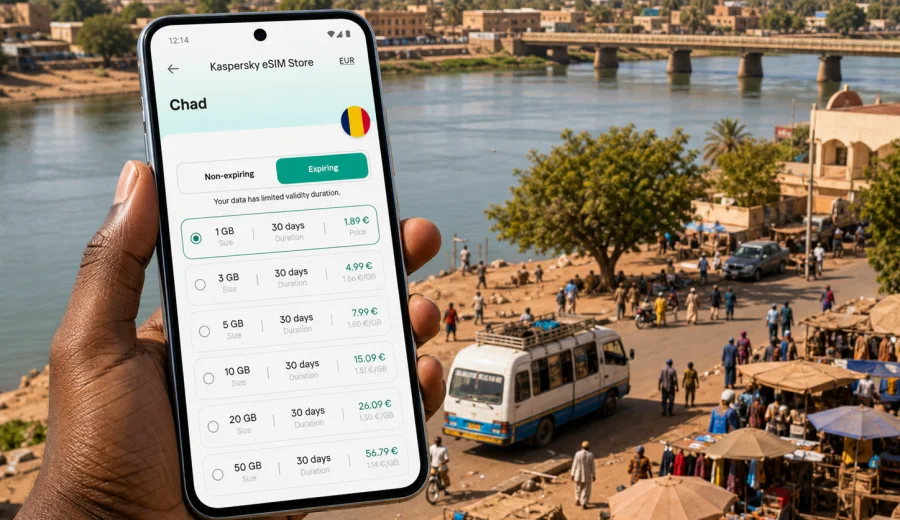
Sarh eSIM: mobile connection and internet for a trip to southern Chad
Sarh is a practical city for travelers who need their phone to work from the first hour of the trip. The city sits in southern Chad on the Chari River, serves as the capital of Moyen-Chari, and is often part of routes that combine work, regional travel, family visits, field projects, or onward movement across southern Chad. In this setting, mobile internet is not only about posting photos. It helps you confirm transport, find a hotel, share your location, check messages, translate details, and keep documents available when Wi-Fi is limited.
An eSIM can make that preparation easier because you do not need to find a physical SIM card immediately after arrival. With Kaspersky eSIM Store, you can choose, arrange, and activate an eSIM with a suitable data plan for mobile internet during an international trip. The practical benefit is control: you can review the destination, data allowance, validity period, and price before deciding which plan fits your stay in Sarh.
This guide focuses on Sarh rather than on Chad in general. It explains mobile connection for airport arrivals, city movement, hotels, business days, stopovers, and trips from Sarh.
Why mobile internet matters in Sarh
Sarh is not a city where you should assume that every useful task can wait until you reach stable hotel Wi-Fi. A working mobile data connection can be useful before you have settled into your room, especially if your arrival involves a local transfer, a change of plans, or a meeting arranged through messaging apps.
Common moments when mobile internet helps in Sarh include:
- checking messages after landing at Sarh Airport or after arriving by road;
- sharing your live location with a driver, colleague, hotel, or host;
- using maps for movement between the airport area, central streets, hotels, markets, riverfront areas, and offices;
- keeping booking confirmations and identity documents available in cloud storage;
- translating short phrases or addresses when you need help locally;
- confirming meeting times during business or field travel;
- arranging onward travel toward other towns in southern Chad;
- using internet-based calls and messages when regular voice service is not part of your data plan.
Arrival in Sarh: the first hour online
Sarh Airport, with the IATA code SRH, serves the city and is close to the urban area. Even when the airport-to-city distance is short, the first hour can involve several tasks that are easier with mobile data. You may need to contact a driver, confirm a hotel pickup, download a message that arrived while you were offline, or check whether your meeting address is still correct.
If you are arriving by road, the need is similar. Travel in southern Chad can involve changing conditions, long stretches between stops, and coordination with people already in Sarh. A prepared eSIM plan helps you avoid treating the first available Wi-Fi network as your only way to reconnect.
Before you travel, prepare these items on your phone:
- your hotel name, address, and phone number saved offline;
- screenshots of booking confirmations and travel documents;
- offline map areas for Sarh and the route into the city;
- the address of your first meeting or pickup point;
- the eSIM installation instructions for your device;
- a backup payment method and access to your email.
This preparation matters because eSIM setup still needs a compatible device and a working internet connection during installation. It is usually simpler to install the eSIM before departure while you are on a reliable home, office, or airport Wi-Fi network. Activation timing and the start of plan validity depend on the specific plan conditions, so check those details before you travel.
City movement: maps, messages, and local coordination
Sarh is organized around everyday movement rather than tourist showpieces. Travelers may move between central streets, administrative areas, hotels, markets, the river area, transport points, and places connected to work or family. Mobile internet helps with this kind of trip because plans often change through short messages rather than formal itineraries.
For navigation, use offline maps as the base and mobile data for live search, location sharing, and revised meeting points. For hotels, mobile internet helps even if Wi-Fi is available, because signal quality can vary by room, floor, time of day, or number of connected guests.
How much data do you need for Sarh?
The right data allowance depends on how you travel. A traveler who mainly uses messaging and maps needs less data than a visitor who sends many photos, joins video calls, or uses the phone as a hotspot for a laptop. Avoid choosing a plan only by the number of days in Sarh. Think about how you will use the internet each day.
| Travel style in Sarh | Typical mobile internet use | Planning tip |
|---|---|---|
| Short stopover | Messaging, hotel confirmation, maps, ride coordination | Choose enough data for arrival tasks and a small buffer |
| Business visit | Email, documents, messaging apps, calendar, maps | Allow extra data for attachments and cloud files |
| Field or project work | Location sharing, photos, reports, team updates | Consider a larger allowance and monitor usage daily |
| Family or personal trip | Messaging, calls through apps, maps, photos | Keep video calls for Wi-Fi if data is limited |
| Regional route from Sarh | Maps, road updates, communication between towns | Check that the plan covers the country or route you need |
As a general rule, messaging and basic maps are light, photo uploads are moderate, and video calls or hotspot use can consume data quickly. App updates, cloud photo backup, and automatic media downloads can also use more data than expected. Before traveling to Sarh, turn off automatic updates over mobile data and set messaging apps to download large media only on Wi-Fi.
Choosing an eSIM plan for Sarh
For a city trip, the plan should match the country where the city is located. Sarh is in Chad, so a country plan for Chad is the natural starting point unless your route requires a regional or global option. If you are visiting Sarh after another country or continuing onward, compare the destination coverage carefully before choosing.
When reviewing an eSIM plan, check:
1. Destination coverage: confirm that the plan applies to Chad or to the region that includes your route.
2. Data allowance: choose enough traffic for maps, messaging, work files, and any expected hotspot use.
3. Validity period: match the plan duration to the full trip, including arrival and departure days.
4. Activation rules: understand when the validity period begins and what action starts the plan.
5. Device compatibility: make sure your phone or tablet supports eSIM and is not locked to another operator.
6. Included services: many travel eSIM plans are data-only and may not include a regular phone number, voice calls, or SMS.
For Sarh, it is sensible to choose a plan before you arrive rather than waiting until you urgently need one. You can review options and prepare an eSIM plan for travel to Sarh in Chad through Kaspersky eSIM Store, then install it on a compatible device according to the plan instructions. This keeps the country selection clear and avoids treating Sarh as a separate telecom destination.
Business trips and project work in Sarh
Many visits to Sarh are practical rather than purely recreational. The city can be relevant for regional administration, education, agriculture, logistics, health work, development projects, and travel connected to the wider Moyen-Chari region. In those cases, mobile internet supports work continuity.
Useful business scenarios include receiving a revised agenda while traveling between meetings, opening an email attachment before a site visit, sharing a location pin with a local contact, uploading a small document or photo from the field, and checking calendar changes without waiting for hotel Wi-Fi. If you need to use a laptop, remember that hotspot use can consume data quickly and may be restricted or affected by the selected plan and device settings.
Installation and compatibility before you travel
Before buying or activating an eSIM plan for Sarh, confirm that your device supports eSIM and is not locked to a mobile operator. Compatibility can vary by model, region, and device configuration, even when phones share a similar name. If you are not sure, check your device before you plan the rest of your setup.
The usual preparation flow is:
1. Check that your phone or tablet supports eSIM.
2. Choose Chad as the destination or select the plan that matches your wider route.
3. Review data allowance, validity period, price, and activation terms.
4. Install the eSIM while connected to stable Wi-Fi.
5. Set the eSIM as the mobile data line when you are ready to use it.
6. Keep your primary SIM available for calls or SMS if you still need it.
7. Monitor data use during the trip and adjust app settings if needed.
If you need device-specific setup guidance, use the Android installation instructions or the iOS installation instructions. The exact menu names can differ by device and operating system version, so follow the steps for your phone and read any plan-specific notes shown after purchase.
In some cases, you may need to enable data roaming for the eSIM profile. This does not mean you are using your home operator's roaming plan; it can be part of how a travel eSIM profile connects to partner networks. Check the instructions and use the eSIM line for mobile data when you want the plan to carry internet traffic.
Using mobile data wisely in Sarh
Sarh's travel pattern rewards practical data habits. You may spend part of the day moving, part of the day in meetings or visits, and part of the evening back at a hotel. A few settings can help your allowance last longer.
Use this checklist before arrival:
- Turn off automatic app updates over mobile data.
- Disable cloud photo and video backup on mobile data.
- Download maps, documents, and translation packs before departure.
- Set messaging apps to manual media download.
- Reduce video quality in streaming and meeting apps.
- Use Wi-Fi for large files when you trust the network and the task is not urgent.
- Track mobile data use in your phone settings every day.
What to expect from an eSIM in Sarh
An eSIM is a digital SIM profile that allows a compatible device to use a mobile data plan without inserting a physical SIM card. For a trip to Sarh, the key advantage is preparation. You can arrange the plan before the trip, keep your usual SIM in the phone, and switch mobile data to the eSIM when needed.
It is also important to understand the limits. An eSIM plan may be data-only, regular calls and SMS may not be included, local network quality can vary by area and device, installation needs internet access, and the profile may not be transferable after activation. Plan validity, top-up options, and refunds depend on the specific conditions.
This realistic view is useful. eSIM is not a guarantee that every place in or around Sarh will have the same connection quality. It is a flexible way to prepare mobile internet for the trip and reduce dependence on public Wi-Fi or last-minute decisions after arrival.
FAQ: eSIM and mobile internet in Sarh
Is Sarh a separate eSIM destination?
For most travelers, no. Sarh is a city in Chad, so you normally choose a plan for Chad or a regional plan that includes Chad. The city matters for planning your arrival, transport, and data use, but the destination selection should match the country or route shown in the plan conditions.
Can I install an eSIM after arriving in Sarh?
You may be able to, but installation requires internet access. It is usually easier to install the eSIM before departure on a stable Wi-Fi connection. Then you can switch mobile data to the eSIM when you are ready to use the plan, following the activation rules for that plan.
Will an eSIM give me a local phone number in Chad?
Many travel eSIM plans are intended for mobile data and do not include a regular phone number, voice calls, or SMS unless stated in the plan conditions. You can use messaging and calling apps over mobile internet, and keep your primary SIM active if you need regular calls or SMS.
Should I use public Wi-Fi in Sarh?
Public or shared Wi-Fi can be helpful for large downloads, but it should not be your only plan for essential tasks. Mobile data gives you another option for maps, messages, documents, and time-sensitive coordination when Wi-Fi is unavailable or unreliable.
What should I do if mobile data does not start?
Check that the eSIM is installed, selected for mobile data, and allowed to use data roaming if the instructions require it. Restart the device, confirm that airplane mode is off, and review the plan instructions. If the issue continues, contact support with your device model, plan details, and screenshots of relevant settings.
Final preparation before your Sarh trip
Before you leave for Sarh, make mobile internet part of the same checklist as your hotel, transport, and documents. Confirm your device compatibility, choose a plan for Chad or your wider route, install the eSIM while you have stable Wi-Fi, and keep offline copies of the information you need most.
Kaspersky eSIM Store helps you choose, arrange, and activate an eSIM with a suitable data plan for international travel. For Sarh, the practical path is to choose an eSIM plan for your trip to Chad, review the data allowance and validity period, and prepare the setup before the day you need mobile internet in the city.