Travel connectivity guide
Sark eSIM: Mobile Internet for Island Travel
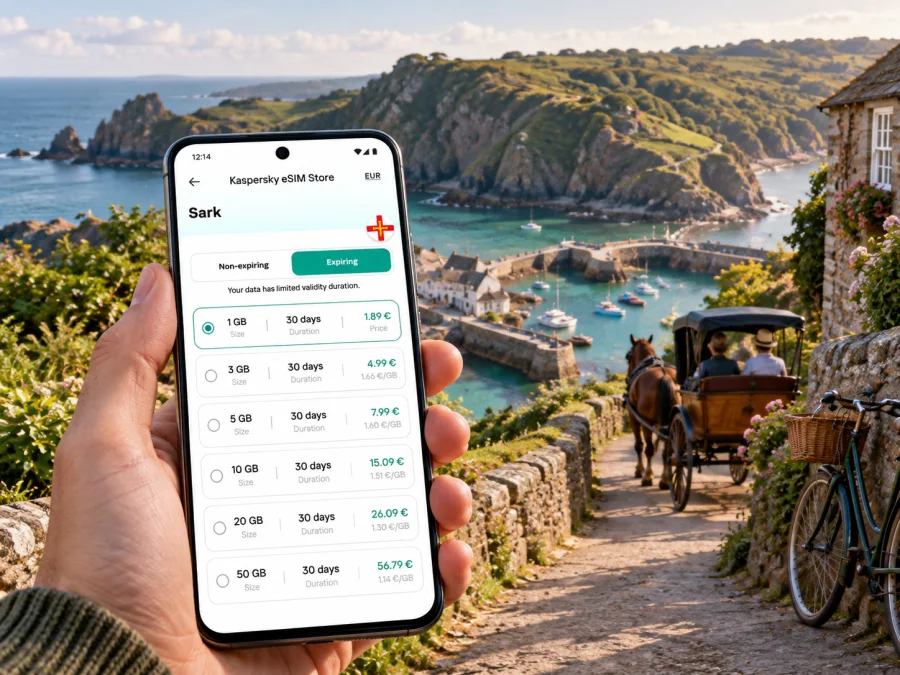
Sark eSIM: mobile connection and internet for your trip
Sark rewards a slower pace. After arriving by boat, you can explore quiet lanes, coastal paths, small settlements and viewpoints without the usual stream of cars. A working mobile internet connection can still be useful here: to check your ferry arrangements, look up accommodation details, message your host, follow a route, or coordinate the next part of an island walk. Planning how you will get online is therefore part of preparing for the journey, even when the point of the visit is to disconnect from busy streets.
An eSIM is a digital SIM profile that can be installed on a compatible device. Kaspersky eSIM Store is an app and website where you can select, purchase and activate an eSIM with a suitable data plan for an international trip. For Sark, the key is to check the destination and coverage details of the specific plan before you travel: Sark is part of the Bailiwick of Guernsey, but mobile service can vary by location, provider and conditions. A plan listing Guernsey should not be treated as a guarantee of the same signal in every cove, lane or building on Sark.
What makes mobile internet useful on Sark
A Sark visit may involve reaching Guernsey, boarding a passenger ferry, climbing from the harbour and continuing on foot or by bicycle. A connection can help you check ferry information, message your accommodation, follow a saved route or open a booking confirmation.
Treat your phone as a planning aid. Download maps and essential details before heading onto quieter paths or down to the coast, where service may vary. Save your lodging directions, ferry details and important contact information offline so a brief loss of signal does not derail the day.
Arriving: the journey runs through Guernsey
Sark is reached by sea. Many visitors travel to Guernsey first and continue by passenger ferry to Sark. There is no airport on Sark, so flights and longer ferry connections belong to the Guernsey part of the itinerary. Check the latest sailing times, ticket conditions and any connection buffer directly with the transport providers before departure; schedules can change by date, season and sea conditions.
Plan the arrival as a sequence:
- Reach Guernsey. Keep your onward ferry booking, departure point and timing accessible offline as well as in email.
- Allow time between connections. Do not plan a tight transfer based only on a map estimate. Leave room for arrival procedures, walking between points and possible timetable changes.
- Board the Sark ferry as a foot passenger. Confirm current baggage rules and passenger guidance before travelling, especially if you are carrying a large case or equipment.
- Continue from Sark Harbour. The harbour is below the main plateau. A steep hill separates the landing point from the upper island, so decide in advance whether you will walk, cycle or use the available local transport option.
- Reach your accommodation. Keep the property name, directions and host’s contact details available without relying on a live connection.
Download tickets or confirmations and screenshot essential instructions. If you are meeting someone, agree on a meeting point and fallback time before leaving Guernsey; do not assume continuous data coverage during the transfer.
Getting around: plan for a car-free island
Sark is known for its car-free character. Visitors generally get around on foot or by bicycle; horse-drawn carriages are part of the island’s transport experience, and a tractor-drawn service can help with the harbour hill. Check current options and consider luggage, timing and mobility needs.
| Travel situation | A practical approach | Where mobile data can help |
|---|---|---|
| Harbour to the top of the hill | Decide whether to walk or use the current local transport option; account for the steep climb and your luggage. | Confirm arrangements and message your accommodation, while keeping key directions saved offline. |
| Exploring the island | Walk or hire a bicycle if that suits your route and ability; check distances and terrain before setting out. | Review a map, identify a return route and share a meeting point with companions. |
| Visiting a coastal spot | Check the path and timing before descending; leave room for the climb back. | Look up saved route details before signal becomes less dependable. |
| Travelling with children or heavier bags | Ask your accommodation or transport provider what is practical for your arrival time. | Keep booking details and contact information ready without repeatedly searching your inbox. |
| Joining a carriage outing | Confirm the meeting location and departure time with the operator. | Open the booking message or send an update if your plans change. |
The island’s quiet roads and lanes are part of its appeal, but they are not a city grid. Some routes are narrow, steep or unpaved, and a direct line on a screen may not be the easiest path on foot. Use signs and local advice where available, check the route before leaving, and avoid staring at your phone while walking or cycling. Pull over or stop somewhere safe if you need to read a map.
For a bicycle day, think about the return journey as well as the destination. Check whether your chosen route includes hills, how much time you want for stops, and whether you need to return a hire bicycle by a particular time. Keep your phone charged and carry a compact power bank if you expect to use maps and a camera through the day. These habits matter more than trying to keep a map open continuously.
Settlements, places to stay and useful meeting points
Sark’s main settlement is centred on the village area on the plateau, while accommodation can be spread across the island. Before arrival, save your lodging’s full name, the host’s directions, check-in instructions and a contact method. Ask whether luggage help or transport from the harbour is available, especially if your ferry arrives later in the day. Services and reception hours vary by property, so confirm your own arrangements rather than relying on a general description.
For meeting friends, agree on a specific place and time and describe it in words as well as sharing a map pin. A clear landmark is more useful than a live location if someone temporarily loses signal or battery.
Navigation and everyday planning
Use your phone as a planning aid, not as a screen you need to watch continuously. Before leaving, check the route and conditions, save a map area and any directions from your host, and set a realistic return point. Tell someone your broad plan for a longer walk. Coastal paths and lanes may be steep or quiet, and a direct line on a screen may not be the easiest route on foot. Stop somewhere safe before checking the map.
For a day trip, keep the return ferry details available offline and allow time to get back down to the harbour. A route planner cannot account for every pause or change in local transport. A data-only eSIM also does not normally provide a regular number for conventional calls or SMS unless its terms say otherwise; internet calling and messaging apps need data access.
Choosing an eSIM plan for a Sark visit
Start with the complete itinerary. If you are spending time in Guernsey as well as Sark, check that the plan’s destination coverage matches every part of the trip. The country page for Guernsey is a useful place to review available options, but confirm the selected plan’s terms and supported locations before purchase. A regional or multi-destination plan may be relevant for a wider island-hopping route, depending on its listed destinations.
Review eSIM options for a trip to Guernsey
Then choose a plan by expected use, not by the largest data allowance alone. A short island visit built around walking may use modest amounts of data if maps and bookings are saved in advance. Video, frequent photo uploads, hotspot use and long calls over data can consume more. The amount required depends on your habits, apps and trip length, so estimate your normal daily use and add a reasonable margin.
| Your likely use | What to consider when comparing plans |
|---|---|
| Ferry messages, bookings and occasional map checks | A smaller allowance may be enough if you save essential details offline. |
| Regular navigation and messaging | Consider how many days you will use data and whether your maps refresh online. |
| Photo sharing or frequent video | Allow for higher usage and check how the plan counts data and how long it remains valid. |
| Guernsey plus Sark or another island | Confirm all destinations are listed for the specific plan; do not infer coverage from a broad regional label. |
| Work during the visit | Check whether your expected apps and any hotspot use fit the plan conditions. |
Review the plan’s data allowance, validity period, activation instructions and any restrictions before payment. Check when validity begins and whether activation or first connection affects the start date. These details can vary between plans. If your trip dates may shift, understand the applicable terms before you buy.
Before you buy or install
Confirm that your phone model supports eSIM and is not locked against another profile. You can check whether your device is compatible. Keep access to Wi-Fi or another connection for installation, and check when the plan becomes active and when its validity begins. If you want to keep your usual SIM available, select the eSIM for mobile data when you are ready to use it and follow the plan’s guidance for data roaming.
Setup steps
- Check device compatibility and any carrier restrictions.
- Select the destination and verify data, validity and plan conditions.
- Install the profile over a reliable connection using the supplied steps.
- Label the eSIM clearly and select it for mobile data when appropriate.
- Save plan details, ferry information and accommodation directions for offline use.
See the Android eSIM installation instructions or the iOS eSIM installation instructions. Menu names vary by device and software version. Do not delete an installed profile unless you understand the plan’s reinstallation rules.
A work trip or a short stopover
Sark is not a conventional business district, but you may need to work while staying on the island or passing through Guernsey. Confirm in advance whether your accommodation has Wi-Fi and where you can take a call. Keep files and meeting notes offline, schedule important uploads for a dependable connection, and do not assume you can work while walking or just before boarding a ferry. Service quality varies, so have a fallback for time-critical tasks.
On a short stopover, save the return ferry details, your meeting point and one offline route. Decide how far you can reasonably travel within the available time, then leave a generous buffer to return to the harbour. Check each onward leg separately: a plan’s destination list and a ferry timetable answer different questions.
Common questions about eSIM and internet on Sark
Is there an airport on Sark?
No. Sark is reached by sea, commonly via Guernsey and a passenger ferry. Check current routes and sailing times for your dates.
Can I rely on mobile internet everywhere on the island?
No. Coverage can vary with location, terrain, buildings, provider and device. Check the plan’s destination details and save essentials offline.
Is Sark easy to explore by car?
Sark is known as a car-free island. Visitors usually walk or cycle; horse-drawn carriages and local tractor transport are alternatives. Confirm availability.
Does a travel eSIM include ordinary calls and text messages?
Travel data plans are generally for internet access rather than a replacement phone number. Check the plan terms; messaging and calling apps need data.
Should I install the eSIM before travelling?
You may be able to prepare it before departure. Check when validity begins and follow the specific plan’s installation and activation steps.
What should I save offline?
Keep ferry confirmations, accommodation directions, booking messages, a route or map, and important contact details accessible without data. This is useful if your connection is temporarily unavailable or your battery is low.
A compact Sark connection checklist
Before setting out, make sure you can answer these questions:
- Have you checked the selected eSIM plan’s destination list for Guernsey and your Sark itinerary?
- Does your phone support eSIM, and is it free to use another profile?
- Do you know which SIM profile will handle mobile data?
- Are ferry details, accommodation directions and key messages saved offline?
- Have you planned the route from the harbour with your luggage and mobility in mind?
- Is your phone charged, with a power bank if you expect extended map or camera use?
- Do you have a fallback meeting point if a live location or message does not arrive?
A little preparation lets you use mobile data for the practical parts of a Sark trip without making every moment depend on a signal. Set up the information you need before leaving, travel at the island’s pace and check the actual terms of your chosen plan.
Prepare your eSIM for Sark
If you are travelling to Sark, review the destination and plan conditions for Guernsey, choose an allowance and validity period that match your itinerary, and install the eSIM on a compatible device. Kaspersky eSIM Store is an app and website that helps you select, purchase and activate a suitable eSIM plan for an international trip. Choose an eSIM plan for Guernsey and keep your ferry and accommodation details available offline before you set out.


